Organizing States
The following concepts have been discussed:
NOTE:
The following examples assume that the system fsm has been defined beforehand. States A and B are defined even if they're not mentioned explicitly. The examples show changing the state from A to B.
We can change states in two ways:
We can change the state of a SnowState instance directly using the .change() method.
Example:
fsm.add("A", {
  some_event: function() {
    if (some_condition) fsm.change("B");
  }
});
Thing(s) to keep in mind:
- Calling
fsm.change()changes the state immediately, but it still runs the rest of the event. To prevent the event from running any following code, you can end the event immediately when changing the state.
fsm.add("A", {
  some_event: function() {
    if (some_condition) {
      fsm.change("B");
      return;
    }
  }
}
or simply
fsm.add("A", {
  some_event: function() {
    if (some_condition) return fsm.change("B");
  }
}
A transition defines rules which can allow changing from a state (or multiple states) to a new state, if it passes a condition. We can define transitions using .add_transition().
Transitions are not executed automatically. We have to trigger a transition using .trigger(), which will attempt to execute the transition.
Example:
fsm.add_transition("t_example", "A", "B", function() { return some_condition; });and later, somewhere, we say:
fsm.trigger("t_example");If the system is in state "A", triggering the transition "t_example" will change the state to "B" if some_condition is true.
Thing(s) to keep in mind:
- Triggers are executed according to the order they are defined.
- When using inheritance, transitions defined in the state are prioritized. Then comes the parent's transitions, then the grandparent's transitions... and so on.
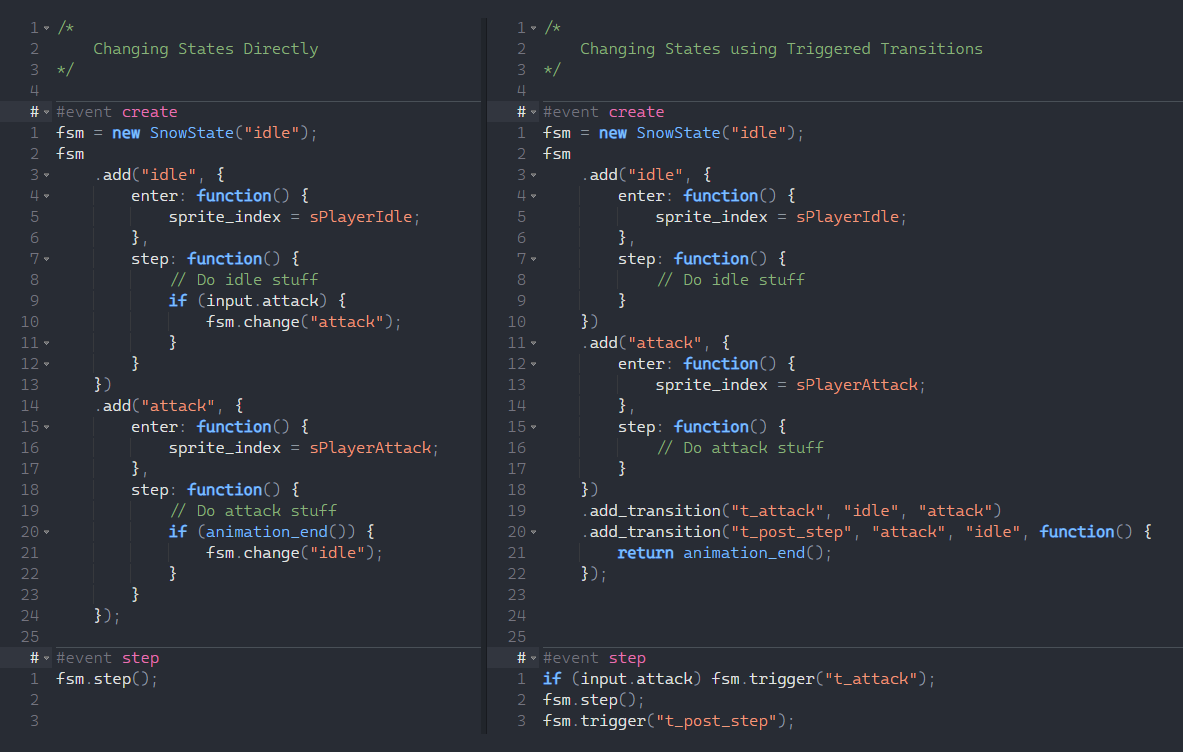
Simple comparison between two ways of changing states
When changing a state, we can:
The default leave/enter events (defined in the states themselves) are executed when we do not use the optional arguments in the .change() method.
Obviously, this is the default behavior.
Example (Direct):
// In state "A"
fsm.change("B", undefined, undefined);
or simply
// In state "A"
fsm.change("B");
Example (Triggered Transition):
fsm.add_transition("t_example", "A", "B", function() { return true; }, undefined, undefined);
fsm.trigger("t_example");
or simply
fsm.add_transition("t_example", "A", "B");
fsm.trigger("t_example");
This does the following things (in order):
- Executes the leave event of state A
- Changes the state of
fsmfrom A to B - Executes the enter event of state B
We can choose to execute custom leave/enter events by overriding the default ones. This is done using the two optional arguments in the .change() method.
leave_func lets us execute a custom function instead of the leave event of state A.
enter_func lets us execute a custom function instead of the enter event of state B.
Example (Direct):
// In state "A"
fsm.change("B",
  undefined,
  function() {
    do_something();
  }
);
Example (Triggered Transition):
fsm.add_transition("t_example", "A", "B", undefined,
  undefined,
  function() {
    do_something();
  }
);
fsm.trigger("t_example");
This does the following things (in order):
- Executes the leave event of state A
- Changes the state of
fsmfrom A to B - Executes a function, which:
- Executes a function
do_something
- Executes a function
Example (Direct):
// In state "A"
fsm.change("B",
  function() {
    do_something();
  },
  function() {
    do_something_else();
  }
);
Example (Triggered Transition):
fsm.add_transition("t_example", "A", "B", undefined,
  function() {
    do_something();
  },
  function() {
    do_something_else();
  }
);
fsm.trigger("t_example");
This does the following things (in order):
- Executes a function, which:
- Executes a function
do_something
- Executes a function
- Changes the state of
fsmfrom A to B - Executes a function, which:
- Executes a function
do_something_else
- Executes a function
Overriding can also be used to skip a state's leave/enter event. We can pass an empty function.
Example (Direct):
// In state "A"
fsm.change("B",
  undefined,
  function() {}
);
Example (Triggered Transition):
fsm.add_transition("t_example", "A", "B", undefined,
  undefined,
  function() {}
);
fsm.trigger("t_example");
This skips the enter event of state B.
Sometimes, we want to execute some code on top of a state's leave/enter event. To do so, we need to fetch the state's leave/enter event using the .event_get_current_function() method, and then we can call it wherever we want in the function.
Calling .leave() or .enter() doesn't work here since these are overridden already!
Example (Direct):
// In state "A"
fsm.change("B",
  undefined,
  function() {
    var _func = fsm.event_get_current_function();
    do_something_before_enter();
    _func();
    do_something_after_enter();
  }
);
Example (Triggered Transition):
fsm.add_transition("t_example", "A", "B", undefined,
  undefined,
  function() {
    var _func = fsm.event_get_current_function();
    do_something_before_enter();
    _func();
    do_something_after_enter();
  }
);
fsm.trigger("t_example");
This does the following things (in order):
- Executes the leave event for state A
- Changes the state of
fsmfrom A to B - Executes a function, which:
- Gets the enter event of state B and stores it in a local variable
_func - Executes a function
do_something_before_enter - Executes the enter event of state B
- Executes a function
do_something_after_enter
- Gets the enter event of state B and stores it in a local variable