feat(batches): add docs for pushed-only changesets #1200
There are no files selected for viewing
This file contains hidden or bidirectional Unicode text that may be interpreted or compiled differently than what appears below. To review, open the file in an editor that reveals hidden Unicode characters.
Learn more about bidirectional Unicode characters
This file contains hidden or bidirectional Unicode text that may be interpreted or compiled differently than what appears below. To review, open the file in an editor that reveals hidden Unicode characters.
Learn more about bidirectional Unicode characters
| Original file line number | Diff line number | Diff line change |
|---|---|---|
| @@ -0,0 +1,30 @@ | ||
| # Pushing code to a code host | ||
|
|
||
| <p className="subtitle">Learn how to push code changes to a code host without making a merge request.</p> | ||
|
|
||
| <Callout type="note">Pushed-only changesets work on GitHub and GitLab only. They do not yet work with forked repositories.</Callout> | ||
|
|
||
| After you've [created a batch change](/batch-changes/create-a-batch-change), you will be redirected to a page displaying a list of the changesets the Batch Change created. From this page, you can apply any bulk operation to more than one changesets. | ||
|
|
||
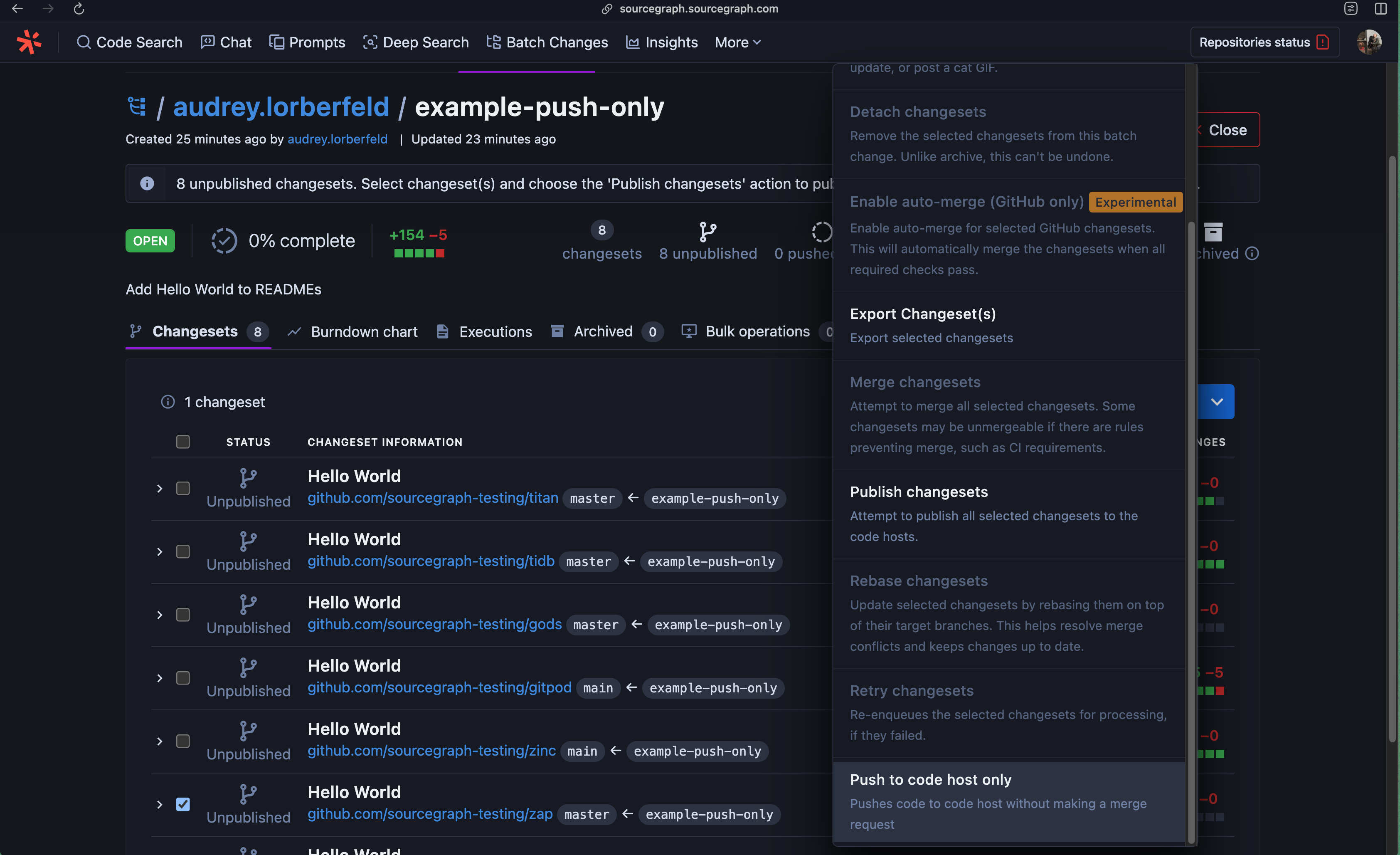
| To push code to a new branch on a code host without also creating a merge request, simply select **Push to code host only** from the dropdown menu: | ||
|
|
||
|  | ||
|
|
||
| ## Few important considerations | ||
|
|
||
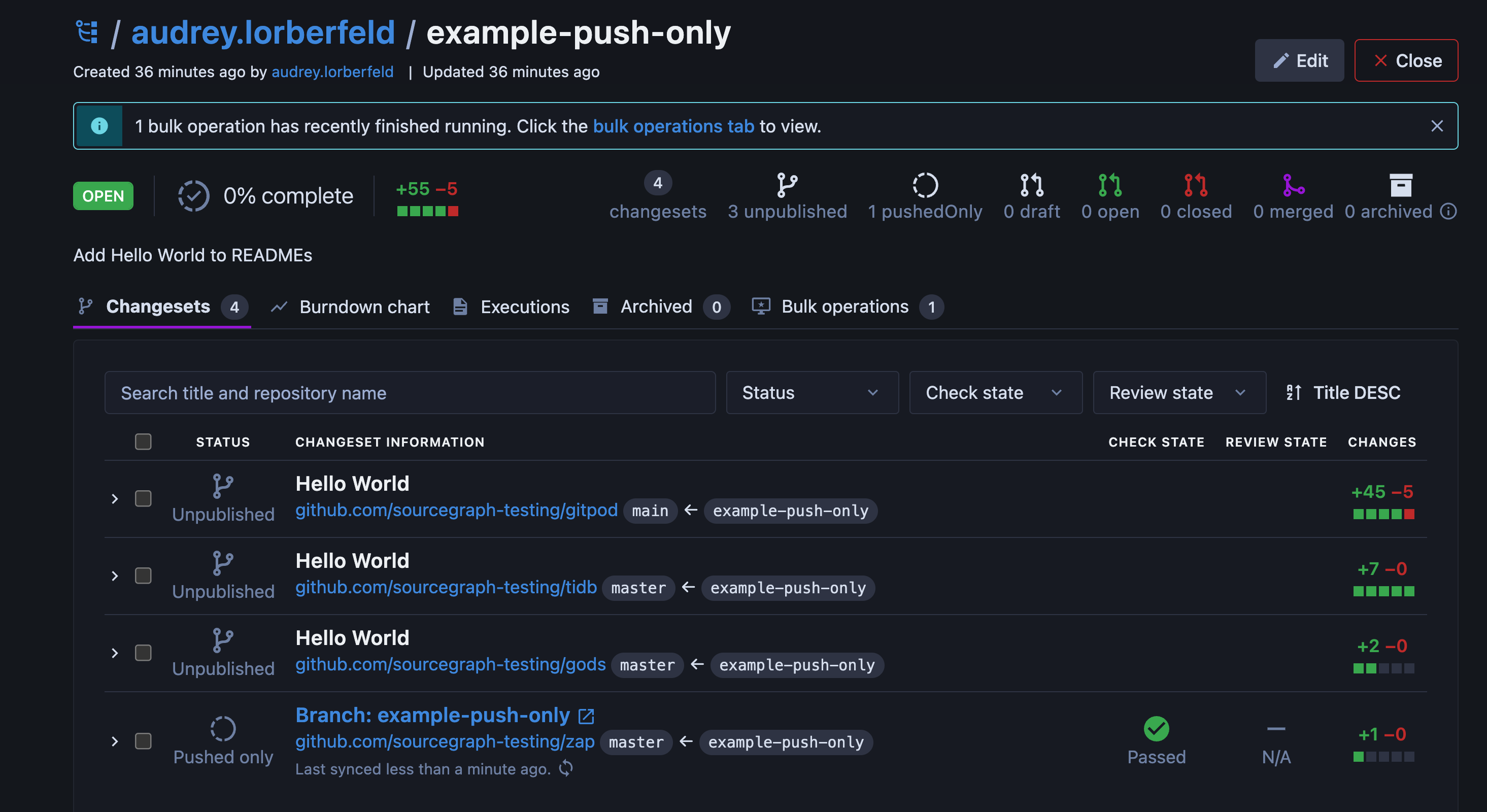
| - With pushed-only changesets, you are still able see CI feedback, as long as it triggers on code pushes | ||
| - The `review` status of a pushed-only changeset is always "N/A" | ||
| - The `status` of a pushed-only changeset is always "Open" | ||
| - To publish a pushed-only changeset, simply select the changeset in the Batch Changes UI and select **Publish** | ||
|
|
||
|  | ||
|
|
||
| ## Requirements | ||
|
|
||
| To push code to a new branch on a code host, you will need: | ||
|
|
||
| - [Admin permissions for the batch change](/batch-changes/permissions-in-batch-changes#permission-levels-for-batch-changes) | ||
|
Contributor
There was a problem hiding this comment. Is this on Sourcegraph's or GitHub's side?
Contributor
There was a problem hiding this comment. Ah, I see write access to the code host mentioned below. Does it make sense to call it site-admin here? |
||
| - Write access to the changeset's repository on the code host | ||
| - [Credentials](/batch-changes/configuring-credentials) configured for the code host | ||
|
|
||
| <Callout type="note">For more information, see [Code host interactions in Batch Changes](/batch-changes/permissions-in-batch-changes#code-host-interactions-in-batch-changes).</Callout> | ||

This file contains hidden or bidirectional Unicode text that may be interpreted or compiled differently than what appears below. To review, open the file in an editor that reveals hidden Unicode characters.
Learn more about bidirectional Unicode characters
This file contains hidden or bidirectional Unicode text that may be interpreted or compiled differently than what appears below. To review, open the file in an editor that reveals hidden Unicode characters.
Learn more about bidirectional Unicode characters

Add this suggestion to a batch that can be applied as a single commit.
This suggestion is invalid because no changes were made to the code.
Suggestions cannot be applied while the pull request is closed.
Suggestions cannot be applied while viewing a subset of changes.
Only one suggestion per line can be applied in a batch.
Add this suggestion to a batch that can be applied as a single commit.
Applying suggestions on deleted lines is not supported.
You must change the existing code in this line in order to create a valid suggestion.
Outdated suggestions cannot be applied.
This suggestion has been applied or marked resolved.
Suggestions cannot be applied from pending reviews.
Suggestions cannot be applied on multi-line comments.
Suggestions cannot be applied while the pull request is queued to merge.
Suggestion cannot be applied right now. Please check back later.
There was a problem hiding this comment.
Choose a reason for hiding this comment
The reason will be displayed to describe this comment to others. Learn more.
Note: the bulk operation is called "push" only (verb is active), whereas the non-bulk-op (not documented in this PR) and the reference to the state of the changeset is "pushED" only (e.g. "Look at this pushed-only changeset I made").