

A productivity platform to import/export/share VS Code snippets & environment snapshots — with cloud sync and web management.


-
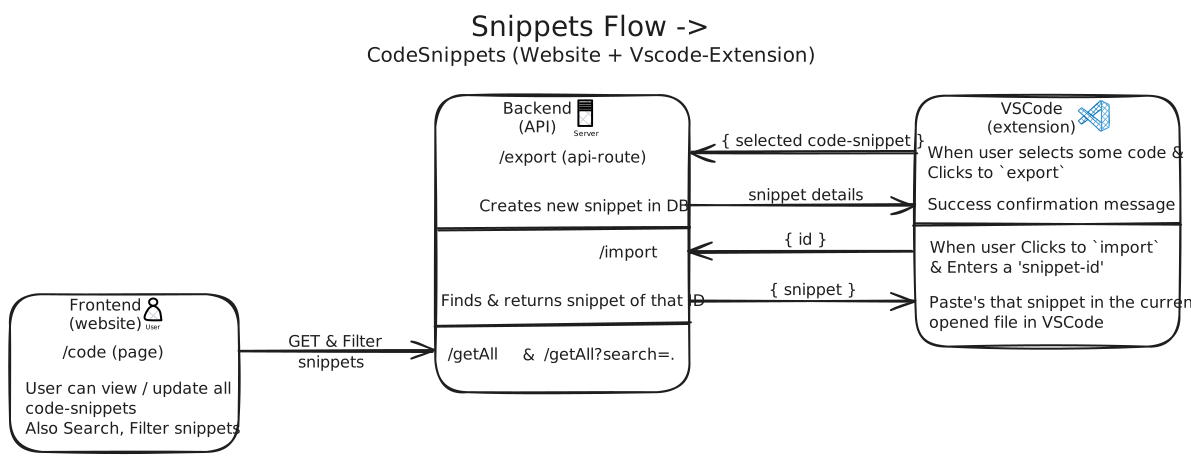
One-Click Snippet Import & Export — Instantly move VS Code snippets across machines without manual setup
-
VS Code Environment Snapshots — Capture and restore your complete editor setup in seconds
-
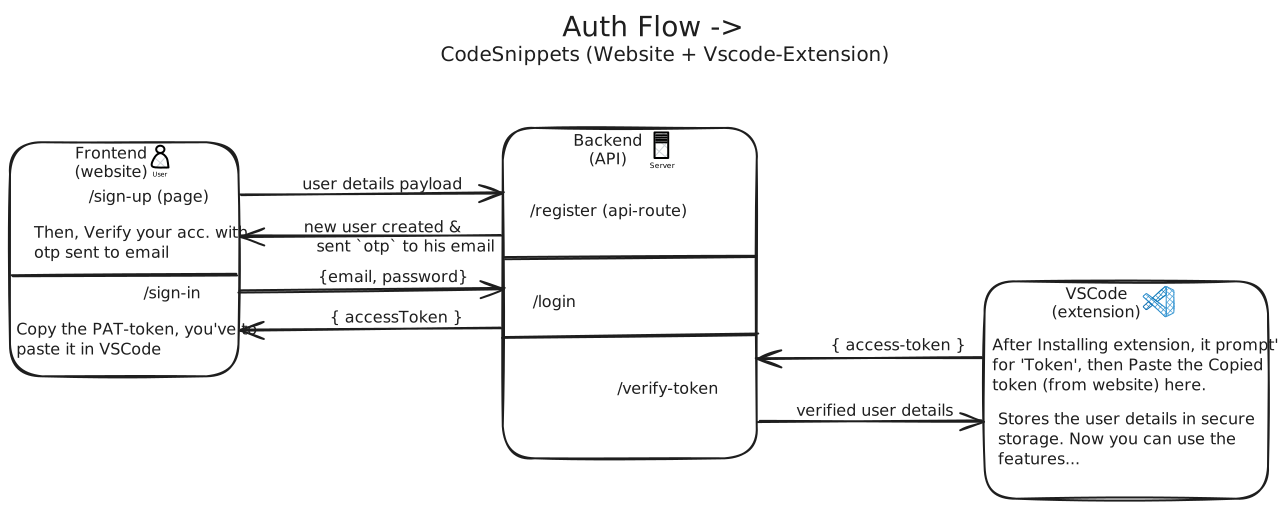
Secure Authentication — User-scoped, token-based authentication to protect snippets and environments
-
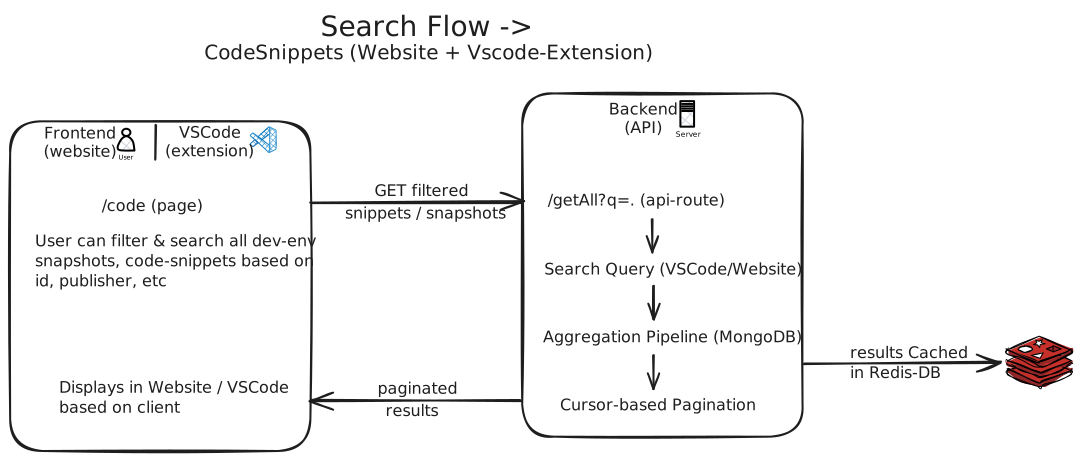
Fast & Reliable Search — Instantly search snippets and users with low-latency results
-
Web Dashboard Management — View, organize, and manage snippets from the web
-
Native VSCode Extension — Seamless, In-editor experience without breaking developer flow
- Open Command Palette. (Ctrl + Shift + P)
- Run "SnipZen: intro".
- You can perform all tasks from this panel.
- Hit Ctrl + Shift + M
( ⌘ + ⇧ + M on macOS )

- Select the code in the editor.
- Right-click and choose "SnipZen: Export Code Snippet".
- Confirm the export.
- Select the code in the editor.
- Open Command Palette. (Ctrl + Shift + P)
- Run
SnipZen: Export Code Snippet.
- Select the code in the editor.
- Hit Ctrl + Shift + E
( ⌘ + ⇧ + E on macOS )

- Open Command Palette.
- Run
SnipZen: Import Code Snippet. - Enter Snippet-ID to import.
- Hit Ctrl + Shift + I
( ⌘ + ⇧ + I on macOS ) - Select the snippet to import.

- Open Command Palette.
- Run
SnipZen: Export Dev-Env Snapshot. - Confirm snapshot export.
- Hit Ctrl + Shift + X
( ⌘ + ⇧ + X on macOS )

- Open Command Palette.
- Run
SnipZen: Import Dev-Env Snapshot. - Enter Snapshot-ID to import.
- Hit Ctrl + Shift + T
( ⌘ + ⇧ + T on macOS )

- Hit Ctrl + Shift + P ( ⌘ + ⇧ + P on macOS )
- Run
SnipZen: Search. - Type your query and press Enter.
- Hit Ctrl + Shift + S
( ⌘ + ⇧ + S on macOS ) - Type your query and press Enter.

▶️ View Feature Workflows (Architecture Diagrams)
- For Teams: Instantly spin up a full development environment and share setups with teammates
- For Individual Developers: Sync personal snippets and dev environments across multiple machines effortlessly
- For Students & Communities: Distribute ready-to-use VS Code setups for courses, workshops, and learning groups
- For Freelancers & Consultants: Maintain and switch between multiple client-specific VS Code setups easily
- Web: Next.js, Tailwind CSS, Next-Auth
- Extension: TypeScript, vscode-engine
- Database: MongoDB Atlas + Mongoose ODM
- API Docs: Swagger Docs
- Deployment: Vercel, VSCode Marketplace, GitHub-Actions(CI/CD)
snipzen/
├── .github/workflows/
├── assets/
├── web/
│ ├── public/
│ └── src/
│   ├── components/
│   ├── models/
│   ├── schemas/
│   ├── types/
│   ├── styles/
│   ├── hooks/
│   ├── lib/
│   └── app/
│     ├── api/
│     └── (pages)/
│
├── extension/
│ └── src/
│   ├── out/
│   ├── commands/
│   ├── panels/
│   └── utils/
├── install.sh
└── Readme.md
- Visit CONTRIBUTING.md
This project is licensed under the MIT License - see the LICENSE file for details.




- Srinivas Batthula @srinivas-batthula
- Himanshu Bijja @himanshubijja