Replaced "Live Editor" with "Copilot" across docs#848
Conversation


WalkthroughThis PR rebands documentation across multiple pages by systematically replacing "Live Editor" terminology with "Copilot" throughout metadata, headings, and content. It adds a navigation entry mapping for the live-editor path and updates eight documentation files. Changes
Estimated code review effort🎯 2 (Simple) | ⏱️ ~15 minutes
Possibly related PRs
Suggested reviewers
Poem
Pre-merge checks and finishing touches✅ Passed checks (3 passed)
✨ Finishing touches🧪 Generate unit tests (beta)
Thanks for using CodeRabbit! It's free for OSS, and your support helps us grow. If you like it, consider giving us a shout-out. Comment |
![coderabbitai[bot]](https://avatars.githubusercontent.com/in/347564?s=60&v=4)

There was a problem hiding this comment.
Actionable comments posted: 3
Caution
Some comments are outside the diff and can’t be posted inline due to platform limitations.
⚠️ Outside diff range comments (2)
src/left-nav-title.json (1)
704-704: Critical: Duplicate JSON keys require consolidation.Verification confirms three
"live-editor"key definitions at lines 704, 728, and 754. In JSON objects, only the last definition (line 754) will be retained—the earlier entries will be silently discarded. This represents a critical data loss issue.The entries require consolidation:
- "live-editor": {"/docs/live-editor/": "Testsigma Terminal (Live Editor)" },
  ...
- "live-editor": {"/docs/atto/generative-ai/copilot/live-editor/": "In Live Editor"},
  ...
  "qtest": {"/docs/integrations/test-management/qtest/": "qTest"},
+ "live-editor": {
+   "/docs/live-editor/": "Testsigma Terminal (Copilot)",
+   "/docs/atto/generative-ai/copilot/live-editor/": "In Testsigma"
+ }
This consolidates both navigation paths under a single
"live-editor"key, preserving all entries.src/pages/docs/atto/generative-ai/copilot/live-editor.md (1)
62-62: Update outdated URL reference in documentation link.The reference link still contains the
/live-editor/path segment, which is inconsistent with the rebranding from "Live Editor" to "Copilot". This link may break or point users to outdated documentation.Update the URL path to align with the new Copilot terminology:
-> For troubleshooting details and frequently asked questions, refer to the [documentation on terminal FAQs](https://testsigma.com/docs/live-editor/faqs-on-testsigma-terminal/).
+> For troubleshooting details and frequently asked questions, refer to the [documentation on terminal FAQs](https://testsigma.com/docs/atto/generative-ai/copilot/faqs-on-testsigma-terminal/).
Alternatively, if the FAQ page has been relocated to a different path, verify and update the URL accordingly.
🧹 Nitpick comments (1)
src/pages/docs/live-editor/faqs-on-testsigma-terminal.md (1)
239-239: Optional: Consider more formal verb choice in answer to Q17.LanguageTool suggests using a more formal verb than "fix" (e.g., "resolve" or "address") in the phrase "To fix this issue, delete the entire .testsigma folder..."
This is a stylistic preference and not required for the current rebranding PR. If you're updating this FAQ entry, consider: "To resolve this issue, delete..." or "To address this issue, delete..." for a more formal tone.
📜 Review details
Configuration used: CodeRabbit UI
Review profile: CHILL
Plan: Pro
📒 Files selected for processing (9)
src/left-nav-title.json(1 hunks)src/pages/docs/atto/generative-ai/copilot/live-editor.md(3 hunks)src/pages/docs/auto-healing/using-auto-healing-in-live-editor-test-execution.md(3 hunks)src/pages/docs/live-editor/editing-test-case.md(4 hunks)src/pages/docs/live-editor/faqs-on-testsigma-terminal.md(8 hunks)src/pages/docs/live-editor/installing-testsigma-terminal-on-linux.md(3 hunks)src/pages/docs/live-editor/installing-testsigma-terminal-on-windows.md(3 hunks)src/pages/docs/live-editor/installing-testsigma-terminal.md(4 hunks)src/pages/docs/live-editor/intro-testsigma-terminal.md(2 hunks)
🧰 Additional context used
🪛 LanguageTool
src/pages/docs/live-editor/faqs-on-testsigma-terminal.md
[style] ~239-~239: Consider using a different verb for a more formal wording.
Context: ...mpatibility with Chrome version 139. To fix this issue, delete the entire **.testsi...
(FIX_RESOLVE)
🪛 markdownlint-cli2 (0.18.1)
src/pages/docs/live-editor/intro-testsigma-terminal.md
53-53: Unordered list indentation
Expected: 0; Actual: 3
(MD007, ul-indent)
src/pages/docs/auto-healing/using-auto-healing-in-live-editor-test-execution.md
54-54: Unordered list indentation
Expected: 0; Actual: 1
(MD007, ul-indent)
57-57: Unordered list indentation
Expected: 0; Actual: 1
(MD007, ul-indent)
⏰ Context from checks skipped due to timeout of 90000ms. You can increase the timeout in your CodeRabbit configuration to a maximum of 15 minutes (900000ms). (1)
- GitHub Check: CI
🔇 Additional comments (6)
src/pages/docs/live-editor/installing-testsigma-terminal-on-linux.md (1)
4-4: Terminology replacement looks good.The transitions from "Live Editor" to "Copilot" are correctly applied in metadata (metadesc), introductory text, notes, and step content. The step renumbering (original steps 9-10 to 1-2) appears intentional and maintains logical flow.
Also applies to: 19-19, 45-45, 47-49
src/pages/docs/live-editor/installing-testsigma-terminal-on-windows.md (1)
4-4: Terminology replacement is consistent and correct.The "Live Editor" to "Copilot" terminology migration is properly applied throughout this file, including metadesc, introductory content, notes, and step sequencing. No formatting issues detected.
Also applies to: 19-19, 34-34, 36-38
src/pages/docs/live-editor/installing-testsigma-terminal.md (1)
4-4: Terminology replacement is thorough and consistent.All references to "Live Editor" have been properly replaced with "Copilot" across metadata, introductory content, instructional steps, and action labels. The file maintains functional integrity while reflecting the new branding.
Also applies to: 32-32, 86-86, 100-100
src/pages/docs/live-editor/faqs-on-testsigma-terminal.md (1)
3-7: Copilot terminology systematically and thoroughly applied across all FAQs.The terminology replacement is comprehensive and consistent throughout all FAQ entries, covering front matter, question headings, and answer content. The changes maintain clarity and user experience.
Also applies to: 17-17, 60-60, 76-76, 105-105, 165-165, 173-173, 200-200, 229-229, 237-237, 239-239
src/pages/docs/live-editor/editing-test-case.md (1)
2-7: Comprehensive and consistent Copilot terminology migration.All documentation elements have been properly updated: front matter metadata, section headings, contextual navigation, step descriptions, UI labels, and procedural notes. The changes maintain document structure and clarity while implementing the new terminology.
Also applies to: 17-18, 35-35, 41-41, 44-44, 54-54, 59-59, 63-63
src/pages/docs/atto/generative-ai/copilot/live-editor.md (1)
41-41: Current image URLs are accessible; naming consistency requires clarification.Verification confirms all three image URLs return HTTP 200 status and are accessible in S3. However, the filenames show inconsistent naming: two URLs still reference
Live_Editorterminology while the third already usesCopilot_in_Live_Editor.png.Since the current URLs work and the images are available, there are no broken links. However, to determine if renaming is necessary, clarify whether the alt text updates (to "Copilot" terminology) should be accompanied by corresponding filename updates in S3 for consistency, or if the current mixed naming is acceptable as-is.
| 6. The **Copilot** will execute all steps up to the debug point. | ||
|
|
||
| 7. Click **Testsigma Copilot** on the **Live Editor**. | ||
| 7. Click **Testsigma Copilot** on the **Copilot**. |
There was a problem hiding this comment.
Clarify unclear action instruction.
Line 48 contains awkward phrasing: "Click Testsigma Copilot on the Copilot." This is ambiguous—it's unclear what UI element the user should interact with or where it's located. Please reword for clarity.
Suggest clarifying the instruction to explicitly describe the element and its location:
-7. Click **Testsigma Copilot** on the **Copilot**.
+7. In the **Copilot** overlay, click **Testsigma Copilot**.
(Or provide a screenshot/alt text describing the button location if necessary.)
📝 Committable suggestion
‼️ IMPORTANT
Carefully review the code before committing. Ensure that it accurately replaces the highlighted code, contains no missing lines, and has no issues with indentation. Thoroughly test & benchmark the code to ensure it meets the requirements.
| 7. Click **Testsigma Copilot** on the **Copilot**. | |
| 7. In the **Copilot** overlay, click **Testsigma Copilot**. |
🤖 Prompt for AI Agents
In src/pages/docs/atto/generative-ai/copilot/live-editor.md around line 48, the
instruction "Click **Testsigma Copilot** on the **Copilot**." is ambiguous;
reword it to explicitly name the UI element and its location (for example: "In
the Copilot panel, click the 'Testsigma Copilot' button" or "From the Copilot
dropdown, select 'Testsigma Copilot'"), and optionally add brief alt text or a
screenshot note indicating where the Copilot panel or dropdown is located so
users know exactly which control to interact with.
| 2. On the **Copilot** overlay, configure the required options and click **Launch**. | ||
|  | ||
|
|
||
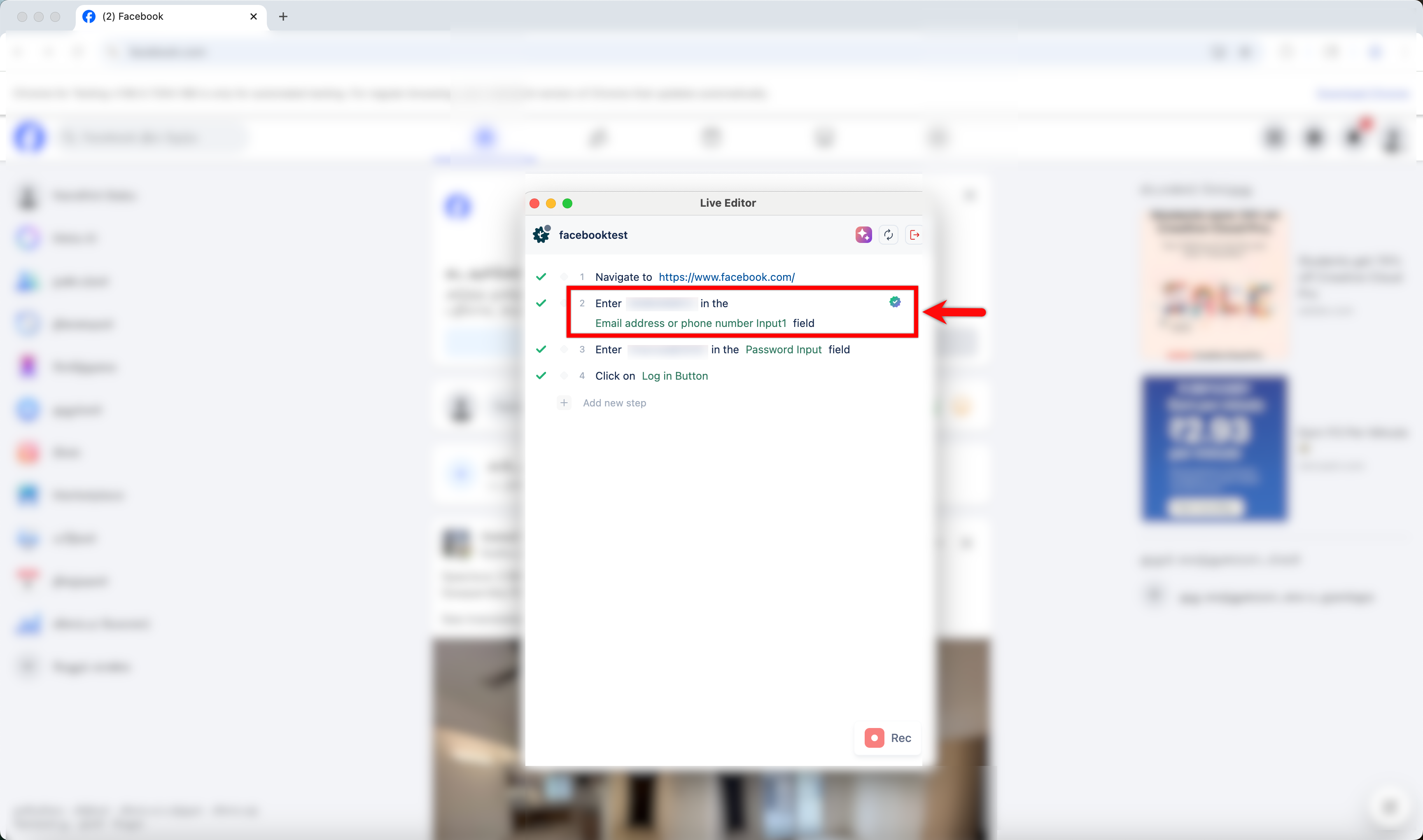
| - Consider that the XPATH for the element Email address or phone number on step 2 changed. |
There was a problem hiding this comment.
Fix unordered list indentation violations (MD007).
Lines 54 and 57 have incorrect list indentation (1 space instead of 0), violating the markdownlint-cli2 MD007 rule.
Apply this diff to fix:
- Consider that the XPATH for the element Email address or phone number on step 2 changed.
- 
+- Consider that the XPATH for the element Email address or phone number on step 2 changed.
+ 
- - When the test case is executed in the Copilot with the Gen AI auto-healing feature enabled, Testsigma automatically identifies the updated XPath and successfully locates the element.
+ - When the test case is executed in the Copilot with the Gen AI auto-healing feature enabled, Testsigma automatically identifies the updated XPath and successfully locates the element.Also applies to: 57-57
🧰 Tools
🪛 markdownlint-cli2 (0.18.1)
54-54: Unordered list indentation
Expected: 0; Actual: 1
(MD007, ul-indent)
🤖 Prompt for AI Agents
In
src/pages/docs/auto-healing/using-auto-healing-in-live-editor-test-execution.md
around lines 54 and 57, the unordered list items are indented with one leading
space which violates MD007; remove the single leading space so the list markers
start at column 0 for both lines (adjust lines 54 and 57 to have no leading
space before the "-") to restore correct markdown list indentation.
| - **Installing Testsigma Terminal** | ||
|
|
||
| - **Editing a Test Case Using Live Editor** | ||
| - **Editing a Test Case Using Copilot** |
There was a problem hiding this comment.
Fix unordered list indentation violation (MD007).
The bullet point at Line 53 has incorrect indentation (3 spaces instead of 0). This violates the markdownlint-cli2 MD007 rule for unordered list items.
Apply this diff to fix the indentation:
   - **Installing Testsigma Terminal**

-   - **Editing a Test Case Using Copilot**
+- **Editing a Test Case Using Copilot**

   - **FAQs on Testsigma Terminal**
📝 Committable suggestion
‼️ IMPORTANT
Carefully review the code before committing. Ensure that it accurately replaces the highlighted code, contains no missing lines, and has no issues with indentation. Thoroughly test & benchmark the code to ensure it meets the requirements.
| - **Editing a Test Case Using Copilot** | |
| - **Editing a Test Case Using Copilot** |
🧰 Tools
🪛 markdownlint-cli2 (0.18.1)
53-53: Unordered list indentation
Expected: 0; Actual: 3
(MD007, ul-indent)
🤖 Prompt for AI Agents
In src/pages/docs/live-editor/intro-testsigma-terminal.md around line 53, the
unordered list item "**Editing a Test Case Using Copilot**" is indented with 3
leading spaces causing an MD007 violation; remove the leading spaces so the
bullet starts at column 0 (no indentation) to restore proper unordered list
indentation.


2 participants


Replaced "Live Editor" with "Copilot" across docs as per the ticket https://testsigma.atlassian.net/browse/DOC-484
Summary by CodeRabbit
New Features
Documentation
✏️ Tip: You can customize this high-level summary in your review settings.