Added a new doc 'Configure User & Org Settings'#864
Conversation


Added a new doc 'Configure User & Org Settings'


WalkthroughAdded a new documentation page for managing user and organization settings in Testsigma, including a corresponding navigation entry in the left-nav configuration to direct users to the guide. Changes
Estimated code review effort🎯 1 (Trivial) | ⏱️ ~3 minutes
Suggested reviewers
Poem
Pre-merge checks and finishing touches✅ Passed checks (3 passed)
✨ Finishing touches🧪 Generate unit tests (beta)
Thanks for using CodeRabbit! It's free for OSS, and your support helps us grow. If you like it, consider giving us a shout-out. Comment |

![coderabbitai[bot]](https://avatars.githubusercontent.com/in/347564?s=60&v=4)

There was a problem hiding this comment.
Actionable comments posted: 3
📜 Review details
Configuration used: CodeRabbit UI
Review profile: CHILL
Plan: Pro
📒 Files selected for processing (2)
src/left-nav-title.json(1 hunks)src/pages/docs/configuration/manage-user-and-organization-settings.md(1 hunks)
🧰 Additional context used
🪛 LanguageTool
src/pages/docs/configuration/manage-user-and-organization-settings.md
[grammar] ~22-~22: Use a hyphen to join words.
Context: ...user settings and configure organization level security policies in Testsigma. Th...
(QB_NEW_EN_HYPHEN)
⏰ Context from checks skipped due to timeout of 90000ms. You can increase the timeout in your CodeRabbit configuration to a maximum of 15 minutes (900000ms). (1)
- GitHub Check: CI
| "qtest": {"/docs/atto/generative-ai/integrations/qtest/": "qTest" }, | ||
| "manage-user-and-organization-settings": { "/docs/configuration/manage-user-and-organization-settings/": "User & Organization Settings" } |
There was a problem hiding this comment.
🧩 Analysis chain
🏁 Script executed:
# First, let's check if the file is valid JSON and understand its structure
jq empty src/left-nav-title.json 2>&1 && echo "✅ Valid JSON" || echo "❌ Invalid JSON"

# Get basic stats about the file
echo "File size:"
wc -l src/left-nav-title.json

# Check the structure at a high level
echo -e "\nFirst few keys:"
jq 'keys[0:5]' src/left-nav-title.json

# Check around lines 760-761
echo -e "\nContent around lines 760-761:"
sed -n '758,763p' src/left-nav-title.json

# Look for the specific keys mentioned
echo -e "\nSearching for 'qtest' entries:"
grep -n '"qtest"' src/left-nav-title.json

echo -e "\nSearching for 'xray' entries:"
grep -n '"xray"' src/left-nav-title.json

echo -e "\nSearching for 'jira' entries:"
grep -n '"jira"' src/left-nav-title.json

echo -e "\nSearching for 'live-editor' entries:"
grep -n '"live-editor"' src/left-nav-title.json
Repository: testsigmahq/testsigma-docs
Length of output: 1922
🏁 Script executed:
# Let's understand the actual JSON structure - are these keys at root level or nested?
echo "JSON Structure Analysis:"
echo "========================"

# Get the top-level structure
echo "Top-level keys (sample):"
jq 'keys | length' src/left-nav-title.json
echo "Total root-level keys above"

# Check the type of values for these keys
echo -e "\nType of value for 'qtest' key:"
jq '.qtest | type' src/left-nav-title.json

# Check if qtest is a single object or array
echo -e "\nValue structure for 'qtest':"
jq '.qtest' src/left-nav-title.json

# Let's look at a few entries to understand structure
echo -e "\nSample entries around line 700-710:"
sed -n '698,712p' src/left-nav-title.json

echo -e "\nLet's verify: are 'qtest', 'xray', 'jira', 'live-editor' at ROOT level?"
jq 'has("qtest") and has("xray") and has("jira") and has("live-editor")' src/left-nav-title.json

# Count unique root keys
echo -e "\nTotal unique root-level keys:"
jq 'keys | unique | length' src/left-nav-title.json
echo "vs total root keys:"
jq 'keys | length' src/left-nav-title.json
Repository: testsigmahq/testsigma-docs
Length of output: 1853
Critical: Source file contains duplicate key definitions that cause silent data loss.
The JSON file is technically valid, but the source code contains multiple definitions of the same keys at the root level. In JSON, only the last occurrence of a duplicate key is retained in the parsed object; earlier definitions are silently discarded:
"qtest": defined 4 times (lines 700, 732, 753, 760) — only line 760 is retained"xray": defined 5 times (lines 426, 699, 731, 752, 759) — only line 759 is retained"jira": defined 4 times (lines 423, 729, 757, 758) — only line 758 is retained"live-editor": defined 4 times (lines 704, 728, 755, 756) — only line 756 is retained
The navigation entries from the earlier definitions become inaccessible. Remove the duplicate key definitions and keep only the intended entries.
|
|
||
| --- | ||
|
|
||
| You can now manage user settings and configure organization level security policies in Testsigma. This includes updating your profile, changing your password, enabling Two-Factor Authentication (2FA), and setting password security requirements for your team. This article discusses configuring User and Organization Settings in Testsigma. |
There was a problem hiding this comment.
Use hyphenated form for compound adjective.
Change "organization level" to "organization-level" to properly modify "security policies" as a compound adjective.
-You can now manage user settings and configure organization level security policies in Testsigma. This includes updating your profile, changing your password, enabling Two-Factor Authentication (2FA), and setting password security requirements for your team. This article discusses configuring User and Organization Settings in Testsigma.
+You can now manage user settings and configure organization-level security policies in Testsigma. This includes updating your profile, changing your password, enabling Two-Factor Authentication (2FA), and setting password security requirements for your team. This article discusses configuring User and Organization Settings in Testsigma.
[Based on static analysis feedback]
📝 Committable suggestion
‼️ IMPORTANT
Carefully review the code before committing. Ensure that it accurately replaces the highlighted code, contains no missing lines, and has no issues with indentation. Thoroughly test & benchmark the code to ensure it meets the requirements.
| You can now manage user settings and configure organization level security policies in Testsigma. This includes updating your profile, changing your password, enabling Two-Factor Authentication (2FA), and setting password security requirements for your team. This article discusses configuring User and Organization Settings in Testsigma. | |
| You can now manage user settings and configure organization-level security policies in Testsigma. This includes updating your profile, changing your password, enabling Two-Factor Authentication (2FA), and setting password security requirements for your team. This article discusses configuring User and Organization Settings in Testsigma. |
🧰 Tools
🪛 LanguageTool
[grammar] ~22-~22: Use a hyphen to join words.
Context: ...user settings and configure organization level security policies in Testsigma. Th...
(QB_NEW_EN_HYPHEN)
🤖 Prompt for AI Agents
In src/pages/docs/configuration/manage-user-and-organization-settings.md around
line 22, the phrase "organization level security policies" uses the wrong form
for a compound adjective; change it to "organization-level security policies" so
the hyphenated compound adjective correctly modifies "security policies" (update
the sentence accordingly and run a quick spell/check to ensure consistency
across the file).
| 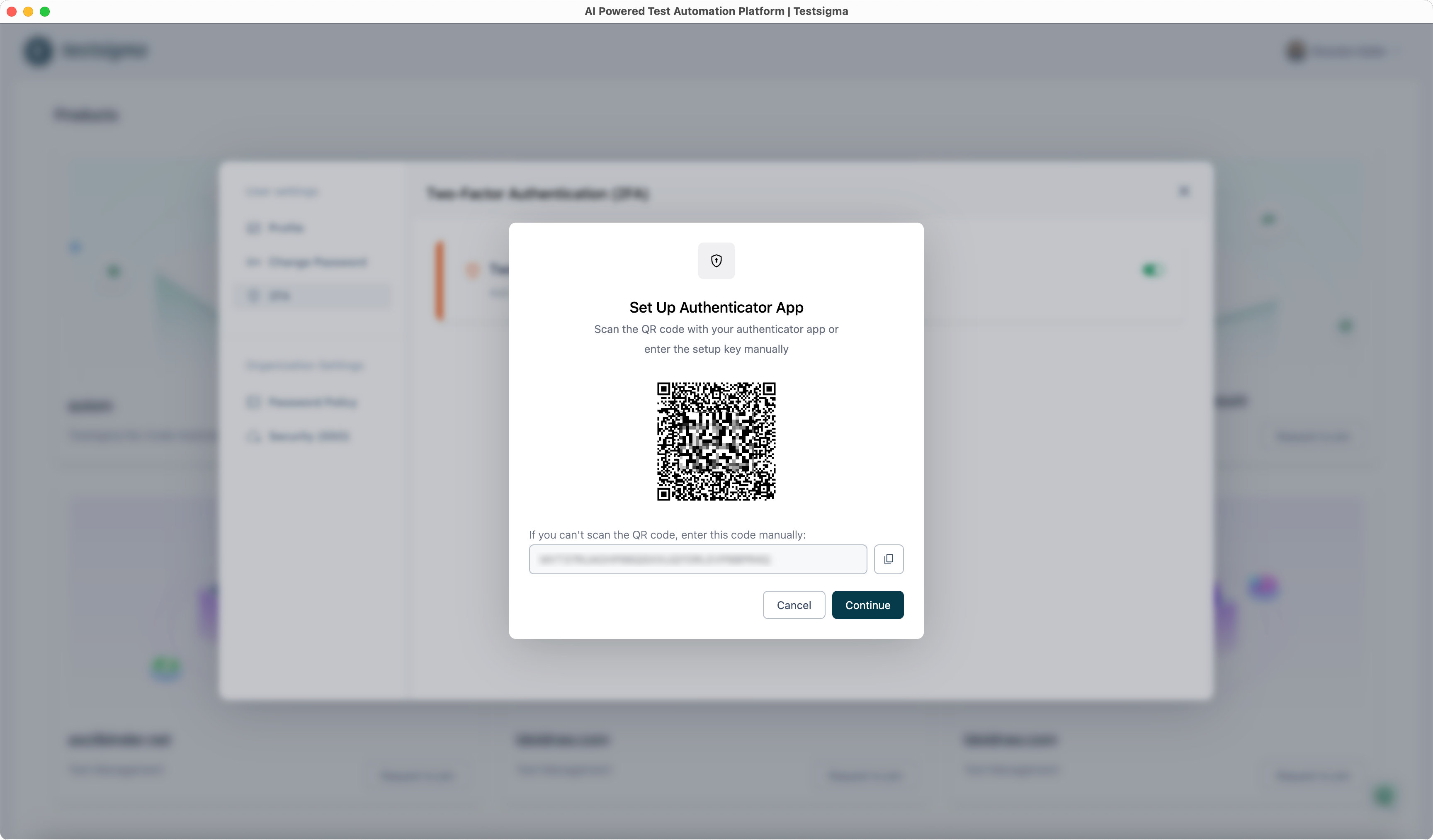 | ||
|
|
||
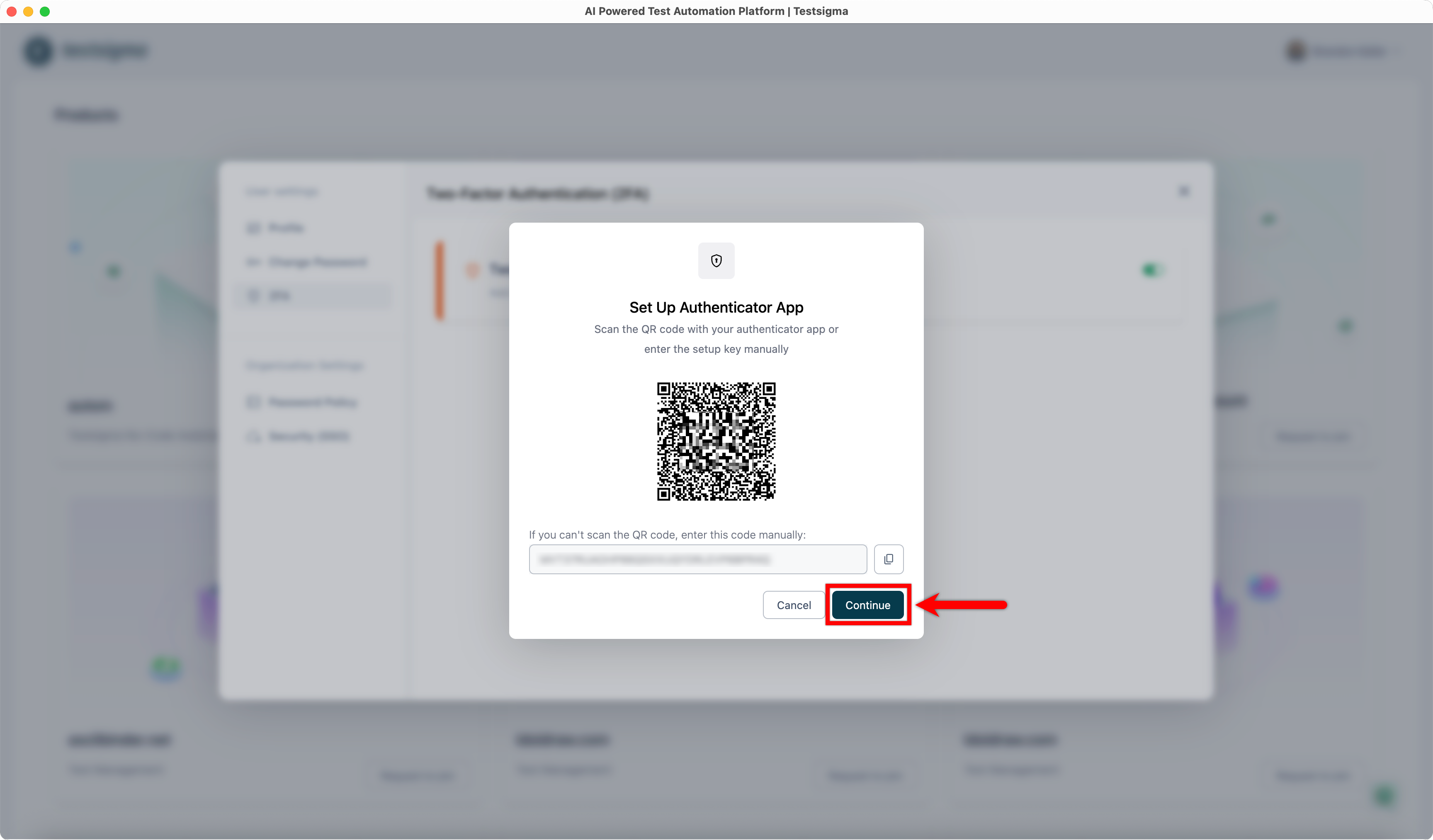
| 5. Click **Continue**. This will open the **Verify Authenticator App** dialog. | ||
|  |
There was a problem hiding this comment.
Fix typo in image filename.
Line 85 references an image with a typo: "Contiune_After_QR_Code.png" should be "Continue_After_QR_Code.png". This will cause the image to fail to load.
- 
+ 📝 Committable suggestion
‼️ IMPORTANT
Carefully review the code before committing. Ensure that it accurately replaces the highlighted code, contains no missing lines, and has no issues with indentation. Thoroughly test & benchmark the code to ensure it meets the requirements.
|  | |
|  |
🤖 Prompt for AI Agents
In src/pages/docs/configuration/manage-user-and-organization-settings.md around
line 85 the image filename contains a typo ("Contiune_After_QR_Code.png");
update the markdown to reference the correct filename
"Continue_After_QR_Code.png" so the image loads properly.

* Updated Jira Bug Reporting doc (#858)

* Created new doc Figma page Loading issues (#859)

* Added a new section to docs (#860)

* Added a new section to docs

* Update live-editor.md

* Update using-auto-healing-in-live-editor-test-execution.md

* Update unable-to-download-the-packages-required-to-start-the-agent.md

* Updated Testsigma Terminal docs and added a new section (#861)

* Added a new section

* Update unable-to-start-the-terminal-due-to-port-unavailability.md

* added a new section for Figma page loading issues (#862)

* added a new section for Figma page loading issues

* Update left-nav-title.json

* updated requirement doc (#863)

* Added a new doc 'Configure User & Org Settings' (#864)

Added a new doc 'Configure User & Org Settings'

* updated Components of Testsigma Terminal doc (#865)

* Deleted 'Configure User & Organization Settings' (#867)

---------

Co-authored-by: Bharath Krishna <118433150+bharathk08@users.noreply.github.com>
2 participants


Added a new doc 'Configure User & Org Settings'

Summary by CodeRabbit
✏️ Tip: You can customize this high-level summary in your review settings.