Conversation


WalkthroughDocumentation updates across three security and user settings guide files restructure navigation instructions and step sequences to reflect a new User Profile menu-based access pattern in the bottom-left corner, replacing previous navigation paths. Step numbers and image references are correspondingly updated. Changes
Estimated code review effort🎯 2 (Simple) | ⏱️ ~8 minutes
Possibly related PRs
Suggested reviewers
Poem
Pre-merge checks and finishing touches✅ Passed checks (3 passed)
✨ Finishing touches🧪 Generate unit tests (beta)
Thanks for using CodeRabbit! It's free for OSS, and your support helps us grow. If you like it, consider giving us a shout-out. Comment |

![coderabbitai[bot]](https://avatars.githubusercontent.com/in/347564?s=60&v=4)

There was a problem hiding this comment.
Actionable comments posted: 1
📜 Review details
Configuration used: CodeRabbit UI
Review profile: CHILL
Plan: Pro
📒 Files selected for processing (3)
src/pages/docs/configuration/security/password-policy.md(1 hunks)src/pages/docs/configuration/security/setup-two-factor-authentication.md(1 hunks)src/pages/docs/configuration/user-settings.md(3 hunks)
⏰ Context from checks skipped due to timeout of 90000ms. You can increase the timeout in your CodeRabbit configuration to a maximum of 15 minutes (900000ms). (1)
- GitHub Check: CI
🔇 Additional comments (5)
src/pages/docs/configuration/security/password-policy.md (1)
34-51: Navigation restructuring looks good.The updated steps properly guide users from the User Profile menu to Organization Settings > Password Policy. Step numbering is correct, image references follow consistent conventions, and the flow is logical. This aligns well with the navigation pattern updates in the other documentation files.
src/pages/docs/configuration/user-settings.md (3)
43-49: User Settings introduction is clear and well-organized.The initial navigation step and options list are consistent with the PR's navigation pattern changes. The bulleted list of three configurable areas (Profile, Change Password, 2FA) provides good visual clarity.
55-61: Profile section steps are clear and complete.The three-step flow (Select Profile, Edit fields, Update) is straightforward. Image references align with the instructions, and the subsection numbering starting at 1 is standard for multi-section documentation.
67-74: Change Password section follows consistent patterns.The three-step sequence properly guides users through password change (Select option, Enter passwords, Update). Instructions are specific about required fields, and image references support each step.
src/pages/docs/configuration/security/setup-two-factor-authentication.md (1)
37-59: 2FA setup flow is logical and well-structured.The 8-step sequence properly guides users through the complete 2FA setup process, from initial menu access through final verification. The step progression and descriptions are clear.
|
|
||
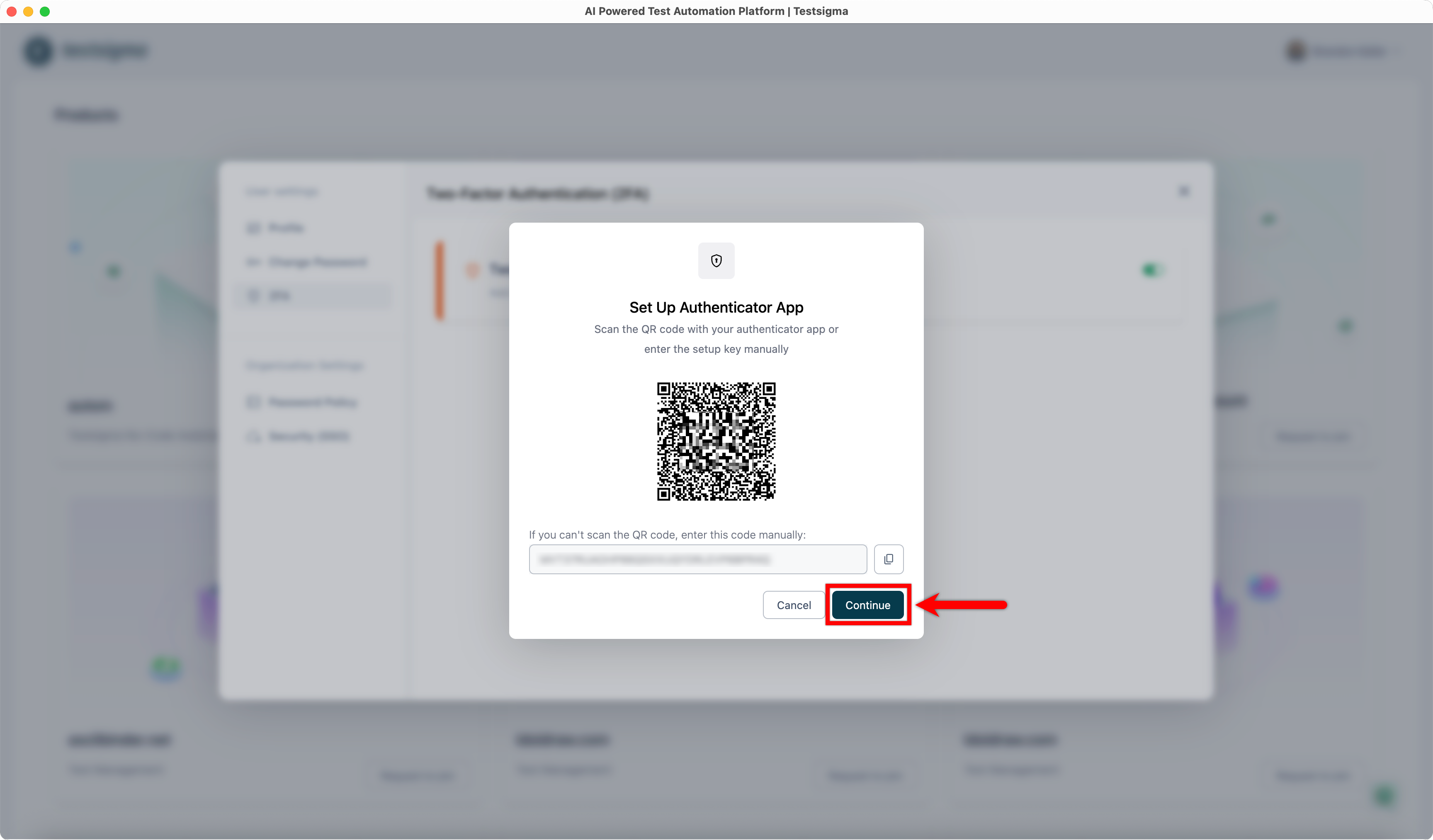
| 5. Click **Continue**. This will open the **Verify Authenticator App** dialog. | ||
| 6. Click **Continue**. This will open the **Verify Authenticator App** dialog. | ||
|  |
There was a problem hiding this comment.
🧩 Analysis chain
🏁 Script executed:
# Check if the file exists and read line 52 with context
head -n 60 src/pages/docs/configuration/security/setup-two-factor-authentication.md | tail -n 20
Repository: testsigmahq/testsigma-docs
Length of output: 1474
🏁 Script executed:
# Search for the typo "Contiune" in the repository
rg "Contiune" --type md
Repository: testsigmahq/testsigma-docs
Length of output: 289
🏁 Script executed:
# Search for the corrected version "Continue_After_QR_Code" to see if it appears anywhere
rg "Continue_After_QR_Code" --type md
Repository: testsigmahq/testsigma-docs
Length of output: 52
Fix typo in image filename.
Line 52 references an image with a typo: "Contiune_After_QR_Code.png" should be "Continue_After_QR_Code.png" to match the naming pattern of adjacent image references in the same file (Continue_with_2FA.png, Continue_after_entering_Authenticator_Code.png).
Apply this diff:
- 
+ Ensure the actual image file on S3 matches the corrected filename.
📝 Committable suggestion
‼️ IMPORTANT
Carefully review the code before committing. Ensure that it accurately replaces the highlighted code, contains no missing lines, and has no issues with indentation. Thoroughly test & benchmark the code to ensure it meets the requirements.
|  | |
|  |
🤖 Prompt for AI Agents
In src/pages/docs/configuration/security/setup-two-factor-authentication.md
around line 52, the embedded image filename has a typo
("Contiune_After_QR_Code.png"); update the Markdown reference to
"Continue_After_QR_Code.png" to match the naming pattern used elsewhere, and
verify that the S3 object at that exact path/name exists (or upload/rename the
file on S3 to match the corrected filename) so the image loads correctly.
2 participants


Summary by CodeRabbit
✏️ Tip: You can customize this high-level summary in your review settings.