-
Notifications
You must be signed in to change notification settings - Fork 34
Added new doc for End-to-End Testing #889
New issue
Have a question about this project? Sign up for a free GitHub account to open an issue and contact its maintainers and the community.
By clicking “Sign up for GitHub”, you agree to our terms of service and privacy statement. We’ll occasionally send you account related emails.
Already on GitHub? Sign in to your account
Merged
Merged
Changes from all commits
Commits
Show all changes
2 commits
Select commit
Hold shift + click to select a range
File filter
Filter by extension
Conversations
Failed to load comments.
Loading
Jump to
Jump to file
Failed to load files.
Loading
Diff view
Diff view
There are no files selected for viewing
This file contains hidden or bidirectional Unicode text that may be interpreted or compiled differently than what appears below. To review, open the file in an editor that reveals hidden Unicode characters.
Learn more about bidirectional Unicode characters
This file contains hidden or bidirectional Unicode text that may be interpreted or compiled differently than what appears below. To review, open the file in an editor that reveals hidden Unicode characters.
Learn more about bidirectional Unicode characters
| Original file line number | Diff line number | Diff line change |
|---|---|---|
| @@ -0,0 +1,97 @@ | ||
| --- | ||
| title: "End-to-End Testing in Testsigma" | ||
| page_title: "End-to-End Testing in Testsigma" | ||
| metadesc: "This document discusses enabling & configuring end-to-end testing in Testsigma by creating a single test plan that includes test suites from multiple projects & applications" | ||
| noindex: false | ||
| order: 8.271 | ||
| page_id: "end-to-end-testing" | ||
| warning: false | ||
| contextual_links: | ||
| - type: section | ||
| name: "Contents" | ||
| - type: link | ||
| name: "Prerequisites" | ||
| url: "#prerequisites" | ||
| - type: link | ||
| name: "Enable End-to-End Testing" | ||
| url: "#enable-end-to-end-testing" | ||
| - type: link | ||
| name: "Add Test Suites from Different Projects & Applications" | ||
| url: "#add-test-suites-from-different-projects--applications" | ||
| --- | ||
|
|
||
| --- | ||
|
|
||
| End-to-end (E2E) testing validates a complete business workflow from start to finish, as experienced by an end user. In modern applications, a single workflow often spans multiple applications, runs across different platforms, and relies on several interconnected systems. | ||
|
|
||
| For example, a user may book a flight on a web application, cancel the booking using a mobile application, and then verify the refund status on the web. This workflow involves systems such as authentication services, booking engines, payment gateways, and notification services. End-to-end testing ensures that these systems work together correctly and that data remains consistent across the entire workflow. | ||
|
|
||
| This document discusses enabling and configuring end-to-end testing in Testsigma by creating a single test plan that includes test suites from multiple projects and applications. | ||
|
|
||
| --- | ||
|
|
||
| > <p id="prerequisites">Prerequisites</p> | ||
| > | ||
| > Before you begin, ensure that you have referred to: | ||
| > | ||
| > 1. [Documentation on creating test plans](https://testsigma.com/docs/test-management/test-plans/overview/). | ||
| > 2. [Documentation on creating test suites](https://testsigma.com/docs/test-management/test-suites/overview/). | ||
| > 3. [Documentation on creating test machine](https://testsigma.com/docs/test-management/test-plans/manage-test-machines/). | ||
|
|
||
| --- | ||
|
|
||
| ## **Enable End-to-End Testing** | ||
|
|
||
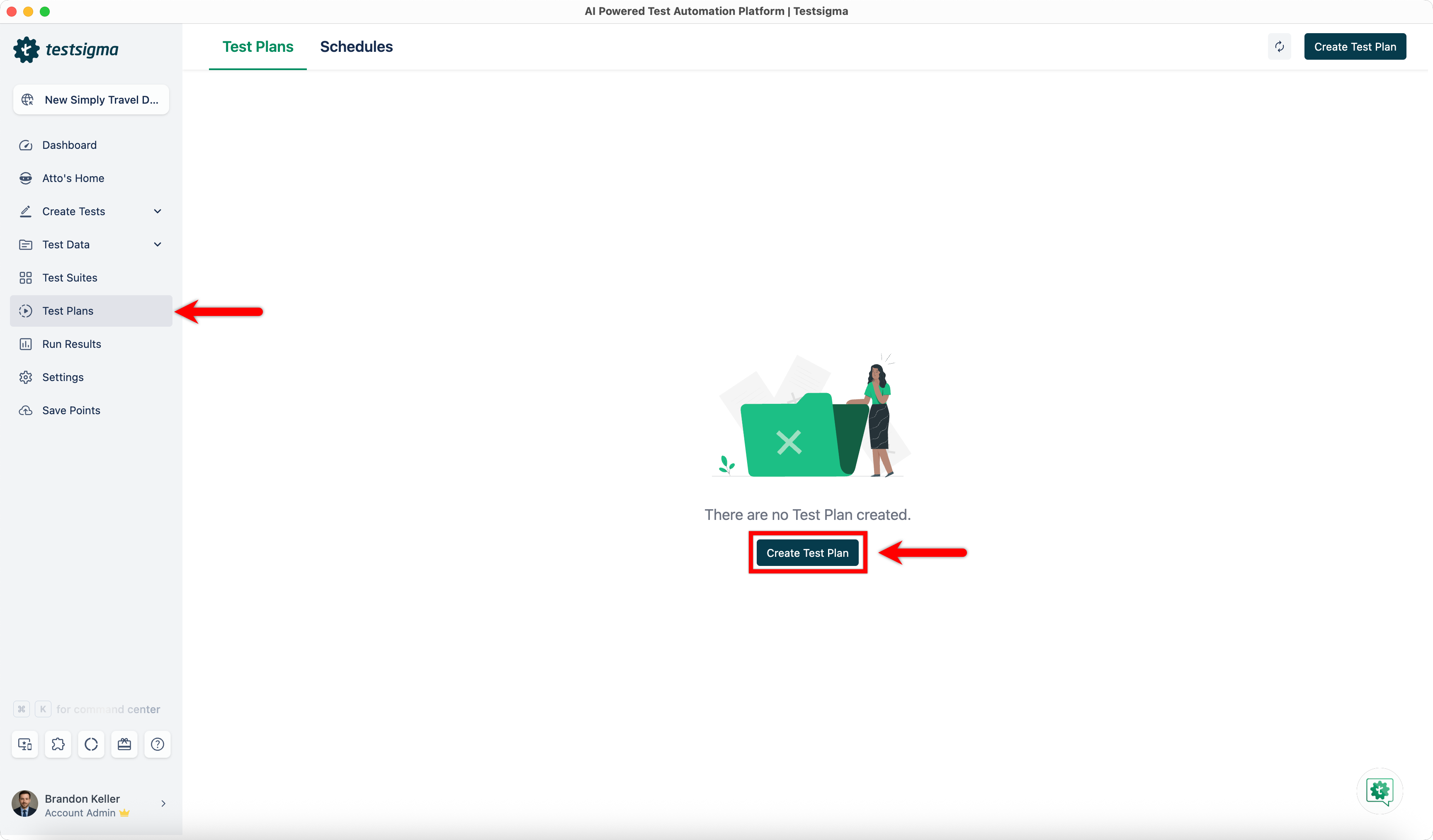
| 1. From the left navigation bar, go to **Test Plans** and click **Create Test Plan**. | ||
|  | ||
|
|
||
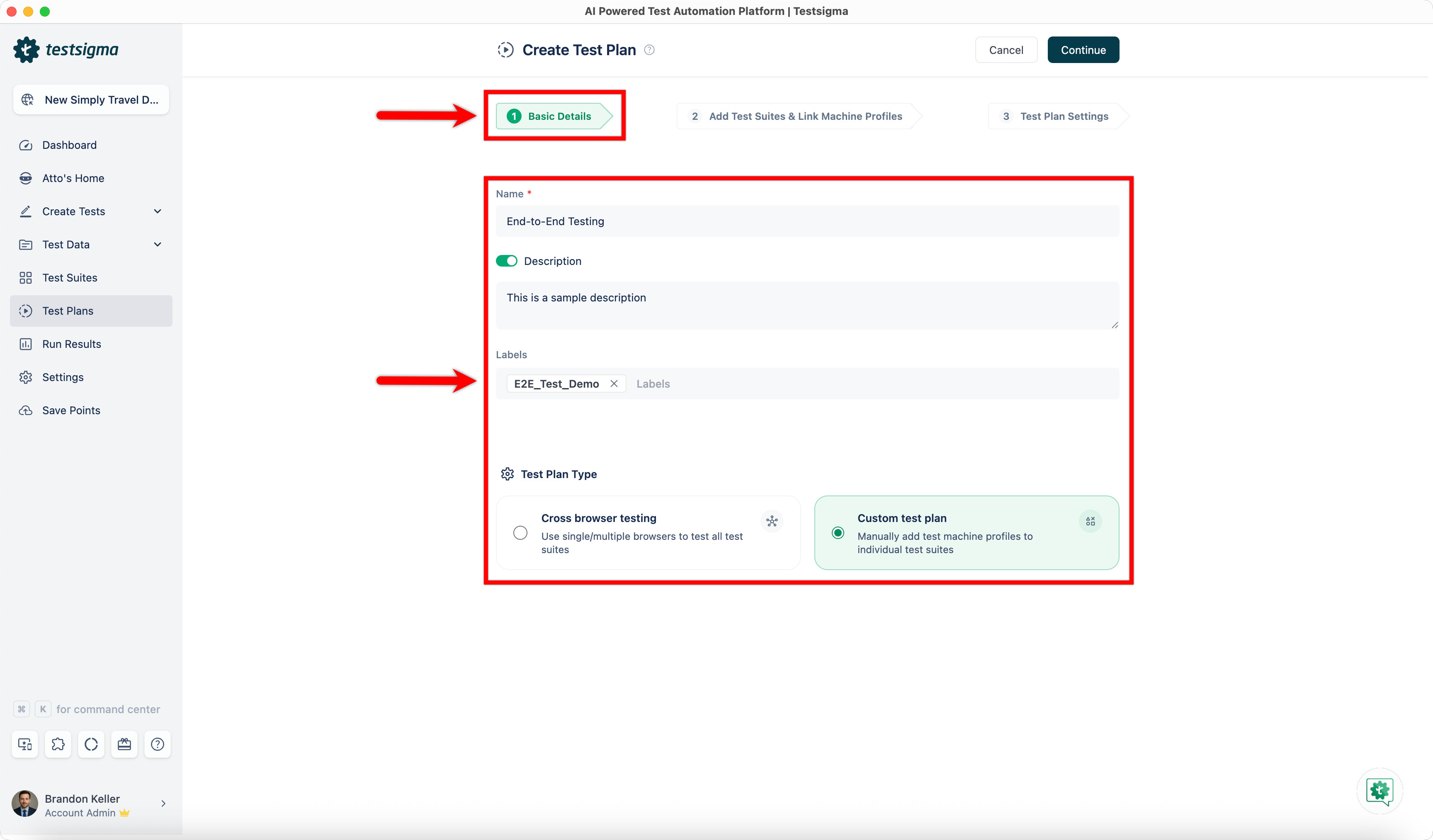
| 2. In the **Basic Details** tab, provide the following information and click **Continue**: | ||
| - **Name (Required)**: Enter a title for the test plan. | ||
| - **Description (Optional)**: Enable the Description toggle and briefly describe the purpose and scope of the test plan. | ||
| - **Labels (Optional)**: Add labels to help organize and manage test plans. | ||
| - **Test Plan Type (Required)**: Select **Custom Test Plan**. | ||
|  | ||
|
|
||
| > End-to-end testing can be enabled only for **Custom Test Plans**. | ||
|
|
||
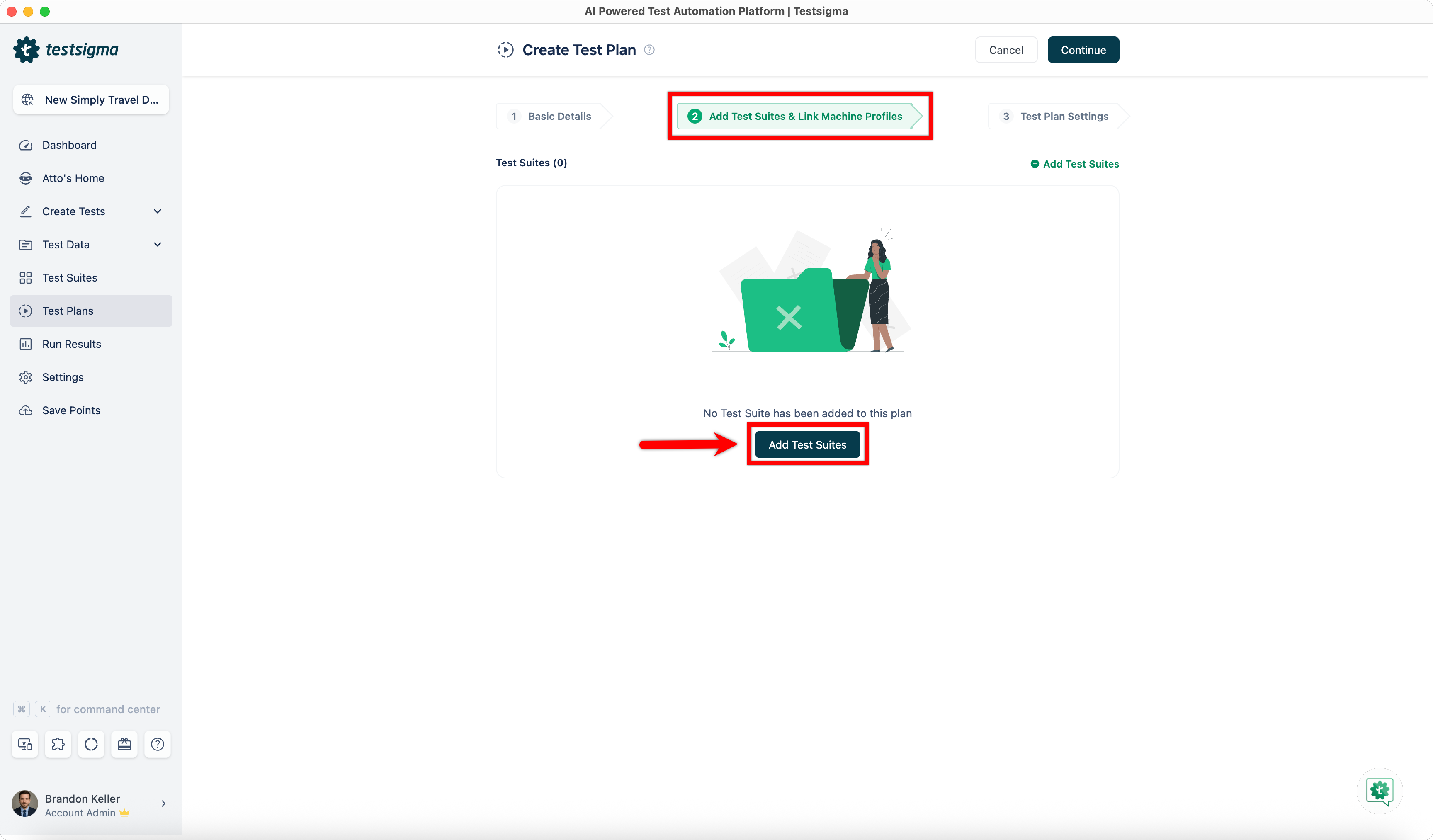
| 3. In the **Add Test Suites & Link Machine Profiles** tab, click **Add Test Suites**. | ||
|  | ||
|
|
||
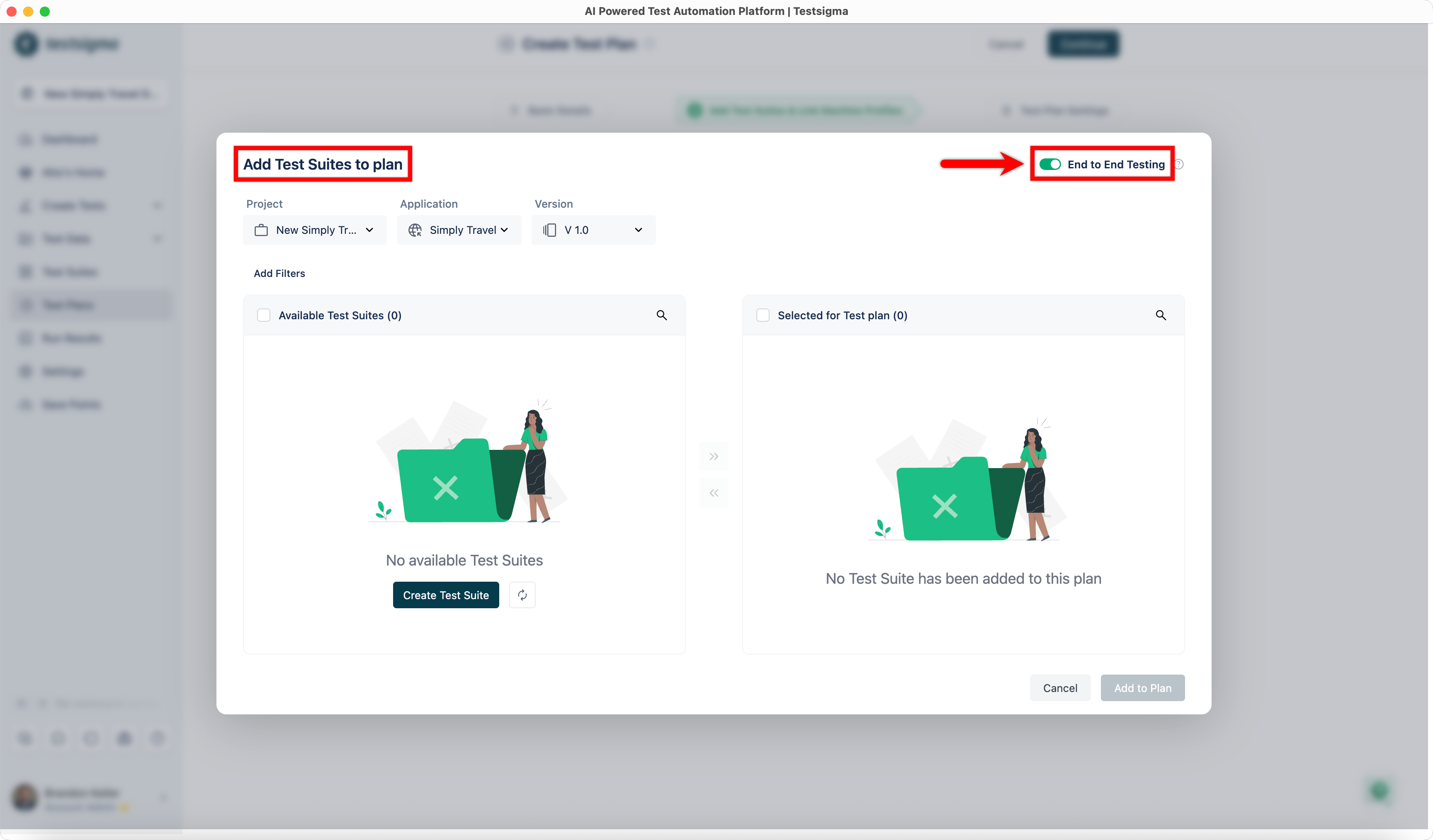
| 4. In the **Add Test Suites to Plan** dialog, enable the **End-to-End Testing** toggle. | ||
|  | ||
|
|
||
| --- | ||
|
|
||
| ## **Add Test Suites from Different Projects & Applications** | ||
|
|
||
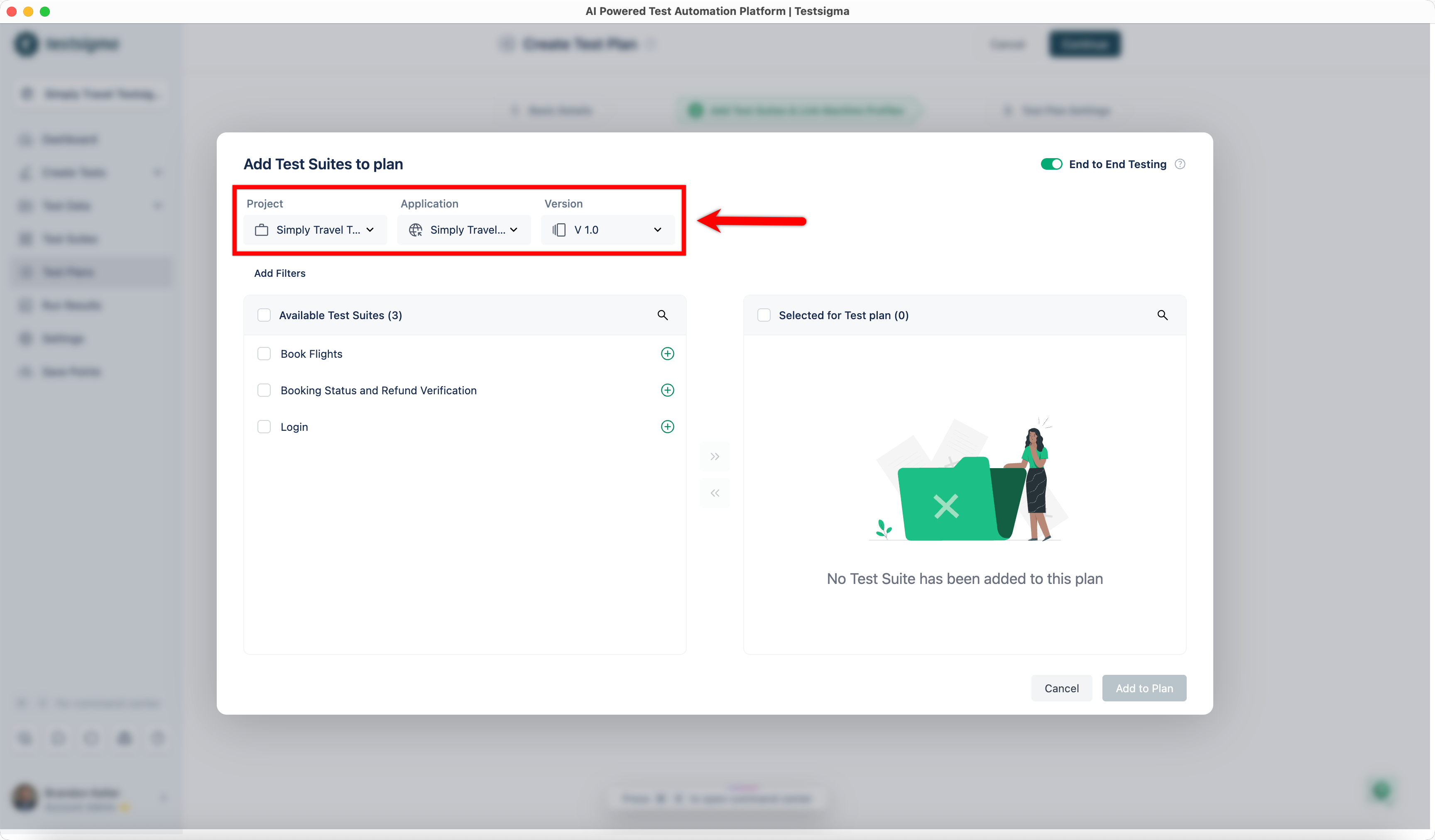
| When end-to-end testing is enabled, you can add test suites from multiple projects and applications to a single test plan. You add test suites incrementally by selecting a project and application, adding the required suites, and then switching to another project or application to continue adding more suites. | ||
|
|
||
| 1. In the **Add Test Suites to Plan** dialog, select the **Project**, **Application**, and **Version**. | ||
|  | ||
|
|
||
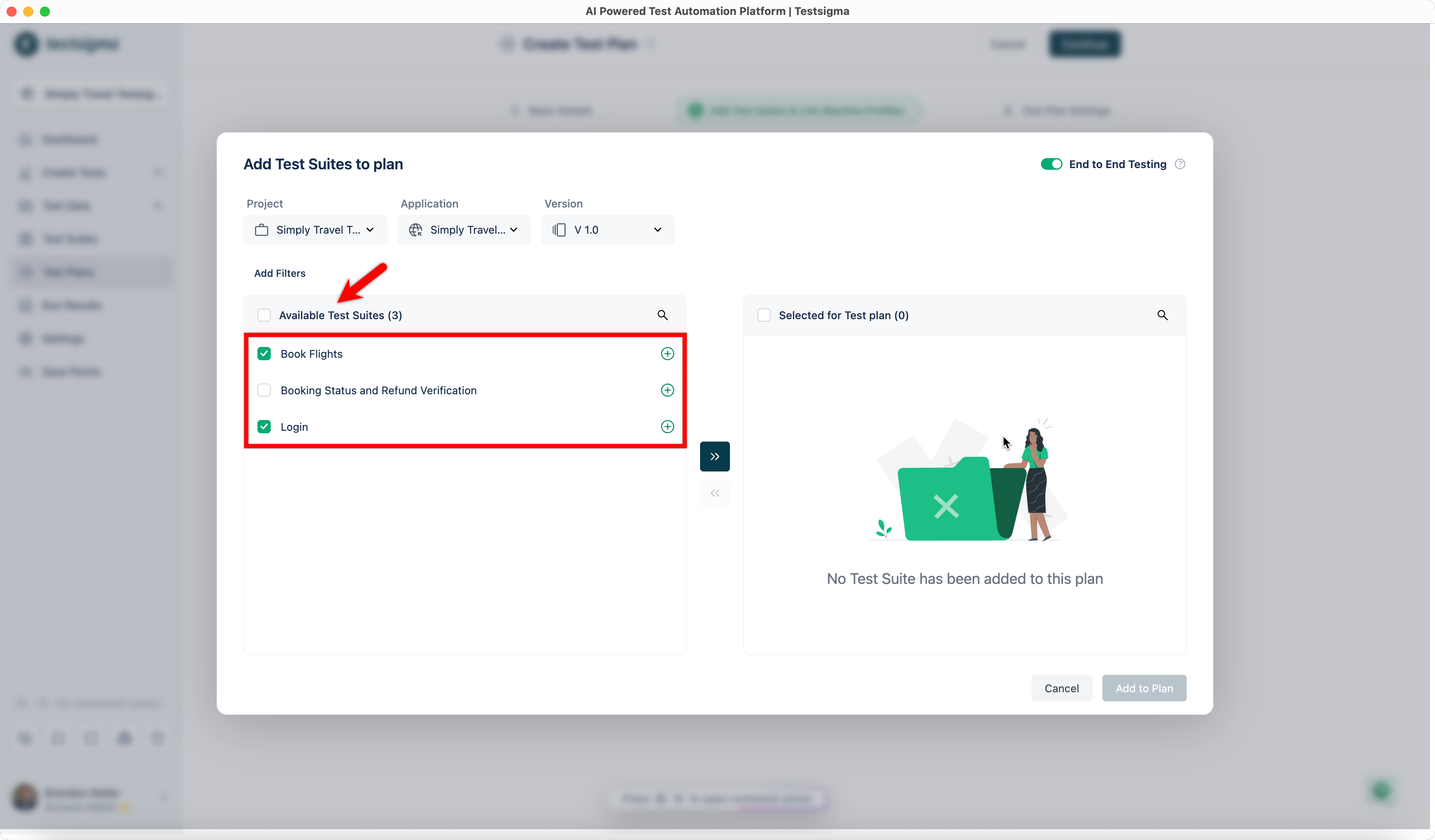
| 2. From the **Available Test Suites** list, select the required test suites and add them to the plan. | ||
|  | ||
|
|
||
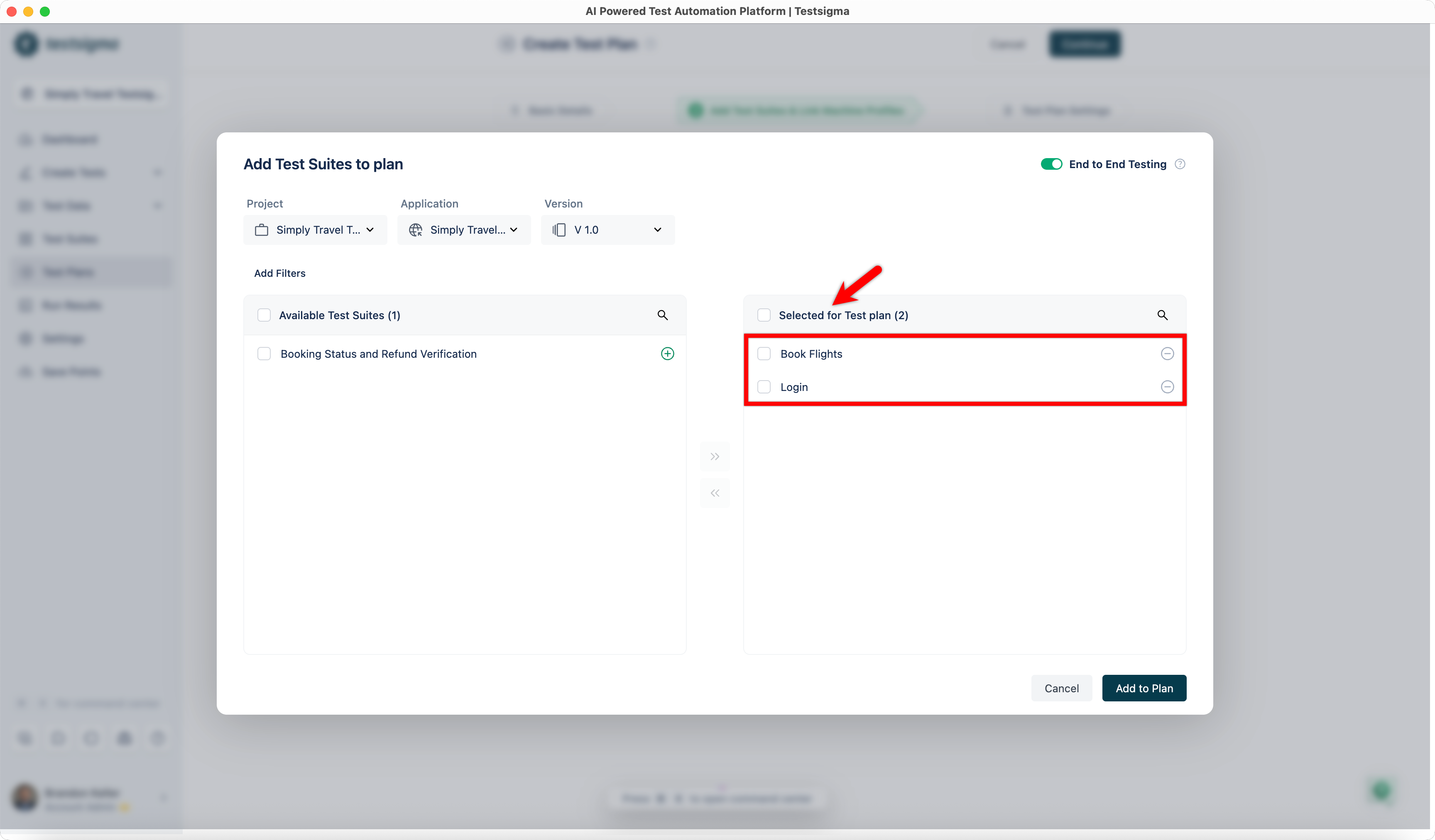
| 3. The selected test suites appear in the **Selected for Test Plan** section. | ||
|  | ||
|
|
||
| 4. Change the **Project**, **Application**, or **Version** to add test suites from a different source. | ||
|
|
||
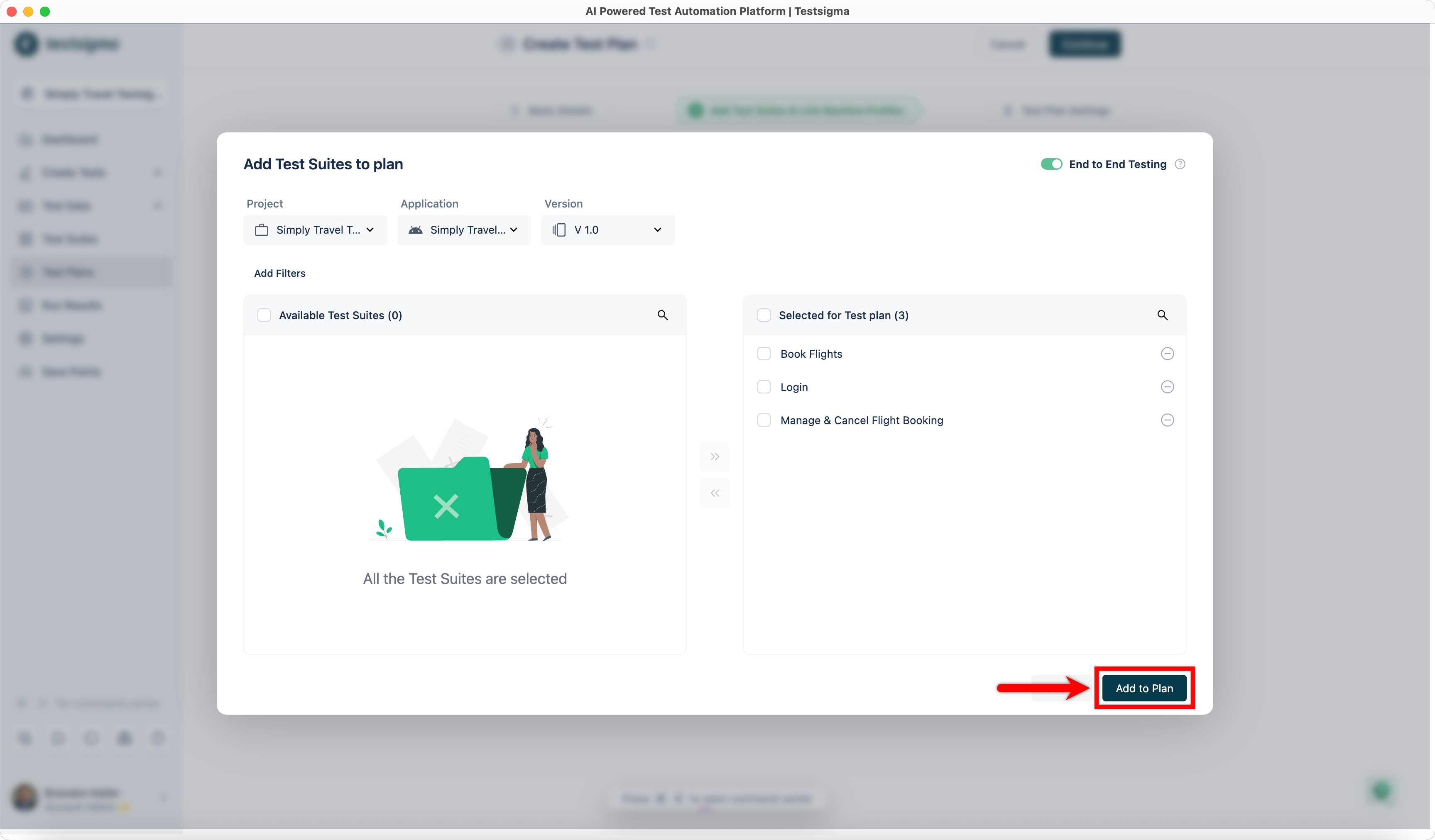
| 5. Repeat steps 1–3 until all required test suites from different projects and applications are added. | ||
|
|
||
| 6. Click **Add to Plan**. | ||
|  | ||
|
|
||
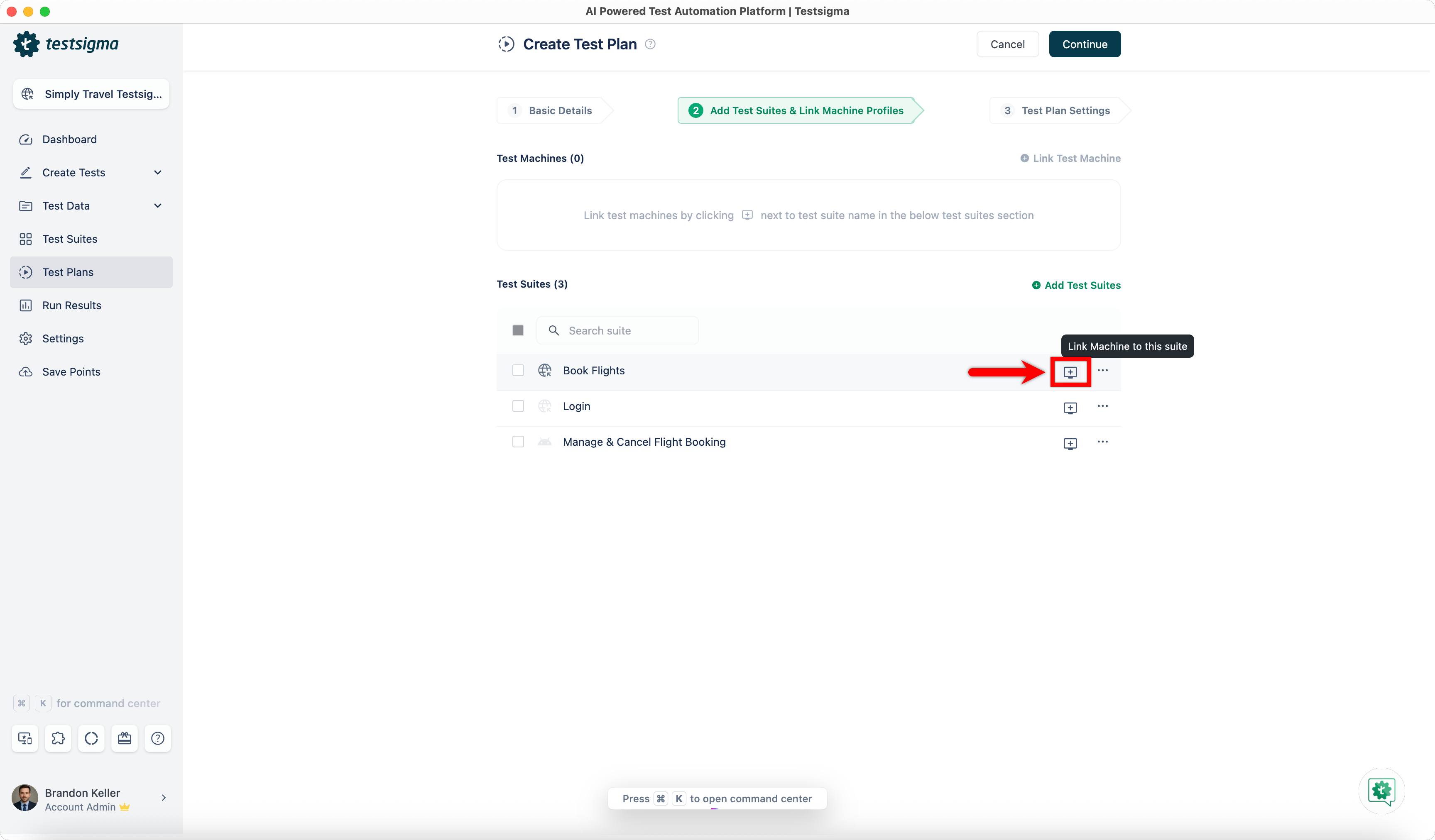
| 7. In the **Add Test Suites & Link Machine Profiles** tab, click **Test Machine** for a test suite. | ||
|  | ||
|
|
||
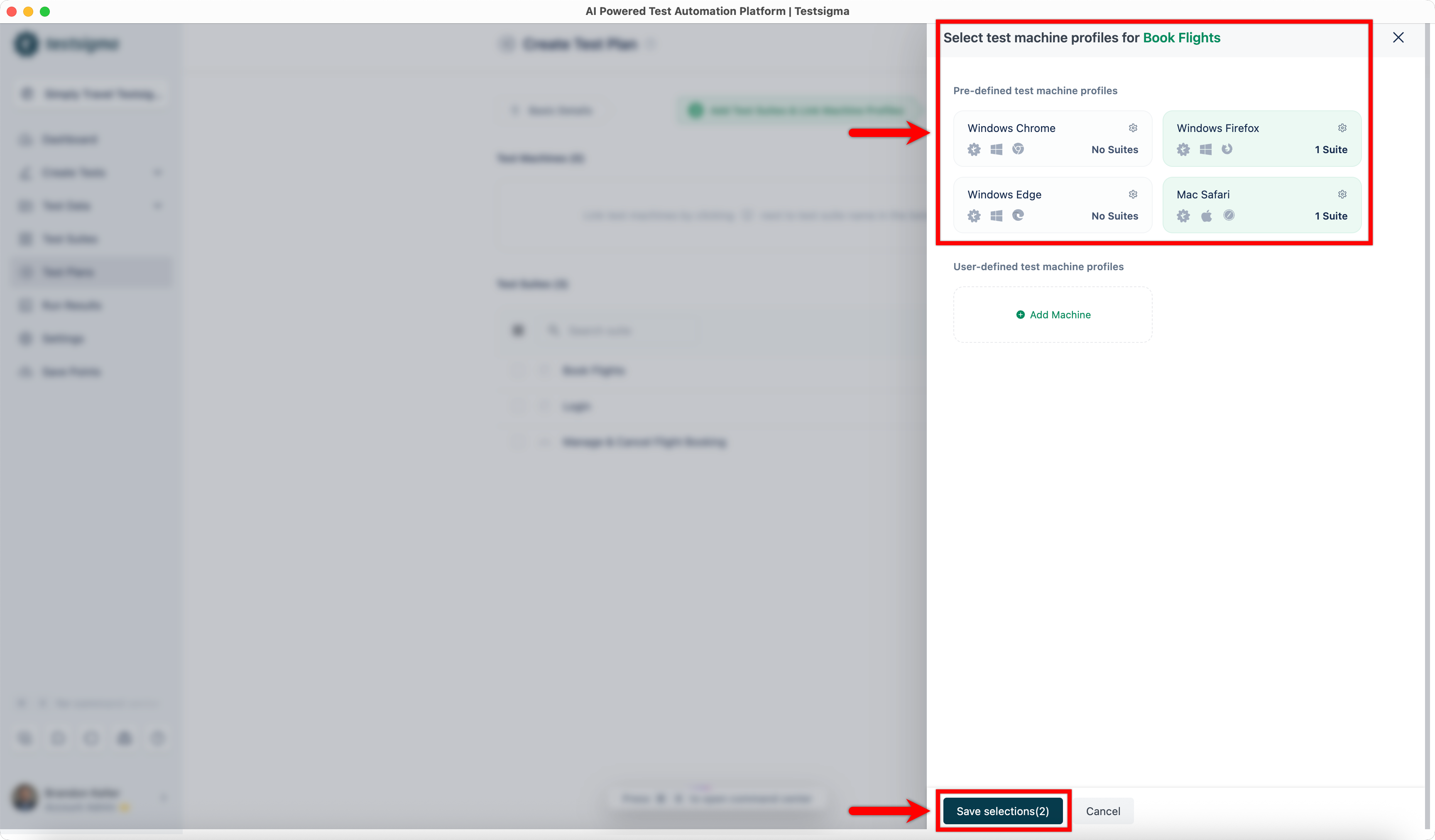
| 8. In the **Select Test Machine Profiles** overlay, select the required test machines and click **Save Selections**. | ||
|  | ||
|
|
||
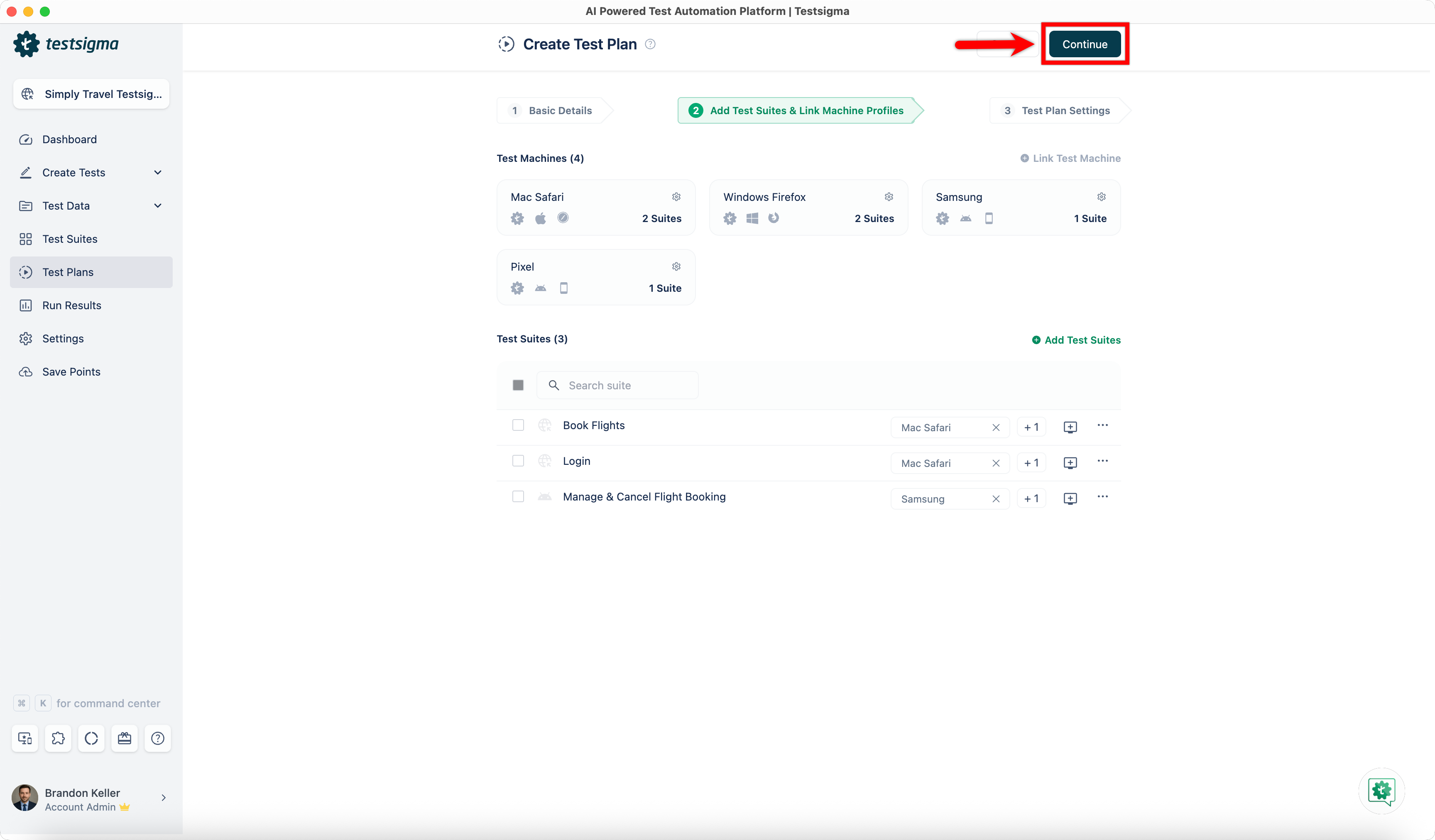
| 9. Repeat the same for each test suite, selecting machine profiles based on the application type. | ||
|
|
||
| 10. Click **Continue** to proceed with the remaining test plan configuration. | ||
|  | ||
|
|
||
|
|
||
| --- | ||
Add this suggestion to a batch that can be applied as a single commit.
This suggestion is invalid because no changes were made to the code.
Suggestions cannot be applied while the pull request is closed.
Suggestions cannot be applied while viewing a subset of changes.
Only one suggestion per line can be applied in a batch.
Add this suggestion to a batch that can be applied as a single commit.
Applying suggestions on deleted lines is not supported.
You must change the existing code in this line in order to create a valid suggestion.
Outdated suggestions cannot be applied.
This suggestion has been applied or marked resolved.
Suggestions cannot be applied from pending reviews.
Suggestions cannot be applied on multi-line comments.
Suggestions cannot be applied while the pull request is queued to merge.
Suggestion cannot be applied right now. Please check back later.
There was a problem hiding this comment.
Choose a reason for hiding this comment
The reason will be displayed to describe this comment to others. Learn more.
🧩 Analysis chain
🏁 Script executed:
Repository: testsigmahq/testsigma-docs
Length of output: 573
🏁 Script executed:
Repository: testsigmahq/testsigma-docs
Length of output: 169
🏁 Script executed:
Repository: testsigmahq/testsigma-docs
Length of output: 1009
🏁 Script executed:
Repository: testsigmahq/testsigma-docs
Length of output: 88
🏁 Script executed:
Repository: testsigmahq/testsigma-docs
Length of output: 52
🏁 Script executed:
Repository: testsigmahq/testsigma-docs
Length of output: 2973
🏁 Script executed:
Repository: testsigmahq/testsigma-docs
Length of output: 151
🏁 Script executed:
Repository: testsigmahq/testsigma-docs
Length of output: 52
Fix broken documentation links and improve sentence variety.
Three issues:
Incorrect documentation link paths: The links reference
/test-management/paths, but the actual documentation is at/test-plans/and/test-suites/. Update the links to:https://testsigma.com/docs/test-plans/overview/https://testsigma.com/docs/test-suites/overview/https://testsigma.com/docs/test-plans/manage-test-machines/Repetitive sentence structure: All three list items begin with "Documentation on". Vary the phrasing for better readability.
Grammar inconsistency: Line 39 says "test machine" (singular) but should be "test machines" (plural) to match the context.
🧰 Tools
🪛 LanguageTool
[style] ~39-~39: Three successive sentences begin with the same word. Consider rewording the sentence or use a thesaurus to find a synonym.
Context: ...anagement/test-suites/overview/). > 3. [Documentation on creating test machine](https://tests...
(ENGLISH_WORD_REPEAT_BEGINNING_RULE)
🤖 Prompt for AI Agents