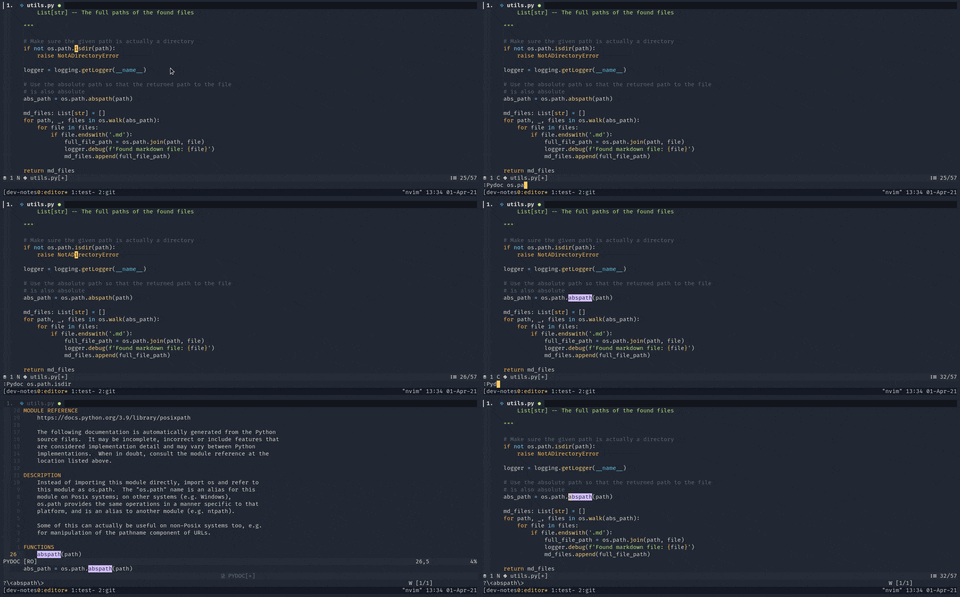
Shows Python documentation from the pydoc command in a neovim window.
- Neovim 0.8+
- Python with
pydocinstalled
return {
  'twanh/nvim-pydoc',
  cmd = 'Pydoc',
  keys = {
    { '<leader>pd', ':Pydoc ', desc = 'Open pydoc' },
    { 'K', ':Pydoc ', desc = 'Pydoc word under cursor' },
  },
}use {
'twanh/nvim-pydoc',
cmd = { 'Pydoc' },
keys = { '<leader>pd' },
}Plug 'twanh/nvim-pydoc':Pydoc os.path
:Pydoc json
:Pydoc collectionsThe plugin provides default keybindings (lazy.nvim/packer):
| Keybinding | Action |
|---|---|
<leader>pd |
Open pydoc (prompts for module) |
K |
Pydoc word under cursor |
Press q to close the pydoc window.
Call require('pydoc').setup() in your init.lua:
require('pydoc').setup({
  -- Keybinding to close the window (use false to disable)
  keymaps = {
    close = 'q',
  },

  -- Maximum window height
  win_height = 25,

  -- Pydoc command to use (pydoc, pydoc3, pydoc3.11, etc.)
  pydoc_cmd = 'pydoc3',
})The plugin provides <Plug>(PydocClose) for custom keybindings. To change the close key:
vim.keymap.set('n', '<leader>q', '<Plug>(PydocClose)', { desc = 'Close pydoc' })Or completely disable the default:
require('pydoc').setup({
  keymaps = {
    close = false,
  },
})The plugin defines these highlight groups:
PydocHeader- Linked toTitleby defaultPydocFunction- Linked toFunctionby default
To customize:
vim.api.nvim_set_hl(0, 'PydocHeader', { fg = '#ffaa00', bold = true })local pydoc = require('pydoc')
-- Open pydoc for a module
pydoc.open_pydoc('os.path')
-- Close the pydoc window
pydoc.close_pydoc()
-- Configure the plugin
pydoc.setup({ win_height = 30 })