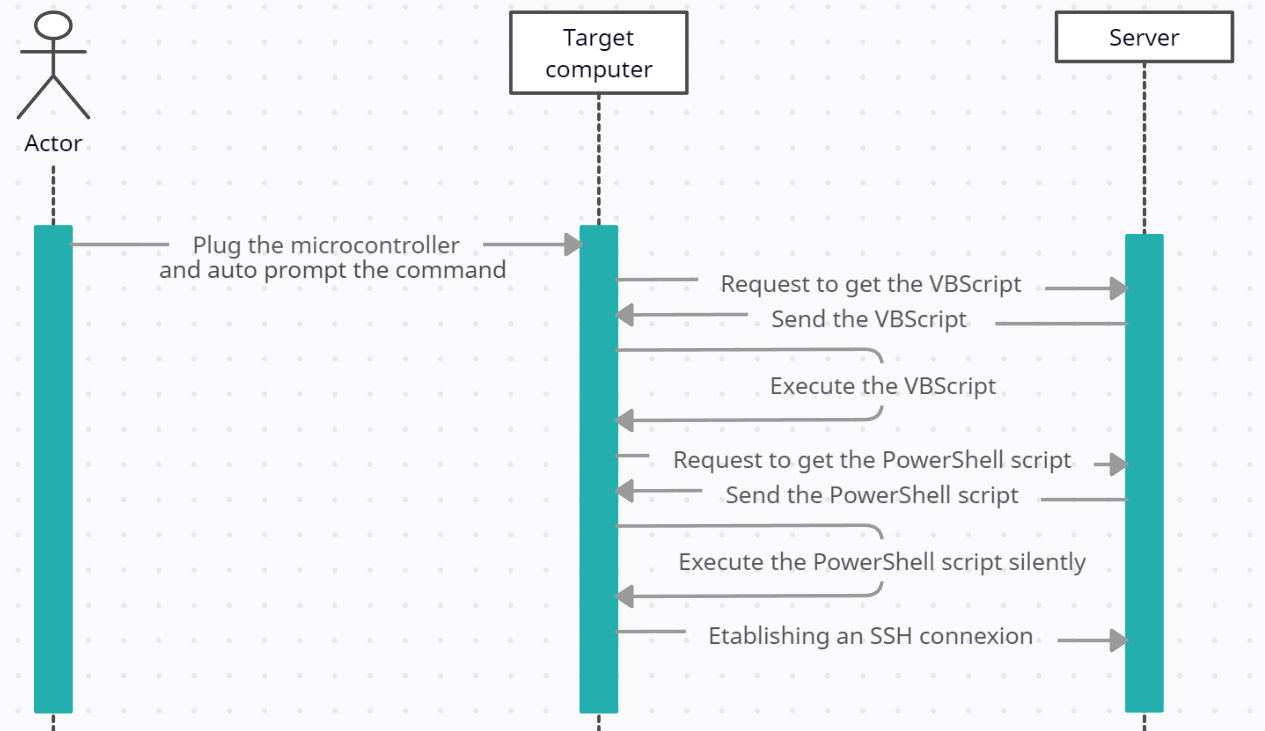
This reverse shell bypass Windows Defender with all security activated, bypass Powershell's Execution-Policy.
Use it only for ethical purposes.
This attack allow the hacker to get full control of the target computer remotely.
- A Server in listening mode.
- A method to get the software installed on the target (like keystroke injection, social engineering, ...).
To set up, follow these steps :
-
On your server, listen on a specific port to intercept the reverse shell sent by the malware installed on the target.
For example on linux, I will listen on the port 553 with netcat with the following command :nc -nvlp 553 -
Host the VBScript and the PowerShell script on your server separately, accessible over the WAN.
In the VBScript, you must specify the IP of your server < SERVER_IP >, and the port < SERVER_PORT > on which your PowerShell script is hosted.
In the PowerShell script, you must specify the IP of your server in < SERVER_IP >, and the port < SERVER_PORT > on which you will listen to intercept the reverse shell. -
Program your microcontroller to download the malware on the target computer by sending keystrokes.
An example is in "digispark_autoprompt/digispark_auoprompt.ino", but you must change the WebRequest to the URL where your VBScript is hosted. This example opens the execution dialog with the shortcut "Windows+R", and executes the command to download and execute the malware. - The malware is now installed on the target computer and stored in the Windows startup folder. This means that every time the target logs in to its Windows session, a connection will be established to your server provided it is listening