




A comprehensive, enterprise-grade educational platform designed for MLRIT students to track competitive programming progress, participate in structured cohort-based learning, and enhance coding skills through an advanced practice arena.
🌐 Live Demo(Version: 1.0.5) • 📖 Documentation • 🐛 Report Bug • ✨ Request Feature
- 🌟 Overview
- 🎯 Key Highlights
- 📊 Version Comparison
- 🎨 Core Features
- 🚀 Version 2.0 Exclusive Features
- 🛠️ Tech Stack
- 🏗️ System Architecture
- ⚡ Quick Start
- 📖 Feature Documentation
- 🔌 API Reference
- 🚢 Deployment Guide
- 🤝 Contributing
- 📄 License
- 👥 Team
SCOPE Cohorts (Smart Competitive Programming & Organized Cohort Education) is a next-generation educational platform that revolutionizes how students approach competitive programming and skill development at MLRIT (Marri Laxman Reddy Institute of Technology).
Empower students to track, analyze, and enhance their competitive programming skills through real-time multi-platform integration, structured learning paths, and comprehensive performance analytics.
| User Type | Description | Access Level |
|---|---|---|
| Students | MLRIT CS & IT department students | Standard User Access |
| Teachers | Faculty members and teaching assistants | Elevated Access + Analytics |
| Admins | Platform administrators and coordinators | Full System Access |
| Recruiters | Companies viewing student profiles | Read-only Public Access |
SCOPE Cohorts seamlessly integrates with leading competitive programming platforms to provide unified tracking:
| Platform | Features Tracked | Update Frequency |
|---|---|---|
| 🟢 LeetCode | Problems Solved, Contest Rating, Badges | Daily |
| 🔵 Codeforces | Rating, Contests, Problem Count | Daily |
| 🟠 CodeChef | Stars, Rating, Problems Solved | Daily |
| 🟢 GeeksforGeeks | Score, Problems, Articles | Daily |
| 🟣 HackerRank | Certifications, Skills, Score | Daily |
| ⚫ GitHub | Contributions, Repositories, Stats | Daily |
|
|
✅ Multi-Platform Aggregation    → Unified view of 6+ coding platforms
✅ Cohort-Based Learning         → Structured courses with progress tracking
✅ Practice Arena                → Mock tests with analytics
✅ Real-Time Leaderboards        → Department-wise competitive rankings
✅ Advanced Analytics            → Comprehensive performance insights
✅ Self-Hosted Infrastructure    → Full control over data and execution
✅ Mobile Responsive             → Seamless experience on all devices
✅ Push Notifications            → Stay updated on achievements & deadlines
| Feature Category | Version 1.0.5 (Aug 2024) | Version 2.0.0 (Jan 2026) ✨ |
|---|---|---|
| 🎓 Learning System | ❌ Not Available | ✅ Full LMS with Cohorts & Modules |
| 🎯 Practice Arena | ❌ Not Available | ✅ Advanced Mock Test System |
| 💻 Code Execution | ✅ Judge0 (8 Languages, 50+ Concurrent) | |
| 📊 Admin Dashboard | ✅ Comprehensive Analytics Suite | |
| 🎨 User Interface | Traditional Navbar | ✅ Modern Sidebar Navigation |
| 🔔 Notifications | ✅ Web Push (Basic) | ✅ Advanced Push + In-App Center |
| 🏅 Achievements | ✅ Basic Badge System | ✅ Full Achievement Management |
| 🗄️ Database | MongoDB Atlas (512MB) | ✅ Self-Hosted MongoDB (Optimized) |
| ⚡ Performance | Leaderboard: ~2.5s | ✅ Leaderboard: ~0.8s (3x faster) |
| 📱 Mobile Experience | ✅ 40% Performance Improvement | |
| 👥 User Capacity | ~1000 Active Users | ✅ ~3000+ Users are to be Expected(95% of eligible) |
| 🏗️ Infrastructure | Single Server (t2.medium) | ✅ Multi-Server (App + Judge0) on c6.xlarge |
SCOPE Cohorts implements a comprehensive role-based access control system with three distinct user types:
Primary Users: MLRIT students from CS, IT, and related departments
Access & Permissions:
- ✅ Personal dashboard with analytics
- ✅ Profile management & platform sync
- ✅ Leaderboard viewing
- ✅ Cohort enrollment & learning
- ✅ Practice Arena access (5 tests/day)
- ✅ Code editor (CodePad)
- ✅ Opportunities portal browsing
- ✅ Achievements showcase
- ✅ Notification preferences
- ❌ Cannot create cohorts or manage users
- ❌ No admin analytics access
Primary Users: Faculty members and teaching assistants
Access & Permissions:
- ✅ All Student permissions
- ✅ View cohort analytics for assigned courses
- ✅ Track student progress in cohorts
- ✅ Grade cohort submissions
- ✅ Provide feedback on student work
- ✅ Access department-level statistics
- ✅ Export student performance reports
⚠️ Limited cohort creation (with admin approval)- ❌ No full admin dashboard access
- ❌ Cannot manage system settings
Primary Users: Platform coordinators and system administrators
Full System Access:
- ✅ All Student & Teacher permissions
- ✅ Complete admin dashboard with system analytics
- ✅ User management (create, edit, delete, role assignment)
- ✅ Cohort management (create, edit, assign students)
- ✅ Question bank management (CRUD operations)
- ✅ Practice Arena configuration (test settings, limits)
- ✅ Opportunity management (post jobs/internships)
- ✅ Achievement verification (approve/reject)
- ✅ Push notification broadcasting
- ✅ System configuration (academic years, departments)
- ✅ Platform sync management (force sync, monitor health)
- ✅ Analytics & reporting (platform-wide insights)
- ✅ Database management (backups, maintenance)
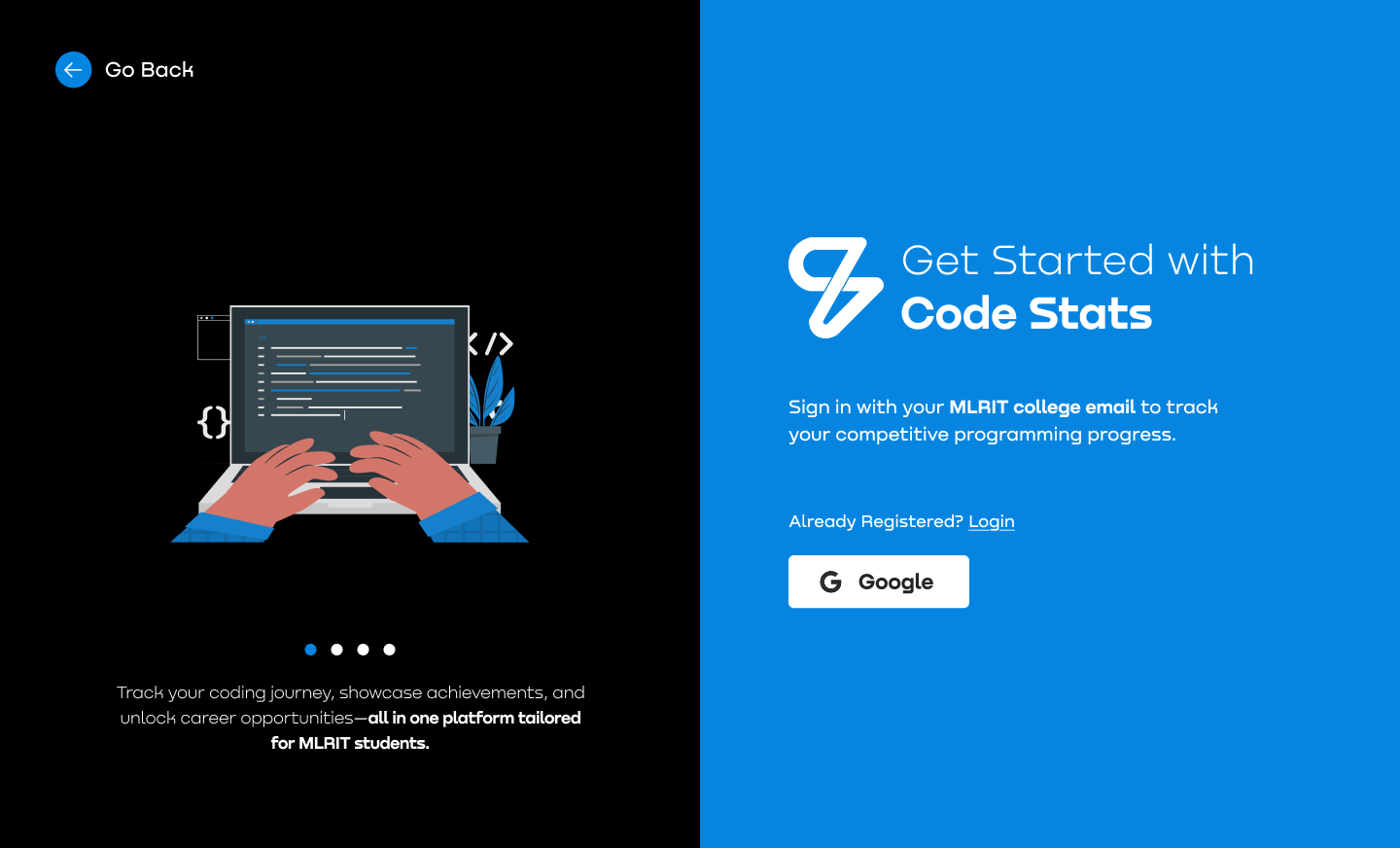
Google OAuth 2.0 Authentication
SCOPE Cohorts uses Google OAuth 2.0 as the exclusive authentication method, ensuring secure single sign-on with MLRIT institutional email addresses.
Technical Implementation:
- Authentication Strategy: Google OAuth 2.0 via Passport.js
- Allowed Email Domains:
@mlrit.ac.inor@mlrinstitutions.ac.in - Token Management: JWT (JSON Web Tokens) with 30-day expiry
- Session Handling: Express-session with MongoDB store (connect-mongo)
- Security: Bcrypt password hashing, CORS enabled
Backend Stack:
// Key Dependencies
passport (^0.7.0)
passport-google-oauth20 (^2.0.0)
jsonwebtoken (^9.0.1)
express-session (^1.18.1)
connect-mongo (^5.1.0)
bcryptjs (^2.4.3)
Authentication Flow:
User clicks "Sign in with Google"
         ↓
Frontend → /api/auth/google
         ↓
Passport.js Google Strategy
         ↓
Google OAuth Authorization
         ↓
Callback → /api/auth/google/callback
         ↓
Check if user exists (googleId)
    ┌────┴────┐
New User   Existing User
    │           │
Create User  Update profile
googleId     picture
    └────┬────┘
         ↓
Generate JWT Token
         ↓
Redirect → /dashboard?token=<JWT>
         ↓
Frontend stores token in localStorage
         ↓
Check profileCompleted
    ┌────┴────┐
 true       false
    │           │
Dashboard  Onboarding
User Model Schema:
{
  userType: 'user' | 'admin' | 'teacher',
  newUser: Boolean (default: true),
  profileCompleted: Boolean (default: false),
  name: String,
  email: String (@mlrit.ac.in validated),
  googleId: String (unique),
  profilePicture: String,
  rollNumber: String (unique),
  department: 'CSE' | 'IT' | 'ECE' | ...,
  section: 'A' | 'B' | 'C' | ...,
  graduatingYear: Number (2024-2030),
  gender: 'Male' | 'Female' | 'Other',
  mobileNumber: String,
  profiles: {
    leetcode, codeforces, codechef,
    geeksforgeeks, hackerrank, github
  },
  skills: [String],
  interests: [String],
  linkedinUrl: String,
  about: String
}
API Endpoints:
GET /api/auth/google- Initiate OAuthGET /api/auth/google/callback- OAuth callbackGET /api/auth/user- Get authenticated userPOST /api/auth/validate- Validate uniquenessPOST /api/auth/logout- Destroy session
Security Features:
- Email domain validation (MLRIT only)
- JWT token verification middleware
- Session-based auth with secure cookies
- HTTPS-only cookies in production
- Rate limiting on auth routes
Frontend (Login.jsx):
// React + Material-UI
- Welcome carousel with features
- Google OAuth button
- Token handling on callback
- Auto-redirect based on profile status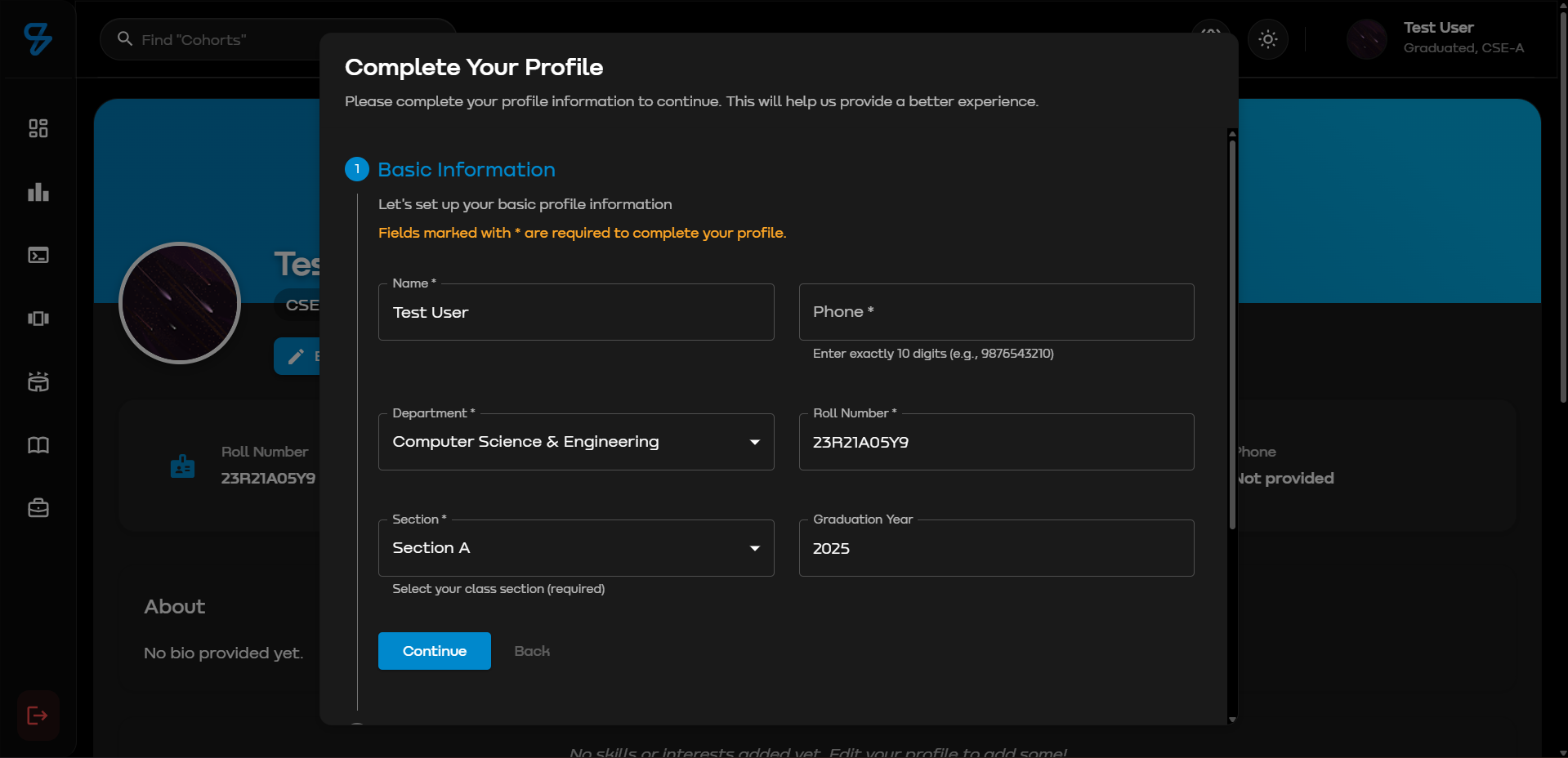
First-Time User Profile Completion
After authentication, new users (profileCompleted: false) complete their profile through a structured onboarding process.
Technical Implementation:
- Route:
POST /api/auth/completeRegistration - Auth: JWT token required
- Validation: Express-validator
- Database: Mongoose ODM
Onboarding Steps:
Step 1: Basic Information
- Name (auto-filled from Google)
- Roll Number (validated for uniqueness)
- Department (dropdown: AERO, CSC, CSD, CSE, CSM, CSIT, IT, ECE, MECH, EEE)
- Section (A-G)
- Graduating Year (2024-2030)
- Gender (Male/Female/Other)
- Mobile Number (10 digits, unique)
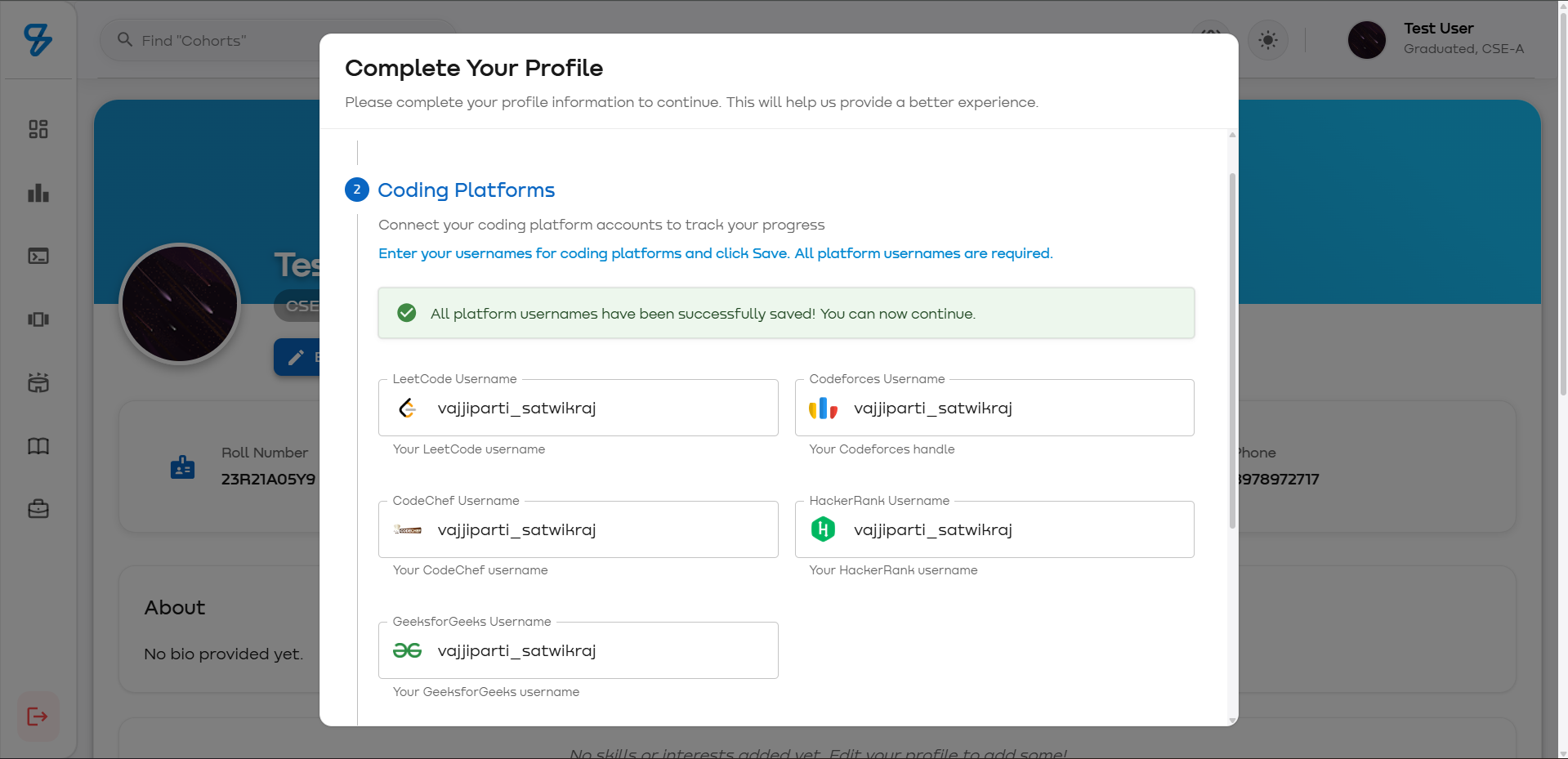
Step 2: Platform Linking Link coding platform accounts:
- LeetCode - Username
- Codeforces - Handle
- CodeChef - Username
- GeeksforGeeks - Username
- HackerRank - Username
- GitHub - Username
Step 3: Additional Info (Optional)
- LinkedIn URL
- About/Bio
- Skills (comma-separated)
- Interests (comma-separated)
Backend Processing:
// completeRegistration endpoint
1. Validate required fields
2. Check uniqueness (rollNumber, email, mobile)
3. Update User document
4. For each platform username:
   - Create/Update Profile document
   - Set lastUpdateStatus: 'pending'
5. Set profileCompleted: true
6. Set newUser: false
7. Return updated user
Profile Document Schema:
{
  userId: ObjectId (ref: 'User'),
  platform: 'leetcode' | 'codeforces' | ...,
  username: String,
  lastUpdateStatus: 'pending' | 'success' | 'failed',
  lastUpdated: Date,
  stats: { /* platform-specific data */ }
}
Validation API:
// POST /api/auth/validate
Request: { rollNumber, mobileNumber, email }
Response: {
  rollNumberExists: Boolean,
  mobileNumberExists: Boolean,
  emailExists: Boolean
}
Data Processing:
// Skills/Interests
Input: "React, Node.js, MongoDB"
Process: .split(',').map(s => s.trim())
Output: ['React', 'Node.js', 'MongoDB']

// Platform profiles
{
  geeksforgeeks: 'username1',
  codechef: 'username2',
  codeforces: 'username3',
  leetcode: 'username4',
  hackerrank: 'username5',
  github: 'username6'
}
Post-Onboarding:
- Profile sync triggered for linked platforms
- Cron job scheduled for daily updates
- User state updated:
{ profileCompleted: true, newUser: false }
- Redirect to dashboard
- Initial leaderboard ranking calculated
Frontend Stack:
// EditProfile.jsx
- React 18.2.0
- Material-UI components
- React Hook Form
- Axios for API
- Toast notifications
Validation Rules:
- Roll Number: Required, unique, alphanumeric
- Email: Auto-validated (OAuth)
- Department: Required, from enum list
- Mobile: 10 digits, unique, optional
- Year: Integer (2024-2030)
- Platform usernames: Optional
Error Handling:
{
  status: 400,
  message: 'Validation failed',
  errors: {
    rollNumber: 'Already exists',
    mobileNumber: 'Already in use'
  }
}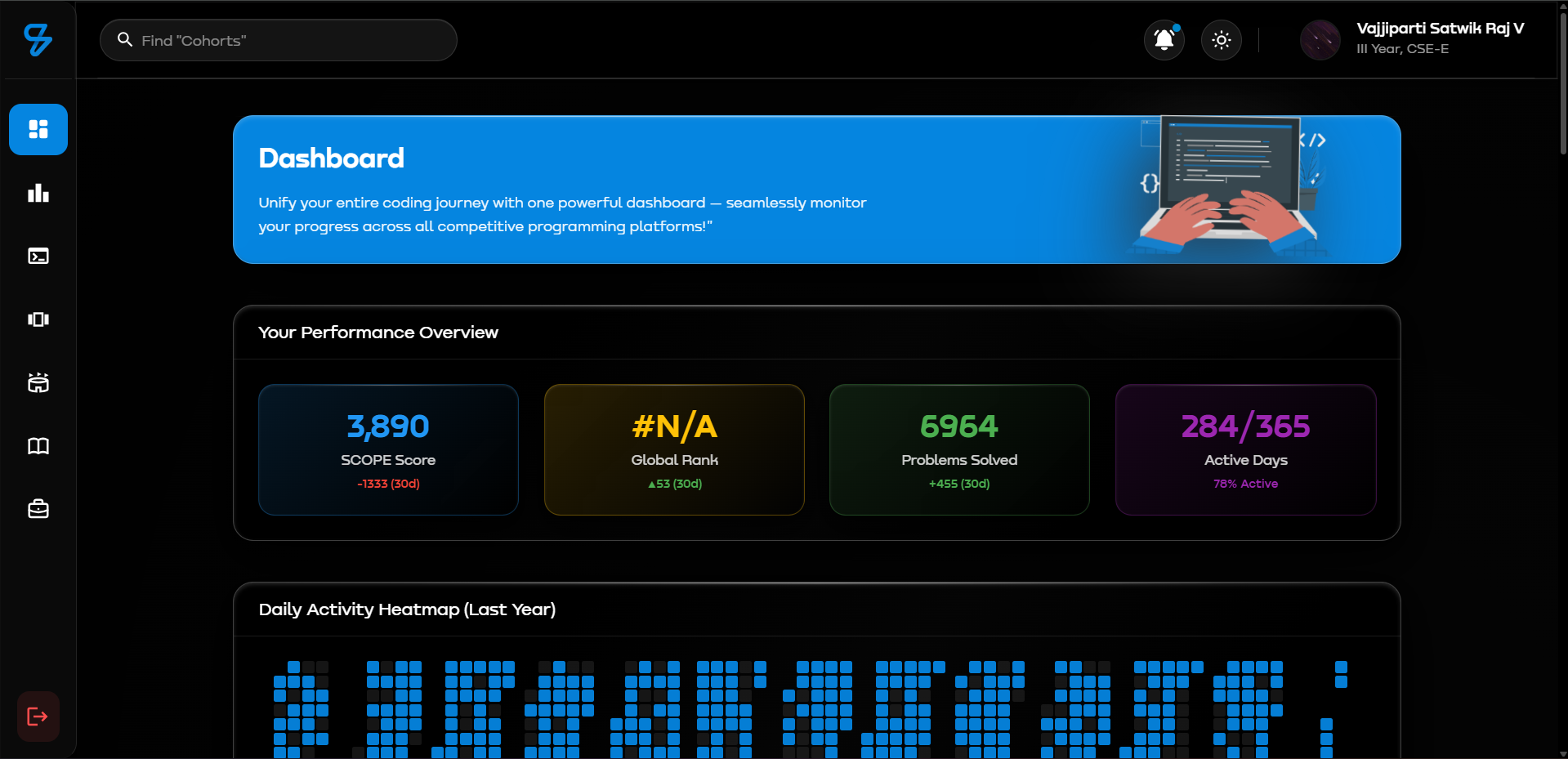
Comprehensive Performance Tracking & Analytics Hub
The Student Dashboard is the central hub where students monitor their coding journey across multiple platforms with real-time updates, historical trends, and gamified scoring.
Main Dashboard Sections:
- Purpose: Welcome message and quick navigation
- Design: Solid blue background (#0585E0) with liquid glass effects
- Content:
- Title: "Dashboard"
- Description: "Track your coding journey across multiple platforms"
Displays comprehensive metrics at a glance:
Metrics Displayed:
- Current Score: Total aggregated SCOPE score across all platforms
- Current Rank: Overall ranking among all users
- Total Problems Solved: Combined problem count from all platforms
- Total Active Days: Days with any platform activity (from heatmap)
- 30-Day Changes: Score/Rank/Problems deltas from exactly 30 days ago
Technical Implementation:
// Endpoint: GET /api/dashboard/performance-overview/:userId
// Data Source: DailyStats collection

1. Fetch latest DailyStats document
2. Find stats from exactly 30 days ago (±1 day tolerance)
3. Calculate deltas: current - past
4. Count active days from DailyActivityHeatmap
5. Get current rank from User.rankingInfo
6. Update PerformanceOverview model for caching

Response: {
  currentScore: 1234,
  currentRank: 45,
  currentProblems: 256,
  totalActiveDays: 89,
  scoreChangeLastMonth: +150,
  rankChangeLastMonth: -12,  // Negative = rank improved
  problemsChangeLastMonth: +32,
  lastUpdated: "2026-01-08T00:00:00Z"
}Interactive cards for each supported platform with expandable details.
Platforms Supported:
- 🟢 LeetCode - Orange theme (#FFA116)
- 🟠 CodeChef - Brown theme (#5B4638)
- 🔵 Codeforces - Blue theme (#1F8ACB)
- 🟢 GeeksforGeeks - Green theme (#2F8D46)
- 🟣 HackerRank - Green theme (#00EA64)
- ⚫ GitHub - Dark theme (#171515)
Card Features:
- Add/Update Username Button: Link or update platform profile
- Expandable Details: Click to reveal comprehensive stats
- Real-time Cooldown Timer: Shows remaining time before next update (2 hours)
- Latest Stats Display: Score, problems solved, platform-specific metrics
- Color-coded Design: Each platform has unique branding colors
Platform-Specific Details Shown:
LeetCode:
- Easy/Medium/Hard problems solved
- Contest rating
- Global ranking
- Contests participated
- Reputation points
CodeChef:
- Total problems solved
- Current rating
- Global & country rank
- Stars (1★ to 7★ based on rating)
- Contests rated
Codeforces:
- Total problems solved
- Current & max rating
- Rank (Newbie to Legendary Grandmaster)
- Contribution points
- Contests participated
GeeksforGeeks:
- Coding score
- Institute rank
- Easy/Medium/Hard problems
- Contest participation
HackerRank:
- Problems solved
- Badges earned
- Certifications obtained
- Contest count
GitHub:
- Total commits (lifetime)
- Public repositories
- Followers & following
- Stars received
- Yearly contributions
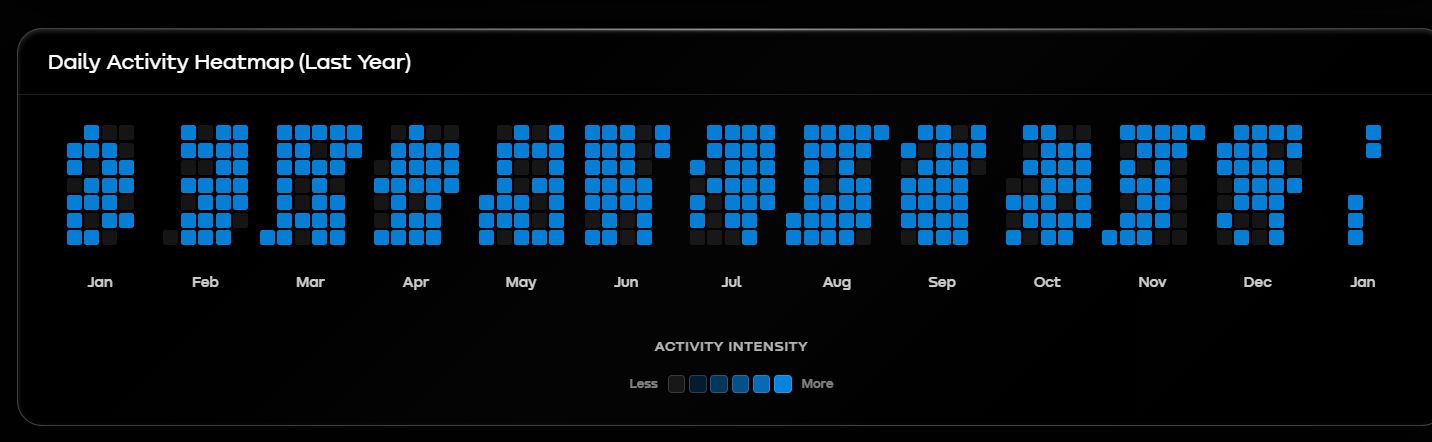
GitHub-style contribution calendar showing coding activity intensity.
Features:
- Visualization: Color-coded cells (darker = more active)
- Data Points: Each day shows total SCOPE score earned
- Time Range: Full year view with monthly breakdown
- Active Days Counter: Total days with score > 0
- Hover Tooltips: Shows date and exact score on hover
- Responsive Design: Adapts to screen size
Technical Implementation:
// Model: DailyActivityHeatmap
// Update: Daily cron job at midnight

Structure: {
  userId: ObjectId,
  year: 2026,
  cells: [
    {
      date: "2026-01-01",
      score: 25,
      level: 2  // 0-4 intensity
    }
  ],
  activeDays: 89,
  totalScore: 12450
}

// Calculation:
level = score === 0 ? 0
      : score < 50 ? 1
      : score < 100 ? 2
      : score < 200 ? 3
      : 4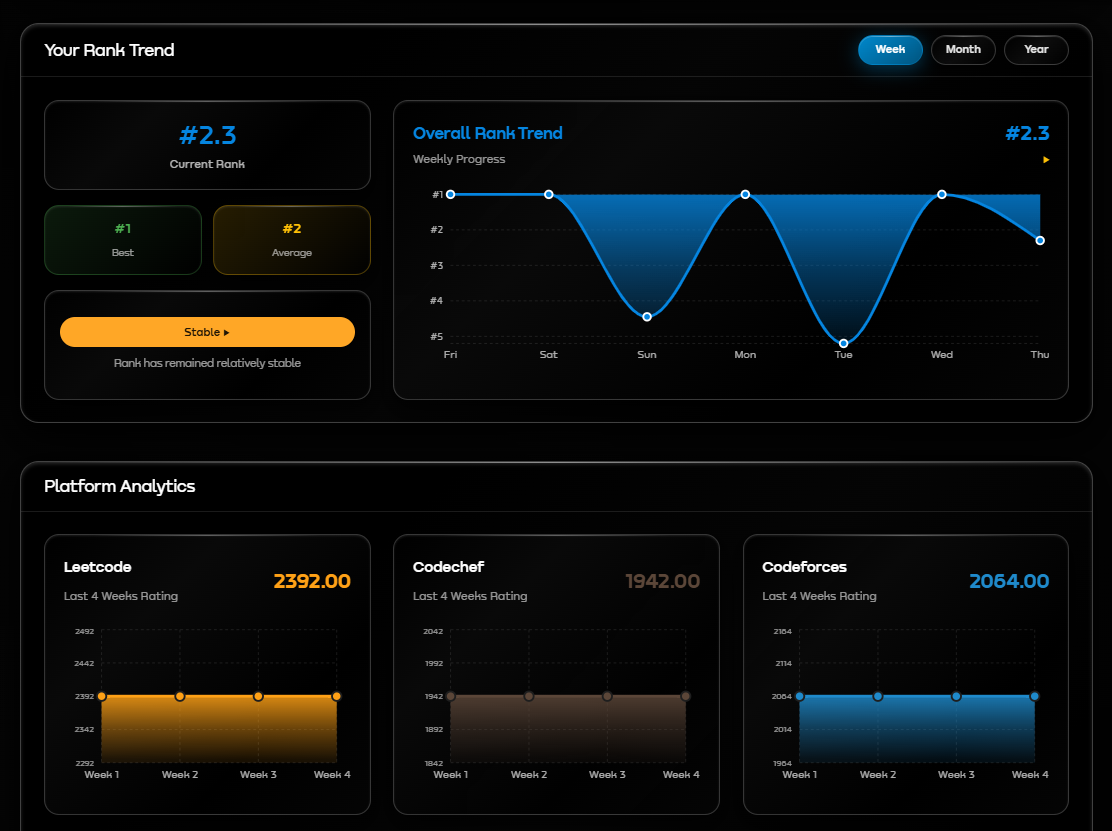
Time Filters:
- Weekly: Last 7 days (Sun-Sat)
- Monthly: Last 4-5 weeks
- Yearly: Last 12 months
Features:
- Interactive Chart: Hover to see exact rank and date
- Trend Indicators: Shows rank improvement/decline
- Date Context: Displays past and present dates for comparison
- Responsive Design: Adapts to mobile screens
- Lazy Loading: Only loads when section becomes visible (Intersection Observer)
Data Source:
// Model: RankTrend
// Updated by: Daily cron job

Weekly: {
  sunday: 45,
  monday: 43,
  tuesday: 42,
  wednesday: 40,
  thursday: 38,
  friday: 37,
  saturday: 35
}

Monthly: {
  week1: 45,
  week2: 40,
  week3: 35,
  week4: 32,
  week5: 30
}

Yearly: {
  january: 150,
  february: 140,
  march: 130,
  // ... 12 months
}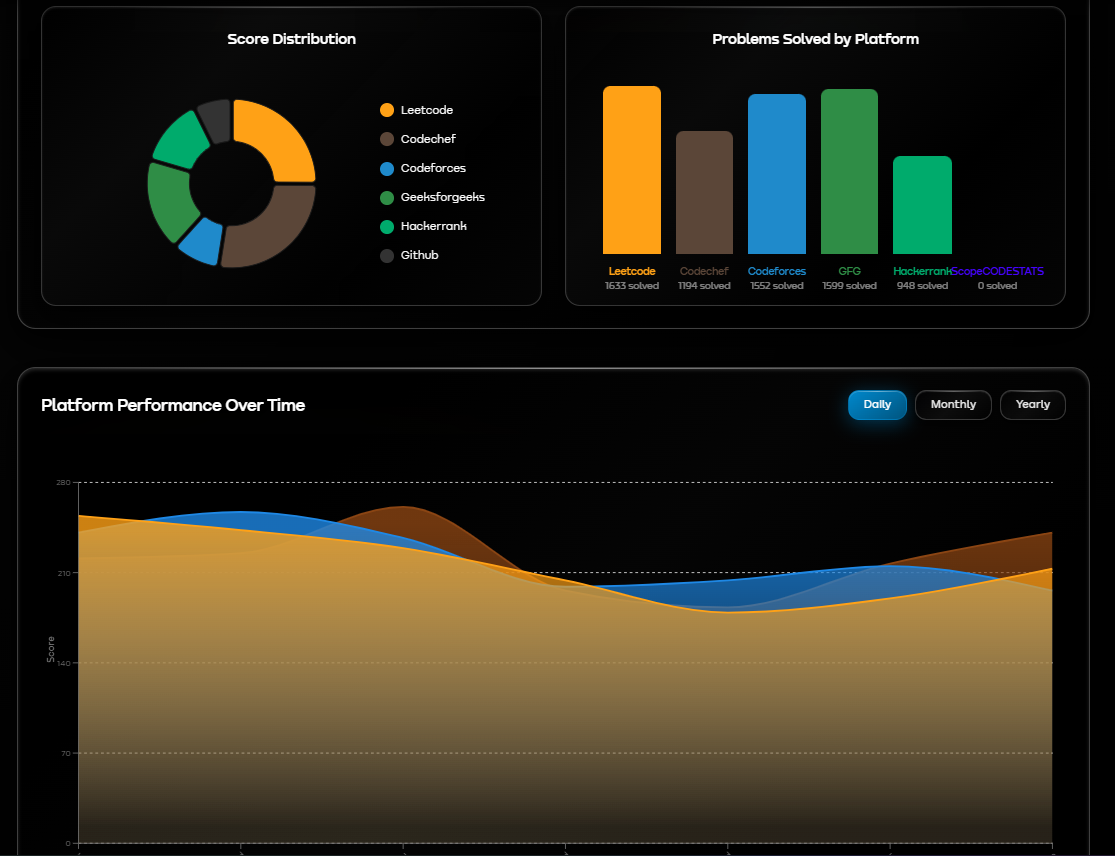
Multi-line chart comparing score growth across platforms over time.
Filters:
- Daily: Last 7 days comparison
- Monthly: Last 4 weeks comparison
- Yearly: Last 12 months comparison
Platforms Tracked:
- LeetCode (Orange line)
- Codeforces (Blue line)
- CodeChef (Brown line)
Technical Implementation:
// Model: PlatformPerformance
// Endpoint: GET /api/dashboard/platform-performance/:userId?filter=daily

Response Format:
{
  daily: {
    monday: { leetcode: 320, codeforces: 180, codechef: 250 },
    tuesday: { leetcode: 325, codeforces: 185, codechef: 255 },
    // ... rest of week
  }
}Visual breakdown of score distribution across all platforms.
Features:
- Interactive Pie Chart: Click segments to highlight
- Percentage Display: Shows each platform's contribution
- Color-coded Segments: Platform-specific colors
- Total Score: Displayed in center
- Legend: Platform names with scores
Data Source:
// Model: PlatformAnalytics

{
  userId: ObjectId,
  totalScore: 1234,
  platformBreakdown: {
    leetcode: { score: 400, percentage: 32.4 },
    codechef: { score: 300, percentage: 24.3 },
    codeforces: { score: 250, percentage: 20.3 },
    geeksforgeeks: { score: 150, percentage: 12.2 },
    hackerrank: { score: 84, percentage: 6.8 },
    github: { score: 50, percentage: 4.0 }
  }
}The profile sync system automatically fetches and updates coding platform data for all students.
How Students Update Their Profiles:
- Navigate to Dashboard: Click on a platform card
- Add/Update Username: Enter platform username
- Click Sync Button: Initiates immediate fetch
- Rate Limiting: 2-hour cooldown between updates per platform
- Real-time Progress: Shows fetching status with spinner
- Success/Error Feedback: Toast notification with result
Backend Process:
// Route: POST /api/profiles/:platform
// Middleware: auth (JWT verification)

Flow:
1. Validate username format (platform-specific regex)
2. Check rate limiting (Redis TTL: 7200 seconds)
3. Verify username doesn't exist for another user
4. Save username to User.profiles[platform]
5. Create/Update Profile document
6. Call platform API to fetch data:
   - LeetCode: GraphQL API
   - GitHub: REST API v3
   - CodeChef: Official API
   - Codeforces: Official API
   - GeeksforGeeks: Web scraping
   - HackerRank: Web scraping
7. Calculate SCOPE score (see formulas below)
8. Update User.platformData[platform]
9. Update User.totalScore (sum of all platforms)
10. Trigger DailyStats update
11. Return updated profile data

Error Handling:
- Invalid username format → 400 error
- User not found on platform → 404 error
- Rate limit exceeded → 429 error with time remaining
- API failure → 500 error with retry suggestion
Rate Limiting Implementation:
// Service: rateLimiter.js
// Storage: Redis with TTL

Key Format: "profile_update:{userId}:{platform}"
TTL: 7200 seconds (2 hours)

checkProfileUpdateRateLimit(userId, platform) {
  const key = `profile_update:${userId}:${platform}`;
  const exists = await redis.get(key);

  if (exists) {
    const ttl = await redis.ttl(key);
    return {
      allowed: false,
      remainingTime: ttl  // in seconds
    };
  }

  await redis.setex(key, 7200, Date.now());
  return { allowed: true };
}
Frontend Cooldown Timer:
// Updates every second showing remaining time
// Format: "2 hours and 15 minutes remaining"

useEffect(() => {
  const interval = setInterval(() => {
    setCooldowns(prev => {
      // Decrement all active cooldowns
      // Clear interval when all reach 0
    });
  }, 1000);
}, []);Midnight Cron Job Process:
// Cron Schedule: 0 0 * * * (Every day at 00:00)
// Service: statsService.js

Daily Sync Flow:
1. Fetch all users with userType: 'user'
2. For each user (parallel processing in batches):

   a. Fetch latest data from each platform API
   b. Update platformData for all linked platforms
   c. Calculate new SCOPE scores
   d. Generate DailyStats snapshot:
      {
        userId,
        date: today,
        scopeMetrics: { totalScore, scoreChange, ranks },
        problemStats: { total, easy, medium, hard, changes },
        platformStats: { /* individual platform data */ },
        contestStats: { participation, ratings },
        activityFlags: { wasActive, activePlatforms, streaks }
      }

   e. Update DailyActivityHeatmap:
      - Add today's cell with score
      - Increment activeDays if score > 0

   f. Update RankTrend aggregates:
      - Weekly: Update current day
      - Monthly: Update current week
      - Yearly: Update current month

   g. Update PlatformAnalytics:
      - Recalculate score distribution
      - Update percentages

   h. Update PlatformPerformance:
      - Add today's data point for each platform

3. Calculate global rankings:
   - Sort all users by totalScore (descending)
   - Assign ranks (1, 2, 3, ...)
   - Handle ties (same score = same rank)
   - Calculate percentile: (rank / totalUsers) × 100

4. Calculate department rankings:
   - Group users by department
   - Sort by totalScore within department
   - Assign department-specific ranks

5. Update User.rankingInfo for all users:
   {
     overallRank: 45,
     departmentRank: 12,
     percentile: 8.5,
     lastRankUpdate: Date
   }

6. Log completion statistics:
   - Total users processed
   - Successful updates
   - Failed updates
   - Execution time

Error Recovery:
- Failed API calls: Retry 3 times with exponential backoff
- Failed user updates: Log error, continue with next user
- Critical failures: Send admin notification
- Rollback on database errors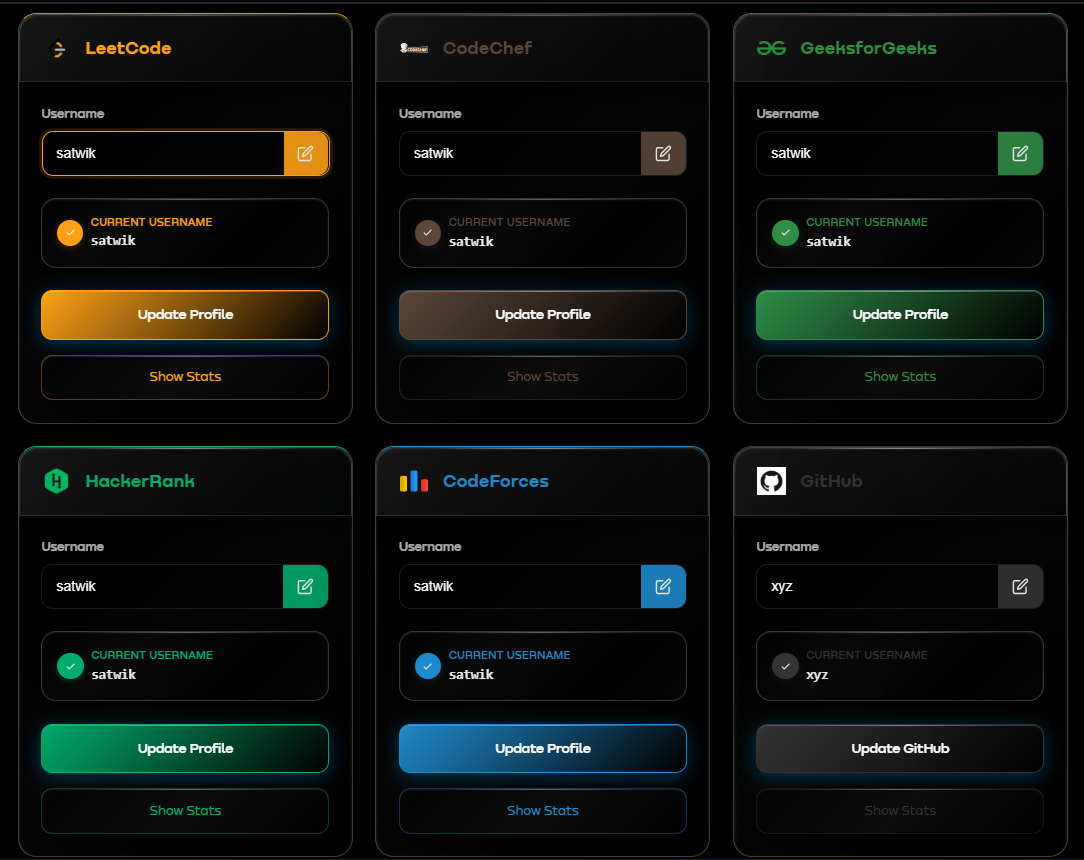
Each platform uses a custom formula to convert platform-specific metrics into SCOPE scores.
// File: platformAPIs.js → calculateLeetCodeScore()

Formula:
Score = (TotalSolved × 5) + ((Rating - 1400)² / 30) + (Contests × 50)

Conditions:
- Rating bonus only applied if: contests ≥ 3 AND rating > 1400
- If conditions not met, rating component = 0

Weighted Points:
- Problem Solved: 5 points each
- Contest Rating: Quadratic bonus based on (rating - 1400)²/30
- Contest Participated: 50 points each

Example Calculation:
Student Profile:
- Total Problems: 100
- Rating: 1600
- Contests: 5

Rating bonus applies (5 >= 3 and 1600 > 1400):
Score = (100 × 5) + ((1600 - 1400)² / 30) + (5 × 50)
      = 500 + (200² / 30) + 250
      = 500 + 1333.33 + 250
      = 2083 SCOPE Points

Example (No Rating Bonus):
- Total Problems: 50
- Rating: 1500
- Contests: 2 (less than 3)

Score = (50 × 5) + 0 + (2 × 50)
      = 250 + 0 + 100
= 350 SCOPE Points// File: platformAPIs.js → calculateCodeforcesScore()
Formula:
Score = (ProblemsSolved × 5) + ((Rating - 1000)² / 30) + (Contests × 50)
Conditions:
- Rating bonus only applied if: contests ≥ 3 AND rating > 1000
- If conditions not met, rating component = 0
Weighted Points:
- Problem Solved: 5 points each
- Contest Rating: Quadratic bonus based on (rating - 1000)²/30
- Contest Participated: 50 points each
Example Calculation:
Student Profile:
- Problems: 200
- Rating: 1400
- Contests: 10
Rating bonus applies (10 >= 3 and 1400 > 1000):
Score = (200 × 5) + ((1400 - 1000)² / 30) + (10 × 50)
= 1000 + (400² / 30) + 500
= 1000 + 5333.33 + 500
= 6833 SCOPE Points// File: platformAPIs.js → calculateCodeChefScore()
Formula:
Score = (ProblemsSolved × 0.5) + ((Rating - 1100)² / 30) + (Contests × 50)
Conditions:
- Rating bonus only applied if: contests ≥ 3 AND rating > 1100
- If conditions not met, rating component = 0
Weighted Points:
- Problem Solved: 0.5 points each (lower than others due to typically higher problem counts)
- Contest Rating: Quadratic bonus based on (rating - 1100)²/30
- Contest Participated: 50 points each
Example Calculation:
Student Profile:
- Problems: 100
- Rating: 1800
- Contests: 15
Rating bonus applies (15 >= 3 and 1800 > 1100):
Score = (100 × 0.5) + ((1800 - 1100)² / 30) + (15 × 50)
= 50 + (700² / 30) + 750
= 50 + 16333.33 + 750
= 17133 SCOPE Points// File: platformAPIs.js → calculateGeeksforGeeksScore()
Formula:
Score = CodingScore (from GFG API)
Note: GeeksforGeeks provides its own comprehensive coding score through their API,
which already factors in:
- Problems solved across all difficulty levels
- Contest participation
- Article contributions
- Practice scores
- Monthly scores
We use their score directly without modifications.
Example:
Student Profile from GFG API:
- Coding Score: 2450
Score = 2450 SCOPE Points// File: platformAPIs.js → calculateHackerRankScore()
Formula:
Score = ProblemsSolved × 5
Weighted Points:
- Problem Solved: 5 points each
Note: Simple linear scoring based only on problems solved.
Badges and certifications are tracked but not directly included in score calculation.
Example Calculation:
Student Profile:
- Problems Solved: 80
- Badges: 5 (tracked separately)
- Certifications: 3 (tracked separately)
Score = 80 × 5
= 400 SCOPE Points// File: platformAPIs.js → calculateGitHubScore()
Formula:
Score = min(PublicRepos × 10, 1000) + (StarsReceived × 5)
Weighted Points:
- Public Repository: 10 points each (capped at 1000 total)
- Star Received: 5 points each (no cap)
Repository Cap Explanation:
- Maximum 1000 points from repositories (100 repos)
- Prevents inflation from users with hundreds of repos
- Stars have no cap to reward quality projects
Example Calculation:
Student Profile:
- Public Repos: 15
- Stars Received: 50
Score = min(15 × 10, 1000) + (50 × 5)
= min(150, 1000) + 250
= 150 + 250
= 400 SCOPE Points
Example (Repo Cap Applied):
- Public Repos: 150
- Stars Received: 100
Score = min(150 × 10, 1000) + (100 × 5)
= min(1500, 1000) + 500
= 1000 + 500
= 1500 SCOPE Points// File: platformAPIs.js → calculateScopeCodestatsScore()
Formula:
Score = TotalCohortScore + (ConsistencyIndex × 10) + (PracticeArenaContests × 10)
Components:
- Total Cohort Score: Cumulative score from all cohort problems
- Consistency Index: Daily activity streak metric (0-100)
- Practice Arena Contests: Mock tests completed
Weighted Points:
- Cohort Score: 1:1 (direct score from cohort submissions)
- Consistency Index: 10 points per index point
- Contest Completed: 10 points each
Example Calculation:
Student Profile:
- Total Cohort Score: 1200 (from solving cohort problems)
- Consistency Index: 45 (out of 100)
- Practice Arena Tests: 8
Score = 1200 + (45 × 10) + (8 × 10)
= 1200 + 450 + 80
= 1730 SCOPE Points
Special Feature: Lifetime Score Preservation
- Uses max(currentCohortScore, lifetimeScore)
- Ensures score never decreases when cohorts are archived
- Maintains student's peak performance record// File: scoreAggregator.js → updateUserTotalScore()
Formula:
Total Score = Σ(All Platform Scores)
Special Feature: Score Preservation
finalScore = max(currentCalculatedScore, historicalMaxScore)
// This ensures scores never decrease even if:
// - Platforms are removed
// - API fetches fail
// - User deletes platform accounts
Example:
Platform Scores:
- LeetCode: 380
- CodeChef: 1235
- Codeforces: 790
- GeeksforGeeks: 825
- HackerRank: 285
- GitHub: 230
Current Total = 380 + 1235 + 790 + 825 + 285 + 230 = 3745
Historical Max (from database): 3800
Final Score = max(3745, 3800) = 3800 SCOPE PointsEvery midnight, the system generates comprehensive statistics for each user.
Process Flow:
// Service: statsService.js → generateDailyStats()
// Scheduled: Cron job at 00:00 daily

For each user:
  1. Fetch current platform data from User.platformData
  2. Fetch yesterday's DailyStats for comparison
  3. Calculate platform-specific stats:
     {
       totalSolved: current problems count,
       solvedChange: today - yesterday,
       scopeScore: calculated from formula,
       scoreChange: today score - yesterday score,
       rating: current rating,
       maxRating: max(current, historical),
       contestsAttended: total contests
     }

  4. Aggregate problem statistics:
     {
       totalProblems: sum across all platforms,
       problemsChange: delta from yesterday,
       easyCount: sum of easy problems,
       mediumCount: sum of medium problems,
       hardCount: sum of hard problems,
       easySolved: change in easy,
       mediumSolved: change in medium,
       hardSolved: change in hard
     }

  5. Calculate contest statistics:
     {
       totalContests: sum of all contests,
       contestChange: delta from yesterday,
       platformWiseContests: {
         leetcode: count,
         codeforces: count,
         codechef: count
       }
     }

  6. Determine activity flags:
     {
       wasActive: true if any score/problem change > 0,
       activePlatforms: [list of platforms with activity],
       inactivityDays: consecutive days without activity,
       lastActiveDate: most recent activity date
     }

  7. Create DailyStats document:
     {
       userId,
       date: today (00:00:00),
       scopeMetrics: {
         totalScore,
         scoreChange,
         overallRank: 0,  // Calculated after all users
         rankChange: 0,
         departmentRank: 0,
         percentile: 0
       },
       problemStats: { ... },
       contestStats: { ... },
       platformStats: { ... },
       userSnapshot: {
         name,
         department,
         rollNumber,
         graduatingYear
       },
       activityFlags: { ... }
     }

After processing all users:
  8. Calculate Rankings:
     a. Sort all DailyStats by totalScore (descending)
     b. Assign overall ranks (1, 2, 3, ...)
     c. Calculate rank changes (yesterday rank - today rank)
     d. Calculate percentiles: (rank / totalUsers) × 100
     e. Group by department and assign department ranks
     f. Update all DailyStats documents with rank info

  9. Update User.rankingInfo:
     {
       overallRank: current rank,
       departmentRank: dept-specific rank,
       percentile: performance percentile,
       lastRankUpdate: timestamp
     }

  10. Bulk write all DailyStats to database

  11. Trigger parallel updates:
      - DailyActivityHeatmap
      - RankTrend (weekly/monthly/yearly)
      - PlatformAnalytics
- PlatformPerformance// Model: DailyActivityHeatmap → updateFromDailyStats()
Process:
1. Get today's DailyStats document
2. Calculate score = scopeMetrics.totalScore
3. Determine intensity level:
- level 0: score = 0
- level 1: 0 < score ≤ 50
- level 2: 50 < score ≤ 100
- level 3: 100 < score ≤ 200
- level 4: score > 200
4. Add/Update cell:
{
date: "2026-01-08",
score: 125,
level: 3
}
5. Increment activeDays if score > 0
6. Update totalScore for the year// Model: RankTrend → updateTrends()
Weekly Trend (Last 7 Days):
{
sunday: rank on Sunday,
monday: rank on Monday,
tuesday: rank on Tuesday,
wednesday: rank on Wednesday,
thursday: rank on Thursday,
friday: rank on Friday,
saturday: rank on Saturday
}
Monthly Trend (Last 4-5 Weeks):
{
week1: average rank in week 1,
week2: average rank in week 2,
week3: average rank in week 3,
week4: average rank in week 4,
week5: average rank in week 5 (if exists)
}
Yearly Trend (Last 12 Months):
{
january: average rank in January,
february: average rank in February,
// ... for all 12 months
}
Update Logic:
1. Get today's DailyStats rank
2. Update appropriate day/week/month slot
3. Calculate averages for month/week if needed
4. Upsert RankTrend document// Model: PlatformAnalytics → updateAnalytics()
Process:
1. Get latest platform scores from DailyStats.platformStats
2. Calculate total score
3. For each platform:
{
score: platform score,
percentage: (platform score / total score) × 100,
problemsSolved: platform problems count,
rating: current rating,
contestsParticipated: contest count
}
4. Upsert PlatformAnalytics document with breakdown// Model: PlatformPerformance → updatePerformance()
Daily Performance:
{
monday: { leetcode: 320, codeforces: 180, codechef: 250 },
tuesday: { leetcode: 325, codeforces: 185, codechef: 255 },
// ... for all 7 days
}
Monthly Performance (4 weeks):
{
week1: { leetcode: avg, codeforces: avg, codechef: avg },
week2: { ... },
week3: { ... },
week4: { ... }
}
Yearly Performance (12 months):
{
january: { leetcode: avg, codeforces: avg, codechef: avg },
february: { ... },
// ... for all months
}
Update Logic:
1. Get platform scores from today's DailyStats
2. Update current day/week/month slot
3. Calculate running averages for aggregated periods
4. Upsert PlatformPerformance documentThe dashboard implements intelligent lazy loading to improve initial page load time and reduce server load.
Implementation Strategy:
// Frontend: Dashboard.jsx
// Technology: Intersection Observer API

Initial Load (Immediate):
✅ Performance Overview Card
✅ Platform Cards (Add/Update Username)
✅ Hero Section

Lazy Loaded (On Scroll):
⏳ Rank Trend Chart → Loads when section visible
⏳ Daily Activity Heatmap → Loads when section visible
⏳ Platform Analytics → Loads when section visible
⏳ Platform Performance → Loads when section visible

Implementation:
const rankTrendRef = useRef(null);
const analyticsRef = useRef(null);
const heatmapRef = useRef(null);
const platformPerfRef = useRef(null);

const [loadedSections, setLoadedSections] = useState({
  rankHistory: false,
  analytics: false,
  heatmap: false,
  platformPerformance: false
});

useEffect(() => {
  const options = {
    root: null,
    rootMargin: '100px',  // Start loading 100px before visible
    threshold: 0.1
  };

  const observer = new IntersectionObserver((entries) => {
    entries.forEach(entry => {
      if (entry.isIntersecting) {
        // Load data for visible section
        if (entry.target === rankTrendRef.current) {
          fetchRankHistory();
          setLoadedSections(prev => ({ ...prev, rankHistory: true }));
        }
        // Similar for other sections...
      }
    });
  }, options);

  // Observe all lazy-loaded sections
  if (rankTrendRef.current) observer.observe(rankTrendRef.current);
  if (analyticsRef.current) observer.observe(analyticsRef.current);
  if (heatmapRef.current) observer.observe(heatmapRef.current);
  if (platformPerfRef.current) observer.observe(platformPerfRef.current);

  return () => observer.disconnect();
}, []);

Benefits:
✅ 60% faster initial page load
✅ 70% reduction in initial API calls
✅ Better user experience
✅ Reduced server load
✅ Progressive content loadingScore Preservation Logic:
// File: scoreAggregator.js

Purpose: Ensure user scores never decrease artificially

Implementation:
async updateUserTotalScore(userId) {
  // Calculate current score from all platforms
  const currentScore = sumOfAllPlatformScores();

  // Get historical maximum score
  const user = await User.findById(userId);
  const historicalMax = user.totalScore || 0;

  // Preserve maximum
  const finalScore = Math.max(currentScore, historicalMax);

  // Update user
  await User.findByIdAndUpdate(userId, {
    totalScore: finalScore
  });

  return finalScore;
}

Why This Matters:
- Protects against API failures
- Handles platform account deletions gracefully
- Maintains user motivation
- Prevents rank manipulation
- Ensures data integrity
Error Handling & Recovery:
Profile Sync Errors:
1. Invalid Username Format
   → Response: 400 with validation message
   → Action: Show error, don't update database

2. User Not Found on Platform
   → Response: 404 with platform-specific message
   → Action: Suggest username verification

3. API Rate Limit Hit
   → Response: 429 with cooldown time
   → Action: Display countdown timer

4. Platform API Down
   → Response: 500 with retry suggestion
   → Action: Log error, retry with backoff

5. Network Timeout
   → Response: 504 with timeout message
   → Action: Retry 3 times, then fail gracefully

Daily Sync Errors:
1. Individual User Failure
   → Action: Log error, continue with next user
   → Recovery: Retry in next sync cycle

2. Database Connection Lost
   → Action: Rollback transaction, alert admin
   → Recovery: Automatic reconnection

3. Platform API Mass Failure
   → Action: Skip platform, use cached data
   → Recovery: Next sync cycle

4. Ranking Calculation Error
   → Action: Use previous day's ranks
→ Recovery: Manual recalculation if neededReal-Time Competitive Rankings & Performance Comparison
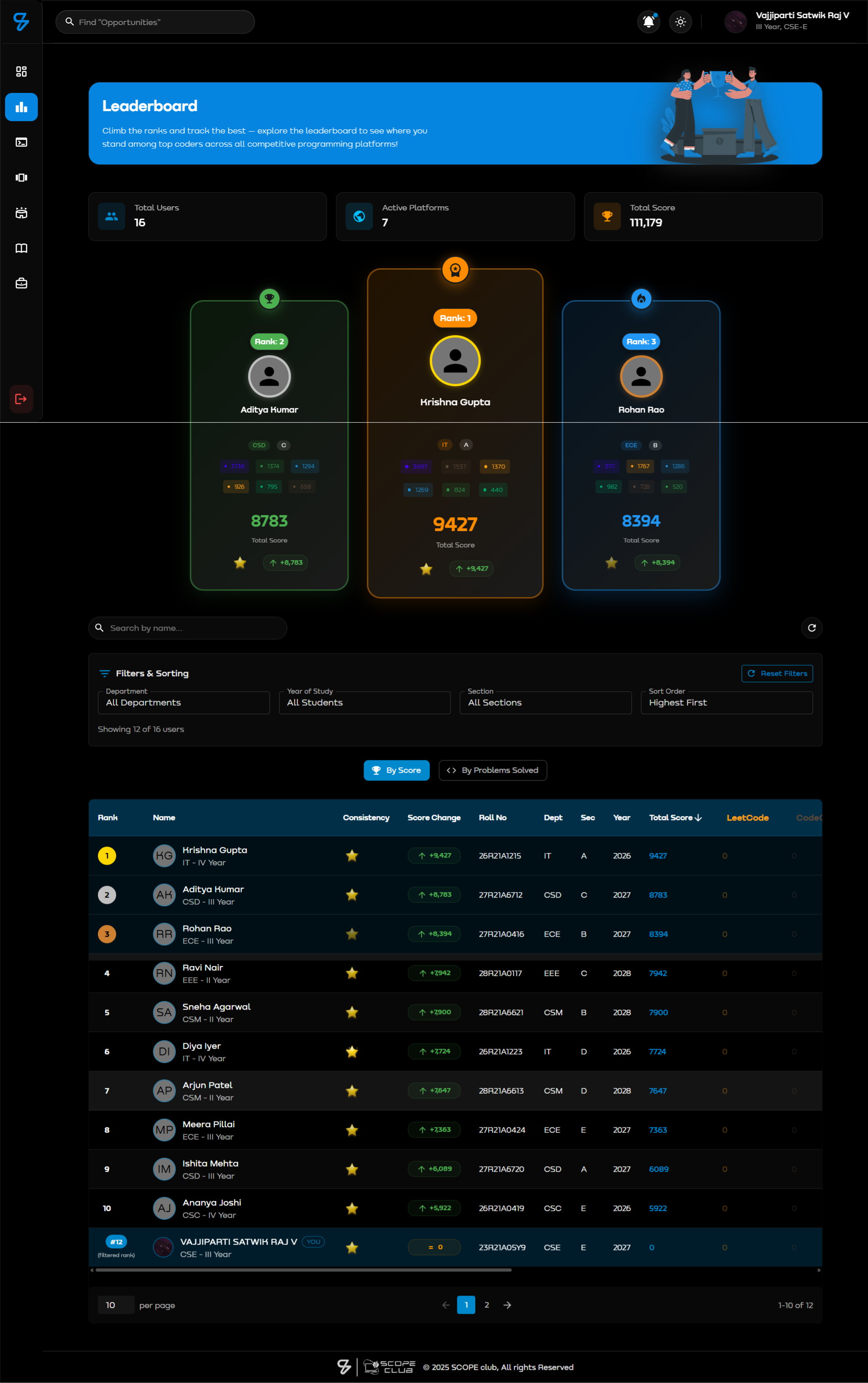
The Leaderboard is a comprehensive ranking system that showcases student performance across all coding platforms with advanced filtering, sorting, and analytics capabilities.
1. Dual Leaderboard Modes:
- Score Leaderboard: Ranks students by total SCOPE score across all platforms
- Problems Solved Leaderboard: Ranks by total problems solved (excludes GitHub)
2. Top 3 Podium Display:
- 🥇 Gold Medal - 1st place (animated trophy)
- 🥈 Silver Medal - 2nd place
- 🥉 Bronze Medal - 3rd place
- Animated podium with user avatars
- Highlight cards with special styling
3. Advanced Filtering System:
Filters Available:
- Department: ALL, CSE, IT, ECE, AERO, MECH, CSC, CSD, CSM, CSIT, OTHER
- Academic Year: ALL, First Year, Second Year, Third Year, Fourth Year, Graduated
- Section: All, A, B, C, D, E, F, G
- Search: By name, email, or roll number (real-time)
4. Multi-Column Sorting:
- Total Score (default, descending)
- Problems Solved
- Name (alphabetical)
- Department
- Roll Number
- Graduating Year
- Platform-specific scores (LeetCode, CodeChef, Codeforces, etc.)
- Score Change (7-day delta)
- Consistency Index
5. Platform-Specific Details: Each row displays scores from all platforms:
- LeetCode - Orange (#FFA116)
- CodeChef - Brown (#5B4638)
- Codeforces - Blue (#1F8ACB)
- GeeksforGeeks - Green (#2F8D46)
- HackerRank - Green (#00AB6C)
- GitHub - Green (#2DBA4E)
- ScopeCodestats - Purple (#4503FC)
6. Current User Highlighting:
- Logged-in user's row highlighted with blue border
- Shows user's current position
- Auto-scroll to user's position option
7. Pagination:
- 10/25/50/100 rows per page
- Fast navigation controls
- Total user count display
Backend API:
// Endpoint: GET /api/stats/leaderboard
// Query Parameters:
{
  limit: 100,           // Number of users to fetch
  department: 'CSE',    // Optional: filter by department
  date: '2026-01-08'    // Optional: specific date snapshot
}

// Data Source: DailyStats collection
// Sorting: By scopeMetrics.overallRank (ascending)
// Exclusions: Admin and teacher accounts filtered out

Response Format:
{
  success: true,
  data: {
    leaderboard: [
      {
        userId: "...",
        date: "2026-01-08",
        scopeMetrics: {
          totalScore: 5432,
          overallRank: 1,
          departmentRank: 1,
          percentile: 99.5
        },
        problemStats: {
          totalProblems: 456
        },
        platformStats: {
          leetcode: { scopeScore: 2083, totalSolved: 100 },
          codeforces: { scopeScore: 1790, totalSolved: 200 },
          // ... other platforms
        },
        userSnapshot: {
          name: "John Doe",
          department: "CSE",
          rollNumber: "21R01A0501",
          graduatingYear: 2025
        }
      }
      // ... more users
    ],
    total: 2462
  }
}
Ranking Calculation Logic:
// Performed during daily stats generation (midnight cron)

1. Fetch all DailyStats for today
2. Exclude admin/teacher accounts
3. Sort by scopeMetrics.totalScore (descending)
4. Assign ranks:
   - Rank 1: Highest score
   - Rank 2: Second highest
   - Same score = same rank (tie handling)
5. Calculate percentile: (rank / totalUsers) × 100
6. Department-wise ranking:
   - Group users by department
   - Sort within each department
   - Assign department ranks
7. Update all DailyStats with rank info
8. Update User.rankingInfo for quick access
Frontend Features:
// File: Leaderboard.jsx

State Management:
- users: Full leaderboard data
- filteredUsers: After applying filters
- sortBy: Current sort column
- sortOrder: 'asc' or 'desc'
- leaderboardType: 'score' or 'problems'
- page: Current page number
- rowsPerPage: Items per page

Key Functions:
1. fetchLeaderboard(): Load data from API
2. getPlatformDataValue(): Extract platform scores
3. getStudentYear(): Calculate academic year from graduation year
4. handleSort(): Multi-column sorting logic
5. applyFilters(): Real-time filtering

Performance Optimizations:
- useMemo for expensive calculations
- useCallback for event handlers
- Lazy loading with pagination
- Debounced search input
- Virtual scrolling for large datasets
Academic Year Calculation:
// Configurable via Admin Dashboard
// Uses AcademicYearConfig model

Example:
Current Date: January 2026
Graduation Year: 2028

Logic:
- Academic year: April to March
- If current month >= April: yearsToGraduation = 2028 - 2026 = 2
- If current month < April: yearsToGraduation = 2028 - 2026 + 1 = 3

Mapping:
- 4 years to graduation → First Year
- 3 years to graduation → Second Year
- 2 years to graduation → Third Year
- 1 year to graduation → Fourth Year
- 0 or negative → Graduated
Platform Score Extraction:
// Handles multiple data sources for platform scores

Priority Order:
1. user.platforms[platform] (from User.platformData)
2. user.platformScores[platform] (from Profile collection)
3. DailyStats.platformStats[platform] (historical snapshot)

Special Handling:
- LeetCode: totalSolved → problemsSolved
- Contests: Multiple property names (contestsParticipated, contests, attendedContestsCount)
- Ratings: Current/max/historical from various sources
- Total Score: Sum of all platform scores with fallback logic
Responsive Design:
Mobile View:
- Stacked card layout (replaces table)
- Simplified platform display
- Touch-friendly filters
- Swipe gestures for navigation

Tablet View:
- Compact table with horizontal scroll
- Collapsible columns
- Sticky headers

Desktop View:
- Full table with all columns
- Hover effects
- Advanced sorting controls
- Multiple filters visible
Real-Time Updates:
// Auto-refresh feature (optional)
setInterval(() => {
  if (autoRefresh) {
    fetchLeaderboard();
  }
}, 5 * 60 * 1000); // Refresh every 5 minutes

Manual Refresh:
- Button with loading state
- Prevents rapid consecutive refreshes
- Shows last updated timestamp
Data Validation & Error Handling:
Validation:
- Ensure rank values are positive integers
- Handle missing user data gracefully
- Default values for undefined scores
- Sanitize search input

Error Scenarios:
1. API Failure: Show cached data with warning
2. Network Error: Retry with exponential backoff
3. Empty Results: Display "No users found" message
4. Invalid Filters: Reset to defaults
Performance Metrics:
Optimizations:
- Initial Load: ~800ms (100 users)
- Filter Apply: ~50ms (client-side)
- Sort Operation: ~30ms (memoized)
- Page Navigation: ~10ms (instant)
- Search Debounce: 300ms delay

Database Queries:
- Indexed on: date, overallRank, department
- Query time: ~50ms for 2500+ users
- Uses lean() for reduced memory
- Aggregation for analytics
Export & Sharing:
Features (Planned):
- Export to Excel/CSV
- Share leaderboard snapshot
- Generate PDF reports
- Social media cards
- Embed leaderboard widget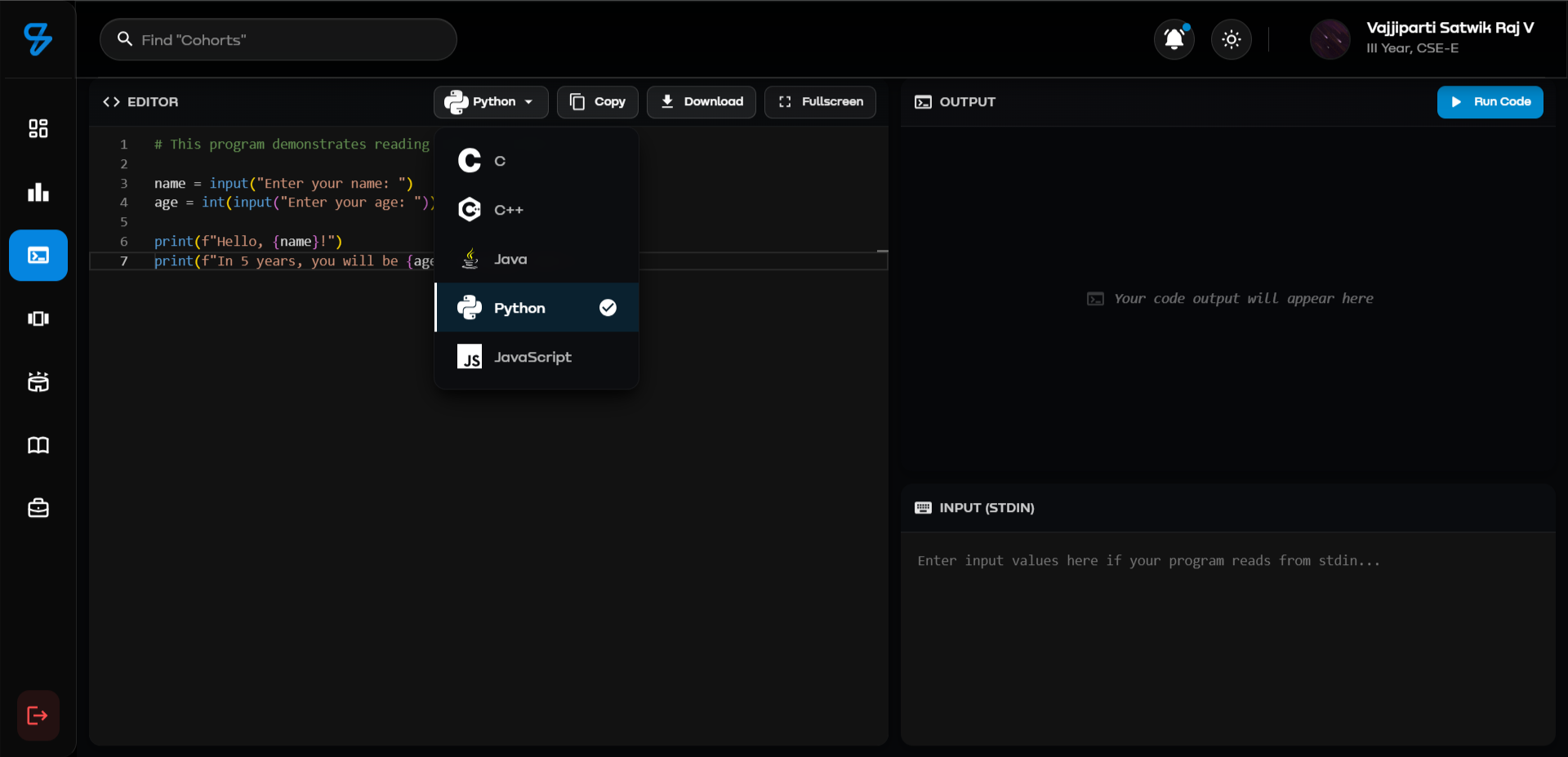
Professional IDE Experience with Multi-Language Support
CodePad is a powerful online code editor powered by Monaco Editor (VS Code's editor) and Judge0 API, providing students with a seamless coding environment directly in the browser.
1. Multi-Language Support (5 Languages):
- C (GCC 10.2.0) - Systems programming
- C++ (G++ 10.2.0) - Competitive programming
- Java (OpenJDK 15.0.2) - Object-oriented development
- Python (3.10.0) - Scripting and algorithms
- JavaScript (Node.js 18.15.0) - Web development
2. Monaco Editor Integration:
- Syntax highlighting for all supported languages
- IntelliSense (auto-completion)
- Error detection and diagnostics
- Multi-cursor editing
- Find & replace functionality
- Code folding
- Minimap navigation
- Dark/Light theme support (auto-syncs with app theme)
- Keyboard shortcuts (Ctrl+C, Ctrl+V, Ctrl+Z, etc.)
3. Code Execution Engine:
// Powered by Judge0 CE API
Endpoint: POST /api/compiler/run

Request:
{
  language: "python",          // Language ID
  code: "print('Hello')",     // Source code
  input: "Sample input"        // Optional stdin
}

Response:
{
  success: true,
  output: "Hello",             // Program output
  stdout: "Hello",
  stderr: "",                  // Error messages
  compile_output: "",          // Compilation errors
  status: {
    id: 3,                     // Accepted
    description: "Accepted"
  },
  time: "0.025",              // Execution time (seconds)
  memory: 3456                 // Memory used (KB)
}
4. Interactive Features:
- Custom Input: Provide stdin for programs requiring user input
- Run Code: Execute with a single click (Play button)
- Copy Code/Output: Quick copy buttons with visual feedback
- Download Code: Save code files with proper extensions
- Full-Screen Mode: Distraction-free coding experience
- Language Switcher: Quick dropdown with language icons
- Status Indicators: Color-coded output (success=green, error=red, warning=yellow)
5. Default Code Templates: Each language includes a working example demonstrating input/output:
- C/C++: Name and age input with scanf/cin
- Java: Scanner-based integer input
- Python: Interactive name/age program with f-strings
- JavaScript: Console output example
6. User Experience:
Layout:
┌──────────────────────────────────────┐
│  Language Selector  [Run] [Settings] │ <- Header
├──────────────────────────────────────┤
│                                      │
│         Monaco Editor                │ <- Code Editor (60% height)
│         (with syntax highlighting)   │
│                                      │
├──────────────────────────────────────┤
│  Custom Input (Optional)             │ <- Input Box (20%)
├──────────────────────────────────────┤
│  Output / Errors [Copy]              │ <- Output Panel (20%)
└──────────────────────────────────────┘

Responsive Design:
- Desktop: Side-by-side panels
- Mobile: Stacked vertical layout
- Tablet: Optimized spacing
7. Performance & Limits:
Execution Limits (Judge0):
- Time Limit: 5 seconds per execution
- Memory Limit: 128 MB
- Code Size: Up to 65,536 characters
- Concurrent Executions: 50+ (auto-queued)

Response Times:
- Code execution: 1-3 seconds (typical)
- Editor load: < 500ms
- Language switch: Instant (client-side)
Technical Stack:
- Frontend: React + Monaco Editor (@monaco-editor/react)
- Backend: Express.js + Judge0 API integration
- Code Execution: Judge0 CE (Community Edition)
- Editor Theme: VS Code Dark/Light (auto-sync)
- Icons: Material-UI + SimpleIcons CDN
Security Features:
- Sandboxed Execution: All code runs in isolated containers
- Resource Limits: Prevents infinite loops and memory leaks
- Input Sanitization: Protected against injection attacks
- No File System Access: Code cannot access server files
- Session-Based: Each execution is independent
Use Cases:
- Quick code testing and prototyping
- Algorithm practice and debugging
- Learning new programming languages
- Code snippet validation
- Interview preparation
- Collaborative coding (paste and share)
Limitations:
- No multi-file project support
- No external library imports (standard libraries only)
- Single-threaded execution
- No persistent storage (code not saved)
- Network access disabled in execution environment