



A powerful and customizable rich text editor built natively for React Native. Everything included, nothing missing.
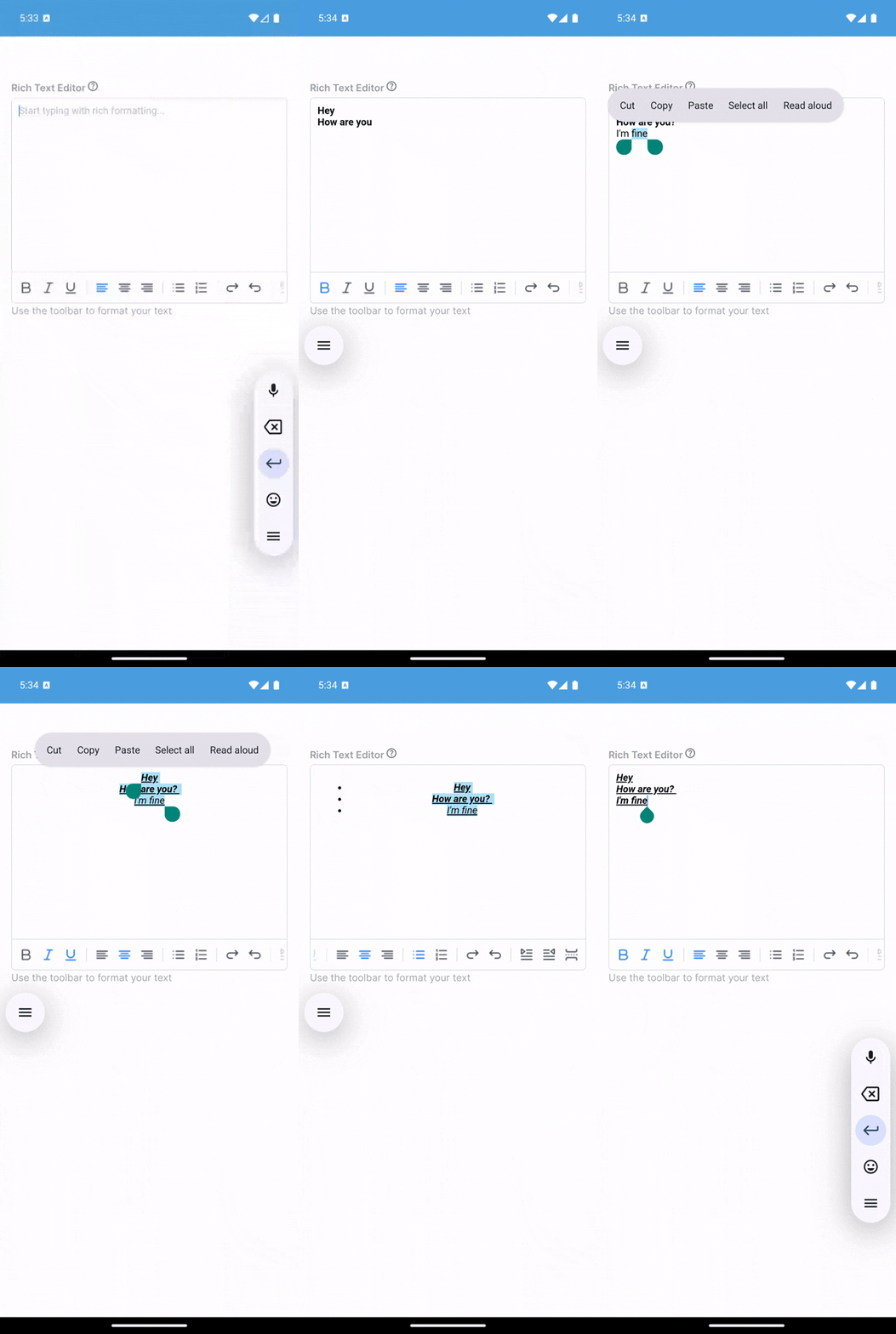
- Rich Formatting: Bold, italic, underline, strikethrough, subscript, superscript
- Text Styling: Font size, family, colors, highlights, line height
- Lists & Structure: Bullet lists, numbered lists, checkbox lists, headings (H1-H6)
- Media: Insert images and videos with custom styling
- Alignment: Left, center, right, justify with cycle button
- Code & Blocks: Code blocks, blockquotes, horizontal rules
- Smart Paste: Automatically preserves HTML formatting from web pages, Word docs, and more
- Read-Only Mode: Display formatted content without editing
- Keyboard Management: Built-in iOS/Android keyboard handling
- Fully Customizable: Toolbar, icons, styles, and behavior
npm install rn-rich-text-editorPeer dependencies:
npm install react react-native react-native-webviewNote: If you use
react-native-svg-transformer, SVG icons work automatically. Installreact-native-svgfor runtime.
import React, { useRef, useState } from 'react';
import { View } from 'react-native';
import { Editor, Toolbar, ColorPicker } from 'rn-rich-text-editor';

function App() {
  const editorRef = useRef(null);

  return (
    <View style={{ flex: 1 }}>
      <Editor
        ref={editorRef}
        placeholder="Start typing..."
        onChange={(html) => console.log('Content:', html)}
      />
      <Toolbar editor={editorRef} />
    </View>
  );
}| Prop | Type | Default | Description |
|---|---|---|---|
ref |
RefObject<EditorRef> |
- | Editor reference for methods |
placeholder |
string |
'' |
Placeholder text |
initialContentHTML |
string |
'' |
Initial HTML content |
readOnly |
boolean |
false |
Display-only mode |
disabled |
boolean |
false |
Disable editing |
pasteAsPlainText |
boolean |
false |
Disable HTML paste |
initialFocus |
boolean |
false |
Auto-focus on mount |
editorStyle |
object |
- | Style configuration (see below) |
onChange |
(html: string) => void |
- | Content change callback |
onFocus / onBlur |
() => void |
- | Focus callbacks |
onPaste |
(data: unknown) => void |
- | Paste event callback |
onLink |
(data: unknown) => void |
- | Link click callback |
onHeightChange |
(height: number) => void |
- | Height change callback |
errorMessage |
string |
- | Error message (shows red border) |
EditorStyle:
{
  backgroundColor?: string;      // Editor background
  color?: string;                // Text color
  placeholderColor?: string;     // Placeholder color
  caretColor?: string;           // Cursor color
  contentCSSText?: string;       // Content CSS
  cssText?: string;              // Additional CSS
  initialCSSText?: string;        // Initial CSS
}Access via editorRef.current:
| Method | Description |
|---|---|
setContentHTML(html) |
Set editor content |
getContentHtml() |
Get content (Promise, deprecated - use onChange) |
insertText(text) |
Insert plain text |
insertHTML(html) |
Insert HTML |
insertImage(attrs, style?) |
Insert image |
insertVideo(attrs, style?) |
Insert video |
insertLink(title, url) |
Insert link |
setFontSize(size) |
Set font size |
setFontName(name) |
Set font family |
setForeColor(color) |
Set text color |
setHiliteColor(color) |
Set highlight color |
setLineHeight(value) |
Set line height |
focusContentEditor() |
Focus editor |
blurContentEditor() |
Blur editor |
dismissKeyboard() |
Dismiss keyboard |
injectJavascript(script) |
Inject custom JS |
| Prop | Type | Default | Description |
|---|---|---|---|
editor |
{ current: EditorRef | null } |
- | Editor ref |
actions |
string[] |
defaultActions |
Action array (see Actions) |
disabled |
boolean |
false |
Disable toolbar |
readOnly |
boolean |
false |
Hide when read-only |
iconTint |
string |
'#71787F' |
Icon color |
selectedIconTint |
string |
- | Selected icon color |
iconSize |
number |
20 |
Icon size |
iconGap |
number |
12 |
Icon spacing |
iconMap |
Record<string, unknown> |
- | Custom icons |
renderAction |
(action, selected) => ReactNode |
- | Custom renderer |
onPressAddImage |
() => void |
- | Image button handler |
onInsertLink |
() => void |
- | Link button handler |
insertVideo |
() => void |
- | Video button handler |
| Prop | Type | Default | Description |
|---|---|---|---|
visible |
boolean |
false |
Controls modal visibility |
onClose |
() => void |
- | Called when modal closes |
onSelectColor |
(color: string) => void |
- | Called when a color is selected (hex format) |
title |
string |
'Text color' |
Modal title text |
initialColor |
string |
'#000000' |
Initial selected color (hex format) |
Import actions: import { actions } from 'rn-rich-text-editor'
Text Formatting: setBold, setItalic, setUnderline, setStrikethrough, setSubscript, setSuperscript, removeFormat
Headings: heading1 through heading6, setParagraph
Alignment: alignLeft, alignCenter, alignRight, alignFull, align (cycle)
Lists: insertBulletsList, insertOrderedList, checkboxList, indent, outdent
Media: insertImage, insertVideo, insertLink
Styling: fontSize, fontName, foreColor, hiliteColor, lineHeight
Other: code, blockquote, setHR, line, undo, redo, table, keyboard, separator
Default actions: keyboard, setBold, setItalic, setUnderline, removeFormat, insertBulletsList, indent, outdent, insertLink
import { Editor, Toolbar, actions } from 'rn-rich-text-editor';

const customActions = [
  actions.keyboard,
  actions.setBold,
  actions.setItalic,
  actions.heading1,
  actions.insertBulletsList,
  actions.insertLink,
];

<Toolbar editor={editorRef} actions={customActions} />// Insert content
editorRef.current?.insertText('Hello');
editorRef.current?.insertHTML('<strong>Bold</strong>');
editorRef.current?.insertLink('Click', 'https://example.com');
editorRef.current?.insertImage({ src: 'image.jpg' }, { width: '100%' });
// Style text
editorRef.current?.setFontSize(18);
editorRef.current?.setForeColor('#FF0000');
editorRef.current?.setLineHeight(1.5);<Editor
ref={editorRef}
editorStyle={{
backgroundColor: '#f5f5f5',
color: '#333',
placeholderColor: '#999',
caretColor: '#007AFF',
contentCSSText: `
font-family: -apple-system, sans-serif;
font-size: 16px;
line-height: 1.6;
`,
}}
/>
<Toolbar
editor={editorRef}
iconTint="#333"
selectedIconTint="#007AFF"
iconSize={24}
style={{ backgroundColor: '#f0f0f0', paddingVertical: 8 }}
/>import { ImagePicker } from 'react-native-image-picker';
const handleAddImage = () => {
ImagePicker.launchImageLibrary({}, (response) => {
if (response.assets?.[0]) {
editorRef.current?.insertImage(
{ src: response.assets[0].uri },
{ width: '100%', height: 'auto' }
);
}
});
};
<Toolbar editor={editorRef} onPressAddImage={handleAddImage} /><Editor
readOnly={true}
initialContentHTML="<p>Formatted content</p>"
editorStyle={{ backgroundColor: '#fff', color: '#333' }}
/>The ColorPicker component provides a modal interface for selecting colors with preset options and custom hex input. Perfect for text color (foreColor) and highlight color (hiliteColor) selection.
import { Editor, Toolbar, ColorPicker, actions } from 'rn-rich-text-editor';

function MyEditor() {
  const editorRef = useRef(null);
  const [showColorPicker, setShowColorPicker] = useState(false);
  const [colorPickerType, setColorPickerType] = useState('foreColor');
  const [selectedColor, setSelectedColor] = useState('#000000');

  const handleColorSelect = (color) => {
    if (colorPickerType === 'foreColor') {
      editorRef.current?.setForeColor(color);
    } else {
      editorRef.current?.setHiliteColor(color);
    }
    setSelectedColor(color);
  };

  return (
    <View style={{ flex: 1 }}>
      <Editor ref={editorRef} />
      <Toolbar
        editor={editorRef}
        actions={[
          actions.setBold,
          actions.setItalic,
          actions.foreColor,
          actions.hiliteColor,
        ]}
        foreColor={() => {
          setColorPickerType('foreColor');
          setShowColorPicker(true);
        }}
        hiliteColor={() => {
          setColorPickerType('hiliteColor');
          setShowColorPicker(true);
        }}
      />
      <ColorPicker
        visible={showColorPicker}
        onClose={() => setShowColorPicker(false)}
        onSelectColor={handleColorSelect}
        title={colorPickerType === 'foreColor' ? 'Text Color' : 'Highlight Color'}
        initialColor={selectedColor}
      />
    </View>
  );
}
ColorPicker Props:
| Prop | Type | Default | Description |
|---|---|---|---|
visible |
boolean |
false |
Controls modal visibility |
onClose |
() => void |
- | Called when modal closes |
onSelectColor |
(color: string) => void |
- | Called when a color is selected |
title |
string |
'Text color' |
Modal title |
initialColor |
string |
'#000000' |
Initial selected color |
<Toolbar
  editor={editorRef}
  fontSize={() => editorRef.current?.setFontSize(18)}
  foreColor={() => editorRef.current?.setForeColor('#FF0000')}
  lineHeight={() => editorRef.current?.setLineHeight(1.5)}
/>// Custom icons
const iconMap = {
[actions.setBold]: require('./assets/bold.png'),
[actions.setItalic]: require('./assets/italic.png'),
};
<Toolbar editor={editorRef} iconMap={iconMap} />
// Custom renderer
const renderAction = (action, selected) => {
if (action === actions.setBold) {
return <CustomBoldButton selected={selected} />;
}
return null; // Use default for others
};
<Toolbar editor={editorRef} renderAction={renderAction} />The editor automatically preserves HTML formatting when pasting. It detects HTML in the clipboard and maintains:
- Text formatting (bold, italic, colors, etc.)
- Inline styles
- Links and HTML elements
To paste as plain text only:
<Editor pasteAsPlainText={true} />editorRef.current?.injectJavascript(`
document.querySelector('#content').style.border = '2px solid red';
`);import { Editor, Toolbar, ColorPicker, EditorRef, EditorProps, ColorPickerProps, actions } from 'rn-rich-text-editor';
const editorRef = useRef<EditorRef>(null);
const props: EditorProps = { placeholder: 'Type...', onChange: (html) => {} };
const colorPickerProps: ColorPickerProps = {
visible: true,
onClose: () => {},
onSelectColor: (color) => {},
title: 'Text Color',
initialColor: '#000000',
};Editor not focusing?
- Set
initialFocus={true}or callfocusContentEditor() - On Android, use
showAndroidKeyboard()first
Content not updating?
- Use
onChangecallback instead of pollinggetContentHtml() - Set
initialContentHTMLcorrectly on mount
Paste not preserving format?
- Ensure
pasteAsPlainTextisfalse - HTML paste works when clipboard contains HTML data
Toolbar not working?
- Verify
editorprop uses ref object:editor={editorRef} - Ensure editor initializes before toolbar interactions
- iOS: WebKit WebView, automatic keyboard handling
- Android: Android WebView, may need
showAndroidKeyboard()for focus
MIT
Contributions welcome! See the GitHub repository for issues and PRs.