step1: Make sure that you have installed the python programming environment.
- If you have already installed it, the following results will appear when typing
pythonorpy, depending on your alias configuration in~/.bashrc
$ py --version                                                                                                                                                                                            ─╯
Python 3.11.5- If you haven't installed it, follow these steps:
- download python source code, and unzip to specified directory.
$ wget https://www.python.org/ftp/python/3.11.5/Python-3.11.5.tgz
$ tar -xvf Python-3.11.5.tgz -C /usr/local- Enter
/usr/local/Python-3.11.5 - Install the required compiler and dependencies. reference: Common build problems
$ sudo apt-get update

# Install multiple software packages, -y indicates Yes to all queries
$ sudo apt-get install -y gcc make build-essential libssl-dev zlib1g-dev \
libbz2-dev libreadline-dev libsqlite3-dev wget curl llvm libncurses5-dev \
libncursesw5-dev xz-utils tk-dev libffi-dev liblzma-dev- Generate
Makefile, specifying installation to/usr/local/python3.11
$ sudo ./configure --enable-optimizations --prefix=/usr/local/python3.11

# compile and install
$ sudo make && sudo make install- Add python environment variables
$ vim ~/.bashrcAdd following command to the .bashrc
export PYTHON_HOME='/usr/local/python3.11'
export PATH=$PATH:$PYTHON_HOME/bin

alias py='python3.11'
Reload bash's configuration file:
$ source ~/.bashrcIf you complete the above steps, type py -V
$ py -V                                                                                                                                                                                                   ─╯
Python 3.11.5
step2: Enter raft module directory
$ cd MIT-6.824/src/raftstep3: Run python test script dstest.py
$ py debug/script/dstest.py [Test]... -n [Iterations] -p [Processes] -o [OutputPath]eg: If you want to run 2A and 2B test function, each test 2000 times, start 20 child processes, you may type:
$ py debug/script/dstest.py 2A 2B -n 2000 -p 20 -o debug/raft_log/ If there are failed tests, corresponding logs will be output to debug/raft_log/ directory.
Lab 2A test result: run 10,000 tests with no failures

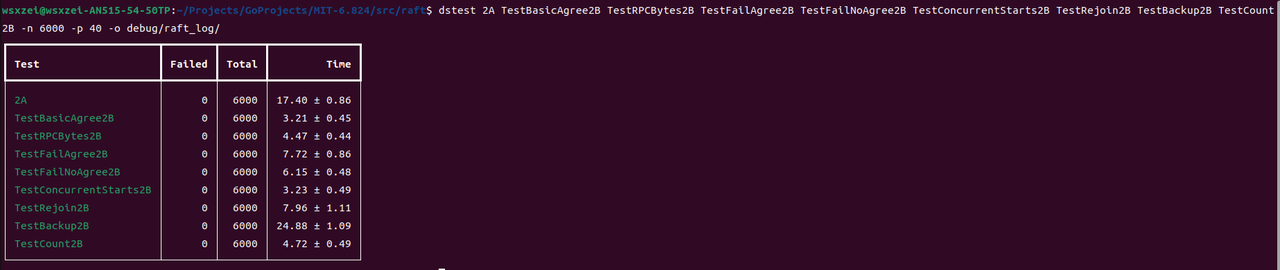
Lab 2B test result: run 6,000 tests with no failures
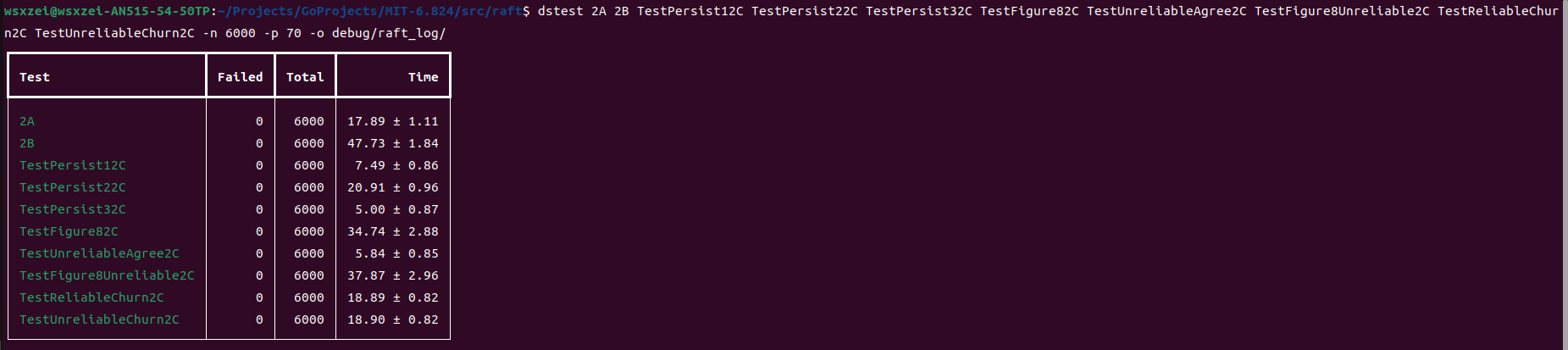
Lab 2C test result: run 6,000 tests with no failures
Lab 2D test result: run 6,000 tests with no failures
