NOTE: the API skyscanner API NO longer works.
Blog Post:
- https://medium.com/swlh/how-to-create-a-white-label-react-app-137c06ae24ad
- https://javascript.plainenglish.io/how-to-add-react-i18next-3d6ace7cf58e
- https://betterprogramming.pub/my-react-app-unit-testing-strategies-18ebe55cd078
This project is a sample flight search app generated using Nx.
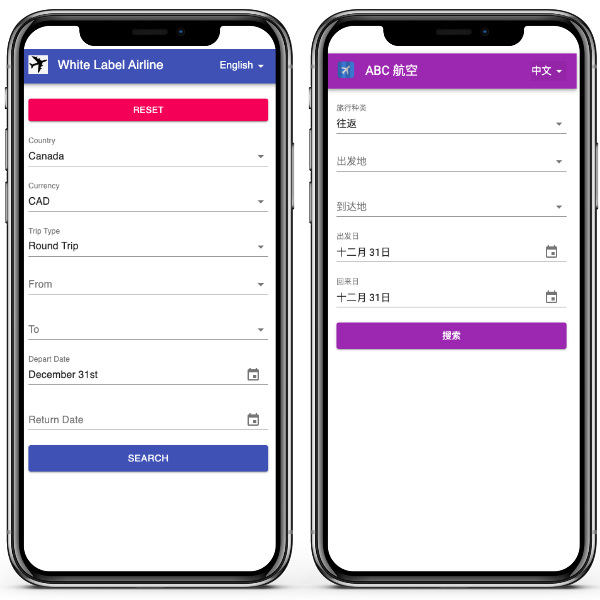
Medium Blog: https://medium.com/swlh/how-to-create-a-white-label-react-app-137c06ae24ad
libs: commonly shared files
|__services: API services, response models, or wrapper for third-party libraries (i18n)
|__models: commonly shared models that are independent of backend API response models
|__store: state management related files
|__ui: commonly shared UI comopnents
apps: applications that consume libs, in this example
|__white-label-airline: a sample app with all feature toggles and en-GB as default locale
|__abc-airline: a sample app with all feature toggles off and zh-CN as default locale
- deploy to GitHub Pages:
npm run deploy - run apps locally:
npm run serve(white-label-airline) ornx serve abc-airline
- test apps:
nx test white-label-airlineornx test abc-airline - test libraries:
nx test uiornx test servicesornx test store - test all files:
npm run test - test watch all files:
npm run test:watch - clear cache:
npm run test:clear
- run lint for all libraries and applications:
npm run lint - run lint with fix for all libraries and applications:
npm run lint:fix
- extract translation keys:
npm run i18n:<app name>. For example,i18n:abc-airlinewill extract translation key for appabc-airline
🔎 Nx is a set of Extensible Dev Tools for Monorepos.
Nx supports many plugins which add capabilities for developing different types of applications and different tools.
These capabilities include generating applications, libraries, etc as well as the devtools to test, and build projects as well.
Below are our core plugins:
- React
npm install --save-dev @nrwl/react
- Web (no framework frontends)
npm install --save-dev @nrwl/web
- Angular
npm install --save-dev @nrwl/angular
- Nest
npm install --save-dev @nrwl/nest
- Express
npm install --save-dev @nrwl/express
- Node
npm install --save-dev @nrwl/node
There are also many community plugins you could add.
Run nx g @nrwl/react:app my-app to generate an application.
You can use any of the plugins above to generate applications as well.
When using Nx, you can create multiple applications and libraries in the same workspace.
Run nx g @nrwl/react:lib my-lib to generate a library.
You can also use any of the plugins above to generate libraries as well.
Libraries are sharable across libraries and applications. They can be imported from @white-label-airline/mylib.
Run nx serve my-app for a dev server. Navigate to http://localhost:4200/. The app will automatically reload if you change any of the source files.
Run nx g @nrwl/react:component my-component --project=my-app to generate a new component.
Run nx build my-app to build the project. The build artifacts will be stored in the dist/ directory. Use the --prod flag for a production build.
Run nx test my-app to execute the unit tests via Jest.
Run nx affected:test to execute the unit tests affected by a change.
Run ng e2e my-app to execute the end-to-end tests via Cypress.
Run nx affected:e2e to execute the end-to-end tests affected by a change.
Run nx dep-graph to see a diagram of the dependencies of your projects.