English | 中文

No alarms on off days.
A holiday-aware iOS app for day classification, automation, and reminders.




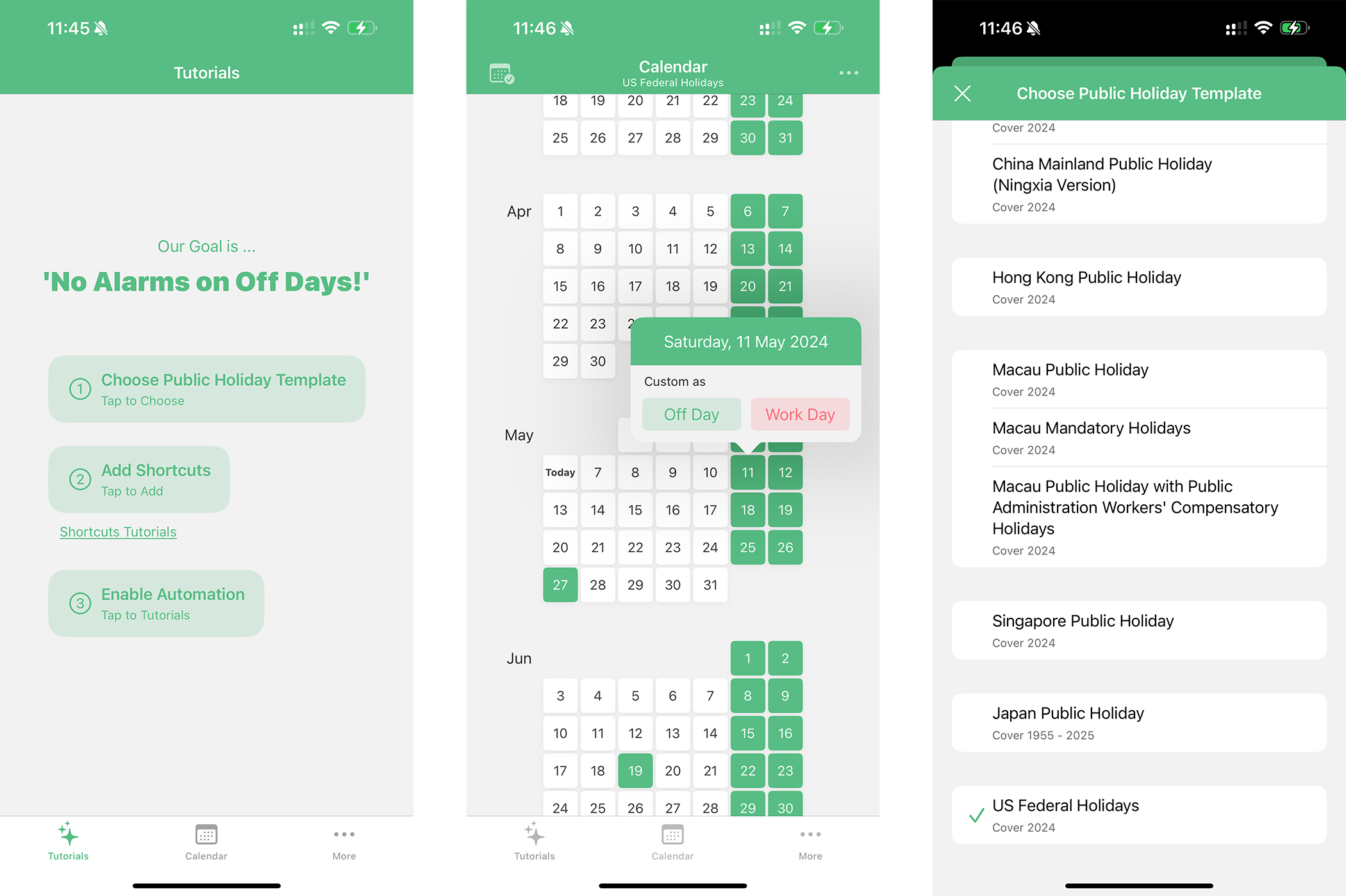
Off Day helps users decide whether a day should be treated as an off day or a work day, then use that result in iOS Shortcuts and notification workflows.
The app is local-first:
- Holiday data is bundled as JSON templates or user-imported custom plans.
- User overrides, comments, and settings are stored in a local SQLite database.
- Optional iCloud backup is available for database snapshots.
- Multi-layer day decision engine with deterministic priority:
User Mark > Public Holiday Template > Base Calendar - Built-in public holiday templates: China Mainland, Xinjiang, Tibet, Guangxi, Ningxia, Hong Kong, Macau (Public / Force / Civil Servant), Singapore, Thailand, Korea, Japan, United States
- Custom public holiday plans: create, edit, duplicate, import JSON, export JSON
- Flexible base calendar modes: Standard weekly, Week-cycle, Day-cycle
- Rich App Intents for Shortcuts automation: check day type, check clash day, get day details, find next off/work day, update day mark, manage day comments
- Notification center for three scenarios: template expiration, upcoming public holidays, upcoming custom-mark days
- Backup and restore:
iCloud auto backup, manual database export/import (
.zip/.sqlite) - Localization support: English, Simplified Chinese, Traditional Chinese, Traditional Chinese (Hong Kong)
- Optional alternative calendar display: Chinese lunar / Kyureki data support
Off Day merges three data sources in fixed order:
- User mark (manual override)
- Public holiday template entry (including holiday shifts)
- Base calendar configuration
Equivalent logic:
finalDayType = userMark ?? publicHolidayType ?? baseCalendarType
This rule is implemented in Off Day/DayManager.swift.
Template files are located at Off Day/PublicPlan/JSON/.
| Region | Coverage |
|---|---|
| China Mainland / Xinjiang / Tibet / Guangxi / Ningxia | 2024-01-01 to 2026-12-31 |
| Hong Kong | 2024-01-01 to 2026-12-31 |
| Macau (Public / Force / Civil Servant) | 2024-01-01 to 2026-12-31 |
| Singapore | 2024-01-01 to 2026-12-31 |
| Thailand | 2024-01-01 to 2026-12-31 |
| Korea | 2024-01-01 to 2026-12-31 |
| United States (Federal) | 2024-01-01 to 2026-12-31 |
| Japan | 1955-01-01 to 2026-12-31 |
- Select a public holiday template.
- Configure your base calendar mode.
- Add Off Day intents in Shortcuts.
- Build personal automations (alarm, focus mode, reminders).
- Optionally add manual day marks and comments for exceptions.
- macOS with Xcode 14 or newer
- iOS/iPadOS 16.0+
- Swift Package Manager (resolved automatically by Xcode)
git clone https://github.com/zizicici/Off-Day.git
cd Off-Day
open "Off Day.xcodeproj"
Select the Off Day scheme and run on simulator or device.
- GRDB.swift
7.9.0 - SnapKit
5.7.1 - Toast-Swift
5.1.1 - MarqueeLabel
4.5.3 - ZipArchive
2.6.0 - ZCCalendar
0.1.4 - AppInfo
1.3.0
Off Day/
├── Block/           # Main calendar UI and day interaction
├── PublicPlan/      # Built-in and custom holiday plans
├── BaseCalendar/    # Base calendar strategies
├── Intent/          # App Intents for Shortcuts
├── Notification/    # Local notification scheduling
├── Backup/          # iCloud backup and DB import/export
├── Database/        # GRDB models, migrations, persistence
├── ChineseCalendar/ # Lunar/Kyureki data support
└── More/            # Settings, about, tutorials, support
Imported/exported plans follow this shape:
{
  "name": "My Plan",
  "start": "2026-01-01",
  "end": "2026-12-31",
  "days": [
    {
      "name": "New Year",
      "date": "2026-01-01",
      "type": "offDay"
    }
  ]
}
Reference model: Off Day/PublicPlan/Model/JSONPublicPlan.swift.
- Built-in multi-region holiday templates
- Custom template import/export
- Base calendar modes (standard/week-cycle/day-cycle)
- App Intents + automation workflow
- Backup and restore
- Interactive widget
- Subscribable remote holiday templates
Issues and pull requests are welcome.
If you contribute holiday data:
- Keep
start/endaligned with actual dataset coverage. - Ensure all
days[].datevalues stay within the range. - Keep JSON sorted and readable.
Off Day is available under the MIT License.