A powerful WordPress plugin that automatically sends rich embedded messages to Discord channels when your posts are published. And now also send new comments as embedded to discord!!
- Automated Discord Notifications: Send embed messages when posts are published
- Category-Based Triggers: Only notify for specific post categories
- Dynamic Placeholders: Customize messages with post-specific data
- Multiple Integration Options: Supports both Discord bots and webhooks
- Rich Embeds: Create beautiful, formatted Discord messages
- Customizable Components: Buttons, fields, and more
- Filter To Markdown: Filter html tag and other to markdown. eg
<strong>to**
The plugin hooks into 3-type hooks/action.
transition_post_statusDefault action thats executed when the post move from one status to other status.${old_status}_to_${new_status}Action that's specifically hooks when specific status change to other specific status. egdraft_to_publish.save_postAction that's executed when user save the post to database, or when the user press publish button when they add new post. I Personally Recommended you choosesave_post.
How The Proceed going?
- Checks if the post belongs to a monitored category
- Constructs a rich embed message using your templates
- Sends the message to your specified Discord channel
- Supports both bot and webhook integration methods
- Download the latest version from the Releases page or The lastest in blob branch main Here
- Navigate to WordPress Admin → Plugins → Add New
- Click "Upload Plugin" and select the downloaded ZIP file
- Activate the plugin after installation
- Create a Discord application at the Developer Portal
- Add a bot to your application and copy the token
- Invite the bot to your server with only necessary permissions
- Note your channel ID (enable Developer Mode in Discord settings)
- Enter these details in the plugin settings
- In Discord channel settings, create a new webhook
- Customize the webhook name and avatar if desired
- Copy the webhook URL
- Paste into the plugin settings
- Go to your discord server
- Open any channels
- Type your tag, example @News update
- Send The Message or Press 'Enter' your keyboard
- Copy the message
- Delete the message
- Now you have a id of the role you have to tag
- Put this id (Example:
<@&12345678912>) to whenever you want like the default tag or directly in Embedded or the main message
- Go to default settings
- Fill the requirement eg. Bot Token or Webhook URL
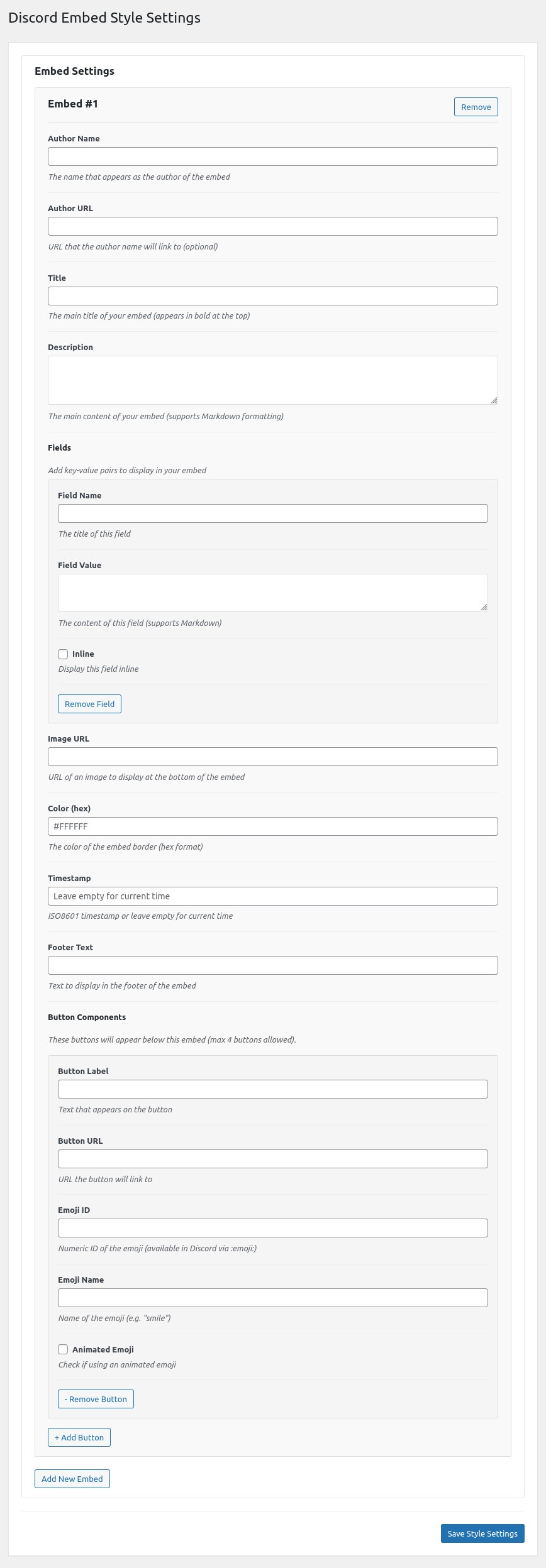
- Go to Embedded Style
- Customize Your Embedded
- Go to Category Settings
- Fill The requirement eg. Categories, Default Messages (optional) etc.
- First go to default settings
- Select comment service eg. WordPress, Wpdiscuz, Disqus(still on development)
- Insert webhooks or Bot Token and the channel id
The plugin offers powerful placeholders to customize your embeds:
Available in almost every section in embedded input:
- Main message
- Embed author/title/description
- Field names/values
- Button labels
- Footer text
Syntax:
${default_message}$ or ${default_message => [var_1,var_2, and more]}$
Example:
if in default settings you set,
'hello %var_0% Current Post Title %var_1% has updated at %var_2%'
~This is just example, ignore my grammar
and in your category setting or embedded setting you set like this.
'${default_message => [@everyone,extract_post_title,extract_post_date]}'
the results will be like this.
'hello @everyone Current Post Title MotoGP has updated at 2025-07-23 14:30:00'
Available Info:
author- Post author namepost_date- Publication datepost_title- Post titlethumbnail_url- Featured image URLpermalink- Post URLpost_name- Post slugpost_content- Post Contentpost_status- Post Current Statuspost_type- Post Typepost_category- Post Category.
Don't Forget to put extract_ when you want to get the post info.
And %var_0% is can be more than 3.
Syntax:
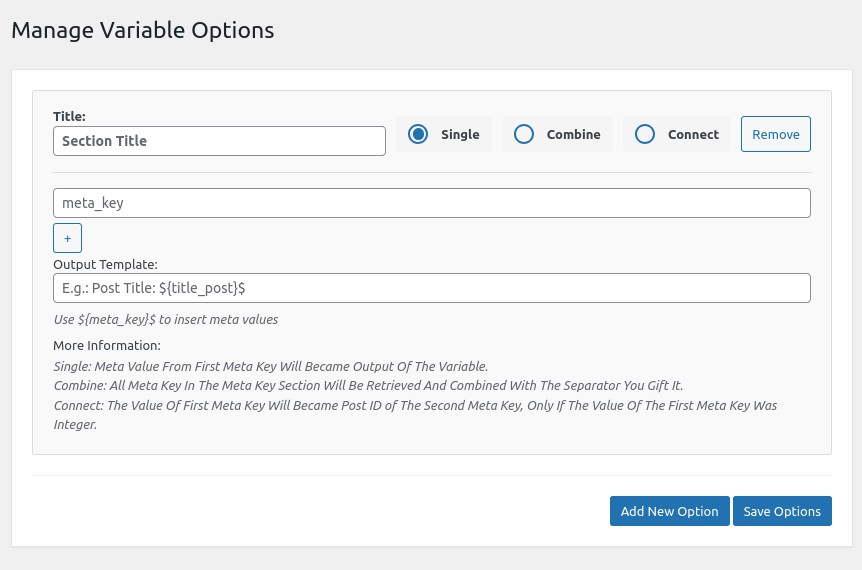
${get_post_meta => [mode],[keys],[separator]}$
Mode Comparison:
| Mode | Input Example | Output Example | Use Case |
|---|---|---|---|
| single | [single],[price] |
29.99 |
Simple field values |
| combine | [combine],[city,state],[, ] |
New York, NY |
Composite fields |
| connect | [connect],[related_post,title] |
Featured Product |
Cross-post data |
Real-World Examples:
1. Product Price Display:
   `${get_post_meta => [single],[product_price]}$` → `49.99`

2. Location Formatting:
   `${get_post_meta => [combine],[city,country], [ - ]}$` → `Paris - France`

3. Related Content:
`${get_post_meta => [connect],[featured_product,product_name]}$` → `Premium Headphones`Advanced Syntax:
# Get from meta-referenced post
${get_post_info => [featured_event],[post_title]}$

# Get from direct ID
${get_post_info => [42],[permalink]}$

# Current post fallback
${get_post_info => [],[thumbnail_url]}$
Output Samples:
| Template | Sample Output |
|---|---|
${...[],[post_date]}$ |
2023-07-15 14:30:00 |
${...[42],[post_title]}$ |
Summer Sale Event |
${...[event_ref],[thumbnail_url]}$ |
https://example.com/image.jpg |
Available Info:
post_author- Post author namepost_date- Publication datepost_title- Post titlethumbnail_url- Featured image URLpermalink- Post URLpost_name- Post slugpost_content- Post Contentpost_status- Post Current Statuspost_type- Post Typepost_category- Post Category.
Quick Reference Table:
| Placeholder | Equivalent PHP | Sample Output |
|---|---|---|
${author}$ |
get_the_author() |
John Doe |
${discord_timestamp}$ |
<t:UNIXTIME:R> |
2 hours ago |
${post_content}$ |
get_the_content() |
Full HTML content |
${post_category}$ |
get_the_category_list() |
News, Updates |
Available Default Placeholders:
${permalink}$- Post URL${author}$- Post author${post_content}$- Post Content${post_content:mode:much}$- Post Content, mode =>0for word,1for characters, much => how much in number${timestamp}$- Publication time (Discord format)${post_title}$- Post title${thumbnail_url}$- Featured image${default_tag}$- Your custom default tag${post_type}$- Post Type${post_name}$- Post slug${post_category}$- Post Category
Quick Reference Table:
| Placeholder | Equivalent PHP | Sample Output |
|---|---|---|
${comment_content}$ |
$comment->comment_content |
This Products Are Soo Good!! |
${comment_discord_timestamp}$ |
<t:UNIXTIME:R> |
2 hours ago |
${comment_author}$ |
$comment->comment_author |
John Doe |
${comment_post_title}$ |
$comment->comment_post_ID => get_post() => $post->post_title |
Nikke New Shoes |
Available Default Placeholders:
${comment_permalink}$- Comment URL${comment_author}$- Comment author${comment_content}$- Comment Content${comment_date}$- Date Of the Comment${timestamp}$- Publication time${comment_discord_timestamp}$- Timestamp will show like2 day ago${comment_post_title}$- Post title of the comment${comment_parent_content}$- The Main Comment Content if the current Comment was a reply${comment_parent_author}$- The Main Comment Author if the current Comment was a reply${comment_parent_date}$- The Main Comment Date if the current Comment was a reply${comment_parent_permalink}$- The Main Comment Permalink if the current Comment was a reply${comment_parent_post_title}$- The Main Comment Post Title if the current Comment was a reply
Basic Announcement:
main_message: "${default_tag}$ @here"
title: "New Post: ${post_title}$"
description: "${post_content:0:25}$... [Read More](${permalink}$)"
thumbnail: "${thumbnail_url}$"
color: "#FF5733"
E-Commerce Product Alert:
main_message: "${default_tag}$ @here"
title: "🚀 New Product: ${get_post_meta => [single],[product_name]}$"
fields:
  - name: "Price"
    value: "$${get_post_meta => [single],[price]}$"
  - name: "Availability"
    value: "${get_post_meta => [single],[stock_status]}$"
button:
  label: "Buy Now"
  url: "${permalink}$"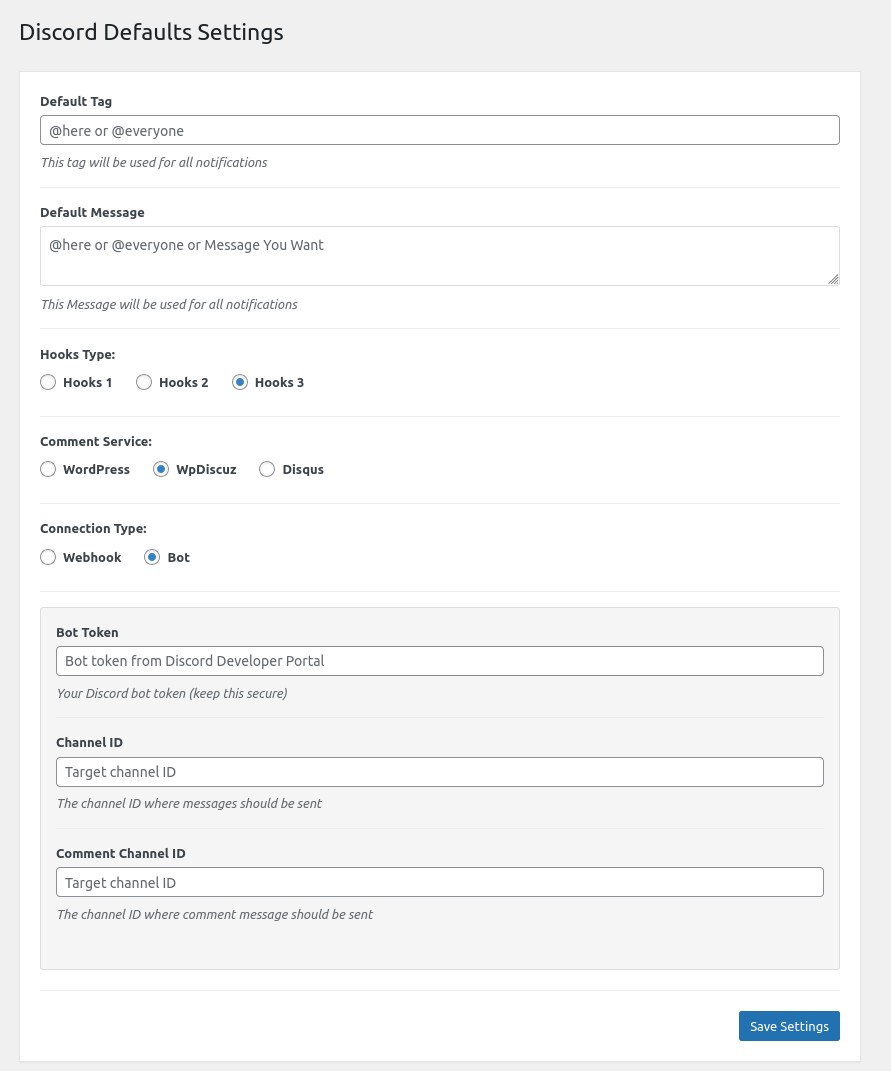

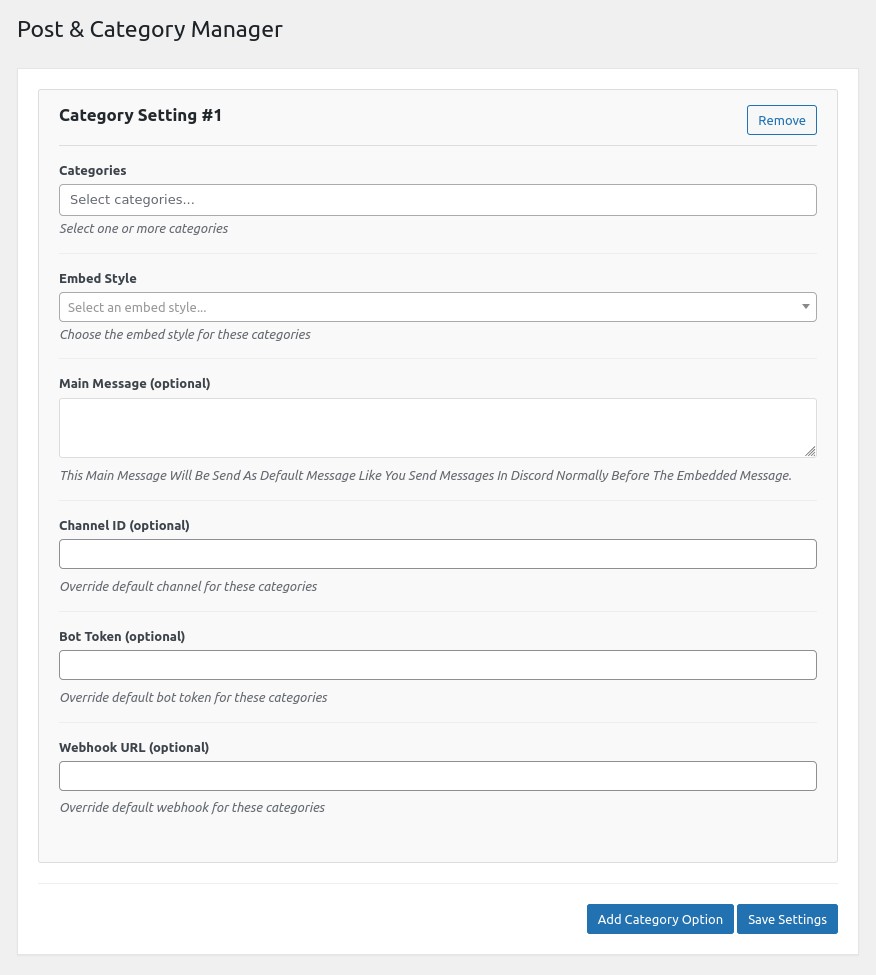 Plugin configuration panel
Sample Discord embed output
We welcome contributions! Please fork the repository and submit pull requests.
Todo List:
- More Platform integration
- Make The Frontend Better
- Make Cache System For Better Performance
