Writing JSON configuration manually
The configuration file for Stock-Patterns uses a JSON file. The program, by default, looks for src/user.json. However, you can define multiple configuration files for different data sources. (For example, EOD data or 1 Min OHLC data.)
Below is a sample configuration file structure:
{
  "DATA_PATH": "path/to/ohlc/data",
  "LOADER": "EODFileLoader",
  "DEFAULT_TF": "daily",
  "DATE_COLUMN": "Date",
  "SYM_LIST": "path/to/watchlist/file",
  "24_7": false,
  "EXCHANGE_START_TIME": "09:30",
  "FLAG_MAX_BARS": 5,
  "PATTERNS": {
    "my_scan": ["vcpu", "dbot", "flagu"]
  }
}- DATA_PATH: The path to the folder containing OHLC (Open, High, Low, Close) data files in CSV format.
-
LOADER: The class used for loading the OHLC data. Possible values are
"EODFileLoader"or"IEODFileLoader". -
DEFAULT_TF: The default timeframe for the OHLC data in your CSV files. Options depend on the loader:
-
"EODFileLoader":"daily","weekly","monthly" -
"IEODFileLoader":"1","5","10","15","25","30","60","75","125","2h","4h"
-
-
DATE_COLUMN: (OPTIONAL - Default 'Date') The name of the date column in your OHLC files. If the column is not named
"Date", specify the name here. (Deprecated since v4.0.10. No longer required) - SYM_LIST: (OPTIONAL) The path to the watchlist file (text or CSV file) with symbol names listed one per line.
-
24_7: (Optional - Default false) Boolean indicating if the market operates 24/7. Set to
truefor markets like Crypto or Forex. If set tofalse, specify theEXCHANGE_START_TIME. -
EXCHANGE_START_TIME: (Optional) The start time of the exchange in
HH:MMformat, if the market does not operate 24/7. - DATE_FORMAT: (Optional) The Date format of OHLC Data. Only required, if Pandas is unable to parse the Date column.
- FLAG_MAX_BARS: (Optional - v4.1.0 and above) Minimum number of bars required for a flag pattern to qualify. Default is 5.
-
PATTERNS: (Optional - v4.0.13 and above) A dictionary containing a custom list of patterns to scan. Once defined, you can pass the key name to
-p
24_7 and EXCHANGE_START_TIME are necessary only if using IEODFileLoader, else the values are ignored.
Starting v4.0.10 - If SYM_LIST is missing from config, it defaults to scanning all files in DATA_PATH folder. This behaviour can be overriden by providing a list of symbols using the --sym or a watchlist file using the -f option.
-
Create a New JSON File: Create a new file named
user.jsonin thesrcfolder. -
Set Up
DATA_PATH: Specify the full file path to the folder containing your OHLC data files. (Must be a folder)."DATA_PATH": "path/to/ohlc/data"
-
Choose and Set the
LOADER: Choose between"EODFileLoader"for end-of-day data or"IEODFileLoader"for intraday data and set it accordingly."LOADER": "EODFileLoader"
-
Specify
DEFAULT_TF: Define the default timeframe. Ensure it matches the timeframe options available for the chosen loader."DEFAULT_TF": "daily"
-
Set
DATE_COLUMN(If Needed - Deprecated since v4.0.10):If your OHLC files use a different date column name, specify it here. Otherwise, it defaults to
"Date"."DATE_COLUMN": "Date"
-
Provide
SYM_LIST: Specify the path to your watchlist file. This file should contain one symbol per line."SYM_LIST": "path/to/watchlist/file"
-
Set
24_7(Optional): If the market operates 24/7, set this totrue. Otherwise, set it tofalseand provide theEXCHANGE_START_TIME."24_7": false
-
Specify
EXCHANGE_START_TIME(If24_7isfalse): Provide the start time of the exchange inHH:MMformat."EXCHANGE_START_TIME": "09:30"
-
Define your own custom scans (Optional - v4.0.13 and higher): Use this to define a custom list of scans. In the below example,
my_scancan be any name of your choice. The values must be a list of valid pattern names."PATTERNS": { "my_scan": ["vcpu", "dbot", "flagu"] }
py init.py -p my_scan -
Save the Configuration File: Save the
user.jsonfile with the specified settings.
You can create multiple config files for different data sources.
To use a config file other than user.json, use the -c or --config followed by the file path to your config file.
py init.py -c intraday-config.jsonAll chart configuration is nested within the CHART key. See example JSON config below.
{
  "DATA_PATH": "/home/benny/Documents/python/eod2/src/eod2_data/daily",
  "LOADER": "EODFileLoader",
  "DEFAULT_TF": "daily",
  "SYM_LIST": "/home/benny/Documents/python/stock-pattern/src/data.csv",
  "CHART": {
    "TYPE": "candle",
    "STYLE": "mike",
    "LINE_COLOR": "gold",
    "LABEL_COLOR": "white",
    "BIAS_LINE_COLOR": "lime",
    "NAV_TITLE_COLOR": "snow"
  }
}
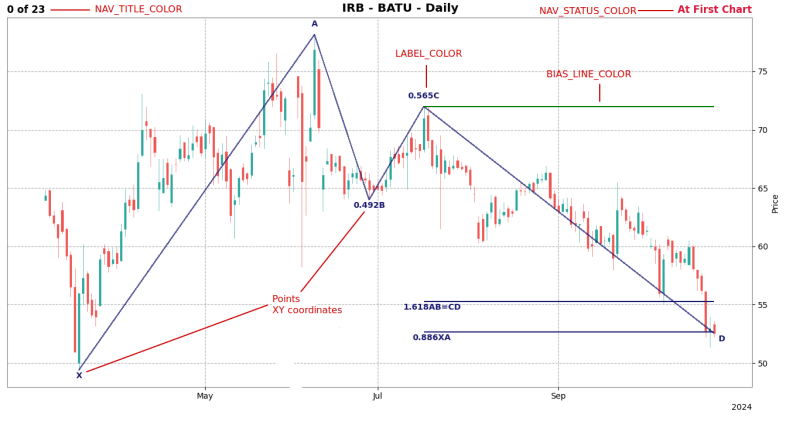
Image below points out the various chart options and how they apply on chart.
For a list of available colors supported in matplotlib: https://matplotlib.org/stable/gallery/color/named_colors.html#css-colors
-
TYPE: One of
candle,ohlcorline. Defaultcandle -
STYLE: One of
binancebinancedarkblueskiesbrasilcharlescheckersclassicdefaultibdkenanmikenightcloudssasstarsandstripestradingviewyahoo. Defaulttradingview. -
LINE_COLOR: Default
midnightblue. -
LABEL_COLOR: Text label color. Default
midnightblue. -
NAV_TITLE_COLOR: Title color in top left corner. (Used to display chart count). Default
black. -
NAV_STATUS_COLOR: Title color in top right corner. (Used to notify
At last chartorAt first chart). Defaultcrimson. -
BIAS_LINE_COLOR: Line color indicating direction of pattern breakout. Default
green. -
LINE_WIDTH: Applies to all lines on chart. Default
0.8. -
ALPHA: Line color transparency. Default
0.7.
OHLC data must be a CSV file and contain Open, High, Low, Close, and Volume columns to work correctly.
Windows users - Use forward slash / in your file paths to avoid JSON parsing errors. ~/path/to/folder