


Home Assistant integration for controlling Audac audio devices:
- MTX48 / MTX88 – Audio matrix (zone control)
- XMP44 – Modular audio system (SourceCon modules)
Communicates directly via TCP with the devices and ships with Bubble Card-inspired Lovelace cards.
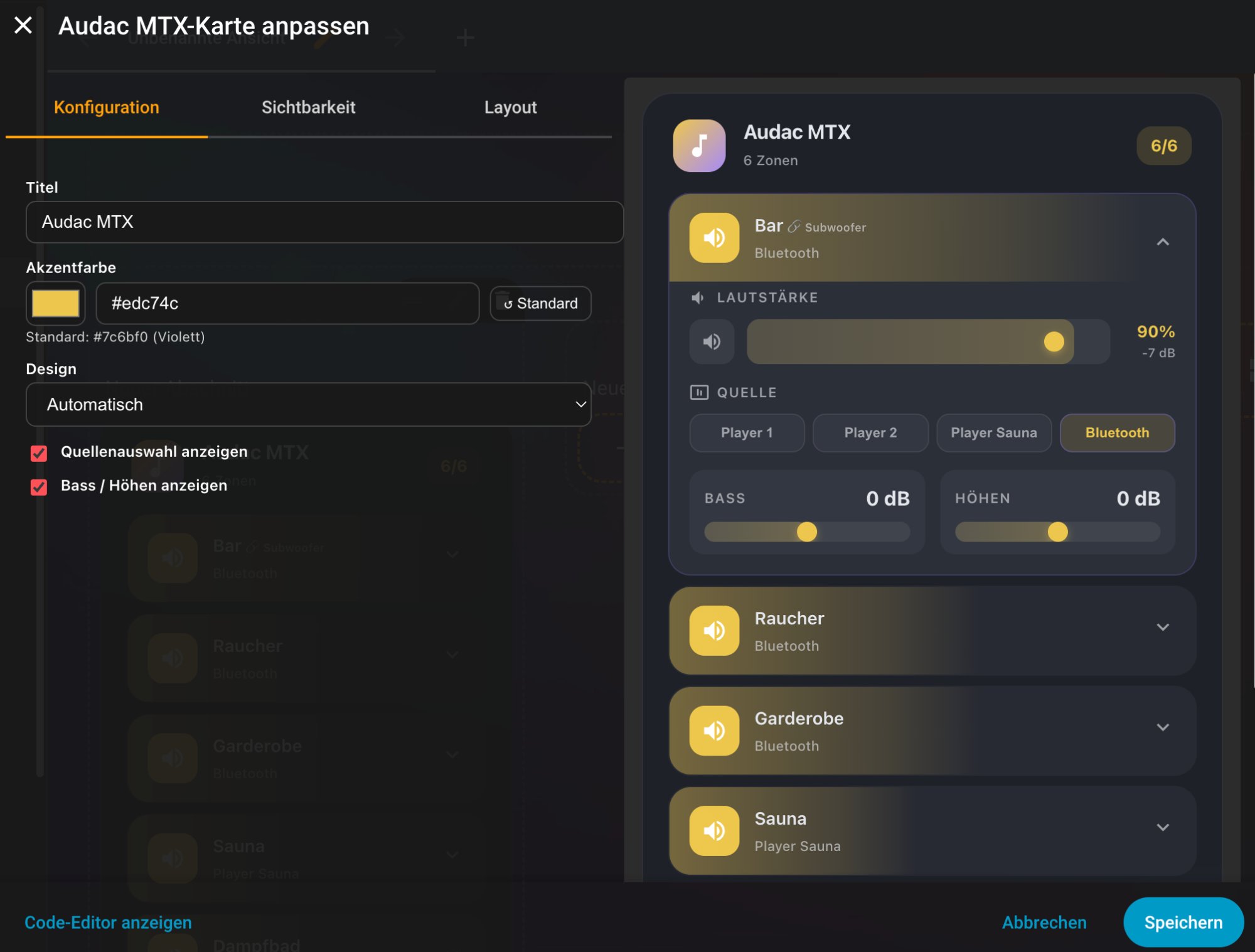
- Direct TCP connection – Communicates directly with Audac devices (port 5001)
- Media player entities – Each zone is exposed as its own media player
- Zone control – Volume, mute, and source selection per zone
- Zone coupling – Link zones as master/slave (dropdown in options). Slave zones are automatically synchronized and hidden from the card. Linked zone names are shown next to the link icon
- Bass & treble – Display and control tone settings (±14 dB), toggleable in the card editor
- Source selection – Clean grid layout of all available inputs
- Auto-discovery – The card automatically finds all MTX zones
- Custom names – Rename zones and sources individually (via options)
- Zone visibility – Hide individual zones; entities remain available for services and automations
- Source visibility – Hide individual sources (e.g. unused inputs)
- Multi-language – Automatic language detection (German / English) based on HA user settings, fallback: English
- Dark / light mode – Automatic or manual selection
- Accent color – Freely configurable accent color in the card editor
- Accordion navigation – Only one zone expanded at a time
- Bubble Card design – Rounded corners, smooth gradients, fluid animations
- Card editor – Visual configuration directly in the Lovelace editor
- Auto-reconnect – Exponential backoff on connection loss (max 30 s)
- Automatic module detection – Installed SourceCon modules are detected via GTPS command
- Media player per slot – Each installed module is exposed as its own media player
- Supported modules – DMP40 (DAB/FM), TMP40 (FM), IMP40 (Internet Radio), MMP40 (Media Player), FMP40 (Voice File), BMP40 (Bluetooth), NMP40 (Network Player)
- Playback control – Play, stop, pause, next, previous for BMP40, MMP40, NMP40
- Song info – Title, artist, album, duration, position for compatible modules
- Tuner info – Frequency, station name, signal strength, DAB/FM switching
- Bluetooth – Pairing status, connected devices
- Home Assistant 2023.9.0 or newer
- HACS (recommended)
- Audac MTX48, MTX88, or XMP44 reachable on the network (TCP port 5001)
- Open HACS in Home Assistant
- Go to Integrations → three dots → Custom repositories
- Add
https://github.com/FX6W9WZK/ha-audac, category Integration - Install Audac
- Restart Home Assistant
- Copy the contents of
custom_components/audac_mtxinto your HA config directory - Restart Home Assistant
- Settings → Devices & Services → Add Integration
- Search for Audac
- Enter IP address, port (default: 5001), and model (MTX48 / MTX88 / XMP44)
The cards are automatically registered as Lovelace resources. If needed, they can be added manually:
Settings → Dashboards → Resources
| Card | URL | Type |
|---|---|---|
| MTX | /audac_mtx/audac-mtx-card.js |
JavaScript Module |
| XMP44 | /audac_mtx/audac-xmp44-card.js |
JavaScript Module |
type: custom:audac-mtx-card
title: Audac MTX
show_bass_treble: true
show_source: true
theme: auto
accent_color: ""type: custom:audac-xmp44-card
title: Audac XMP44
theme: auto
accent_color: ""The XMP44 card automatically detects all configured modules and shows per slot:
- Playback controls (BMP40, MMP40, NMP40)
- Station selection (IMP40 favourites)
- Trigger buttons (FMP40)
- Station search and presets (DMP40, TMP40)
- Bluetooth pairing and disconnect (BMP40)
- Song info, frequency, signal strength, output gain
| Service | Parameter | Description |
|---|---|---|
media_player.volume_set |
volume_level (0.0–1.0) |
Set volume |
media_player.volume_mute |
is_volume_muted |
Set mute |
media_player.select_source |
source |
Select input |
audac_mtx.set_bass |
bass (0–14) |
Set bass |
audac_mtx.set_treble |
treble (0–14) |
Set treble |
audac_mtx.routing_up |
– | Select next input |
audac_mtx.routing_down |
– | Select previous input |
See CHANGELOG.md for the full release history.
MIT License