



A Node.js tool to automate end-to-end web testing.
Write tests in JS or TypeScript, run them and view results.
Homepage • Documentation • FAQ • Support
- Works on all popular environments: TestCafe runs on Windows, MacOS, and Linux. It supports desktop, mobile, remote and cloud browsers (UI or headless).
- 1 minute to set up: You do not need WebDriver or any other testing software. Install TestCafe with one command, and you are ready to test:
npm install -g testcafe - Free and open source: TestCafe is free to use under the MIT license. Plugins provide custom reports, integration with other tools, launching tests from IDE, etc. You can use the plugins made by the GitHub community or make your own.
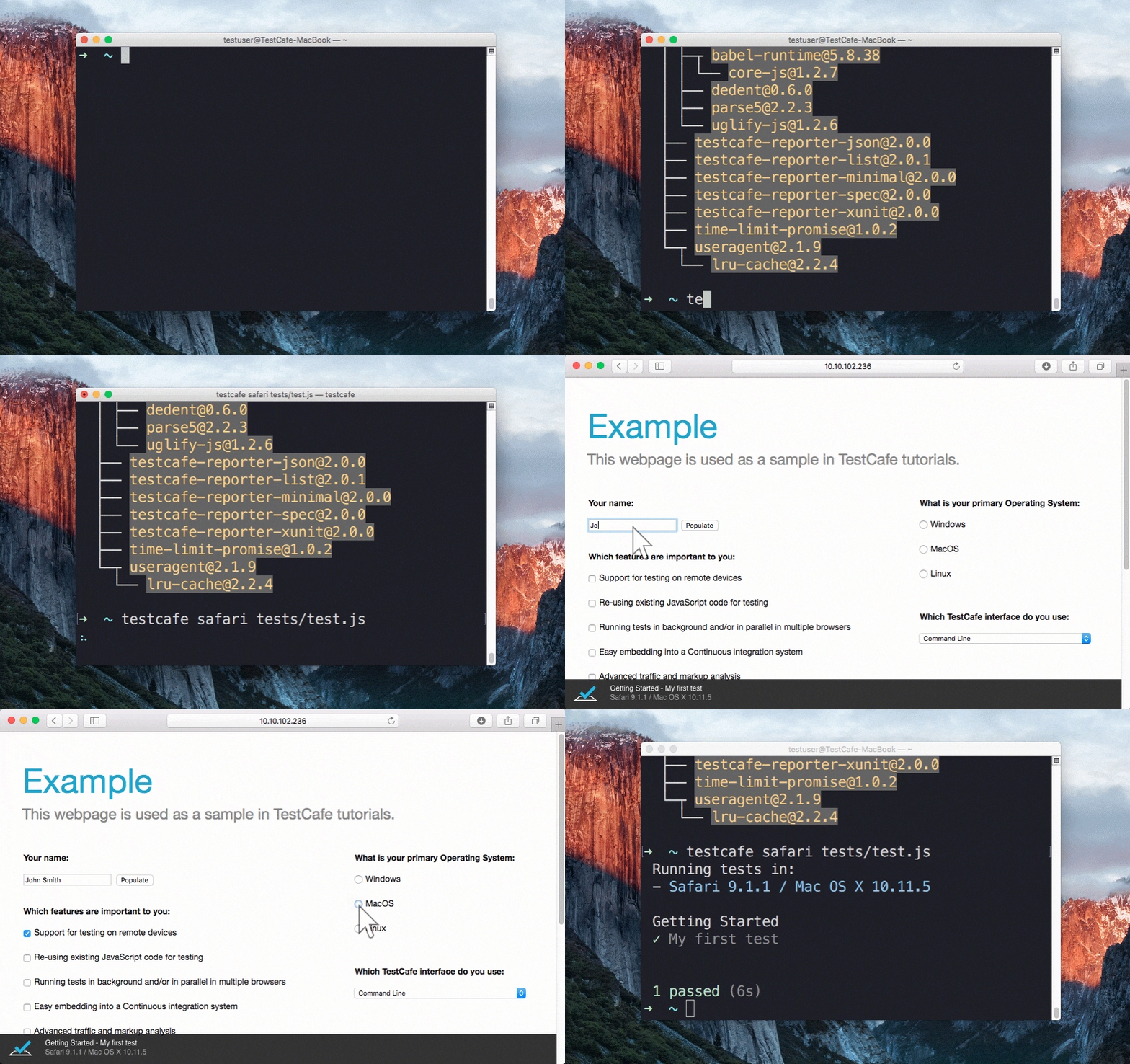
Running a sample test in Safari
- Features
- TestCafe Studio: IDE for End-to-End Web Testing
- Getting Started
- Documentation
- Get Help
- Issue Tracker
- Stay in Touch
- Contributing
- Plugins
- Different Versions of TestCafe
- Badge
- License
- Creators
Stable tests and no manual timeouts
TestCafe automatically waits for page loads and XHRs before the test starts and after each action.
It also features smart test actions and assertions that wait for page elements to appear.
You can change the maximum wait time.
If elements load faster, tests skip the timeout and continue.
Rapid test development tool
Changes in test code immediately restart the test, and you see the results instantly.
See how it works in the TestCafe Live repository.
Latest JS and TypeScript support
TestCafe supports the latest JavaScript features, including ES2017 (for example, async/await).
You can also use TypeScript
if you prefer a strongly typed language.
Detects JS errors in your code
TestCafe reports JS errors that it finds on the webpage.
Tests automatically fail because of that.
However, you can disable this.
Concurrent tests launch
TestCafe can open multiple instances of the same browser to run parallel
tests which decreases test execution time.
PageObject pattern support
The TestCafe's Test API
includes a high-level selector library, assertions, etc.
You can combine them to implement readable tests with the PageObject pattern.
const macOSInput = Selector('.column').find('label').withText('MacOS').child('input');Easy to include in a continuous integration system
You can run TestCafe from a console, and its reports can be viewed in a CI system's interface
(TeamCity, Jenkins, Travis & etc.)
TestCafe works great for JavaScript developers, but at some point you will need to delegate testing tasks to your Q&A department. If that's the case and you are looking for a codeless way to record and maintain tests compatible with your existing infrastructure, check out TestCafe Studio - a testing IDE built on top of the open-source TestCafe.
Read the following article to learn how TestCafe Studio could fit into your workflow: What's Better than TestCafe? TestCafe Studio.
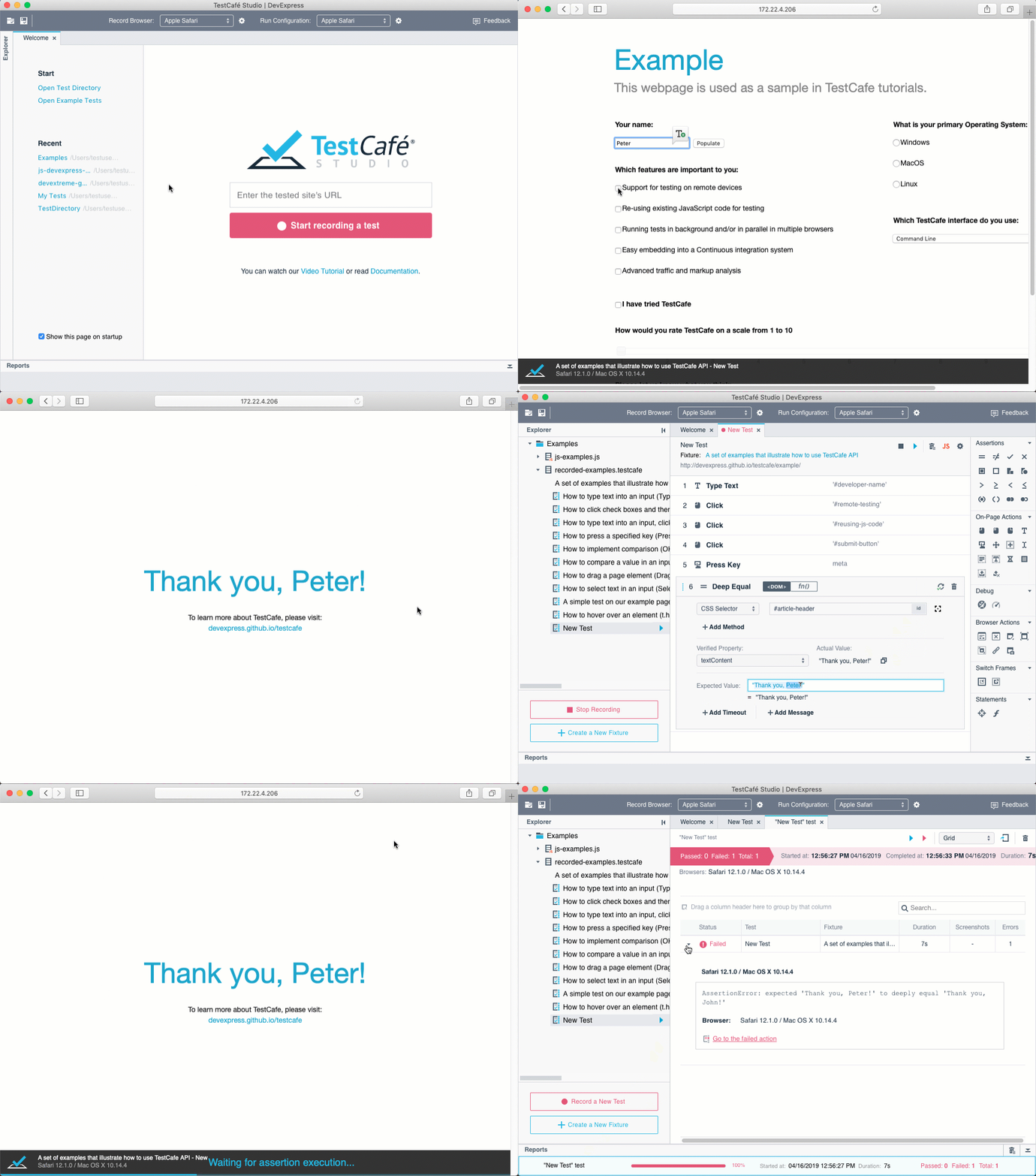
Record and Run a Test in TestCafe Studio
Ensure that Node.js (version 6 or newer) and npm are installed on your computer before running it:
npm install -g testcafeAs an example, we are going to test the https://devexpress.github.io/testcafe/example page.
Create a .js or .ts file on your computer.
Note that it needs to have a specific structure: tests must be organized into fixtures.
You can paste the following code to see the test in action:
import { Selector } from 'testcafe'; // first import testcafe selectors

fixture `Getting Started`// declare the fixture
    .page `https://devexpress.github.io/testcafe/example`;  // specify the start page


//then create a test and place your code there
test('My first test', async t => {
    await t
        .typeText('#developer-name', 'John Smith')
        .click('#submit-button')

        // Use the assertion to check if the actual header text is equal to the expected one
        .expect(Selector('#article-header').innerText).eql('Thank you, John Smith!');
});Call the following command in a command shell. Specify the target browser and file path.
testcafe chrome test1.jsTestCafe opens the browser and starts executing the test.
Important! Make sure to stay in the browser tab that is running tests. Do not minimize the browser window. Tests are not guaranteed to execute correctly in inactive tabs and minimized browser windows because they switch to a lower resource consumption mode.
TestCafe outputs the results into a command shell by default. See Reporters for more information. You can also use plugins to customize the reports.

Read the Getting Started page for a more detailed guide.
Go to our website for full documentation on TestCafe.
Join the TestCafe community on Stack Overflow to get help. Ask and answer questions with the TestCafe tag.
Use our GitHub issues page to report bugs and suggest improvements.
Follow us on Twitter. We post TestCafe news and updates, several times a week.
Read our Contributing Guide to learn how to contribute to the project.
To create your own plugin for TestCafe, you can use these plugin generators:
- Build a browser provider to set up tests on your on-premises server farm, to use a cloud testing platform, or to start your local browsers in a special way. Use this Yeoman generator to write only a few lines of code.
- To build a custom reporter with your formatting and style, check out this generator.
If you want your plugin to be listed below, send us a note in a Github issue.
Thank you to all the people who already contributed to TestCafe!
 |
 |
 |
 |
 |
 |
|---|---|---|---|---|---|
| Nuarat | Farfurix | aleks-pro | ericyd | NickCis | andrewbranch |
 |
 |
 |
 |
 |
 |
|---|---|---|---|---|---|
| radarhere | ai | AndyWendt | arubtsov | infctr | caseyWebb |
 |
 |
 |
 |
 |
 |
|---|---|---|---|---|---|
| smockle | beyondcompute | GeoffreyBooth | Ivan-Katovich | jamesgeorge007 | mcjim |
 |
 |
 |
 |
 |
 |
|---|---|---|---|---|---|
| dej611 | MatthewNielsen27 | morfey13 | renancouto | honsq90 | sgrillon14 |
 |
 |
 |
 |
 |
 |
|---|---|---|---|---|---|
| timnederhoff | tobiasbueschel | raspo | varunkumar | theghostbel | vitalics |
 |
 |
 |
 |
 |
 |
|---|---|---|---|---|---|
| aha-oretama | bsmithb2 | link89 | murajun1978 | pietrovich | superroma |
 |
 |
 |
 |
 |
 |
|---|---|---|---|---|---|
| VasilyStrelyaev | AndreyBelym | AlexanderMoskovkin | inikulin | helen-dikareva | AlexKamaev |
 |
 |
 |
 |
 |
 |
|---|---|---|---|---|---|
| miherlosev | MargaritaLoseva | LavrovArtem | churkin | kirovboris | AlexSkorkin |
 |
 |
 |
 |
|---|---|---|---|
| lzxb | intermike | DevSide | b12031106 |
TestCafe developers and community members made these plugins:
-
Browser Providers
Allow you to use TestCafe with cloud browser providers and emulators.- Nightmare headless provider (by @ryx)
- fbsimctl iOS emulator (by @ents24)
- Electron (by @AndreyBelym)
- Puppeteer (by @jdobosz)
-
Framework-Specific Selectors
Work with page elements in a way that is native to your framework.- React (by @kirovboris)
- Angular (by @miherlosev)
- Vue (by @miherlosev)
- Aurelia (by @miherlosev)
-
Plugins for Task Runners
Integrate TestCafe into your project's workflow. -
Custom Reporters
View test results in different formats.- TeamCity (by @nirsky)
- Slack (by @Shafied)
- NUnit (by @AndreyBelym)
- TimeCafe (by @jimthedev)
-
Test Accessibility
Find accessibility issues in your web app. -
IDE Plugins
Run tests and view results from your favorite IDE. -
ESLint
Use ESLint when writing and editing TestCafe tests.- ESLint plugin (by @miherlosev)
| TestCafe | TestCafe Studio | |
|---|---|---|
| No need for WebDriver, browser plugins or other tools | ✓ | ✓ |
| Cross-platform and cross-browser out of the box | ✓ | ✓ |
| Write tests in the latest JavaScript or TypeScript | ✓ | ✓ |
| Clear and flexible API supports ES6 and PageModel pattern | ✓ | ✓ |
| Stable tests due to the Smart Assertion Query Mechanism | ✓ | ✓ |
| Tests run fast due to intelligent Automatic Waiting Mechanism and Concurrent Test Execution | ✓ | ✓ |
| Custom reporter plugins | ✓ | ✓ |
| Use third-party Node.js modules in test scripts | ✓ | ✓ |
| Integration with popular CI systems | ✓ | ✓* |
| Free and open-source | ✓ | |
| Visual Test Recorder | ✓ | |
| Interactive Test Editor | ✓ | |
| Automatic Selector Generation | ✓ | |
| Run Configuration Manager | ✓ | |
| IDE-like GUI | ✓ |
* You can use open-source TestCafe to run TestCafe Studio tests in CI systems.
Show everyone you are using TestCafe:

To display this badge, add the following code to your repository readme:
<a href="https://github.com/DevExpress/testcafe">
    <img alt="Tested with TestCafe" src="https://img.shields.io/badge/tested%20with-TestCafe-2fa4cf.svg">
</a>On January 12, 2026, LambdaTest evolved to TestMu AI, the world's first fully autonomous Agentic AI Quality Engineering Platform.
Same team. Same infrastructure. Same customer accounts. All existing LambdaTest logins, scripts, capabilities, and integrations continue to work without change.
👉 Find the new home for LambdaTest.
In 2017, we launched LambdaTest with a simple mission: make testing fast, reliable, and accessible. As LambdaTest grew, we expanded into Test Intelligence, Visual Regression Testing, Accessibility Testing, API Testing, and Performance Testing, covering the full depth of the testing lifecycle.
As software development entered the AI era, testing had to evolve, too. We rebuilt the architecture to be AI-native from the ground up, with autonomous agents that plan, author, execute, analyze, and optimize tests while keeping humans in the loop. The platform integrates with your repos, CI, IDEs, and terminals, continuously learning from every code change and development signal.
That evolution earned a new name: TestMu AI, built for an AI-first future of quality engineering. TestMu is not a new name for us. It is the name of our annual community conference, which has brought together 100,000+ quality engineers to discuss how AI would reshape testing, long before that became an industry norm.
What started as a high-performance cloud testing platform has transformed into an AI-native, multi-agent system powering a connected, end-to-end quality layer. That evolution defined a new identity: LambdaTest evolved into TestMu AI, built for an AI-first future of quality engineering.
Code released under the MIT license.
Developer Express Inc. (https://devexpress.com)