In Practice: QODER CLI × HARNESS ENGINEERING — Building a 7×24 Autonomous Feedback Processing System

desc: A 7×24 unattended feedback system built on Qoder CLI, compressing root-cause analysis per issue from 30 minutes to 2.
category: Technology
img: https://img.alicdn.com/imgextra/i4/O1CN01QdHNTC1WKFqHk40BR_!!6000000002769-2-tps-1712-1152.png
time: April 24, 2026 · 3min read
Background
As the Qoder product family grows and user volume continues to climb, feedback and suggestions from users across Qoder products are increasing rapidly. However, the previous feedback handling process was entirely manual: operations staff exported Excel data from feedback channels, cleaned and categorized it, then manually entered it into the project management system. Finally, engineers analyzed logs and pinpointed issues by hand.
The pain points of this workflow are obvious — operations got trapped in repetitive work of data entry and ticket dispatch, while engineers spent at least 30 minutes on each log analysis task, and even longer for complex issues. As feedback volume grew, the human bottleneck became increasingly pronounced, with large backlogs piling up without timely response.
Our goal is clear: build a 7×24 autonomous user feedback processing system — from feedback submission to issue classification, clustering, log analysis, and even code fixes, all handled automatically by Agents, with humans only doing a final review at the last Code Review stage.
Product Design
To achieve this, we designed a new issue-processing backend with four core modules connected in a pipeline sequence:
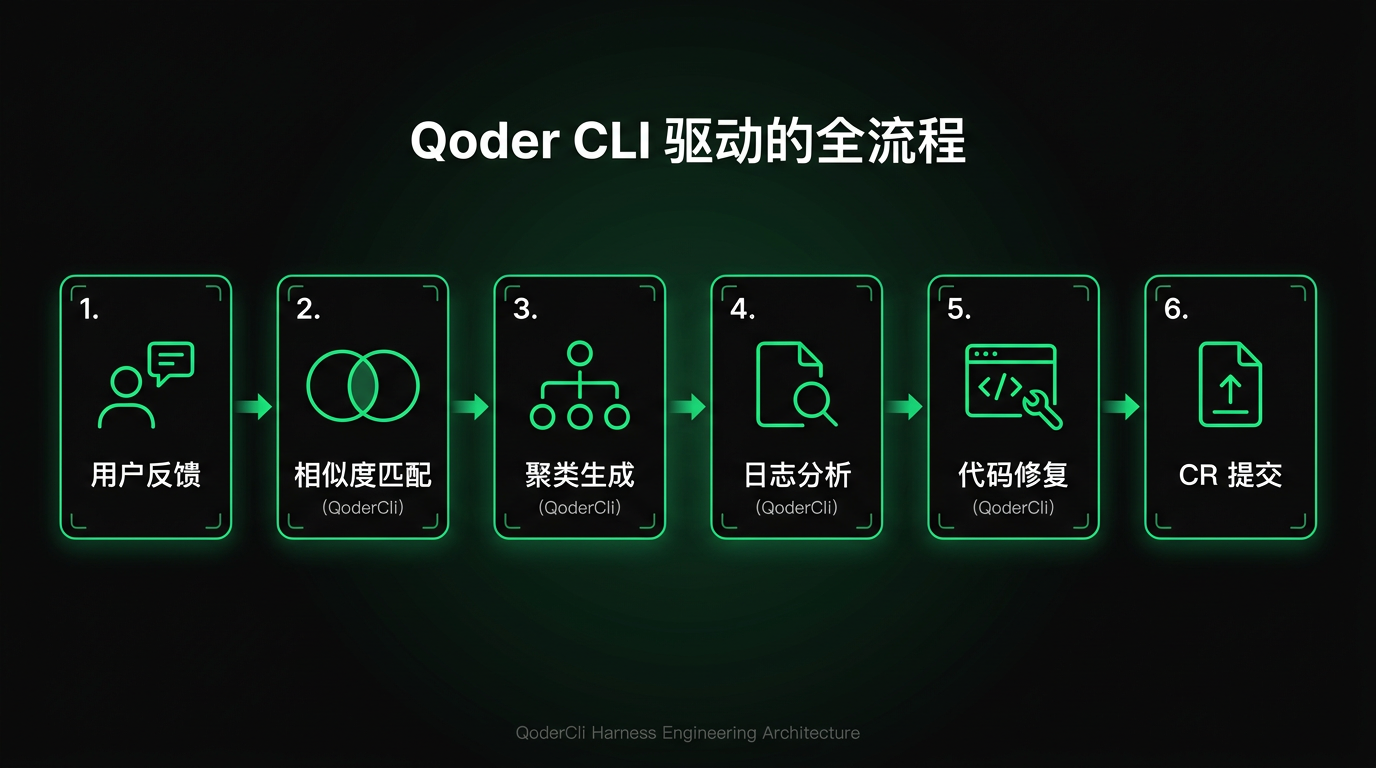
Issue Classification: After a user submits feedback, the system first filters out invalid data, classifies valid feedback into product suggestions and bug reports, and further determines the business-domain subcategory for bug reports. This step replaces the manual classification and entry work previously done by operations staff.
Issue Clustering: On top of classification, the system aggregates similar issues. This reduces interference from duplicate problems, allowing subsequent advanced analysis to focus on issues that truly need attention, rather than being drowned by N reports of the same bug.
Log Analysis: For bugs requiring deep investigation, the system automatically analyzes logs in conjunction with the codebase, extracts user operation trajectories, identifies root causes, and provides fix recommendations. This step replaces the manual log analysis previously done by engineers.
Auto Fix: For issues where the AI has high confidence in a fix, the system automatically generates fix code and creates a Code Review, with humans performing the final review.
For the boundary between human and machine collaboration, our principle is: classification, clustering, and analysis are fully delegated to Agents; code fixing is done by Agents but retains human Code Review as a quality gate. Agents handle throughput; humans ensure quality.
Technical Implementation
Why Qoder CLI
The entire AI capability layer of our system is built on Qoder CLI. The reasons for choosing CLI over direct model API calls or other Agent frameworks are core:
| Feature | Advantage |
|---|---|
| Interaction Model | Naturally Agent-friendly, atomic operations, pure text stream processing, easy for LLM parsing |
| Environment Compatibility | Unified interaction logic, Agents seamlessly migrate across platforms, local dev machines, CI/CD pipelines, and production servers |
| Process Isolation | Each invocation is an independent process, tasks do not interfere, failures or timeouts do not affect the host service |
| Observability | Execution logs, Exit Code, Stdout/Stderr are all traceable, enabling Agent backtracking and self-correction |
| Standard Protocol | Based on POSIX/Shell standards, Agents can precisely invoke CLI capabilities, pipe composition without multiple adapters |
| Rich Tooling | Built-in grep, read, web_search tools, Agents can autonomously plan invocations without extra toolchain development |
For Harness Engineering scenarios requiring 7×24 continuous operation, CLI's instant start/stop, concurrency-friendly, and process-isolation characteristics are especially critical. Direct model API calls require managing tool invocation, context windows, retry logic, and much other infrastructure code, while Qoder CLI encapsulates all of this — we only need to focus on business orchestration.
Environment Setup
Add the Qoder CLI installation script to the server-side application's Dockerfile:
RUN curl -fsSL https://qoder.com/install | bash
Then copy the Access Token from https://qoder.com/account/integrations and configure it as the environment variable QODER_PERSONAL_ACCESS_TOKEN. This allows Qoder CLI to be invoked via subprocess from the server-side code.
When invoking, pass the prompt via the -p parameter and enable headless mode without TUI interaction. Other commonly used parameters:
--yolo: Auto-confirm mode, no human interaction needed--model: Model tier selection, better models cost more--output-format=json: Structured output for program parsing, observe reasoning process--worktree: Independent workspace to avoid multi-task file conflicts--max-turns: Limit maximum turns to prevent infinite loops wasting tokens
Issue Classification
After user feedback data is submitted, Qoder CLI is first used for preliminary issue classification. In this single-turn task, Qoder CLI performs:
- Filter out invalid data without specific feedback information
- Classify remaining issues into product suggestions and bug reports
- Determine whether bug reports are valid defects
- Further classify valid defects into business-domain subcategories
This task does not require high model capability or deep reasoning; --model with Effective tier is sufficient, saving significant cost.
Issue Clustering
After parsing Qoder CLI's structured output, we obtain issue classifications. Within each category dimension, a similarity matching and clustering task is performed.
Clustering uses Qoder CLI for LLM semantic understanding rather than traditional text similarity algorithms. The reason: the same issue may be described in completely different ways, and user screenshots must also be considered — pure text matching cannot handle this.
In this task, we leverage Qoder CLI's Auto model tier multimodal capability to comprehensively analyze screenshots, user descriptions, and client environment information, generating clustering metadata for matching against the active issue database, and passing this data to another Qoder CLI subprocess for clustering.
To ensure clustering quality, the context length fed to the large model must be controlled within a certain range to prevent memory and attention degradation. Therefore, we set a dynamic time window to retire old clustering issues, using issue freshness combined with a time-decay coefficient to improve correct clustering hit rate.
Since the Auto model tier's capability range is limited, its clustering output requires further dynamic tuning. We have Qoder CLI output issue similarity data, allowing dynamic threshold adjustment to tune aggregation effects in practice. Going further, we can use an advanced model to set up an "inspector" within the Harness Engineering system to sample and review aggregation results, providing adjustment direction recommendations for the similarity threshold based on quality-check outcomes.
Log Analysis and Root Cause Identification
After issue classification and clustering, the system enters a deeper technical analysis phase. The goal of this task is to analyze logs in conjunction with the codebase, extract user operation trajectories, and identify root causes.
Here, Qoder CLI's Performance model tier is used, fully leveraging its Agent autonomy and rich tool invocation capabilities. Codebases and logs are typically very large, and reading everything with the read tool would degrade results. Qoder CLI intelligently uses the grep tool to efficiently search relevant content based on issue descriptions, and even autonomously plans web_search tool queries for similar issues on VS Code without prompting.
Before the task concludes, we require Qoder CLI to perform a retrospective review: could fewer tool invocations have found the root cause? Which steps in this operation were ineffective or avoidable? What lessons learned can be summarized to prevent the same mistakes next time?
This reflection data is written to a separate task-retro.md file, which is periodically reviewed by another Pipeline Agent responsible for process improvement to update the corresponding Skill content. The entire process forms a clear evolution chain:
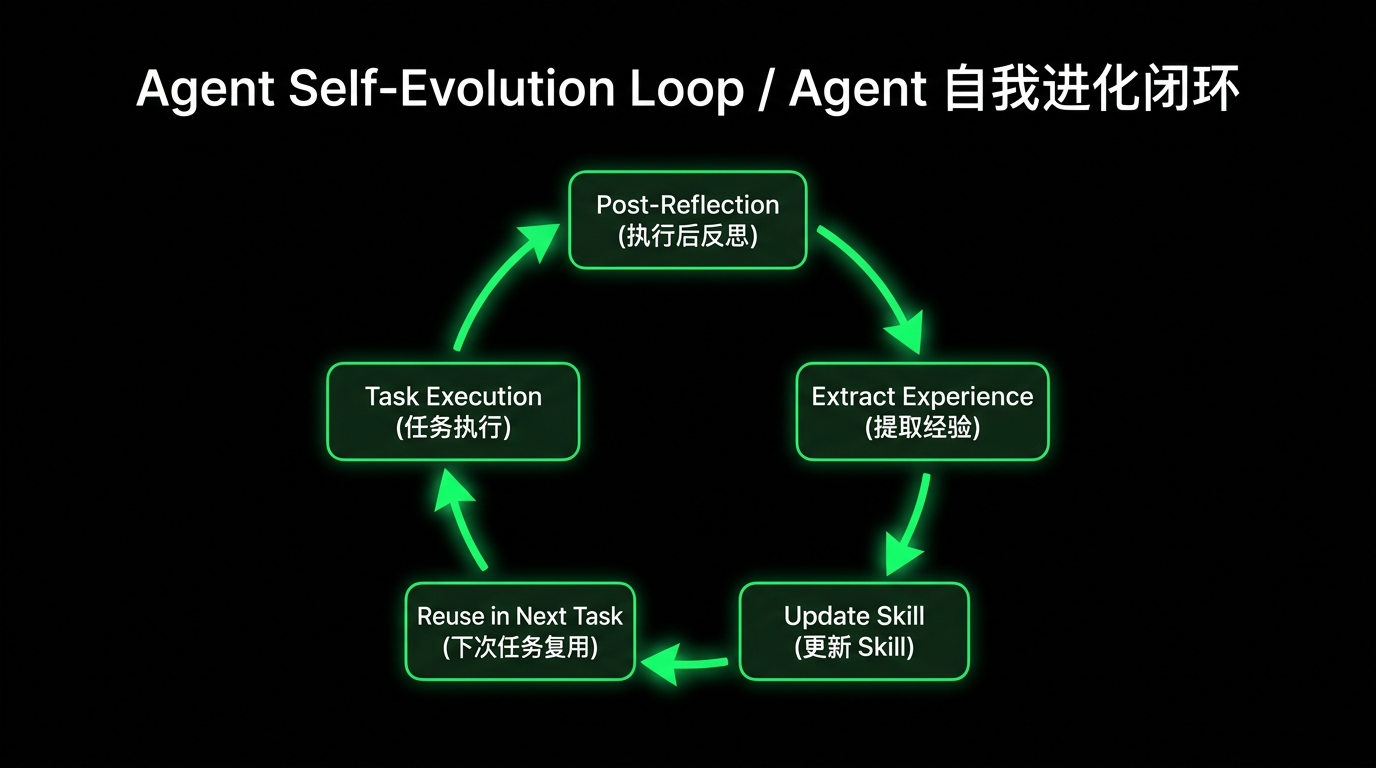
This closed loop gives the system self-evolution capability, corresponding to the Critic → Refiner feedback loop in Harness: every Agent mistake is a signal. If the same category of errors recurs repeatedly, it indicates a gap in the Harness itself. Rather than relying on humans to discover these gaps, let the system analyze and patch itself.
Auto Fix
During the log analysis task, we have the AI autonomously evaluate fix confidence and structurally output a confidence score for resolving the issue. We set dynamic thresholds to trigger auto-fix tasks.
The reason for introducing the confidence-score mechanism is that even with the Ultimate model, current SOTA large model capabilities cannot autonomously resolve all issues. While fully unattended Harness Engineering is the end goal, in the present moment, we must be realistic about cost control and avoid fix tasks producing large amounts of invalid code. In this task, we rely on Qoder CLI's --worktree capability to support concurrent fixes for different issues within the same project.
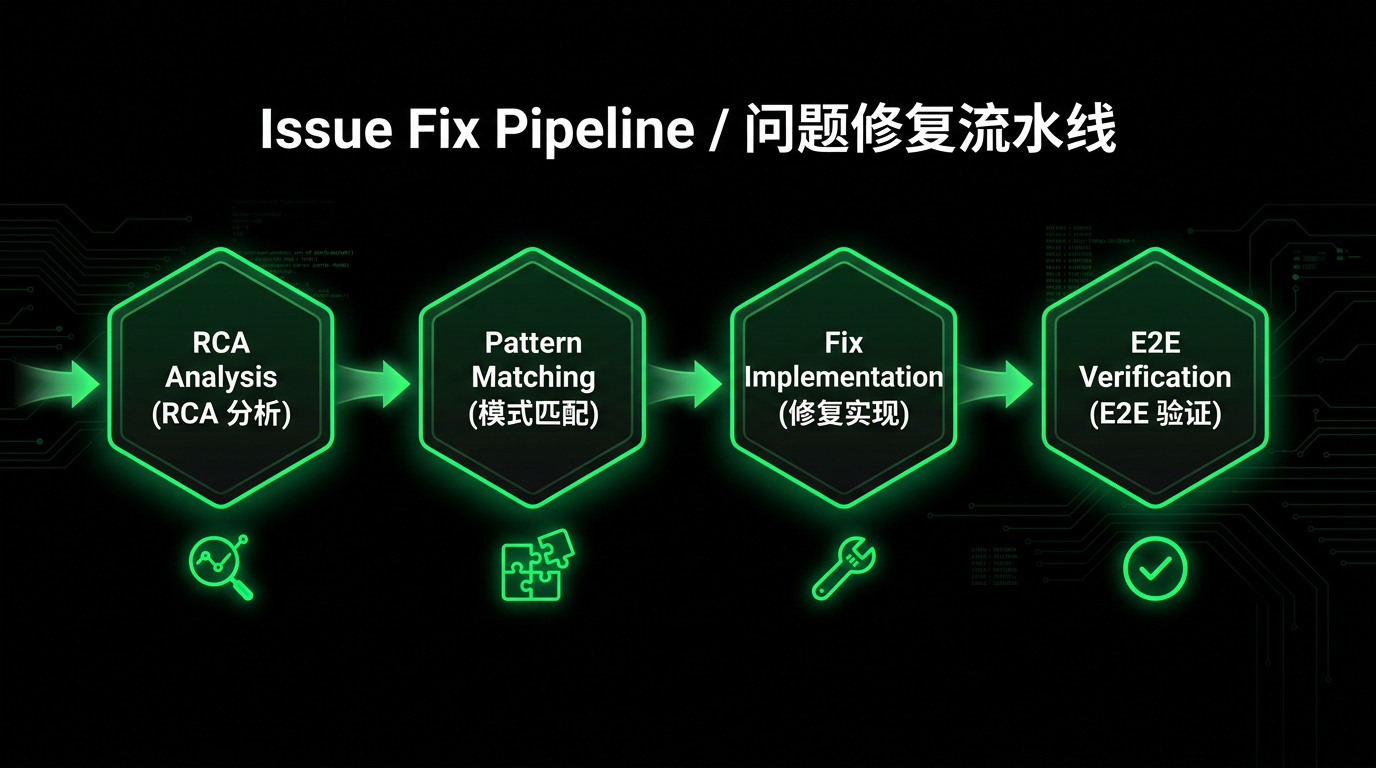
We built a problem diagnosis and fix Skill system:
| Skill | Responsibility |
|---|---|
| debug | Workflow orchestrator, coordinates downstream Skills |
| rca | Log analysis + code traceability + root cause identification |
| fix | Fix implementation + build validation |
| qodercli-dev | Python SDK driven E2E test validation |
These Skills work together to form a complete fix pipeline:
To control the cost ceiling, we added two measures:
qodercli -p "..." --max-turns 80        # limit invocation turns
timeout 1800 qodercli -p "..." --yolo   # limit timeout duration
After fix tasks complete, a ticket system API call is used to create a Code Review.
System Self-Ops Closed Loop
So far, we have built a complete chain from user feedback to auto-fix. But this system itself also needs operations and iteration, so we adopted the Harness approach to build it.
The core idea: every task failure is not an endpoint but a trigger for self-diagnosis and repair. Through a single Qoder CLI invocation combined with Aone Change MCP deployment capabilities, the Agent can autonomously complete a full self-healing closed loop. We codified this process as a devops Skill in the project:
qodercli -p "Task task-123456 failed, please diagnose and fix" --yoloThe devops Skill tells the AI "how to fetch logs," "common error patterns," and "how to invoke Aone MCP tools for deployment." After loading the Skill, the Agent autonomously drives the entire fix flow:
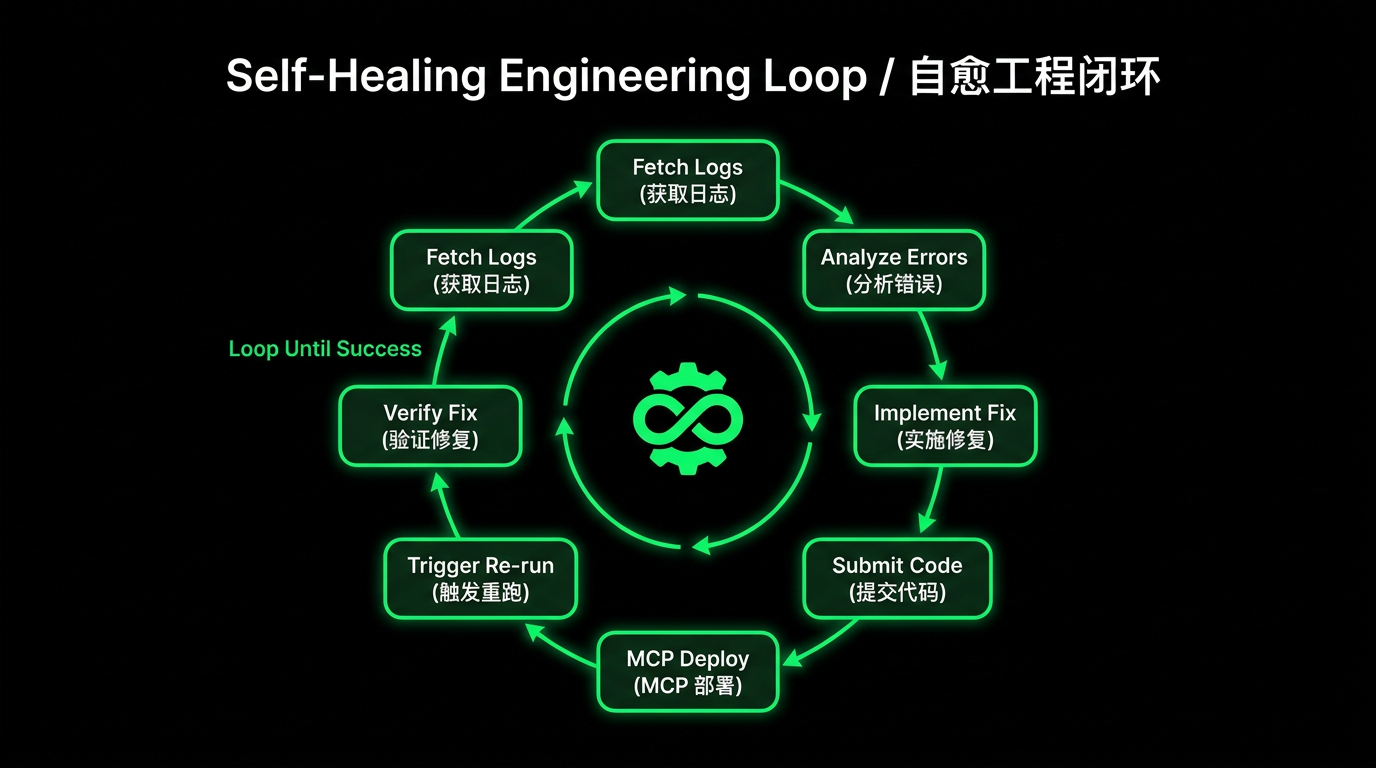
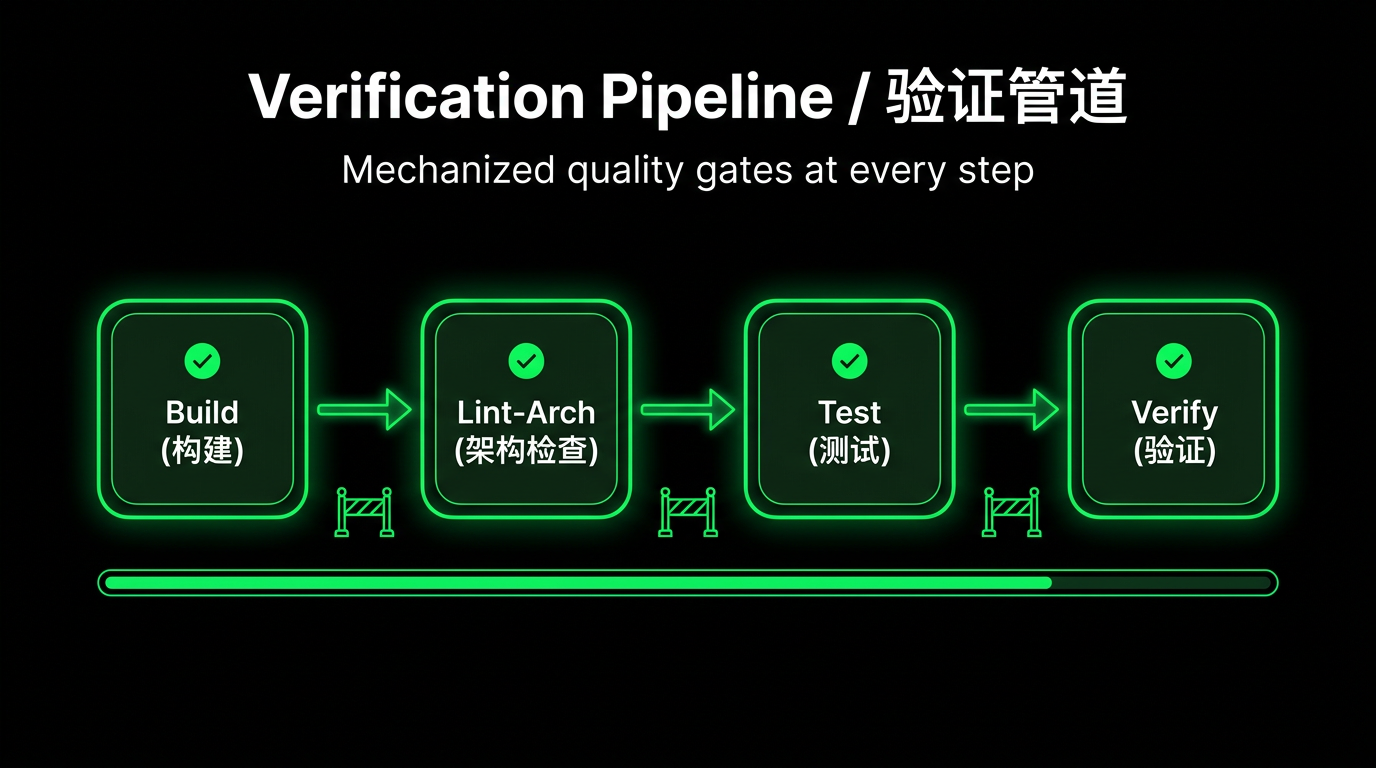
This corresponds to the verification pipeline concept in Harness: at every step, set up mechanized quality gates. Do not rely on Agent "intuition" to judge completion — use deterministic checks to ensure quality.
In the practice of programmatically invoking Qoder CLI, special attention must be paid to cost control to avoid wasting credits due to program exceptions. But do not cut costs by blindly using cheaper models. From our experience, using cheap models is actually more wasteful.
Complex tasks require strong models. Root cause analysis and code fix tasks involve deep reasoning; if cheap models are used, they will repeatedly try in wrong directions, consuming large amounts of tokens and time, and ultimately fail to produce correct answers. In these cases, it is better to go straight to the SOTA model — getting it right the first time is actually cheaper.
Simple tasks use small models. Issue clustering and user operation trajectory extraction tasks cause strong models to engage in unnecessary deep reasoning, slowing response without better output. Cheap small models are faster and more accurate.
Our final conclusion: tier models by task complexity — classification and clustering use economic models, log analysis uses performance models, code fixes use ultimate models. Matching different models to different stages is the optimal balance of cost and effectiveness.
Results
With this system, the user feedback handling process has transformed qualitatively. Previously, from feedback submission to manual log analysis and root cause identification, each issue required at least 30 minutes; now the system completes root cause analysis automatically in just 2 minutes.
The entire system can run 7×24 hours uninterrupted, and the only human intervention required is the final Code Review at the last stage. Full-time operations no longer need to spend time on Excel import/export and manual classification entry, and engineers no longer need to read logs one by one.
The return on investment in environment design carries time leverage — as the system continues to run, Agent Skills are continuously optimized through self-reflection, and the more experience accumulated, the better the performance. Welcome to try Qoder CLI and build self-growing Harness Engineering in your own business scenarios.