
This fork of DrawDB extends the original with AI assistant integration via Model Context Protocol (MCP). AI assistants like Claude can create, modify, and manage database diagrams programmatically.
The backend owns the diagram. MCP tools read and write the authoritative state directly, so every tool works whether or not a browser is open — you do not need the editor running for an assistant to build a schema. When a GUI is connected it acts as a synced view: the backend pushes each committed change to it, and edits made in the editor are submitted back. A tab that reconnects adopts whatever the backend holds.
This project began as a fork of DrawDB but has since diverged substantially and is intentionally not kept in sync with upstream. Selected fixes and features are occasionally cherry-picked from the parent project, but the two will continue to drift apart as drawdb-mcp evolves on its own. DrawDB remains a separate, actively maintained project, and full credit goes to its authors — see drawdb-io/drawdb.
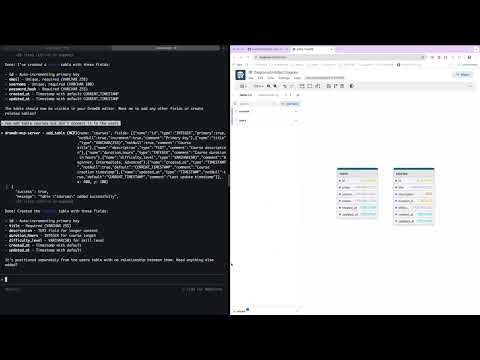
Watch how to design database schemas using natural language with Claude AI.
Architecture:
- apps/gui: React frontend derived from DrawDB — a synced view of the backend's diagram, not the store
- apps/backend: NestJS MCP server that holds the authoritative diagram state
- packages/diagram-core: framework-free domain layer — entity schemas, the state reducer, the datatype tables and the SQL/DBML codecs, so the backend can render exports with no GUI running
- packages/remote-control-contract: the typed ORPC contract both directions of the socket share
- Built with Turborepo and pnpm workspaces
The easiest way to get started is using Docker:
docker run \
  --name drawdb-mcp \
  -p 8080:80 \
  -p 3000:3000 \
  --restart unless-stopped \
  ghcr.io/anatoly-lab/drawdb-mcp:latest
Then:
- Open GUI: http://localhost:8080
- Connect Claude Code to the MCP server:
claude mcp add --transport http drawdb-mcp http://127.0.0.1:3000Now Claude can create and modify database diagrams for you!
latest tracks stable releases only. Betas and release candidates are published under their exact version and never move latest, so pin the full version to run one:
docker run \
  --name drawdb-mcp \
  -p 8080:80 \
  -p 3000:3000 \
  ghcr.io/anatoly-lab/drawdb-mcp:2.0.0-beta.1
See GHCR_DEPLOYMENT.md for available tags and advanced usage.
- Node.js 20.19+ or 22.22+ (see
enginesinpackage.json) - pnpm 8.15.0+ (install via
npm install -g pnpm)
Start both GUI and backend:
git clone https://github.com/anatoly-lab/drawdb-mcp
cd drawdb-mcp
pnpm install
pnpm dev
Start GUI only:
pnpm gui:dev
# Access at http://localhost:5173
Start backend only:
pnpm backend:dev
# WebSocket at ws://localhost:3000/remote-control
Build both applications:
pnpm install
pnpm build
Build specific app:
pnpm build --filter=gui
pnpm build --filter=backendWhen running locally, connect Claude Code:
claude mcp add --transport http drawdb-mcp http://127.0.0.1:3000The frontend connects to the backend over WebSocket automatically. Remember it is a view of the backend's state rather than the store: the tools keep working with no browser open, and a tab that reconnects adopts whatever the backend holds.
See DOCKER_BUILD.md for detailed build instructions.
Build with Docker Compose:
docker-compose up --build
# Access at http://localhost:8080
Or build directly:
docker build -t drawdb-mcp:local .
docker run -p 8080:80 -p 3000:3000 drawdb-mcp:local
The Docker image includes both frontend and backend. WebSocket is proxied through Nginx.
When updating to a new version (whether via Docker or local development), you must perform a hard refresh in your browser to clear the cached frontend JavaScript:
- Windows/Linux:
Ctrl + Shift + RorCtrl + F5 - macOS:
Cmd + Shift + R
Without a hard refresh, the browser may continue using the old cached frontend code even though the backend has been updated, which can cause errors or unexpected behavior.
The MCP server provides tools for exporting and importing database diagrams in multiple formats:
Export Formats:
- SQL DDL: Export database-specific SQL statements (PostgreSQL, MySQL, SQLite, MariaDB, MSSQL, Oracle)
- DBML: Export to Database Markup Language (human-readable, database-agnostic format)
- JSON: Export complete diagram state for backup/restore
Import Formats:
- DBML: Import database schemas from DBML format
- JSON: Import complete diagram state
Available MCP Tools:
export_sql- Export diagram as SQL DDL for current database typeexport_dbml- Export diagram as DBMLimport_dbml- Import database schema from DBMLexport_diagram- Export complete diagram as JSONimport_diagram- Import complete diagram from JSON
See CLAUDE.md for complete list of available MCP tools and their usage.
This project is licensed under the GNU Affero General Public License v3.0 (AGPL-3.0), inherited and retained from upstream DrawDB. See the LICENSE file for the full text.
Built on top of DrawDB by the DrawDB authors and contributors. Huge thanks to the original project for the foundation this fork is built on.