Edge-preserving color cleanup for flat illustrations, logos, and AI-generated raster graphics.
deblotch removes small color blotches, accidental gradients, and local color
noise from artwork that is supposed to look flat. It combines median filtering
and mean-shift filtering behind a small, opinionated Python API and CLI.
It is deliberately not a general image-restoration system: there is no machine learning, semantic segmentation, vectorization, or contour reconstruction.




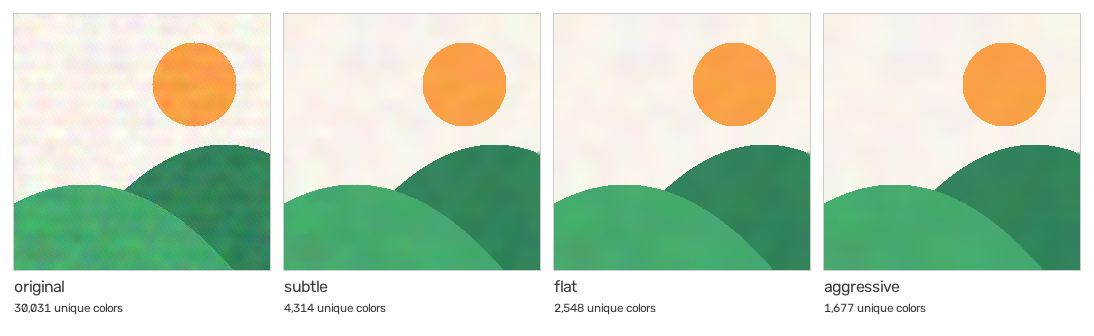
The strip is a synthetic flat illustration with added speckle, banding, and
color blotches (assets/generate_demo.py). The count under each panel is the
unique-color diagnostic that --stats prints.
The picture is correct. The pixels are slightly dirty.
Flat illustrations and AI-generated raster graphics often carry color artifacts that are hard to notice one by one but make clean artwork look muddy or uneven: small chromatic blotches, faint accidental gradients, speckle, and noisy transitions near edges.
General-purpose denoisers are built for photographs, and heavier restoration
approaches may blur edges, alter shapes, or bring far more machinery than
this problem needs. deblotch targets the narrower case: artwork whose
geometry is already right and whose color fields just need cleaning.
It provides:
- edge-preserving color cleanup built on median and mean-shift filtering;
- reproducible presets for common cleanup strengths;
- predictable handling of alpha channels and raster formats;
- a Python API for pipelines and a CLI for single files or batches;
- conservative filesystem behavior, so large batches process safely.
It does not try to redraw, reinterpret, or add detail to an image. If the
geometry is wrong, deblotch is the wrong tool.
deblotch requires Python 3.10 or newer.
With uv, either as the deblotch command in an isolated tool environment or
as a project dependency:
uv tool install deblotch   # just the CLI, kept out of your environments
uv add deblotch            # the Python API and CLI inside a project
With pip:
python -m pip install deblotchFor development, from a checkout:
python -m pip install -e ".[dev]"The package uses opencv-python-headless because it does not need OpenCV's GUI
features. OpenCV's wheel variants all provide the same cv2 module and should
not be installed together; remove opencv-python, opencv-contrib-python, or
other OpenCV wheel variants before installing deblotch if they conflict.
Clean one image:
deblotch input.png output.pngChoose a preset or override individual parameters:
deblotch input.png output.png --preset subtle
deblotch input.png output.png --preset aggressive
deblotch input.png output.png --color 22 --spatial 12 --median 3
Snap nearly white pixels to pure white and print color statistics:
deblotch input.png output.png --white-threshold 250 --statsExisting outputs are protected by default. Pass --force to replace them:
deblotch input.png output.png --forceInput and output may never be the same file, including with --force.
Process a glob or directory:
deblotch "assets/*.png" --output-dir cleaned/
deblotch assets/ --output-dir cleaned/
Process nested directories while preserving their relative layout:
deblotch assets/ --output-dir cleaned/ --recursiveWhen the output directory is inside the input tree, deblotch excludes that
directory from input discovery. It also rejects output collisions before
writing any files. Directory inputs preserve their relative layout; glob
inputs are flattened to basenames inside --output-dir.
Once the package is installed, the same CLI is available even when its console
script is not on PATH:
python -m deblotch --helpClean a file:
from deblotch import clean

output = clean(
    "input.png",
    "output.png",
    color_radius=18,
    spatial_radius=10,
)
clean returns the output pathlib.Path. Set overwrite=True to replace an
existing destination. It still rejects using the input itself as the output.
Clean an in-memory OpenCV/NumPy image:
import cv2

from deblotch import clean_image

image = cv2.imread("input.png", cv2.IMREAD_UNCHANGED)
cleaned = clean_image(image, preset="flat")
clean_image accepts unsigned 8-bit BGR or BGRA arrays, never mutates its
input, and preserves the alpha channel byte for byte. RGB hidden beneath fully
transparent pixels is normalized before filtering so it cannot bleed into
visible edges.
Both functions also accept a pre-validated settings object, which is useful when the same configuration is reused across many images:
from deblotch import clean_image, resolve_settings

settings = resolve_settings("subtle", color_radius=16)
cleaned = clean_image(image, settings=settings)
settings cannot be combined with preset or individual parameter overrides.
| Preset | Median | Spatial radius | Color radius | Pyramid levels | Passes |
|---|---|---|---|---|---|
subtle |
3 | 8 | 12 | 1 | 1 |
flat |
3 | 10 | 18 | 1 | 1 |
aggressive |
3 | 12 | 28 | 1 | 1 |
flat is the default. Explicit options override values from the selected
preset. A median value of 0 or 1 disables the median-filtering step; a
positive even value is rounded up to the next odd kernel size. Pyramid levels
must be between 0 and 8. The white threshold must be between 1 and
255; a threshold of 0 would blank the whole image and is rejected.
PNG, JPEG, WebP, BMP, and TIFF input files are recognized. Alpha-bearing output must use PNG, WebP, or TIFF; deblotch refuses to silently discard alpha when writing JPEG or BMP. Only unsigned 8-bit raster images are supported; 16-bit PNG and TIFF inputs are rejected instead of being converted implicitly.
OpenCV does not preserve image metadata such as EXIF, ICC profiles, or textual PNG metadata. The cleanup is intended for flat raster assets rather than photographs or archival image workflows.
The unique-color count printed by --stats counts BGR colors only for pixels
with nonzero alpha. It is a useful noise diagnostic, not a measurement of
visual quality.
ruff check .
ruff format --check .
mypy src/deblotch
pytest --cov=deblotch
python -m build
python -m twine check dist/*
Golden-image tests compare the presets against fixtures in tests/golden/
with a small tolerance for OpenCV drift. After an intentional algorithm
change, regenerate them with python tests/test_golden.py and review the
visual diff. python assets/generate_demo.py rebuilds the README demo strip.
The project is licensed under Apache-2.0.