Real-time 3D visualization dashboard for OpenClaw AI agents.
Watch your AI agents come alive in a vibrant 3D world — each agent is a continent, each session is a minion walking around. Click to see live conversations, send messages, and monitor your entire agent fleet in real-time.


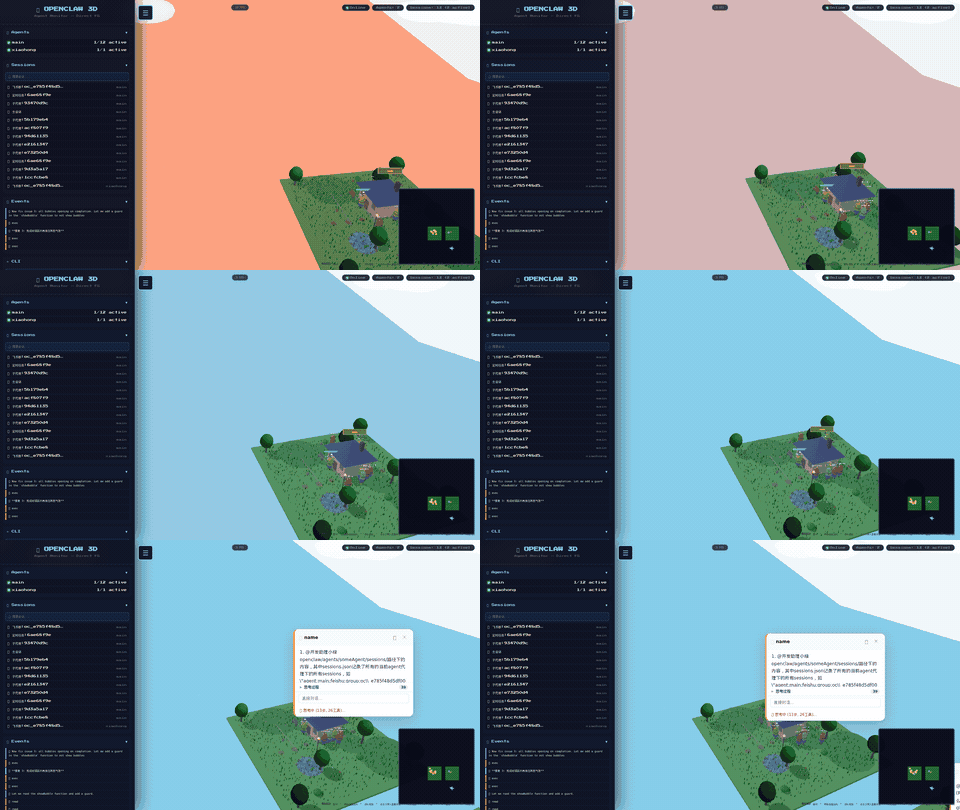
| Problem | Solution |
|---|---|
| "What is my agent doing right now?" | 🟡 Minions with live thinking bubbles |
| "Which session is active?" | 🌍 Each session = a minion on its continent |
| "I want to talk to my agent directly" | 💬 Click any minion to open a chat bubble |
| "Agent dashboards are boring" | 🎮 Pokémon-style 3D world with physics |
- Agent Continents — Each OpenClaw agent gets a procedurally-generated village with houses, trees, flowers, ponds, fences, lamp posts, and benches
- Dynamic Nature — Wind-swaying grass (600+ blades), fluffy animated trees, rippling water with lily pads, floating cherry blossom petals
- Clouds & Sky — Volumetric clouds, dynamic lighting
- Weather Effects — Toggleable rain system
- Draggable Minions — Pick up any minion and drop them anywhere in the world
Each active OpenClaw session spawns a unique minion character:
- Unique Characters — Randomized height, width, body color, eye count (1 or 2), hair style, goggles, arms, legs
- Detailed 3D Model — Capsule body, goggle frames, overalls, shoes — all built from Three.js primitives
- Chinese Names — Each minion gets a random name (小明, 阿花, 大壮...)
- Physics System — Gravity, ground collision, drag & drop with falling animation
- Smart Pathfinding — Walk to points of interest: house, table, pond, bench
- AABB Collision — No walking through walls, furniture, or other minions
- Live Expressions — Eyes change based on state (thinking 💛, done ✅, idle)
- Thinking Bubbles — Animated "..." + mini speech bubble showing latest activity
Click any minion to open its conversation bubble — a live window into the agent's mind:
| Section | What it shows |
|---|---|
| 💭 Thinking | Extended reasoning content (if model supports it) |
| 🔧 Tool calls | Tool name + arguments |
| 📋 Tool results | Execution output (truncated) |
| 💬 Final reply | The actual response sent to the user |
Features:
- Real-time SSE — Updates stream in as the agent works
- Expandable history — Scroll up to load older messages
- Collapsible panel — Click header to show/hide activity log
- Two view modes — Floating bubble (default) or pinned panel (📌)
- Auto-scroll — Follows new activity while respecting manual scroll
- Direct chat — Type in the bubble to send a message to that session
- Abort button — 🛑 Terminate an active thinking run from the bubble
Press T to open the world chat panel — broadcast a message to all agents at once, or watch the live feed of all agent activity across every session.
When auth.enabled: true, the monitor requires login before accessing the 3D world.
How it works:
- The first user to register automatically becomes admin — no pre-seeding needed
- Subsequent registrations require an invite or admin approval
- Session tokens are stored in
localStorageand validated on every API call - The admin panel is accessible only at a secret randomized URL (generated on first run, persisted to disk, printed in server logs, and linked from the 3D world UI via a hidden button)
Roles:
| Role | 3D World | Chat | Admin Panel | User Management |
|---|---|---|---|---|
admin |
✅ | ✅ | ✅ | ✅ |
user |
✅ | ✅ | ❌ | ❌ |
viewer |
✅ | ❌ | ❌ | ❌ |
When auth.enabled: false (default): no login required — anyone with port access can use the monitor.
The admin panel is a separate management UI accessible at the secret URL. It has three sections:
- View all registered users with their role, creation time, and last login
- Create new users (set username, password, role)
- Delete users (with confirmation)
- Change roles on the fly
- Overview cards: total agents, active sessions, total sessions
- Sessions table — lists every session with: agent name, session type (group/dm/cron/subagent), channel, and current status
- Useful for quickly spotting stuck or zombie sessions
- Runtime config editing without restarting the server
Navigation:
- Admin panel has its own sidebar with Users / Agents sections
- "🌍 返回 3D 世界" button in the sidebar takes you back to the 3D monitor
git clone https://github.com/ccperdst-lab/openclaw-monitor.git
cd openclaw-monitor
npm install
npm start
# Open http://localhost:7777
Requires OpenClaw to be installed and running on the same machine.
Create config.yaml in the project root:
openclawRoot: ~/.openclaw  # Path to OpenClaw root (auto-detected if omitted)
port: 7777                 # Server port

auth:
  enabled: false           # Set true to require login

display:
  showCron: true           # Show cron sessions as minions
  showSubagent: true       # Show subagent sessions as minions
recentMinutes: 10 # Only show sessions active in last N minutes| Key | Action |
|---|---|
W / A / S / D or Arrow Keys |
Move camera |
| Mouse drag | Rotate view |
| Scroll | Zoom |
T |
Toggle world chat panel |
R |
Toggle rain |
F1 |
Screenshot mode (hide UI) |
| Click minion | Open conversation bubble |
| Drag minion | Pick up and relocate |
┌─────────────────┐     SSE      ┌──────────────┐
│  OpenClaw       │ ──────────▶  │  Monitor     │
│  Gateway        │              │  Server      │
│  ~/.openclaw/   │ ◀──────────  │  (Express)   │
└─────────────────┘   REST API   └──────┬───────┘
                                        │  WebSocket
                                   ┌────▼────────┐
                                   │  Three.js   │
                                   │  3D World   │
                                   └─────────────┘
The monitor server tails OpenClaw's session JSONL files and broadcasts events to all connected browsers via SSE. No modification to OpenClaw is required.
| Project | Difference |
|---|---|
| openclaw-office | Isometric view, no physics |
| Divan | Room-based, no minions |
| agent-monitor | Pixel art style |
Our edge: Full 3D physics world + per-session minion characters + live thinking bubbles + direct chat + admin panel.
PRs welcome! Check Issues for open tasks.
MIT

