n8n with AI coding agent integration. This fork adds a chat sidebar and "Fix with vibe8n" button to help you build and debug workflows.
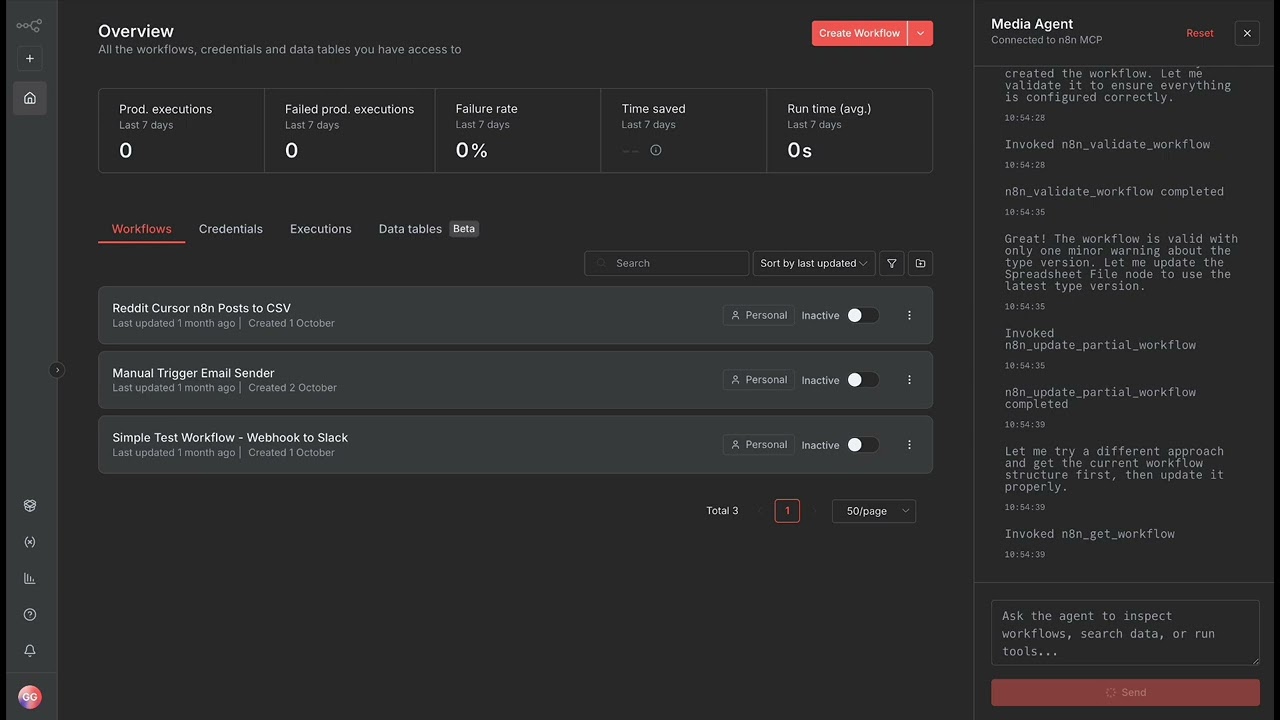
Two UI additions to n8n:
- "vibe8n" button - Opens AI agent chat sidebar
- "Fix with vibe8n" - Auto-debug button in error dialogs
The agent can list workflows, execute them, help debug errors, and answer questions about n8n.
git clone https://github.com/guillaumegay13/n8n-agentic.git
cd n8n-agentic
pnpm install
pnpm build > build.log 2>&1Option A: Use Hosted vibe8n API (easiest)
- Set the API URL:
export VITE_MCP_AGENT_API_URL='https://api.vibe8n.io'-
Expose your local n8n with a tunnel (required for cloud agent):
The built-in n8n tunnel (
hooks.n8n.cloud) does not work because it blocks API access. You must use a full tunnel like ngrok.-
Install ngrok:
brew install ngrok/ngrok/ngrok(or download from ngrok.com) -
Start the tunnel:
ngrok http 5678
-
Copy the generated URL (e.g.,
https://your-name.ngrok-free.app). -
When you open the vibe8n Agent Sidebar in the UI (after step 3 below), paste this URL into the sidebar to configure the agent's connection.
-
-
Start the n8n frontend:
pnpm --filter n8n-editor-ui serveOpen http://localhost:5678, click the "vibe8n" button, and sign up for an API key if prompted.
Option B: Run Example Agent (Self-Hosted)
This runs everything locally, so no tunnel is needed.
# In examples/ directory
cd examples
pip install -r requirements.txt

# Configure (create .env with your settings)
export ANTHROPIC_API_KEY=sk-ant-...
export MCP_SERVER_COMMAND=npx
export MCP_SERVER_ARGS=n8n-mcp
export MCP_SERVER_ENV_N8N_API_URL=http://localhost:5678
export MCP_SERVER_ENV_N8N_API_KEY=your-key

# Start simple agent
python simple_agent.py

# In another terminal, start n8n frontend
export VITE_MCP_AGENT_API_URL='http://localhost:8000'
pnpm --filter n8n-editor-ui serve
See examples/README.md for details on the reference implementation.
Option C: Build Your Own Agent
See "Building Your Own Agent" section below for API contract details.
- Click the "vibe8n" button (lower-right corner)
- Send a message:
List my workflows - The agent responds with your n8n workflows
The vibe8n panel uses smart authentication that adapts based on the API URL:
Cloud (vibe8n.io):
- Authentication is always required (cannot be bypassed for security)
- Users sign up with email to receive an API key
- Keys are stored in browser localStorage and sent via
Authorization: Bearerheader
Self-hosted (localhost, custom domains):
- Authentication is optional - disabled by default for easy local development
- No signup required - works immediately out-of-the-box
- Set
VITE_MCP_AGENT_REQUIRE_AUTH=trueto enable email signup for your self-hosted instance
Example - Enable auth for self-hosted:
export VITE_MCP_AGENT_API_URL='https://my-agent.example.com'
export VITE_MCP_AGENT_REQUIRE_AUTH=true
pnpm --filter n8n-editor-ui serveJust change the environment variable before starting the frontend:
# Use hosted API
export VITE_MCP_AGENT_API_URL='https://api.vibe8n.io'

# OR use local agent
export VITE_MCP_AGENT_API_URL='http://localhost:8000'

# Then start frontend
pnpm --filter n8n-editor-ui serve
Pro Tip: Create shell aliases:
# Add to ~/.bashrc or ~/.zshrc
alias n8n-hosted='export VITE_MCP_AGENT_API_URL="https://api.vibe8n.io" && pnpm --filter n8n-editor-ui serve'
alias n8n-local='export VITE_MCP_AGENT_API_URL="http://localhost:8000" && pnpm --filter n8n-editor-ui serve'The vibe8n panel is agent-agnostic - it works with any backend that implements the /chat API contract.
We provide a minimal reference implementation in examples/simple_agent.py:
- ~400 lines of Python
- Connects to any MCP server (n8n-mcp, filesystem, GitHub, etc.)
- No auth, no billing, no database - pure protocol demo
- Perfect starting point for customization
See examples/README.md for setup instructions.
Want to build a custom agent? You need an HTTP API with one endpoint:
Request:
{
  "prompt": "User's message",
  "session_id": "optional-session-id"
}
Response:
{
  "session_id": "session-id",
  "events": [
    {
      "type": "assistant_message",
      "content": "Your response here",
      "metadata": {}
    }
  ],
  "final": "Your response here"
}assistant_message- Final response (required)tool_call- When calling a tool (e.g., "list_workflows")tool_result- Tool execution resultthought- Agent's reasoning stepssystem_notice- Status updates
The integration adds these files to n8n:
- Sidebar:
packages/frontend/editor-ui/src/components/McpAgent/McpAgentSidebar.vue- Chat interfaceMcpAgentFloatingButton.vue- "vibe8n" button
- Store:
packages/frontend/editor-ui/src/stores/mcpAgent.store.ts - Error Button:
packages/frontend/editor-ui/src/components/Error/NodeErrorView.vue
Environment Variables:
VITE_MCP_AGENT_API_URL- Agent API endpoint (defaults tohttp://localhost:8000)VITE_MCP_AGENT_REQUIRE_AUTH- Enable authentication for self-hosted setups (defaults tofalsefor localhost, alwaystruefor vibe8n.io)VITE_MCP_AGENT_API_TOKEN- Optional static auth token for simple token-based auth
- Natural language workflow operations
- Real-time "thinking timeline" (tool calls, reasoning steps)
- Session persistence across requests
- User authentication with API keys
- Appears in error dialogs when nodes fail
- Automatically includes:
- Workflow/execution IDs
- Node config and error details
- Stack traces and input data
- Opens sidebar with pre-filled diagnostic prompt
If your agent implements GET /sessions/:id/events (Server-Sent Events), the UI shows real-time updates as the agent thinks and works.
If you are using the Cloud Agent (https://api.vibe8n.io) and your n8n is running locally (http://localhost:5678), you might see errors like:
"n8n instance is not accessible" or "Network Error"
Reason: The Cloud Agent running on our servers cannot see your localhost.
Solution: You must expose your local n8n to the internet using a tunnel.
Note: Do not use pnpm run start:tunnel (hooks.n8n.cloud) as it blocks API access. Use ngrok instead:
- Install & start ngrok:
ngrok http 5678
- Copy the generated URL (e.g.,
https://your-name.ngrok-free.app). - Paste this URL into the vibe8n Agent Sidebar.
Alternatively, use a self-hosted agent (see "Option B" in Quick Start) which can connect to localhost.
Button doesn't appear:
- Set
VITE_MCP_AGENT_API_URLbefore starting frontend - Restart dev server:
Ctrl+Cthenpnpm --filter n8n-editor-ui serve
CORS errors: Add CORS middleware to your agent (see example above)
Local agent won't start:
# Check database is running
docker-compose ps

# Check Python dependencies
pip install -r requirements.txt

# Check n8n is accessible
curl http://localhost:5678/healthz
Connection refused:
- Verify agent is running:
curl http://localhost:8000/health - Check the URL matches:
echo $VITE_MCP_AGENT_API_URL
Edit files in packages/frontend/editor-ui/src/components/McpAgent/ - changes hot-reload automatically.
- Edit
mcpAgent.store.ts:
type McpAgentEventType = 'assistant_message' | 'tool_call' | 'your_new_type';-
Update
summariseEvent()function to handle the new type -
Emit from your agent backend
# Frontend tests
cd packages/frontend/editor-ui
pnpm test

# Lint and typecheck
pnpm lint && pnpm typecheckBuild for production:
export VITE_MCP_AGENT_API_URL='https://api.vibe8n.io'
pnpm build
Deploy packages/frontend/editor-ui/dist/ to your hosting platform.
Inherits n8n's Sustainable Use License.
The vibe8n Agent API is a separate service.
- UI Issues: https://github.com/guillaumegay13/n8n-agentic/issues
- vibe8n API: guillaume.gay@protonmail.com
Quick Commands Reference:
# Use hosted vibe8n API
export VITE_MCP_AGENT_API_URL='https://api.vibe8n.com'
pnpm --filter n8n-editor-ui serve

# Use your custom agent
export VITE_MCP_AGENT_API_URL='http://localhost:8000'
pnpm --filter n8n-editor-ui serve

# Test custom agent API
curl http://localhost:8000/health
curl -X POST http://localhost:8000/chat -H "Content-Type: application/json" -d '{"prompt":"Hello"}'