+ 29 july 2026
+ new build system seems to be working great for both x64 and arm64.
+ I'd like to understand if it's possible for me to codesign uxplay-windows before making a new releaseFree as both in "freedom" and "free beer"!
Download the latest version of uxplay-windows from releases.
After installing, control uxplay-windows from it's tray icon! Right-click it to start or stop AirPlay.
You can also set it to run automatically when your PC starts
Please take a look at the Wiki, it should contain everything you're looking for
Important
Why is Windows Defender complaining during installation?
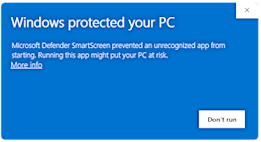
Just click on More info and it will let you install. It complains because the executable is not signed. If you don't trust this software you can always build it yourself! See below.
If prompted by Windows Firewall, please allow uxplay-windows to ensure it functions properly.
Advanced configuration
UxPlay arguments are read from arguments.txt.
Configuration precedence:
%ProgramData%\uxplay-windows\arguments.txt%APPDATA%\leapbtw\uxplay-windows\arguments.txt- built-in default:
-n uxplay-windows -nh
The machine-wide file takes precedence when it exists, allowing administrators
to enforce a shared configuration. When it is absent, each user can maintain
their own configuration under %APPDATA%.
Environment variables are expanded when the app starts. For example:
-n %COMPUTERNAME% -nh
Local development (x64 and ARM64)
After installing MSYS2, the complete local build is one PowerShell command:
.\build.ps1 package -Architecture x64
.\build.ps1 package -Architecture arm64
Each command produces a verified portable ZIP and MSI under the corresponding
out\<architecture>\artifacts directory. See the developer
guide for prerequisites and additional commands.
TODO
- make an update checker
- include uxplay.exe for debugging purposes
pass arguments from uxplay-windows.exe to uxplayor maybe not
Known Issues
uxplay bugs out when waking PC from Sleep
you can fix this by killing uxplay-windows.exe and restarting Bonjour Service, and restarting uxplay.exe. Also restarting your PC might fix this.
Apparently moving from Bonjour PS to mDNSResponder fixed it? :)
- Sometimes just after connecting the iPhone to uxplay-windows, the stream appears but frozen. Reconnecting a second time fixes this. Probably an upstream issue maybe already fixed in the newer UxPlay version. I need to investigate further
Please report issues related to the build system created with GitHub Actions in this repository. For issues related to other parts of this software, report them in their respective repositories.
Please take a look at the LICENSE.