
A switchable, reusable runtime settings preset selector for Claude Code.






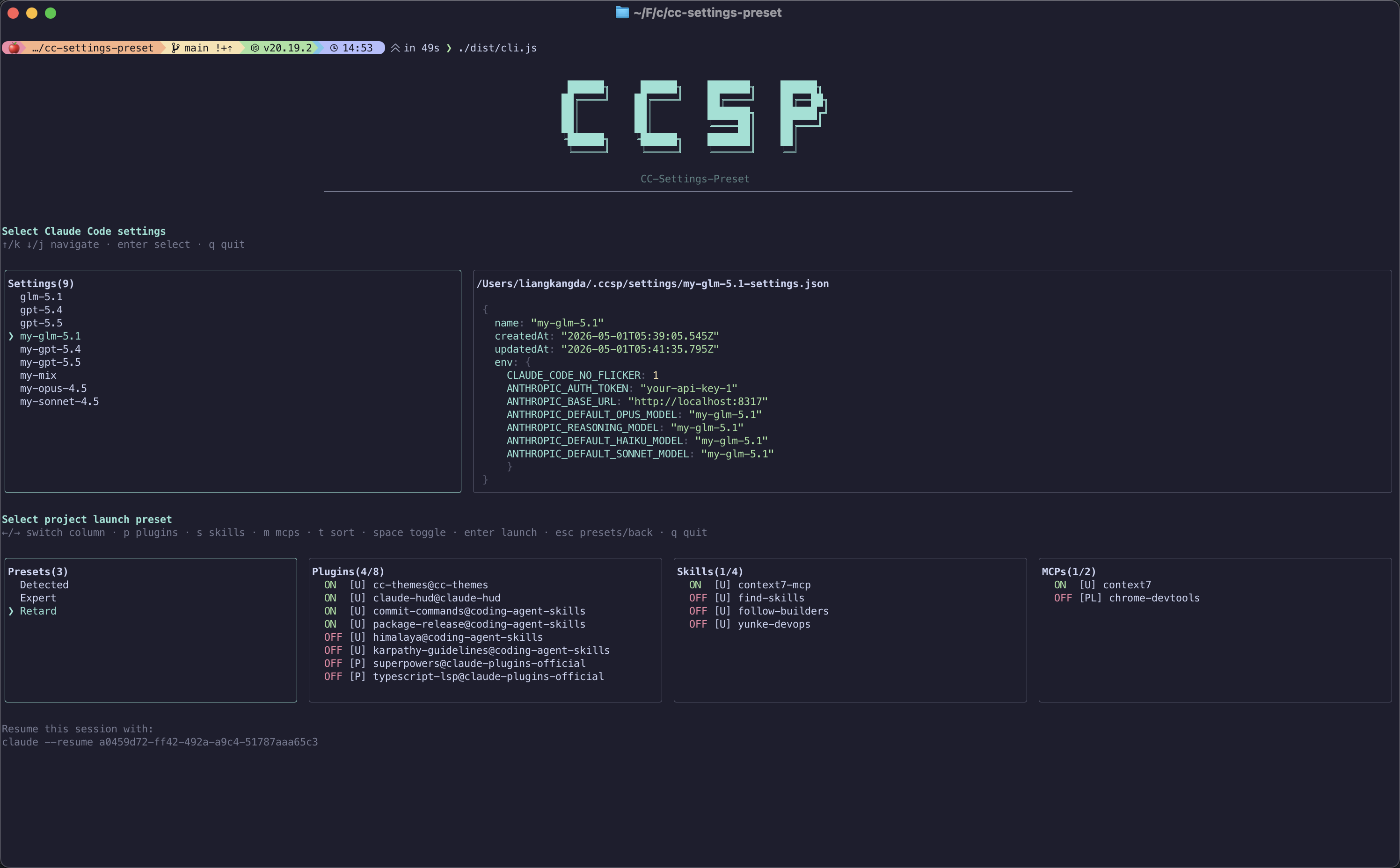
Interactive flow: pick a global base preset (left), preview its settings as YAML or JSON (right), then tune plugins / skills / MCP per launch before starting Claude Code.
English | 简体中文
Prerequisites: Claude Code CLI installed (claude available on your PATH).
macOS (Homebrew, recommended) — via the personal tap lkangd/homebrew-tap; Node.js 20 is installed as a dependency:
brew tap lkangd/tap
brew install cc-settings-preset
npm / pnpm — requires Node.js ≥ 20.19.2 on your machine:
npm install -g @lkangd/cc-settings-preset
# or
pnpm add -g @lkangd/cc-settings-preset
After install, use either ccsp or cc-settings-preset.
To update later, run ccsp update. It checks the latest published version, prints changelog entries for versions newer than your current install, detects Homebrew vs npm installation, and runs the matching upgrade command.
# Start from a project directory (recommended entry)
ccsp

# Forward Claude Code args (ccsp owns --settings)
ccsp claude --help
ccsp claude -p "review this PR"

# Direct run: skip the TUI, pick presets by name, forward remaining args to claude
ccsp -g work -p web
ccsp -g glm-5.1 -p Chore claude -p "summarize open issues"
ccsp --global-preset work --project-preset web --dry-run   # preview merged config, no launch

# Check for updates and upgrade ccsp with the detected installer
ccsp update

# Resume the last session in this project with its original preset/launch config
ccsp --continue

# Resume a specific session by id, reusing the preset/launch config it was launched with
ccsp --resume 99580820-9437-475c-883c-399bcfba3c47
First-time workflow:
# 1. Import a global base preset from existing settings
ccsp create

# 2. In a project: pick a preset, tune plugins / skills / MCP for this launch, then start Claude
ccsp

# 3. Manage global or project launch presets
ccsp manage
ccsp manage --projectCCSP (Claude Code Settings Preset) helps when you need to switch Claude Code configuration across contexts without hand-editing JSON every time.
Different projects use different API keys, ANTHROPIC_BASE_URL, or default models (Opus, Sonnet, custom gateway). Editing ~/.claude/settings.json by hand is error-prone.
Approach: Run ccsp create to save a global base preset per environment (including env and model fields). In each project, run ccsp and pick the preset—no repeated edits to your main settings file.
Under one global baseline, project A disables an official plugin, project B blocks Chrome DevTools MCP, project C turns off certain skills.
Approach: Use a launch preset in the project to override only enabledPlugins, skillOverrides, and deniedMcpServers. CCSP merges that with the base preset into a temp settings file, then starts claude.
The team can commit .claude/settings.json as the project baseline. Individuals keep global presets locally and store launch combinations under .claude/.ccsp/ (gitignored by default to avoid leaking secrets).
Instead of:
claude --settings ~/.claude/my-api-1.json -- ...use ccsp or ccsp claude -- ... to pick presets and toggles in the TUI; CCSP generates the settings path and runs claude --settings <generated>.
ccsp manage— browse, rename, delete global base presets, preview JSON, launch from the UI.ccsp manage --project— manage launch presets for the current repo (create / save / rename / delete / launch).
CCSP now supports non-interactive direct launch: specify presets on the command line, merge settings, and spawn claude without opening the TUI. This pairs naturally with Claude Code’s print / agent mode (claude -p "…") for scripts, cron jobs, GitHub Actions, and other automation.
# One shot: global base preset + project launch preset + non-interactive prompt
ccsp -g my-gateway-api -p ci-minimal claude -p "run the test suite and summarize failures"

# Preview what would launch (two-column global view + four-column launch toggles)
ccsp -g my-gateway-api -p ci-minimal --dry-run
Why this matters now: Starting June 15, 2026, Anthropic separates Agent SDK / claude -p usage from your subscription usage limits. Interactive Claude Code in the terminal still draws from your plan quota; claude -p moves to a dedicated monthly Agent SDK credit (Pro/Max/Team/Enterprise). That makes non-interactive automation a much cheaper lane than burning interactive session limits—if you can still swap API backends and tune plugins / skills / MCP per job.
Where CCSP fits: Keep a global preset pointed at a third-party API (ANTHROPIC_BASE_URL, keys in env, model defaults) and a launch preset that enables only the plugins, skills, and MCP servers that job needs. Direct run applies both layers and forwards the rest of the argv to claude:
| Flag | Alias | Role |
|---|---|---|
--global-preset |
-g |
Global base preset name (from ~/.ccsp/settings/) |
--project-preset |
-p |
Project launch preset name, or Detected for the auto-discovered baseline |
--dry-run |
— | Print the resolved global + launch preview; do not spawn claude |
Notes:
- Provide at least one of
-g/-pto enter direct mode; otherwise CCSP stays interactive. - Put CCSP flags before
claudewhen forwarding args. Afterclaude,-pis Claude’s prompt flag, not CCSP’s project preset. - With only
-p, the global base falls back to last-used preset or the project settings source (same as project-manage launch). - With only
-g, launch toggles use the Detected baseline (no saved launch preset required).
| Layer | Location | Role |
|---|---|---|
| Base preset | ~/.ccsp/settings/*.json |
Full settings snapshot (import from user / project / project-local or any JSON) |
| Launch preset | <project>/.claude/.ccsp/launch-presets/*.json |
Delta only: plugin toggles, skill overrides, MCP deny list |
On launch, CCSP does not overwrite ~/.claude/settings.json or the project’s .claude/settings.json. It writes a temporary merged file (.claude/.ccsp/tmp/<timestamp>-settings.json) and runs:
claude --settings <temp-file> [your other args]
┌─────────────────────────────────────────────────────────────────────────┐
│                    User runs ccsp / ccsp claude                         │
└─────────────────────────────────────────────────────────────────────────┘
                                      │
                                      ▼
┌─────────────────────────────────────────────────────────────────────────┐
│ ① Discover settings sources (collect if present; no runtime merge yet) │
│    · .claude/settings.local.json  (project-local)                       │
│    · .claude/settings.json        (project)                             │
│    · ~/.claude/settings.json      (user)                                │
└─────────────────────────────────────────────────────────────────────────┘
                                      │
                    ┌─────────────────┴─────────────────┐
                    ▼                                   ▼
      Base presets exist in ~/.ccsp?              No base presets yet
                    │                                   │
                    ▼                                   ▼
    ┌───────────────────────────┐          Use empty base {} or
    │ TUI: pick global base      │          run ccsp create first
    │ (remember last per cwd)    │
    └───────────────────────────┘
                    │
                    ▼
┌──────────────────────────────────────────────────────────────────────────┐
│ ② Resolve effective baseline                                             │
│    · Plugins: user < project < project-local < selected base preset      │
│    · Skills: scan ~/.claude/skills, project skills/commands, plugin cache│
│    · MCP: merge .mcp.json, ~/.claude.json, plugin manifests, etc.        │
└──────────────────────────────────────────────────────────────────────────┘
                                      │
                                      ▼
┌─────────────────────────────────────────────────────────────────────────┐
│ ③ TUI: project launch layer (Launch Preset)                             │
│    · Left: launch presets  Right: plugin | skill | MCP toggles           │
│    · Save as preset / overwrite / launch without saving                  │
└─────────────────────────────────────────────────────────────────────────┘
                                      │
                                      ▼
┌─────────────────────────────────────────────────────────────────────────┐
│ ④ finalizeSettings(base, launch)                                        │
│    · Copy full base preset                                               │
│    · Strip enabledPlugins / skillOverrides / deniedMcpServers from base  │
│    · Apply launch-layer values for those three fields (if any)           │
└─────────────────────────────────────────────────────────────────────────┘
                                      │
                                      ▼
┌─────────────────────────────────────────────────────────────────────────┐
│ ⑤ Write .claude/.ccsp/tmp/*.json (gitignored; ~50 files retained)     │
└─────────────────────────────────────────────────────────────────────────┘
                                      │
                                      ▼
┌─────────────────────────────────────────────────────────────────────────┐
│ ⑥ spawn: claude --settings <tmp> [sanitized args]                      │
│    · Strip user --settings / --settings=... (managed by ccsp)           │
└─────────────────────────────────────────────────────────────────────────┘
| Pain point | Why it hurts |
|---|---|
| Multiple files and scopes | user / project / project-local settings make it hard to see what actually applies. |
| High switching cost | Changing API, model, or plugin mix means editing JSON or memorizing --settings paths. |
| Easy to break main config | Editing ~/.claude/settings.json can mix secrets and global defaults. |
| Scattered toggles | enabledPlugins, skillOverrides, deniedMcpServers sit beside env with no “this launch only” view. |
| Commit risk | Project settings with keys in env can be committed by mistake. |
- Non-destructive launch — inject config via temp files; does not force-overwrite your main settings.
- Two-layer split — global “base environment” vs project “launch delta” for multi-repo work.
- Visual toggles — terminal TUI to browse JSON and flip plugins / skills / MCP.
- Quick settings — cycle
permissions.defaultModeandeffortLevelfor the selected preset right from the base screen; only fields you touch persist (to the preset, or~/.claude/settings.jsonfor Claude Official). - Direct run —
-g/-p/--dry-runfor scripts and CI; combine withclaude -pfor headless agent tasks. - Remembers last choice — per project directory for base and launch presets.
- Resumable sessions — every launch is bound to its preset/launch config;
ccsp --continueandccsp --resume <id>restore the original config and resume the matching Claude session in one shot. - Safer defaults —
.claude/.ccsp/gets a.gitignorethat ignores everything on init.
The base preset selection screen has a middle Quick Settings column. Move focus there (h/l or ←/→) and press space to cycle two Claude Code options for the selected preset:
- mode —
permissions.defaultMode:manual→acceptEdits→plan→auto→dontAsk→bypassPermissions. - effort —
effortLevel:low→medium→high→xhigh→max→ultracode.
Fields you don't touch show the effective default resolved by precedence (managed → local → project → user). Only fields you actually cycle are written, and every effort level persists the same way: as effortLevel in the preset.
max and ultracode need one extra step. Claude Code's settings schema only accepts low / medium / high / xhigh for effortLevel, so it never applies those two from a settings file, and a preset that only stored effortLevel: "max" would silently fall back to the effortLevel inherited from ~/.claude/settings.json. CCSP therefore also restates them on the command line: when the effective level — resolved over the same chain the column displays (preset → managed → local → project → user) — is max or ultracode, the launch appends --effort max / --effort ultracode, which outranks every settings scope. This applies to direct run and --resume too. An explicit --effort <level> or --effort=<level> in your own args always wins.
Edits are written to the preset file on confirm. Editing the temporary Claude Official entry writes straight back to ~/.claude/settings.json.
After Claude exits, CCSP records the real Claude session id (discovered by diffing ~/.claude/projects/<encoded-cwd>/ against a pre-launch snapshot — --session-id is unreliable in interactive mode, so we don't pin it) and binds it to the launch config used. Stored under .claude/.ccsp/sessions.json (capped at 50, pruned by last-used time):
ccsp --resume <uuid>— re-finalize that session's stored config and runclaude --resume <uuid>in one step.ccsp --continue— pick the most recently exited ccsp session in this project and resume it deterministically by id. Concretely: launch A, then B, exit A first, runccsp --continue— you get A back with A's original preset/launch config (not B's).ccsp claude --resume <uuid>andccsp claude --continuekeep Claude passthrough syntax but open the global/project preset selectors for a new configuration.- If the stored binding points at a Claude session that no longer exists, CCSP discards it and falls back to interactive preset selection.
The position of the session flag controls the route: put it before claude to reuse CCSP's saved binding, or after claude to choose presets. In the top-level form, the trailing claude is a CCSP routing token and is not passed to Claude.
| Cannot / caveat | Explanation |
|---|---|
| Not a Claude Code replacement | Wraps the claude subprocess only; exits if CLI is missing. |
| Does not write back main settings | Merged output is not saved to ~/.claude/settings.json; sync manually or update base presets via ccsp create. |
Owns --settings |
Your --settings is ignored with a warning; path is generated by CCSP. |
| Limited launch fields | Launch presets only override enabledPlugins, skillOverrides, deniedMcpServers; other fields (e.g. env) come from the base preset. |
| No “add MCP server” in UI | Can deny discovered MCPs via deniedMcpServers; cannot create new server entries. |
| Interactive-first for create/manage | create / manage remain TUI-driven; use direct run or edit JSON for headless launch. |
| Derived presets | Schema supports derived type; CLI does not expose full create/manage flow yet. |
| Project store is local by default | launch-presets, tmp, and sessions.json under .claude/.ccsp/ are not in Git unless you opt in. |
| Temp file cap | Oldest temp settings in tmp/ are pruned past 50 by write time, except those a still-running session holds — the count may sit above 50 while sessions are live. Statusline scripts are cleaned every exit. |
| Resume only sees ccsp launches | ccsp --continue / --resume only know about sessions started through ccsp on the new code path; sessions started directly with claude aren't bound and won't appear. |
| Command | Description |
|---|---|
ccsp |
Default: pick base preset → configure launch layer → start claude |
ccsp -g <name> |
Direct run: global base preset only (launch layer = Detected) |
ccsp -p <name> |
Direct run: project launch preset only (global base = last-used or project settings) |
ccsp -g <global> -p <launch> |
Direct run: both layers, then start claude |
ccsp … --dry-run |
With -g and/or -p: preview resolved presets; no spawn |
ccsp … claude [args…] |
Direct or interactive; CCSP flags before claude, Claude args after |
ccsp claude [args...] |
Same, forwarding args to claude (without --settings) |
ccsp --continue |
Resume the most recently exited ccsp session in this project with its original preset / launch config |
ccsp --resume <uuid> |
Resume a specific session by id, reusing the preset / launch config it was launched with (falls back to interactive if the binding is unknown) |
ccsp claude --continue / ccsp claude --resume <uuid> |
Choose global/project presets, then pass the Claude session flag through |
ccsp --continue claude / ccsp --resume <uuid> claude |
Skip preset selection and reuse the matching saved session binding |
ccsp create |
Interactively create a global base preset |
ccsp manage |
Manage global base presets (preview / rename / delete / create / launch) |
ccsp manage --project |
Manage launch presets for the current project |
ccsp config |
Configure ccsp preferences (run mode, env-only preview, statusline, preview format) |
Base preset selection: h/l or ←/→ switch between the Settings and Quick Settings columns, j/k or ↑/↓ to move, space to cycle the focused quick setting, t to change sort order, f toggle between env-only and full settings preview, Enter to confirm, q to quit.
Global manage (ccsp manage): l launch, r rename, d delete, c create, o reveal in Finder, q quit.
Project launch layer: switch between presets and plugin / skill / MCP columns; save as launch preset. s saves the selected preset as a global template, i opens the import panel (global templates + presets from recent projects; r/d manage templates in place). Ctrl+L refreshes the UI.
Config (ccsp config): j/k or arrows to move, space/Enter toggle the focused option, q quit.
ccsp config opens a two-column view (options on the left, the focused option's description on the right) for global, per-user preferences stored in ~/.ccsp/config.json. Both default to enabled:
| Option | Default | Effect |
|---|---|---|
| Run mode | both |
Controls which launch stages ccsp uses: both selects a global preset and then a project launch preset; global-only selects only a global preset; project-only skips the global preset stage and launches from a project launch preset using the current project settings source as the base. |
| Global preset env-only | enabled | The base preset selection screen previews only the env field of the selected preset by default. Press f on that screen to toggle between the env-only view and the full settings view. When disabled, the full settings are shown by default. |
| Show statusline | enabled | ccsp injects a statusline at the bottom of Claude Code showing the active preset and toggle summary (`CCSP: / |
| Settings preview format | yaml |
How the selected preset settings are rendered on the right of the preset selection (ccsp) and manage (ccsp manage) screens — yaml or json. Both are syntax-highlighted. |
~/.ccsp/
├── index.json                 # global base preset index
├── settings/
│   └── <name>-settings.json   # base preset body
├── launch-presets/            # global launch preset templates (promoted with s)
│   ├── index.json
│   └── <name>-launch.json
├── config.json                # user preferences (run mode, env-only preview, statusline, preview format)
└── last-settings.json         # last base preset name per project cwd; also the import candidate pool

<project>/.claude/.ccsp/       # entire dir gitignored by default
├── launch-presets/
│   ├── index.json
│   └── <name>-launch.json     # launch-layer overrides only
├── tmp/
│   └── <stem>-settings.json   # finalized launch config (~50 kept, oldest pruned)
├── sessions.json              # sessionId → launch config binding, for --continue / --resume
├── worktree-seed.json         # written only when a worktree declines to inherit
└── last-used.json             # last launch preset used
Templates are copied, not linked: a preset imported from a template is an independent
file from that moment on, and the copy records where it came from (shown as ← <source>).
A preset may name plugins, skills or MCP servers this project has not installed — those
appear as [!] not installed rows, cannot be toggled, and are preserved when you save,
so the preset starts working as soon as they are installed.
In a linked git worktree with no presets of its own, ccsp offers once to inherit the main repository's presets (and its last-used pointer). Declining is remembered per worktree.
git clone https://github.com/lkangd/cc-settings-preset.git
cd cc-settings-preset
pnpm install
pnpm run dev          # run tsx src/cli.ts directly
pnpm run check # typecheck + build + testIssues and pull requests are welcome. Before you contribute:
- Search existing issues to avoid duplicates; open an issue for new features with motivation and proposed usage.
- Verify locally:
pnpm run checkmust pass; CLI changes should include or update tests undertests/. - Style: Match the codebase (ESM, strict TypeScript, Ink +
flows/state machines); avoid unrelated refactors. - Scope: CCSP focuses on settings presets and launch orchestration—avoid heavy unrelated dependencies.
- Docs: Update both
README.mdandREADME.zh-hans.mdfor user-visible behavior changes. - Commits: Concise English or Chinese is fine; explain why, not only what.
Bug reports should include: OS, Node version, how you invoked ccsp, relevant ~/.ccsp or .claude/.ccsp layout (redact secrets), and full terminal output.
ISC © lkangd