ViewPoint is a math expression parser and evaluator that supports runtime data-type checking written in native JS. It allows you to evaluate mathematical expressions with ease while ensuring the correctness of the input data.
- What's new
- Features
- How to include ViewPoint in your project ?
- How to use ViewPoint ?
- Expression evaluation modes
- Supported operators
- Functions and Variables
- Functions
- Using a function in expression
- Defining a custom function
- Built-in functions
- Basic math and number related functions
- Power & Root functions
- Logarithmic functions
- Exponential functions
- Trigonometry (angle value in radian) related functions
- Hyperbolic functions
- Comparison functions
- Logical functions
- Bitwise functions
- Statistical functions
- Constants
- String functions
- Miscellaneous functions
- Variables
- Functions
- Keywords in ViewPoint
- Other methods and properties of ViewPoint
- License
- Thanks
-
- Added support for scientific (exponential) number notation as input, such as
15e2,18e+4, and20e-5. - Fixed an issue where console.log() was executed whenever an inline function was evaluated. The leftover testing code (
console.log(...)) has been removed from the release version. Sorry for any inconvenience caused. - Fixed the behavior of the Bitwise AND (
&), Bitwise OR (|) and Unary NOT (!) operators. - Added the
isNotEqual()or!=()function. - Added the
fract ()function. - Added the
prod(...)function, which returns the multiplication of all supplied parameters. - Added additional trigonometric functions:
csc(): Cosecantsec(): Secantcot(): Cotangent
- Added additional hyperbolic functions:
csch(): Hyperbolic Cosecantsech(): Hyperbolic Secantcoth(): Hyperbolic Cotangent
- Added the following string manipulation functions:
strLen()strUpper()strLower()strTrim()strIncludes()strStartsWith()strEndsWith()strIndexOf()strSubStr()strRepeat()strReplace()strReplaceAll()
- Added the following bitwise operation functions:
-
bitAnd()or&()-bitOr()or|()-bitXor()or^()-bitNot()or~()-bitLShift()or<<()-bitRShift()or>>()-bitURShift()or>>>() - Added the
vpVer()function for getting information about the current ViewPoint version. - Improved error handling by categorizing errors into specific types. Previously, all errors were reported simply as
Error; errors are now categorized asTypeError,SyntaxError,Error(for generic errors)
- Added support for scientific (exponential) number notation as input, such as
-
- Bug fixed related to the
restkeyword: Fixed an issue where only the last argument of a rest parameter was processed during function evaluation. - Bug fixed related to missing operator detection: ViewPoint now throws a missing operators error if the operator is missing in the expression (e.g.
25 30will throw an error). - Bug fixed related to missing operand detection: Fixed an issue where operators without operands (e.g.
/ +) produced a data type error. The ViewPoint now reports regarding the missing operand error. - Bug fixed for variable names beginning with the character
n: Fixed an issue where variable names beginning withncould evaluate incorrectly.
- Bug fixed related to the
-
- Improved the
.tokenize()method to support more complex infix expressions and advanced calculations more accurately - Added support for more operators:
- Arithmetic operators:
^,**,*,/,%,+,-can be used for performing math operations. - Comparison operators:
<,>,<=,>=,==,!=can be used for performing comparison operations in the expression. - Logical operators:
&,|,&&,||can be used for performing logical operations in the expression. - Unary operators:
+,-,!()can be used for performing unary operations in the expression. - Ternary operator:
?and:pairs can be used for performing ternary operations in the expression. - Assignment operators:
=,+=,-=,*=,/=can be used for performing in-line variable assignment operations in the expression. - New line operator: A new line character (
\nor\r) or a semicolon (;) character can be used for separating multiple expressions.
- Arithmetic operators:
- Added support for multiple nested ternary operations in expression.
- ViewPoint functions can now be used without the
#character prefix (e.g.max(478, 52)can now be used directly instead of#max(478, 52)) - Added support for more built-in functions:
string()takes the data and returns its string form.typeof()takes data as its input parameter and returns the data type of that parameterConst()function takes the name of Constant (in string format) and returns the result by calling the corresponding Math object 's property / constant namedegToRad()function takes input in degree form and returns the output in radian formsum()function returns the sum of all provided parameterscount()function returns the total numbers of the given parametersavg()function returns the average value of the given parameters
- Added support for all functions from JavaScript 's
Mathobject. - Added support for in-line variable definition within expressions (using the assignment operators
= , += , -= , *= , /=). - Added support for in-line function definition within expressions (using the
funckeyword). - Added supports for variable clearing directly from the expressions (using the
clr variableNamekeyword). - Added supports for function clearing directly from the expressions (using the
clrFn functionNamekeyword). - Added supports for clearing all user-defined variables and functions directly from the expressions (using the
cleankeyword) - Added an interpreter execution mode (
.interpret()) that interprets and executes one or more expressions/statements represented as a string and returns the calculated results as an array format
- Improved the
-
- The v 2.0.0 update introduces support for a variety of built-in functions, along with the ability to define and use custom user functions. ViewPoint v2.0 's function must be started with
#character (e.g.#max(478 , 52)) - Supports various inbuilt functions:
#max()#min()#and()or#&&()#or()or#||()#not()or#!()#greaterThan()or#>()#lessThan()or#<()#isEqual()or#==()#greaterThanOrEqual()or#>=()#lessThanOrEqual()' or '#<=()#if()
- Supports for user defined function using external way (using
.addFunc( )method)
- The v 2.0.0 update introduces support for a variety of built-in functions, along with the ability to define and use custom user functions. ViewPoint v2.0 's function must be started with
-
- Fixed calculation issues for BigInt datatypes.
- Error message for unclosed quoted text is fixed.
-
- Supports for basic arithmetic operators (
+,-,*,/,^,%). - Supports string concatination operator (
+). - Supports nested math expression. (e.g
(52/8+2)+56*((25/2)*4+(8-2))) - Supports multiple datatypes (e.g. expressions with decimal / floating points numbers, BigInt, String, and Boolean datatype)
- Supports runtime data-type checking.
- Support for defination of variables using external way (using
.var()method). - Support for custom order of operations (default is
PEMDAS).
- Supports for basic arithmetic operators (
⬆ Back to the Tables of Contents ⬆
- Expression Evaluation:
- Parses and evaluates mathematical expressions like '5*52+285/2'
- Supports multiple types of operators:
- Arithmetic operators:
^,**,\*,/,%,+,-can be used for performing math operations. (e.g.7+5*2 + 4/2-> 19) - Comparison operators:
<,>,<=,>=,==,!=can be used for performing comparison operations in the expression. (e.g.50 > 60-> false) - Logical operators:
&,|,&&,||can be used for performing logical operations in the expression. (e.g.true && false-> false) - Unary operators:
+,-,!()can be used for performing unary operations in the expression. (e.g.-4*-2-> 8 or! (true)-> false ) - Ternary operator:
?and:pairs can be used for performing ternary operations in the expression. (e.g.45 > 4 ? "Yes" : "No"-> 'Yes') - Assignment operators:
=,+=,-=,*=,/=can be used for performing in-line variable assignment operations in the expression. (e.g.a = 56,a+4-> 60) - New line operator: A new line character (
\nor\r) or a semicolon (;) character can be used for separating multiple expressions. [Note: Multiple expression evalution can be performed using the ViewPoint 's.interpret()method]
- Arithmetic operators:
- Supports nested expressions with parentheses:
- Supports complex nested expression with multiple levels of nesting (e.g.
((2 + 3) * (4 - (6 / (1 + 1))))-> 5 ) - Supports multiple nested function expression (e.g.
(max(sum(4,5,2),avg(50,60,70,20,150)) + count(45,25,36,52,500) +1.6)*5-> 383) - Supports multiple nested ternary operations in expression (e.g.
40 > 2 ? 25 > 7? 4 < 1? "a" : "b" : "c" : "d"-> 'b')
- Supports complex nested expression with multiple levels of nesting (e.g.
- Supports multiple datatypes e.g expressions with decimal / floating points numbers, BigInt, String, and Boolean datatype
- Data Type Validation:
- Validates data types during expression evaluation, throwing errors for invalid operations (e.g., attempting sum or multiplication between strings and numbers).
- Function(s) in the expression (added in v2.0.0) (improved in v2.1.0):
- Function(s) can be used in the expression string for complex expression computing (e.g.
and()function for using logical and to the expression orif(condition, whatIfTrue, whatIfFalse)for using the 'if testing'). - It has various built-in function (e.g.
max(),min()etc...) - User can also add their own function
- using external way: Using the
.addFunc( )method of the ViewPoint object - using in-line expression way: Using the
funckeyword e.g.func addTwoNum(x,y) = x + ycan createaddTwoNum()function which takes two parameters and give output of their addition.
- using external way: Using the
- Function(s) can be used in the expression string for complex expression computing (e.g.
- Expression Tokenization:
- It can tokenize a expression into individual tokens and can return tokenized expression as an array (e.g expression = "5 + 7*2+(85^2+1)",
tokens = [5,'+',7,'*',2,'+','(',85,'^',2,'+',1,')'])
- It can tokenize a expression into individual tokens and can return tokenized expression as an array (e.g expression = "5 + 7*2+(85^2+1)",
- Infix to Postfix Conversion:
- It can convert infix expressions to postfix notation and return as an array
- JavaScript Variable Support:
- ViewPoint supports using of JavaScript variables in an expressions using
${}and backticks (`)
- ViewPoint supports using of JavaScript variables in an expressions using
- ViewPoint 's Variables Support:
- ViewPoint allows users to define variables in 2 ways
- External way: using the
.var()method of the ViewPoint object. - In-line expression way: Variables can be created directly in the expression using any of these assignment operators
'=' , '+=' , '-=' , '*=' , '/='
- External way: using the
- ViewPoint allows users to define variables in 2 ways
- Operator Order Control:
- Follows PEMDAS (Parentheses, Exponents, Multiplication and Division, and Addition and Subtraction) order of operations by default
- Allows users to define their own custom order of operations (if needed)
- Customizable Operator Behavior:
- Allows users to re-define the math operator (e.g. '*' or '%') behavior to suit specific requirements (if needed)
⬆ Back to the Tables of Contents ⬆
To use this evaluator/library, firstly, you need to link ViewPoint.js to your project. You can do that by using two ways:
- Download/Clone and Use: Download or clone the repository and use the ViewPoint.js file in your project.
- Use via CDN:
- Use the library directly via CDN using the following script tag:
https://cdn.jsdelivr.net/gh/nirmalpaul383/ViewPoint/ViewPoint.js - For using it in browser/webpage you can use
<script src="https://cdn.jsdelivr.net/gh/nirmalpaul383/ViewPoint/ViewPoint.js"></script>
- Use the library directly via CDN using the following script tag:
⬆ Back to the Tables of Contents ⬆
After including this library, you will need to:
- create a ViewPoint object using
new ViewPoint()keywords:
//Create a new ViewPoint object with ViewPoint class
let ViewPoint_obj = new ViewPoint();- Store your expression in string format:
//Sample Expression
const expresion = `((52/8+2)+56*((25/2)*4+(8-2)))*2`;- For evaluating an expression use
.evaluate()method:
//Expression evaluating
let output = ViewPoint_obj.evaluate(expresion);

//For output
console.log(output); //Output 6289 to the console- For interpreting multiple expressions use
.interpret()method:
let multipleExpr = `5+5
a = 45
a += 5
func area (l, w) = l*w //Defining area function
area(a, 40) //Using area function
-5*+2 //Expression with Unary operators
`

//Expression interpreting
let output = ViewPoint_obj.interpret(expresion);

//For output
console.log(output); //Output [ 10, 45, 50, "The 'area(l,w)' was registered.", 2000, -10 ] to the console
⬆ Back to the Tables of Contents ⬆
ViewPoint supports two types of evalutaion mode:
.evaluate() method evaluates a expression represented as a string and returns the calculated result
//Create a new ViewPoint object with ViewPoint class
let ViewPoint_obj = new ViewPoint();

//Simple Expression evaluation
console.log(ViewPoint_obj.evaluate(`25+5*2`)); //Output 35 to the console

//Nested expression evaluation
console.log(ViewPoint_obj.evaluate(`((52/8+2)+56*((25/2)*4+(8-2)))*2`)); //Output 6289 to the console

//BigInt Expression evaluation
console.log(ViewPoint_obj.evaluate(`11n ^2n`)); //Output 121n to the console

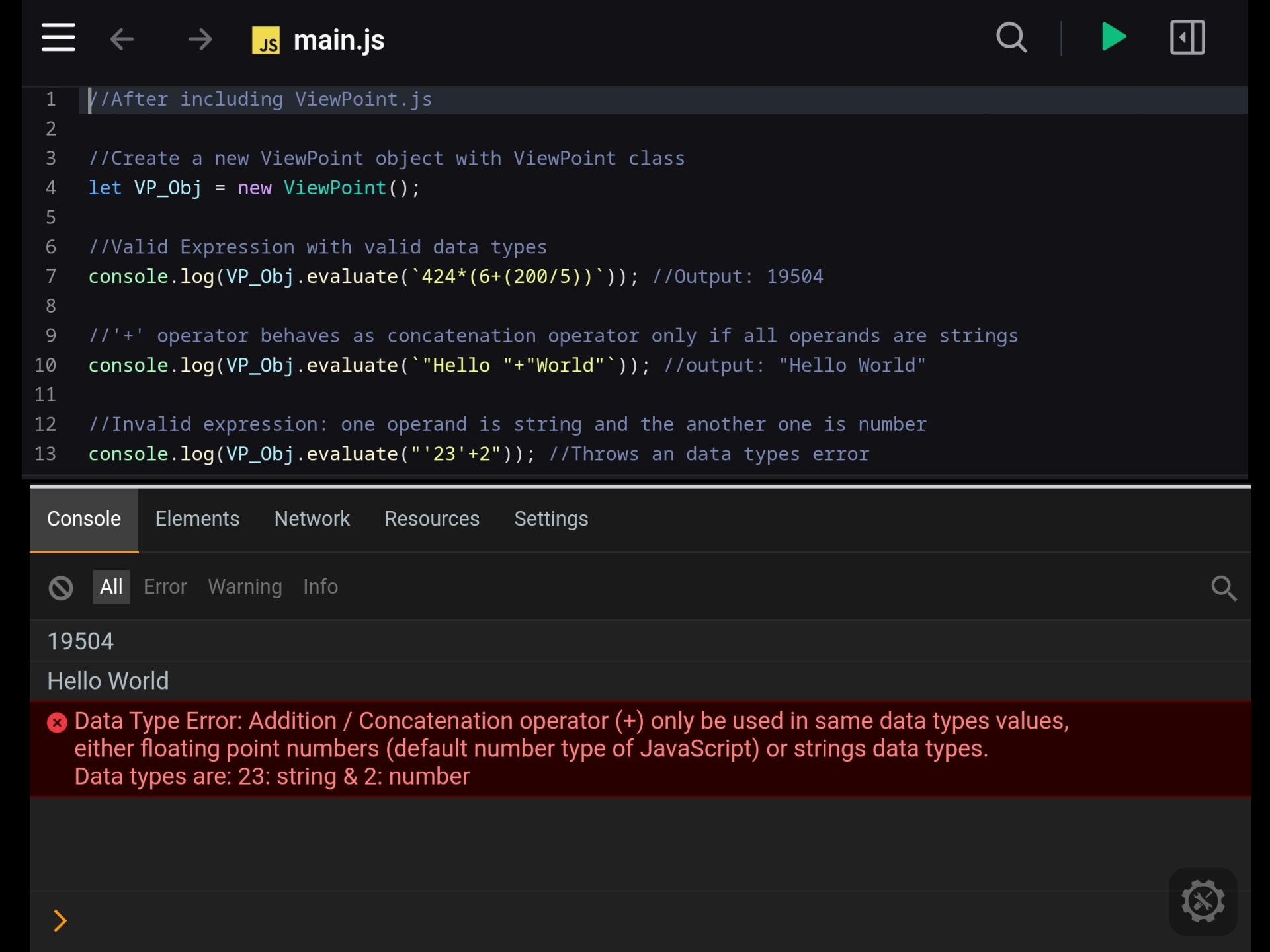
//String concatenation: '+' Operator behaves as concatenation operator if all operands are string
console.log(ViewPoint_obj.evaluate(`"Hello " + "World"`)); //Output "Hello World" to the console

//Boolean data operation using logical operators
console.log(ViewPoint_obj.evaluate(`(true && false) || (true && !(false))`)); //Output true to the console

//Using ternary operations in the expression
console.log(ViewPoint_obj.evaluate('20 > 18? "You can drive": "You can not drive"')); //Output 'You can drive' to the console


//Invalid Expression: One operand is a string and another one is number
console.log(ViewPoint_obj.evaluate(`"45" + 5`)); //Throws a datatype error

//Invalid Expression: One operand is a number and another one is boolean
console.log(ViewPoint_obj.evaluate(`45 * true`)); //Throws a datatype error

//Invalid Expression: unclosed quoted text
console.log(ViewPoint_obj.evaluate(`"Hello World `)); //Throws a error message for unclosed quoted text.interpret() method interprets and executes one or more expressions/statements represented as a string and returns the calculated results as an array format
//Create a new ViewPoint object with ViewPoint class
let ViewPoint_obj = new ViewPoint();

let multipleExpr = `"Example for: multiple expression interpretation:";

//Price of sugar per kg
Sugar = 42

//Custom function defination of price of sugar
func priceOfSugar (qty) = qty * Sugar

//Calculating the price of 4.5 Kg sugar
priceOfSugar (10)

//Using built-in function 'if()'
if(priceOfSugar(10) > 100, "Use online payment for purchase", "Cash can be used for purchase")
`

console.log(ViewPoint_obj.interpret(multipleExpr));

// Output: ['Example for: multiple expression interpretation:','',42,'',"The 'priceOfSugar(qty)' was registered.",'',420,'','Use online payment for purchase'] to the console
⬆ Back to the Tables of Contents ⬆
ViewPoint supports a wide range of operators for mathematical, logical, and other operations. Here is complete reference:
| Type | Operator | Default precedence | Details | Example |
|---|---|---|---|---|
| Unary Operator | + |
Highest | Indicates a positive value | +25 *2 returns 50 |
| Unary Operator | - |
Highest | Indicates a negative value | -25 *2 returns -50 |
| Arithmetic Operator | ^ or ** |
11 | calculates a base number raised to the power of an exponent | 2 ** 3 returns 8 |
| Arithmetic Operator | * |
10 | Multiplies two operands | 2 * 3 returns 6 |
| Arithmetic Operator | / |
9 | Multiplies two operands | 6 / 3 returns 2 |
| Arithmetic Operator | % |
9 | Returns the remainder after division. | 7 % 3 returns 1 |
| Arithmetic Operator | + |
8 | Adds two numbers or concatenates two strings. | 7 +3 returns 10 "Hello " + "Word" returns 'Hello word' |
| Arithmetic Operator | - |
8 | Subtracts the right operand from the left operand. | 7 - 3 returns 4 |
| Comparison Operator | < |
7 | Returns true if the left operand is less than the right operand, otherwise returns false. | 3 < 7 returns true |
| Comparison Operator | > |
7 | Returns true if the left operand is greater than the right operand, otherwise returns false. | 8 < 5 returns true |
| Comparison Operator | <= |
7 | Returns true if the left operand is less than or equal to the right operand, otherwise returns false. | 10 <= 50 returns true |
| Comparison Operator | >= |
7 | Returns true if the left operand is greater than or equal to the right operand, otherwise returns false. | 100 >= 50 returns true |
| Comparison Operator | == |
6 | Returns true if both operands are equal, otherwise returns false. | 100 == 100 returns true |
| Comparison Operator | != |
6 | Returns true if both operands are not equal, otherwise returns false. | 100 != 50 returns true |
| Bitwise Operator | & |
5 | Performs a bitwise AND operation on two operands. | 5 & 3 returns 1 |
| Bitwise Operator | | |
4 | Performs a bitwise OR operation on two operands. | 5 | 3 returns 7 |
| Logical Operator | && |
3 | Returns true if both operands are true, otherwise returns false. | true && true returns true |
| Logical Operator | || |
2 | Returns true if any of one operand is true, otherwise returns false. | true || false returns true |
| Assignment operators | = += -= *= /= |
1 | Performs in-line variable assignment. | Explore ViewPoint 's variable assignment operators and their usage. |
| New line operators | \n \r ; |
0 | Separates multiple expressions in .interpret (...) mode | "1st string" ; "2nd string" \n "3rd string" returns ['1st string', '2nd string', '3rd string'] |
| Comment Operator | // |
Not Applicable | Starts a single-line comment. Everything after it on the same line is ignored. | 16+4 //This is 1st comment ; 21+5 //This is 2nd comment returns [ 20, 26 ] |
| Ternary Operator | (cond) ? (what_to_do_if_true) : (what_to_do_if_false) |
Not Applicable | If the codition is true then the what_to_do_if_true is evaluated otherwise the what_to_do_if_false is evaluated |
45 > 8*5 ? "Yes" : "No" returns true |
| Unary Operator | ! |
Not Applicable | Returns false if the operand is true and returns true if the operand is false |
! true returns false ! false returns true |
⬆ Back to the Tables of Contents ⬆
Functions are reusable blocks of code / expression which can be used for performing mathematical calculations, string manipulation, logical operations, and other operations.
//Create a new expression evaluator object with ViewPoint class
let VP_Obj = new ViewPoint();

//Example 1: using the built-in function 'max'

//Expression 1 (simple expression with multiple layer of brackets and 'max' function):
let expr1 = "2*(500-4*(25+ max(8, (2*6))+45)) +39";

//Output to the console
console.log(VP_Obj.evaluate(expr1)); //Output 383


//Example 2: using the built-in function 'if' and 'and'

//For creating 3 variables in our ViewPoint object using the in-line variable defination
VP_OBJ.interpret(`Eng = 45 //Marks for english subject
Math = 85 //Marks for math subject
FA = 55 //Marks for financial accounting subject`)

//For creating Passmark variable in our ViewPoint object using '.var()' method
VP_Obj.var("Pass", 35); //Passmark

//Expression 2 with advance function like 'and()' and 'if()'
let expr2 = "if(and(Eng >= Pass , Math >= Pass, FA >= Pass), 'All Cleared', 'Fail')";

//Output to the console
console.log(VP_Obj.evaluate(expr2)); //Output 'All Cleared'//Create a new expression evaluator object with ViewPoint class
let VP_Obj = new ViewPoint();
//Function defination using external way (using ```.addFunc()``` method):
//Example 1: adding 'greet()' function which return "Hello!" string
//For defining and storing user-defining function to the ViewPoint object
VP_Obj.addFunc("greet", ()=>{return "Hello!"})
//For defining and storing user-defining function to the ViewPoint object
VP_Obj.addFunc("myName", (name)=>{return String(name)})
//Using our custom function in expression
let expr4 = "greet() + ` ` + myName('Nirmal') " ;
//Output to the console
console.log(VP_Obj.evaluate(expr4)) //Output 'Hello! Nirmal'//Function defination using in-line expression way (using the 'func' keyword):
//Create a new expression evaluator object with ViewPoint class
let VP_Obj = new ViewPoint();
//Defination of our custom function: area, which takes two parameters and returns the multiplication of those two parameters
let expr_for_inline_func = `func area(length, width) = length * width //Defination of the 'area()' function`;
//Evaluating for defining the in-line function
VP_Obj.evaluate(expr_for_inline_func);
//Output to the console
console.log(VP_Obj.evaluate('area(11,21)')) //Output 231ViewPoint provides 85+ built-in functions for performing various operations, ranging from mathematical calculations to string manipulation, bitwise operations to logical operations and more. ViewPoint has all functions from JavaScript's Math object, as well as several additional native functions provided by ViewPoint.
The complete list of available functions is shown below:
| Function Name | Details | Example |
|---|---|---|
abs (x) |
Returns the absolute value of a number. | abs (-5) returns 5 |
sign (x) |
Returns -1 for negetive number, 0 for zero and 1 for positive number. |
sign (-45) returns -1 |
ceil (x) |
Returns the number rounded up to the nearest integer | ceil (45.43) returns 46 |
floor (x) |
Returns the number rounded down to the nearest integer | floor (45.43) returns 45 |
round (x) |
Returns the number rounded (up / down) to the nearest integer | round (45.43) returns 45 |
trunc (x) |
Returns the number with the fractional part removed. | trunc (53.75) returns 53 |
fract (x) |
returns the fractional part of the provided number by removing the integer part of that number. | fract (53.75) returns 0.75 |
| Function Name | Details | Example |
|---|---|---|
pow (x, y) |
Returns the value of x raised to the power of y. | pow(5,3) returns 125 |
sqrt (x) |
Returns the square root of a number. | sqrt(144) returns 12 |
cbrt (x) |
Returns the cube root of a number. | cbrt(125) returns 5 |
hypot (x, y, ...) |
Returns the square root of the sum of squares of its arguments. | hypot(3, 4) returns 5 |
| Function Name | Details | Example |
|---|---|---|
log (x) |
Returns the natural logarithm (base e). | log(Const(E)) returns 1 |
log10 (x) |
Returns the base 10 logarithm. | log10(100) returns 2 |
log2 (x) |
Returns the base 2 logarithm. | log2(8) returns 3 |
log1p (x) |
Returns the natural logarithm of (1 + x), computed accurately for small values. | log1p(1) returns 0.6931471805599453 |
| Function Name | Details | Example |
|---|---|---|
exp (x) |
Returns Euler's number e raised to the power of x |
exp(0) returns 1 |
expm1 (x) |
Returns Euler's number e raised to the power of x, minus one. |
expm1(0) returns 0 |
| Function Name | Details | Example |
|---|---|---|
sin (x) |
Returns the sine (ratio) of an angle (radians). | sin(0) returns 0 |
cos (x) |
Returns the cosine (ratio) of an angle (radians). | cos(0) returns 1 |
tan (x) |
Returns the tangent (ratio) of an angle (radians). | tan(0) returns 0 |
csc (x) |
Returns the cosecant (reciprocal sine ratio) of an angle (radians). (i.e. 1/sin(x)) |
csc(Const('PI')/2) returns 1 |
sec (x) |
Returns the secant (reciprocal cosine ratio) of an angle (radians). (i.e. 1/cos(x)) |
sec(0) returns 1 |
cot (x) |
Returns the cotangent (reciprocal tangent ratio) of an angle (radians). (i.e. 1/tan(x)) |
cot(Const('PI')/4) returns 1 |
asin (x) |
Returns the the angle (radians) whose sine is x | asin(0) returns 0 |
acos (x) |
Returns the the angle (radians) whose cosine is x | acos(1) returns 0 |
atan (x) |
Returns the the angle (radians) whose tangent is x | atan(0) returns 0 |
atan2 (y,x) |
Returns the arctangent of the quotient of its arguments, using the signs of both arguments to determine the correct quadrant. | atan2(0, 1) returns 0 |
| Function Name | Details | Example |
|---|---|---|
sinh (x) |
Returns the hyperbolic sine of a number. | sin(0) returns 0 |
cosh (x) |
Returns the hyperbolic cosine of a number. | cosh(0) returns 1 |
tanh (x) |
Returns the hyperbolic tangent of a number. | tanh(0) returns 0 |
csch (x) |
Returns the hyperbolic cosecant (reciprocal hyperbolic sine) of a number. (i.e. 1/sinh(x)) |
csch(1) returns 0.8509181282393216 |
sech (x) |
Returns the hyperbolic secant (reciprocal hyperbolic cosine) of a number. (i.e. 1/cosh(x)) |
sech(0) returns 1 |
coth (x) |
Returns the hyperbolic cotangent (reciprocal hyperbolic tangent) of a number. (i.e. 1/tan(x)) |
coth(1) returns 1.3130352854993315 |
asinh (x) |
Returns the inverse hyperbolic sine of a number. | asinh(0) returns 0 |
acosh (x) |
Returns the inverse hyperbolic cosine of a number. | acosh(1) returns 0 |
atanh (x) |
Returns the inverse hyperbolic tangent of a number. | atanh(0) returns 0 |
| Function Name | Details | Example |
|---|---|---|
greaterThan (x, y) or > (x, y) |
greaterThan() or > () takes 2 parameters and compare if that the 1st parameter is greater than the second parameter or not |
> (67 , 5) returns true. Same as the expression: 67 > 5 |
lessThan (x, y) or < (x, y) |
lessThan() or < () takes 2 parameters and compare if that the 1st parameter is less than the second parameter or not |
< (67 , 5) returns false. Same as the expression: 67 < 5 |
isEqual (x, y) or == (x, y) |
isEqual () or == () takes 2 parameters and compare them and returns true if the both parameters are same, otherwise it returns false |
isEqual (60 , 50+10) returns true. Same as the expression: 60 == 50 + 10 |
isNotEqual (x, y) or != (x, y) |
isNotEqual () or != () takes 2 parameters and compare them and returns false if the both parameters are same, otherwise it returns true |
isNotEqual (60 , 50+10) returns false. Same as the expression: 60 != 50 + 10 |
| Function Name | Details | Example |
|---|---|---|
and (x, y, ...) or &&(x, y, ...) |
and() or &&() tests each of its arguments , if all are true then it will return true |
and(true , false, true, false) returns false |
or (x, y, ...) or ||(x, y, ...) |
or() or ||() tests each of its arguments , if any of its arguments is true then it will return true |
or (true , false, true, false) returns true |
not (x) or !(x) |
not () or !() changes a 'true' value to a 'false' value and a 'false' value to a 'true' value |
not (false) returns true |
if (condition, valueIfTrue, valueIfFalse) |
if() takes 3 parameters. 1st parameter is a condition parameter, if the condition is true then it returns 2nd parameter otherwise it returns 3rd parameter (if the 3rd parameter is not specified then its default value false will be return) |
if(50 < 100 , '50 is less than 100', '100 is less than 50') returns '50 is less than 100' |
| Function Name | Details | Example |
|---|---|---|
bitAnd (x , y) or & (x , y) |
bitAnd (x , y) or & (x , y) returns the bitwise AND ( & ) of those two parameters. |
bitAnd (5 , 1) returns 1 |
bitOr (x , y) or | (x , y) |
bitOr (x , y) or | (x , y) returns the bitwise OR ( | ) of those two parameters. |
bitAnd (5 , 1) returns 5 |
bitXor (x , y) or ^ (x , y) |
bitXor (x , y) or ^ (x , y) returns the bitwise XOR (exclusive OR) of those two parameters. |
bitXor (5 , 1) returns 4 |
bitNot (x) or ~ (x) |
bitNot (x) or ~ (x) returns the bitwise NOT ( ~ ) of the given parameter |
bitNot (5) returns -6 |
bitLShift (numberValue , positionValue) or << (numberValue , positionValue) |
bitLShift (numberValue , positionValue) or << (numberValue , positionValue) returns the Bitwise Left Shifted numberValue with respect to the positionValue. |
bitLShift (5 , 2) returns 20 bitLShift (-5 , 2) returns -20 |
bitRShift (numberValue , positionValue) or >> (numberValue , positionValue) |
bitRShift (numberValue , positionValue) or >> (numberValue , positionValue) returns the Bitwise Right Shifted numberValue with respect to the positionValue. |
bitRShift (5 , 2) returns 1 bitRShift (-5 , 2) returns -2 |
bitURShift (numberValue , positionValue) or >>> (numberValue , positionValue) |
bitURShift (numberValue , positionValue) or >>> (numberValue , positionValue) returns the Bitwise Unsigned Right Shifted numberValue with respect to the positionValue. |
bitURShift (5 , 2) returns 1 bitURShift (-5 , 2) returns 1073741822 |
| Function Name | Details | Example |
|---|---|---|
max (x, y, ...) |
Returns the largest number of the provided numerical arguments | max (10, 20, 30, 40, 50) returns 50 |
min (x, y, ...) |
Returns the smallest number of the provided numerical arguments | min (10, 20, 30, 40, 50) returns 10 |
count (x, y, ...) |
Returns the total numbers (count) of the given arguments | count (10, 20, 30, 40, 50) returns 5 |
sum (x, y, ...) |
Returns the sum of all provided arguments | sum (10, 20, 30, 40, 50) returns 150 |
avg (x, y, ...) |
Returns the average value (arithmetic mean) of the given parameters | avg (10, 20, 30, 40, 50) returns 30 |
prod (x, y, ...) |
Returns the multiplication of all provided arguments | prod (10, 20, 30, 40, 50) returns 12000000 |
| Name | Details | Example |
|---|---|---|
Const ('E') |
Returns Euler's number, the base of natural logarithms | Const('E') returns 2.718281828459045 |
Const ('LN2') |
Returns the natural logarithm of 2 | Const('LN2') returns 0.6931471805599453 |
Const ('LN10') |
Returns the natural logarithm of 10 | Const('LN10') returns 2.302585092994046 |
Const ('LOG2E') |
Returns the base 2 logarithm of e |
Const('LOG2E') returns 1.4426950408889634 |
Const ('LOG10E') |
Returns the base 10 logarithm of e |
Const('LOG10E') returns 0.4342944819032518 |
Const ('PI') |
Returns the ratio of the circumference of a circle to its diameter | Const('PI') returns 3.141592653589793 |
Const ('SQRT1_2') |
Returns the square root of 1/2 | Const('SQRT1_2') returns 0.7071067811865476 |
Const ('SQRT2') |
Returns the square root of 1/2 | Const('SQRT2') returns 1.4142135623730951 |
| Function Name | Details | Example |
|---|---|---|
string (x) |
Returns the string converted value of the given parameter | string (46) returns '46' |
strLen (x) |
Returns the length of the given string parameters | strLen ('Sample') returns 6 |
strUpper (x) |
Converts all characters of the provided string to uppercase and returns the converted string | strUpper ('Sample') returns 'SAMPLE' |
strLower (x) |
Converts all characters of the provided string to lowercase and returns the converted string | strLower ('SaMpLe') returns 'sample' |
strTrim (x) |
Removes whitespace from both sides of the provided string and returns the new string | strTrim (' Sample ') returns 'Sample' |
strIncludes (largerString, smallerString, pos) |
Returns true if a larger string contains a specified smaller string otherwise it returns false It takes 3 parameters: 1st parameter is the larger string (main string) on which the test / search to be done. 2nd parameter is the smaller string for which the test / search to be done. 3rd parameter is the start position: The starting index in the main string from which the test / search begins. This parameter is optional and default value is 0 |
strIncludes('This is a sample string data which contains the "sample" word','sample') returns true |
strStartsWith (largerString, smallerString, pos) |
Returns true if a larger string starts with a specified smaller string otherwise it returns false. It takes 3 parameters: 1st parameter is the larger string (main string) on which the test / search to be done. 2nd parameter is the smaller string for which the test / search to be done. 3rd parameter is the start position: The starting index in the main string from which the test / search begins. This parameter is optional and default value is 0 |
strStartsWith('This is a sample string data which contains the "sample" word','This is a') returns true |
strEndsWith (largerString, smallerString, pos) |
Returns true if a larger string ends with a specified smaller string otherwise it returns false. It takes 3 parameters: 1st parameter is the larger string (main string) on which the test / search to be done. 2nd parameter is the smaller string for which the test / search to be done. 3rd parameter is The length of the main string upto which point the search / test is to be performed. This parameter is optional and default value is the full length of the larger string. |
strEndsWith('This is a sample string data which contains the "sample" word','the "sample" word') returns true |
strIndexOf(largerString, smallerString, pos) |
Returns the position of the first occurrence of the specified smallerStr value in a largerStr string. This function returns -1 if there are no occurrence of the specified smallerStr value in a largerStr string. It takes 3 parameters: 1st parameter is the larger string (main string) on which the test / search to be done. 2nd parameter is the smaller string for which the test / search to be done. 3rd parameter is the start position: The starting index in the main string from which the test / search begins. This parameter is optional and default value is 0. |
strIndexOf('This is a sample string data which contains the "sample" word',"string data") returns 17 |
strSubStr (mainStr, startPos, endPos) |
Returns the extracted portion of the mainStr from the startPos up to (but not including) the endPos. It takes 3 parameters: 1st parameter is the main string from which the substring extraction is performed. 2nd parameter: the startPosition index from which (including the index) the extraction begins. 3rd parameter is the endPosition index parameter up to (not including) which index of the extraction take places. This parameter is optional if omitted then the extraction continues to the end of the string (including last character of the main string). |
strSubStr ('This is a sample string data which contains the "sample" word',10,28) returns sample string data |
strRepeat (str , count) |
Returns a new string which contains the specified number of copies of the string, concatenated together. | strRepeat ('This is a sample string! ',3) returns 'This is a sample string! This is a sample string! This is a sample string! ' |
strReplace (mainStr, searchValue, replacement) |
Searchs for a specifed sub string within the main string, replaces the first occurrence of that substring with the given replacement string, and returns the new (resulting) string. | strReplace('This is a sample string data which contains the "sample" word' , 'sample','demo') returns 'This is a demo string data which contains the "sample" word' |
strReplaceAll (mainStr, searchValue, replacement) |
Searchs for a specifed sub string within the main string, replaces all the occurrence of that substring with the given replacement string, and returns the new (resulting) string. | strReplaceAll ('This is a sample string data which contains the "sample" word' , 'sample','demo') returns 'This is a demo string data which contains the "demo" word' |
| Function Name | Details | Example |
|---|---|---|
degToRad (x) |
degToRad () function takes input in degree form and returns the output in radian form |
tan(degToRad(45)) returns 1 |
random () |
random () returns a pseudo-random number between 0 and 1. |
random () may returns 0.6030318664027469 |
fround (x) |
Returns the nearest 32-bit floating-point representation of a number. | fround (0.1) returns 0.10000000149011612 |
f16round (x) |
Returns the nearest 16-bit floating-point representation of a number. | f16round (0.1) returns 0.0999755859375 |
clz32 (x) |
Returns the number of leading zero bits in the 32-bit binary representation of a number. | clz32(1) returns 31 |
imul (x, y) |
Returns the result of the 32-bit multiplication of the two parameters. | imul (2, 4) returns 8 |
typeof (x) |
Returns the data type of its parameter | typeof ("String Data") returns 'string' |
vpVer () |
Returns the current version of the ViewPoint in a string format | vpVer() returns 'ViewPoint v2.1.2' |
⬆ Back to the Tables of Contents ⬆
Variables are named containers used to store data values that can be accessed, modified, and reused during expression evaluation.
//Create a new ViewPoint object with the ViewPoint class
let VP = new ViewPoint();

//Sample JavaScript variable
let a = 5;

//Sample expression with JavaScript variable
const expresion = `35 +(${a}*9)*2`;

//Expression evaluating and storing the result into the output variable
let output = VP.evaluate(expresion);

//For output the result
console.log(output); //Output: 125
Using ViewPoint 's variable in the expression [defined using external way: (.var( name, value) method)]
//Create a new ViewPoint object with viewpoint class
let ViewPoint_obj = new ViewPoint();

//Defination of ViewPoint 's variable using external way (using .var(name, value) method):
ViewPoint_obj.var("myVar", 400);

//Sample expression with an external variable
const expresion = `35 *100 - myVar`;

//Expression evaluating and storing the result into the output variable
let output = ViewPoint_obj.evaluate(expresion);

//For output the result
console.log(output); //Output: 3100
Using ViewPoint 's variable in the expression [defined directly using in-line expression way: (with assignment operators)]
//Create a new ViewPoint object with viewpoint class
let VP_obj = new ViewPoint();

//Expression evaluating for assignmenting of myVar2 variable
VP_obj.evaluate(`myVar2 = 400`);

//Sample expressions with variable
let expression = `35 * 100 - myVar2`;

//Expression evaluating and storing the result into the output variable
let output = VP_obj.evaluate(expression);

//For output the result
console.log(output); //Output: 3100


//Example 2 (in interpret mode)
let expr = `myVar3 = 500
45 + myVar3 *(50-2)`

//for interpreting the expression and output the result
console.log(VP_obj.interpret(expr)) //Output: [500 ,  24045]
ViewPoint supports assignments of in-line variables using the following operators. Starting from ViewPoint v2.1.0 there are various assignment operators for variable assignment:
| Name | Operator | Details | Example | Equivalent To |
|---|---|---|---|---|
| Equal assignment operator | = |
Assigns a value to a variable | myVar = 10 |
myVar = 10 |
| Addition assignment operator | += |
Adds a value to a previously existing variable and assign the updated value | myVar += 1 |
myVar = myVar + 1 |
| Subtraction assignment operator | -= |
Subtracts a value from a previously existing variable and assign the updated value | myVar -= 1 |
myVar = myVar - 1 |
| Multiplication assignment operator | *= |
Multiplies a value with a previously existing variable and assign the updated value | myVar *= 2 |
myVar = myVar * 2 |
| Division assignment operator | /= |
Divides a previously existing variable with a value and assign the updated value | myVar /= 2 |
myVar = myVar / 2 |
⬆ Back to the Tables of Contents ⬆
Starting from ViewPoint v2.1.0 there are some keywords for various purpose:
| Keyword | Syntax | Purpose | Example useage |
|---|---|---|---|
func |
func name_of_function(parm1, parm2,..parmN) = ... |
func keyword can used to defined an in-line function |
func greet(x) = "Hello " + x; //Greet function defination |
rest |
func name_of_function (rest) = ... |
rest keyword can be used to collect multiple parameters values in inline functions |
func max_plus_two(rest) = max(rest) + 2; //Will define a function which can takes any numbers of parameters and returns their maximum number + 2 |
clr |
clr variable_Name |
clr keyword can be used for clearing a variable by its name |
clr myVar2 ; //Will clear myVar2 variable (if defined early) |
clrFn |
clrFn function_Name |
clrFn keyword can be used for clearing a user defined function |
clrFn greet ; //Will clear 'greet()` function (if defined early) |
clean |
clean |
clean keyword can be used for clearing all user defined variables and all user defined functions. It can be useful for freshly running the .evaluate() or .interpret() method |
clean ; //Will clear all the user-defined variables and all the user-defined functions. |
//Create a new ViewPoint object with the viewpoint class
let ViewPoint_obj = new ViewPoint();

//Sample expression with number, operators, BigInt, parentheses, floating point number, quoted text, and white space
const expresion = `2 / 5.04 +5n +"Sample quoted text"  + (40*(45-2))`;

//For tokenization of expression and storing into the token array
let token_array = ViewPoint_obj.tokenize(expresion)

//For output the token array into the console
console.log(token_array)
/*
[ 2, '/', 5.04, '+', 5n, '+', 'Sample quoted text', '+', '(', 40, '\*', '(', 45, '-', 2, ')', ')' ]
*///Create a new ViewPoint object with viewpoint class
let VP = new ViewPoint();
//Sample expression
const expresion = `4+8*(5-1)`;
//For tokenization of expression and storing into the token array
let token_array = VP.tokenize(expresion)
//For converting an infix expression array to its equivalent postfix expression array and storing into the postfix array
let postFix_Array = VP.infix_to_postfix(...token_array)
//For output the postfix expression array into the console
console.log(postFix_Array) //Output: [ 4, 8, 5, 1, '-', '*', '+' ]//Create a new ViewPoint object with viewpoint class
let ViewPoint_obj = new ViewPoint();
//Sample expression
const expresion = `4*2+1`;
//Expression evaluating with default operator precedence
let output = ViewPoint_obj.evaluate(expresion);
//Changing the default operator_precedence in the ViewPoint Obejct
//promote '+' and '-' operator to highest precedence
ViewPoint_obj.ViewPoint_math_def.operator_precedence = {
'^': 1,
'*': 1,
'/': 1,
'%': 1,
'+': 2,
'-': 2,
}
//Expression re-evaluating
let output2 = ViewPoint_obj.evaluate(expresion);
//For output the actual result
console.log(output); //Output: 9 (First * then +)
//For output the re-evaluating result (after changing the default operator_precedence)
console.log(output2); //Output: 12 (First + then *)Default operator's precedence in the ViewPoint
//Create a new ViewPoint object with viewpoint class
let ViewPoint_obj = new ViewPoint();

//Sample expression
const expresion = `4*2`;

//Expression evaluating with default operator behavior
let output = ViewPoint_obj.evaluate(expresion);

//Override default behavior of multiplication ('*') operator in the ViewPoint object and redefine * operator to behave like '+' (addition) operator
ViewPoint_obj.ViewPoint_math_def.multiplication = function (val1, val2) {
    return val1 + val2;
}
//Expression re-evaluating
let output2 = ViewPoint_obj.evaluate(expresion);

//For output the actual result
console.log(output); //Output: 8 (multiplication ('*') operator works as multiplication)

//For output the re-evaluating result (multiplication ('*') operator works as addition ('+'))
console.log(output2); //Output: 6This object is used for defining the math and other expression related logic and operations for ViewPoint
| Name | Type | Details |
|---|---|---|
| operator_precedence | Object | This object contains the operator's precedence value according to the BODMAS or PEMDAS rule |
| exponents (value1, value2) | Method | Definition of Power(^ or **) operator Behavior |
| multiplication (value1, value2) | Method | Definition of Multiplication(*) operator Behavior |
| division (value1, value2) | Method | Definition of Division(/) operator Behavior |
| modulus (value1, value2) | Method | Definition of Modulus(%) operator Behavior |
| addition (value1, value2) | Method | Definition of Addition(+) and concatenation(+) operator Behavior |
| subtraction (value1, value2) | Method | Definition of Subtraction(-) operator Behavior |
| isLessThan (value1, value2) | Method | Definition of Less than (<) operator Behavior |
| isGreatThan (value1, value2) | Method | Definition of Greater than (>) operator Behavior |
| isLessThanEq (value1, value2) | Method | Definition of Less than or Equal(<=) operator Behavior |
| isGreatThanEq (value1, value2) | Method | Definition of Greater than or Equal(>=) operator Behavior |
| isEqual (value1, value2) | Method | Definition of Equal(==) operator Behavior |
| isNotEqual (value1, value2) | Method | Definition of Not Equal(!=) operator Behavior |
| bitWiseAnd (value1, value2) | Method | Definition of Bit Wise And (&) operator Behavior |
| bitWiseOr (value1, value2) | Method | Definition of Bit Wise Or (|) operator Behavior |
| logicalAnd (value1, value2) | Method | Definition of Logical And (&&) operator Behavior |
| logicalOr (value1, value2) | Method | Definition of Logical Or (||) operator Behavior |
| assign (varName, varValue, assignType) | Method | Definition of Assignment operator (equal assignment operator (=), addition assignment operator (+=), subtraction assignment operator (-=), multiplication assignment operator (*=), division assignment operator (/=)) Behavior |
⬆ Back to the Tables of Contents ⬆
The ViewPoint is licensed under the GNU General Public License v3.0 (GPLv3).
While not legally required, I kindly request that if you use, modify, or distribute this project, please give credit to the original author name, Nirmal Paul (N Paul) (https://github.com/nirmalpaul383) .
I have dedicated significant time and effort to developing this project, with a strong focus on clean, well-structured, and easy-to-understand code. Your acknowledgment of the original authorship is greatly appreciated.
If you like this project please give a star to this project . This project is originally made by me(N Paul). My github profile , My youtube page , facebook page
This is an open-source program. You are welcome to modify it...
Thank you for trying it out!