Tutorials
Learn how to recreate some of the modules available in Effects menu.
Recreating Tremolo (Gain) effect
Level: ★☆☆☆☆
To complete this task you will need to know:
Instruction:
- Create
Gainmodule and rename it toInput & Output - Create
Oscillatormodule- Leave
sinetype - Change
Frequencyvalue to3 Hz - Change
Oscillator's frequency name toSpeed
- Leave
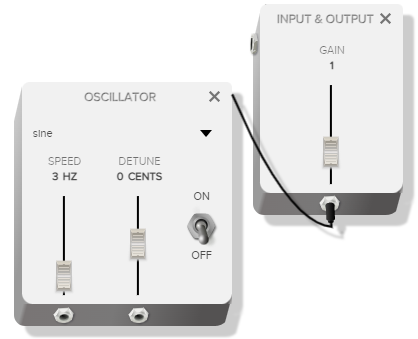
- Connect
OscillatorwithInput's gain parameter - Tremolo module with all its parameters is ready!
Recreating Reverb effect
Level: ★★☆☆☆
To complete this task you will need to know:
Instruction:
- Create four
Gainmodules- Rename first
Gainmodule toInput - Rename second
Gainmodule toOutput - Rename third
Gainmodule toWetness- Change
Wetness's gain name toWetness
- Change
- Rename fourth
Gainmodule toDryness- Change
Dryness's gain name toDryness
- Change
- Rename first
- Create one
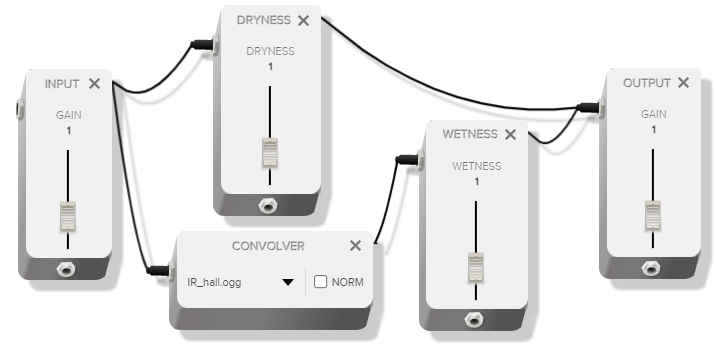
Convolermodule - Connect them as follows:
-
InputwithConvoler -
InputwithDryness -
ConvolerintoWetness -
WetnesswithOutput -
DrynesswithOutput
-
- Reverb module with all its parameters is ready!
Recreating Delay effect
Level: ★★★☆☆
To complete this task you will need to know:
Instruction:
- Create four
Gainmodules- Rename first
Gainmodule toInput - Rename second
Gainmodule toOutput - Rename third
Gainmodule toWetness- Change
Wetness's gain name toWetness
- Change
- Rename fourth
Gainmodule toDuration- Change
Duration's gain name toDuration- Open debug option for
Durationslider- Change
Maxto1
- Change
- Open debug option for
- Change
- Rename first
- Create one
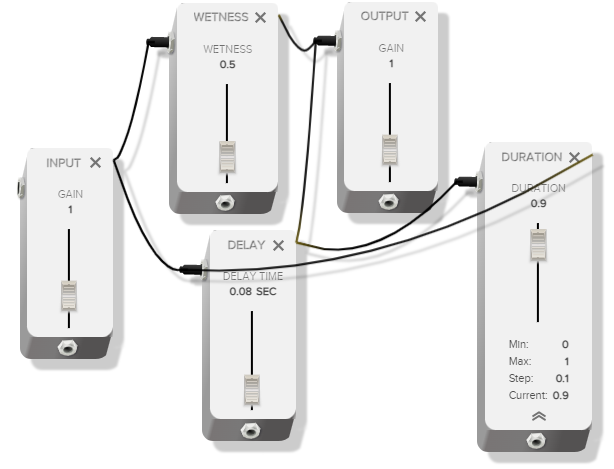
Delaymodule - Connect them them as follows:
-
InputwithWetness -
WetnesswithOutput -
InputwithDelay -
DelaywithDuration -
DurationwithDelay(create a loop) -
DelaywithOutput
-
- Delay effect module with all its parameters is ready!
Recreating Flanger effect
Level: ★★★★☆
To complete this task you will need to know:
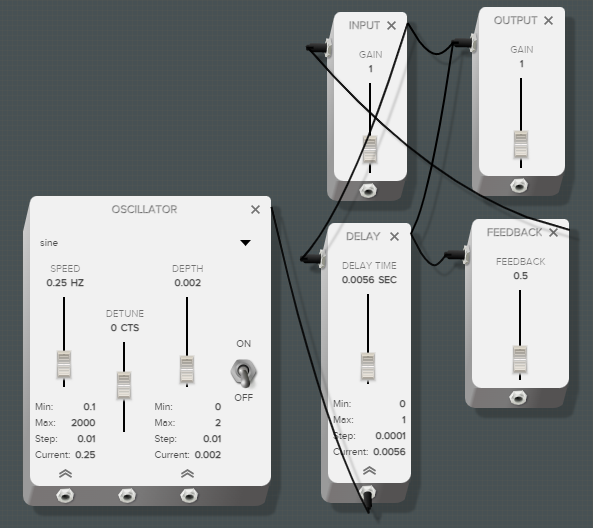
Instruction:
- Create three
Gainmodules- Rename first
Gainmodule toInput - Rename second
Gainmodule toOutput - Rename third
Gainmodule toFeedback- Rename
Feedback's gain name toFeedback- Open debug option for
Feedbackslider- Change
Maxto1 - Change
Currentto0.5
- Change
- Open debug option for
- Rename
- Rename first
- Create one
Delaymodule- Open debug option for delay time slider
- Change
Maxto0.01 - Change
Stepto0.001(you can even put here value like0.0000001to see more precisely how oscillator controls delay time) - Change
Currentto0.005
- Change
- Open debug option for delay time slider
- Create one
Oscillatormodule- Leave
sinetype - Rename
Oscillator's frequency name toSpeed- Open debug option for
Speedslider- Change
Maxto1 - Change
Currentto0.25
- Change
- Open debug option for
- Rename
Oscillator's amplitude name toDepth- Open debug option for
Depthslider- Change
Maxto0.01 - Change
Stepto0.001 - Change
Currentto0.002
- Change
- Open debug option for
- Leave
- Connect them as follows:
-
OscillatorwithDelay timeparameter -
InputwithOutput -
InputwithDelay -
DelaywithOutput -
DelaywithFeedback -
FeedbackwithInput
-
- Start the
Oscillator - Flanger module with all its parameters is ready!
Recreating Chorus effect
Level: ★★★★★
To complete this task you will need to know:
- Create seven
Gainmodules- Rename first
Gainmodule toInput - Rename second
Gainmodule toOutput - Rename third
Gainmodule toFeedback- Rename
Feedback's gain name toFeedback- Open debug option for
Feedbackslider- Change
Maxto1 - Change
Currentto0.6
- Change
- Open debug option for
- Rename
- Rename fourth
Gainmodule toDepth L- Rename
Depth L's gain name toDepth L- Open debug option for
Depth Lslider- Change
Maxto1 - Change
Currentto0.4
- Change
- Open debug option for
- Rename
- Rename fifth
Gainmodule toDepth R- Rename
Depth R's gain name toDepth R- Open debug option for
Depth Rslider- Change
Maxto1 - Change
Minto-1 - Change
Currentto-0.4
- Change
- Open debug option for
- Rename
- Rename sixth
Gainmodule toWetness- Rename
Wetness's gain name toWetness
- Rename
- Rename fifth
Gainmodule toDryness- Rename
Dryness's gain name toDryness
- Rename
- Rename first
- Create two
Delaymodules- Rename first
Delaymodule toDelay L- Set the value to
0.5
- Set the value to
- Rename second
Delaymodule toDelay R- Set the value to
0.5
- Set the value to
- Rename first
- Create two
Oscillatormodules- Rename first
Oscillatormodule toSpeed L- Rename
Speed L's frequency name toSpeed L- Set the value to
0.1
- Set the value to
- Rename
- Rename second
Oscillatormodule toSpeed R- Rename
Speed R's frequency name toSpeed R- Set the value to
0.1
- Set the value to
- Rename
- Rename first
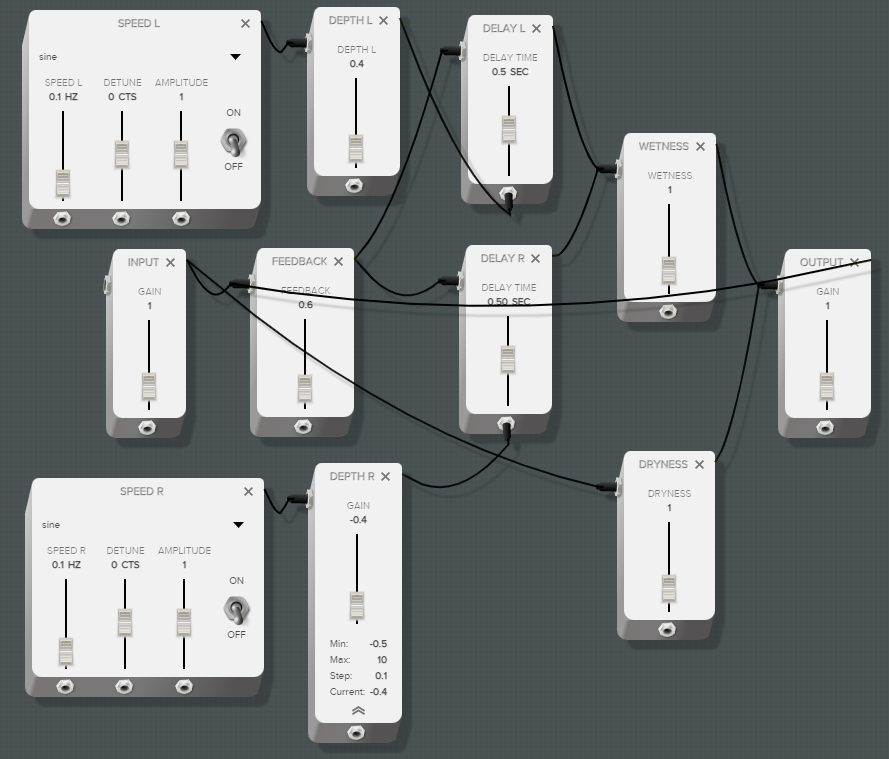
- Connect them them as follows:
-
InputwithFeedback -
FeedbackwithDelay R -
FeedbackwithDelay L -
Delay LwithWetness -
Delay RwithWetness -
WetnesswithOutput -
OutputwithFeedback(create a loop) -
Speed LwithDepth L -
Depth LwithDelay L's delay time parameter -
Speed RwithDepth R -
Depth RwithDelay R's delay time parameter -
InputwithDryness -
DrynesswithOutput
-
- Start both
Speedmodules - Chorus module with all its parameters is ready!