HUD
One of the first features you will notice is the HUD:

The HUD is made up of multiple displays, each of which can be configured or disabled individually.
This screenshot shows a player with an active flight plan and all automation features enabled. Some indicators only appear under specific circumstances.
There are three HUD layouts:
- Not flying (without elytra)
- Not flying (with elytra equipped)
- Flying
For each layout, you can customize the HUD size, colors, and which displays are enabled.

Shows the current airspeed. Because Minecraft does not simulate actual airflow, the mod assumes the air direction is opposite of the player's velocity, so this display represents forward speed.
When autothrust is enabled, the number above the scale shows the target airspeed.

Shows the currently active automation modes. From left to right:
-
Thrust mode - e.g.
SPEED, meaning autothrust is maintaining a specific airspeed. -
Vertical mode - e.g.
CLIMB, meaning the autopilot is climbing toward a target altitude. -
Lateral (horizontal) mode - e.g.
TRK NAV, meaning the autopilot is following a predefined track. -
Automation status - shows which systems are active, e.g.
FD(flight directors),A/THR(autothrust),AP(autopilot).

Shows active alerts sorted by importance. Alerts are grouped by category. In this example, alerts come from the AUTO FLT (autoflight), THRUST, and F/CTL (flight control) categories.
Below the main alert text, advisory messages may appear:
-
Text starting with a dash (
-) indicates an action the player should take.
Example: ForTHRUST LOCKED, the suggested action isTHR CTRL KEYS: USE. -
Text without a dash provides additional information or guidance.
Example: ForF/CTL PROTECT LOST, the guideline isMANEUVER WITH CARE.
Full list of alerts and their meanings
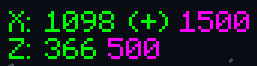
Shows the current coordinates. A + or - in parentheses indicates whether each coordinate will increase or decrease when moving in the current direction.
The numbers to the right represent the target coordinates.

Shows the current elytra durability. The display units can be changed in the config screen to one of the following:
- Percentage
- Time (approximate)
- Minecraft units (raw durability as shown in advanced tooltips)
If the equipped elytra is unbreakable, the display shows INFN.
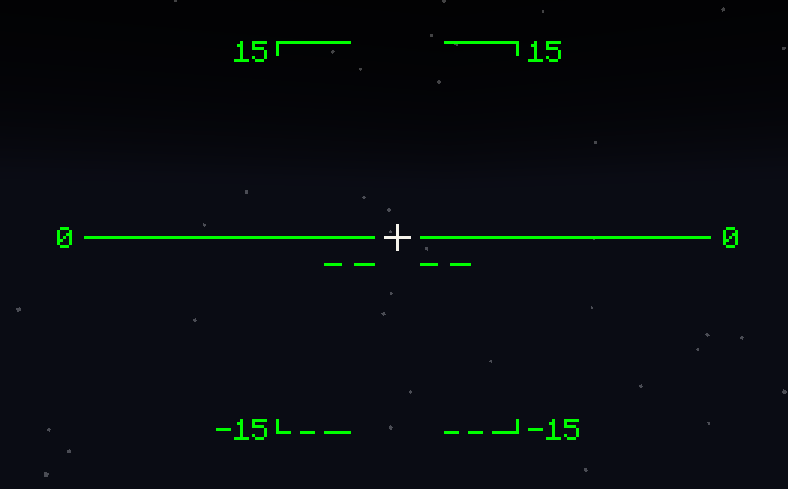
Shows an artificial horizon and pitch lines to help orient the player. Negative pitch lines are dashed.
If a roll mod is installed, the display rotates accordingly.
Reference pitch marks (shown as paired dashes on each side):
- 47.5° - maximum safe pitch with no thrust
- -2.2° - optimum glide pitch
- -38.5° - maximum safe negative pitch
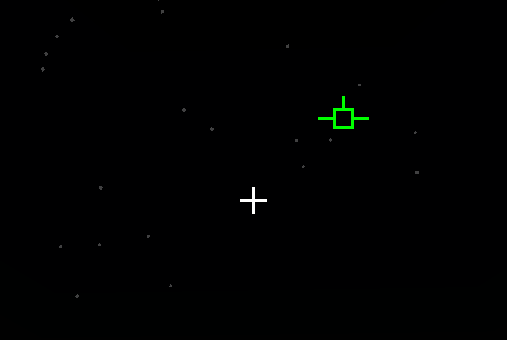
Shows the player’s true movement path using an aircraft-style symbol, indicating trajectory and drift.

Shows one or two guidance bars depending on the active automation modes.
Align your crosshair with the intersection of the bars to follow the commanded direction

Shows deviation from the target course while flying under a flight plan.
- The horizontal bar shows lateral deviation.
- The vertical bar shows vertical deviation.
- The purple rectangle marks the target.
- If it is left of center, turn left.
- If it is above center, pitch up.

Shows the current heading.
Below the scale, a symbol indicates the heading axis.
Above the scale, the target heading is displayed if available.

Shows contextual flight information. Example:
-
CLIMB- current flight phase -
WP DIST: 423- distance to the next waypoint (423 blocks) -
WP TIME: 0:15- estimated time to the waypoint (15 seconds) -
FRWK CNT: 415- number of usable fireworks in the inventory -
THR: 18.5%- current thrust setting

Shows the current ground (horizontal) speed and vertical speed.
Negative vertical speed indicates descent.

Shows the current altitude.
A vertical line to the left of the scale visually represents vertical speed.
The number above the scale is the target altitude.

Shows the current radar altitude - height above terrain or void.
- If only void is below,
GRNDis replaced withVOID. - If radar altitude cannot be computed (chunk unloaded or altitude too high), the flag
R/ALTis shown.