基于课程11的 stable_fluid 代码添加 advection reflection,maccormack, MGPCG
- Reference
- Advection reflection https://jzehnder.me/publications/advectionReflection/
- https://github.com/taichi-dev/taichi/blob/master/python/taichi/examples/simulation/stable_fluid.py
- https://github.com/erizmr/stable_fluid_MGPCG/blob/master/stable_fluid_MGPCG.py
- https://forum.taichi.graphics/t/homework-0-fluid-simulation/459
[Taichi] version 0.8.7, llvm 10.0.0, commit 88d81df6, win, python 3.7.7
python stable_fluid.py: use the jacobi iteration to solve the linear system.python stable_fluid.py -S: use a sparse matrix to do so.python stable_fluid.py -M: use MGPCG- press 'A' switch advection reflection
- press 'C' show curl field
- press 'V' show velocity field
- press 'S' enhance vortex
- You can change MGPCG and Jacobi iteration to change precision
- impulse

- smoke

-LICENSE
-|data
-README.MD
-stable_fluid.py
-PCG_Solver.py
- scene choice
- use_spray # which change velocity a lot, you can test reflection without projection
- use_smoke # 2 smoke source
- use_impulse # drag impulse
maccormack: 首先插值当前位置得到q, 然后以当前速度场backtrace位置p_new,差值得到 new_q, 再用得到的p_new 用 -dt backtrace p_aux, 插值得到 q_aux, error = q - q_aux , q更新为 q = q_new + 0.5 * error, 最后记得对 q 检查是否超出 p_new 所在格点 四个 q 值, 可以参考Games201第四课理解
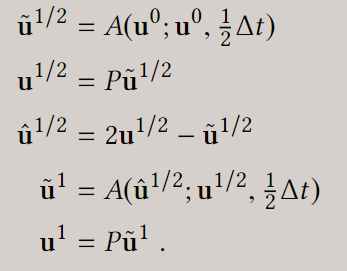
advection_reflction: 先 advect 0.5dt, 得到 advected_v, 再对advected_v project, 得到 projected_v, reflected_v = 2 * projected_v - advected_v 再以 projected_v当速度场 advect prejected_v 得到最后速度, 如果速度场散度变化很大,需要 再对 速度 project
MGPCG: 经典conjugate gradient 用 multigrid 做 预条件,参考 Games201第四课及mgpcg代码
在smoke,和 spray 场景中有 '源' 不断产生新的速度,如果要精确解出Ax = b jacobi,mgpcg,sparse matrix 几乎相同的消耗 因此这种场景不如用Jacobi,容易实现
advection refletion 能一定程度上加快收敛, 减小残差
- 40ite_jacobi_without_reflection

- 40ite_jacobi_with_reflection

- reference_sparse_matrix

-
!!! 如果速度场散度变化很大,需要 再对 速度 project, (如果解算器不准的话,视觉上也没有太大问题,但如果残差小,速度场会发生剧烈抖动)
-
Reflection_without_projection
