-
Notifications
You must be signed in to change notification settings - Fork 17
How to use
To open the Cheat-Menu press the SELECT Button.
The ID Lists for the different cheats is located here.
This lets you change your town name. Press the Enter Symbol to confirm your new town name.
| Option | Description |
|---|---|
| Save Backup | This lets you backup your current Game Save (only the garden_plus.dat!) to the SD-Card. If you dump the Game Save while located in a Dream Town, you will dump the Game Save of the person you are dreaming about (the same applies to you visiting other towns)! |
| Save Restore | This lets you restore a selected backup of a Game Save that is saved on your SD-Card. To restore the save just press onto a backup while being in your own town and it will restore it for you. |
| Delete File | Lets you delete created backups from the SD-Card. |
| Option | Description |
|---|---|
| Backup Message | This lets you backup a selected Bulletin Board Message to your SD-Card. |
| Restore Message | This lets you restore a wanted Bulletin Board Message that is saved on your SD-Card. |
| Delete File | Lets you delete created backups from the SD-Card. |
This lets you change the size of your towns tree. Reload your town to see the changes.
This lets you change your native town fruit to a different one.
This lets you unlock/lock all the Public Work Projects.
This lets you change the Grass Type of your town. Reload your town to see the changes.
This lets you modify the currently visiting caravan villagers from your campground.
This lets you modify or remove the currently visiting campground villager from your town.
This lets you unlock any shop from the main street. It can also change the current state of the nookling store.
This lets you upgrade your house and customize its exterior! First select the player, then select one of the following options:
| Option | Description |
|---|---|
| Upgrade House | Here you can upgrade your house, the options will vary, depending how far your house is already upgraded. |
| Finish House | This will upgrade your house to the maximum! Also unlocks the secret storage and the room editor. |
| Edit Exterior | This will let you customize the exterior of your house. |
This lets you place, move and remove any public work projects in your town. Some Buildings cause issues and are therefore disabled. Face-Cutout-Standees and Design-Stands have a maximum amount to be placed, the plugin will stop you from building too many. Here are the Building ID's
This lets you finish the museum or clear all donations. Choose the player who will appear as the donator of all the donations.
This lets you finish your mayor permit instantly.
This lets you edit your towns acre tiles. Just press onto the tiles and type in a new Acre ID (you can then scroll through the different acre to choose one). Warning Invalid acre-structures can break your save, always make save backups before using this cheat. Try not to do any crazy layouts.
This disables other players being able to push you around.
This lets you move around your player without actually walking. To move around press the A Button and one of the Directions of the DPad. To modify the speed the player is moving press the Keyboard Symbol on the bottom screen while on the cheat!
This lets you move your player up/down. To move press L and DPadUp/DPadDown. Other players will see you floating.
This lets you teleport your player to a specific location on your map by tapping onto the map on the bottom screen. Only works in town, the mainstreet and on the island.
This disables collisions for your player so you can walk over buildings etc. To enable/disable it press L + DPadUp.
This lets you switch between swimming and walking. To switch press B + L.
This lets you change the particles the player is creating while walking. To change the particle effect press L + X and enter a new Particle ID.
Here is a list of the Particle ID's
This lets you teleport a selected player to your position. To switch between players press R + DPadLeft.
To teleport the player to you press R + DPadRight.
This lets you modify your players visibility. To change the visibility press A + L.
This lets you change the walking speed of your player (To change the speed press the Keyboard on the bottom screen while on the cheat and type in a speed value.) The plugin has a maximum speed to ensure no crashes.
This lets you warp to any room you want to. To warp to a room press L + X.
Here is a list of all Room ID's
This disables the knock back of the shovel when hitting something (like rocks). Helpful if you are hitting a money rock.
This lets you spawn in any item you want. It has different ways to do that:
| Option | Description |
|---|---|
| Item to first slot | This lets you spawn an item into the first slot of your inventory by pressing X + DPadRight and typing in the item ID you want. |
| Item Set to Inventory | This will fill your inventory with a set starting with the ID you type in by pressing X + DPadUp. For example type in 2117 and the set will be 2117;2118;2119;etc.. |
| Write Item you are standing on | This will write the item your player is standing into the first slot of your inventory by pressing X + DPadDown. |
By pressing the keyboard symbol on the cheat you can also search for items via their name! Just enter the name (or a part of the name) and choose the item from a list of results. Here is a list of all Item ID's
This will duplicate the item that is on your first inventory slot. To duplicate it to the second slot press R, to fill your whole inventory with that item press R + X.
This lets you spawn any item that is located in the catalog to your inventory.
To open the catalog either open it the regular way (through the catalog inside the shop) or by pressing DPadRight + L.
Then select the item you want and press L + Y to spawn it into your inventory.
(Note: The Search Function of the Catalog doesn't work while not in Nooks Shop)
This cheat also works in the Camping Ground RV Ordering Catalog and the Happy Home Showcase Ordering Catalog!
This lets you spawn any item you type in the ACNL Keyboard into your inventory.
To spawn the item, type in the Item ID and press R + DPadLeft (you do not need to send the message).
This removes every item in your inventory. You can not get them back after clearing them.
This enables certain item functions like showing off or eating for all items. The following options are available:
| Option | Description |
|---|---|
| Show Off Everything | Lets you show off every item from your inventory, such as trees, tools etc. |
| Infinite Items | If you drop an item from your inventory it will not disappear which lets you drop it infinite times. |
| Eat Everything | Lets you eat every item from your inventory, such as trees, tools etc. |
This lets you change the menu which appears if you want to save the game. Just change the Menu to one of the given ones or a custom one.
This lets you spawn a Item Set to your inventory, just press on the given sets to spawn it.
To create a custom Item Set place the Items you want to be in the set into your inventory, then press Backup Custom Set.
To use the custom Item Set, just go to Restore Custom Set and select your wanted custom set.
This lets you add new custom options to your items. Just press on an item to see the new options.
Following options are available:
| Option | Description |
|---|---|
| Duplicate | Lets you duplicate the item to the next slot |
| Wrap It! | Lets you wrap any item to gifts |
| Put in Storage | Lets you put the item into your locker |
| Pay Debt | Lets you pay your debt directly with the bells in your inventory |
This displays a few informations about your player, like your current coordinates, room, item standing on, etc. Usually for debugging purposes used.
This rather useless cheat allows you to move around the neck of your player by pressing DPadDown and L.
This allows you to have custom hair and eye colors! By pressing the keyboard symbol on the cheat you get following options:
| Option | Description |
|---|---|
| Set Hair Color | Set the RGB Color you want to edit the hair color |
| Set Eye Color | Set the RGB Color you want to edit the eye color |
| Save Colors | Lets you save the current colors to a file, the colors will automatically be set again when restarting your game |
By pressing R you can randomize the eye and hair color!
This lets you wear helmets and accessories at the same time, make sure to wear the accessory first!
This lets you faint your player like when getting stung by a scorpion or tarantula.
Just press A + R to faint.
This will show every player on the map with their respective colors as figures.
This prevents your hair from getting messy when starting the game after a long time not playing.
This lets you edit your player name.
This lets you change your players appearance and outfit. Just select the part you want to change and type in the ID! Here are all needed ID's:


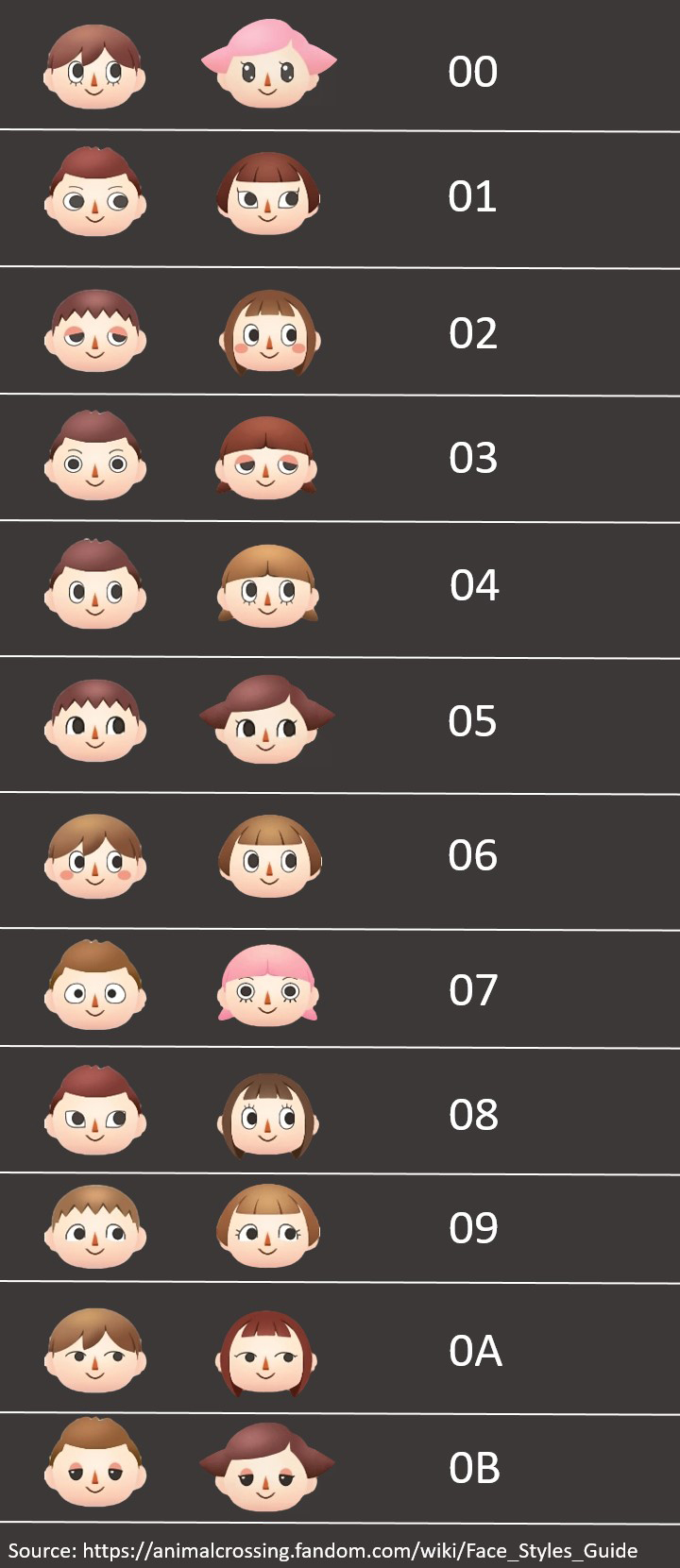
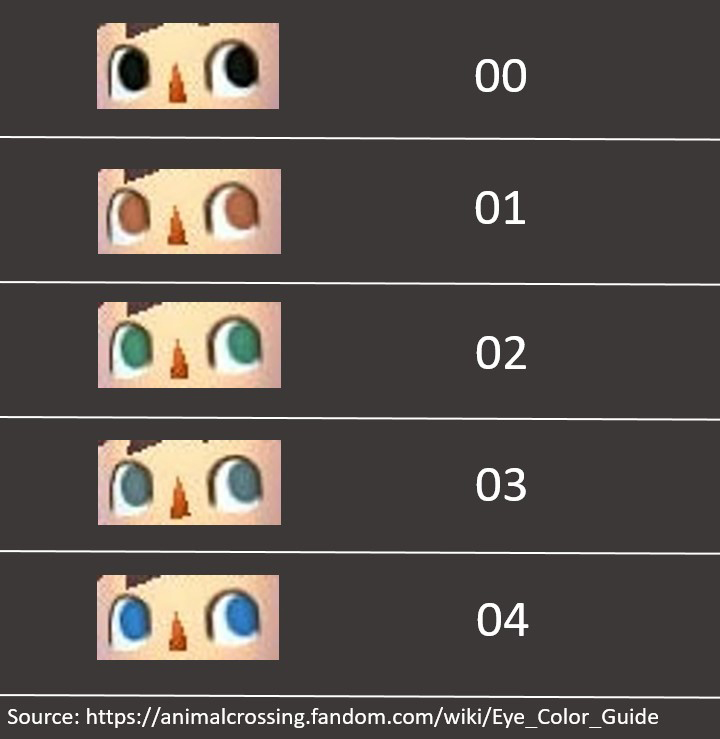
This lets you randomize your outfit or whole players appearance. Just select if you only want to randomize the outfit or randomize the outfit and appearance. Your old outfit will be gone when randomizing!
This lets you backup your player looks (outfit and appearance) to a file. Following options are available:
| Option | Description |
|---|---|
| Backup Player | This lets you backup your players data to the SD-Card. |
| Restore Player | This lets you restore your backuped player data which is saved on the SD-Card. |
This lets you edit your current tpc message. It sounds useless, but it does allow you to enter special symbols and lets you enter way more characters than usually allowed.
This lets you backup your TPC Picture and restore it afterwards. Following options are available:
| Option | Description |
|---|---|
| Backup TPC Picture | This lets you backup a specific TPC Picture to the SD-Card (into .jpg picture format) (if the player is not loaded it will not create a backup!). |
| Restore TPC Picture | This lets you restore a selected TPC Picture that is saved on your SD-Card. |
| Delete File | This lets you delete saved backups of your TPC Pictures to free space if having many of them |
This lets you backup your designs. Following options are available:
| Option | Description |
|---|---|
| Backup Design | This lets you backup one of your designs to your SD-Card. |
| Restore Design | This lets you restore a selected design that is saved on your SD-Card. |
This lets you fill/clear your Emotion List.
This lets you fill/clear your Encyclopedia List.
This lets you modify your current Dream Code. The cheat is only usable if a player is loaded and if you already have a Dream Code! To enter a new Dream Code just type in all the 12 Digits of the Dream Code. It will not replace your Dream Code!! Other players will see the custom Dream Code in your TPC but it will not function as a new Dream Code!
This lets you unlock the unused menu. It is present in the TPC Menu. It will show you many statistics about your player/town. But by default the text is sadly scrapped. I did restore most of the text though. This mod allows you to restore it as well to use the menu properly: https://gamebanana.com/mods/522625#FileInfo_1498936 It does only work for the US Games currently!
This lets you fill/clear your K.K. Song List.
This lets you fill/clear your whole Catalog.
This lets you unlock/lock the QR Machine inside the tailor shop.
This lets you select other players to put animations onto them, drop items from their location and more!
To select a player press DPadRight + L and select the wanted player.
To deselect the player press DPadLeft + L.
This prevents other hackers to teleport you around or put animations onto you.
This lets you modify the current animation of the selected player (selectable through the Player Selector).
There are several animation modes which you can set with A + DPadRight.
Here is a short explanation what which mode does:
| Mode | Description |
|---|---|
| Animation Mode | Is the main mode, which can do almost everything and needs Animation ID's to be inputted. |
| Tool Mode | The tool mode lets you spawn a given tool into the hands of your player, only Tool Item ID's work with it. |
| Snake Mode | The snake mode lets you use snake animations (more precised animations), uses Snake ID's. |
| Emotion Mode | The emotion mode lets you use emotions, uses Emotion ID's. |
| Sound Mode | The sound mode lets you play any sound/music you want, uses Sound ID's. |
| Appearance Mode | The appearance mode lets you change the selected players hairstyle, hair color and eye color, uses Hair Style/Color and Eye Color ID's |
If you selected the wanted mode you can now type in the wanted ID for it by pressing A + DPadLeft.
After setting the ID you can execute the mode by pressing A + B. If you want the specific mode to be executed faster you can set the speed by pressing A + DPadUp.
This lets you loop a selected emotion (selected in the emotion menu) if you hold down B while using the emotion.
This lets you idle/reset the selected players (selectable through the Player Selector) animation, useful if your player is stuck and can't move anymore.
To idle just press R
This lets you slow down your players animations (which will result in a funny way of the player walking around).
To enable it press L + DPadLeft.
This lets you set animations on every present player at the same time.
The Animation Mode is linked to the Animation Modifier, refer to that cheat to set the Animation Mode.
To put the animation onto the players press A + R.
This cheat also lets you idle all the players at once with R + B.
And you can also make every player fly up by pressing Y + R.
This lets you spawn every item to the ground by using one of the pickup modes.
To set a pickup mode press B + DPadRight.
After setting a pickup mode you can set an item ID by pressing B + DPadLeft.
To spawn the item just press Y (the standard way of picking up items).
You can also pickup every item that is on the ground through the PickUp Seeder by switching over to the Remove Item Mode by pressing B + DPadDown (to switch back to spawning items just press the keys again).
You can also set the speed how fast you do the animation of the pickup mode by pressing B + DPadUp.
There is also a Auto Pickup which will automatically spam the PickUp Seeder with no need of pressing Y anymore, to enable/disable it press B + L.
This lets you remove/destroy items you are walking over.
To enable/disable it press B + R.
This lets you change the item which will appear after a fountain firework is used up. To change the ID just go to Change Item ID.
To spawn a fountain firework into your inventory go to Spawn Firework to Slot 1.
This lets you precisely spawn one or multiple items at once onto the ground.
Enable/Disable it by pressing START + DPadUp.
To move around press the DPad-Directions.
To spawn the item/items press A.
To make the spawn-size bigger/smaller to spawn more/less items press R.
To set an Item ID you can either copy the current item on the ground by pressing Y or manually set the Item ID by pressing L.
This cheat can use the Item Sequencer, more to that at the Item Sequencer part!
This lets you change every item you interact with, with the chosen Item ID.
To set the ID press the keyboard symbol on the bottom screen while on the cheat.
To activate it hold down L, if you stop holding down it will not change the Items you interact with.
Examples of interactions which will change through the cheat: Dropping Items, Picking Up Items, plucking weed, etc.
This allows you to drop a chain of different items. To set the chain refer to Drop Modifiers. If you set a chain of items and drop an item with one of the dropper cheats (Drop Items, Auto Drop, Touch Drop, Slot Drop) it will now switch over to the next item in the chain every time you drop.
For example: Drop Chain(2117, 335B, 0070), if you now drop, the first item will be 2117, drop again and the next one is 335B, the next one will be 0070 and then the chain begins from the start again!
| Option | Description |
|---|---|
| Change Drop Animation | The drop animation is the animation which appears if you use one of the dropper cheats (Drop Items, Auto Drop, Touch Drop, Slot Drop). To set the animation press A + DPadRight and choose the wanted animation. |
| Change Drop Radius | The drop radius is how big of a radius you can drop items, the standard game only allows 3x3, the plugin will allow a far bigger radius! To set the radius just press A + DPadLeft and set the radius, there are different patterns you can choose. |
| Change Item To Replace | The Item To Replace is the item that gets replaced if you drop an Item. Normally you can only replace 7FFE (which is a Blank Spot with no item on it), but you can change it to any Item you want by pressing A + DPadDown. If you enter FFFFFFFF you will be able to replace every item. Example of replacing item 2117: If you set it to 2117 you can now only drop items onto the item 2117, which will replace it with the wanted item. |
| Item Sequencer | Here you can set the chain for the Item Sequencer. Just press A + DPadUp and set the items you want to use for the chain, if you want to remove items out of the chain just press onto the item you want to remove and press B. |
This lets you drop items instantly with no need of opening the inventory or having items in the inventory.
To set an Item ID you want to drop press Y + DPadRight.
To drop the item press L + DPadDown.
This lets you drop items automatically while you walk with no need to spam buttons.
To set an Item ID you want to drop press Y + DPadRight. To start/end the auto dropper press Y + DPadLeft.
This lets you drop items at the position where you tapped on the town map. To set an Item ID you want to drop press Y + DPadRight.
This lets you drop items which are selected in your inventory, just select the item and either press R + Y to single drop the item or R + X to automatically drop that item onto the ground.
This will let you shake fruit trees forever without the tree losing its fruits (or items, refer to Fruit Tree Item Modifier for more info on that).
This lets you chop down trees by just shaking them.
This lets you modify the item that is present on a tree (for example apples) to whatever Item you want!
Just press A + DPadLeft to set an Item ID which should appear on every tree (not permanent, will be reverted back to previous item (for example apples) after switching off the cheat!
This lets you chop trees by chopping them only once instead of the regular 3 times!
This lets you choose a wanted amount of bells which will be transferred to your wallet.
This lets you choose a wanted amount of bells which will be transferred to your ABD/Bellpoint.
This lets you choose a wanted amount of meow coupons which will be transferred to your coupons.
This lets you choose of 4 different options:
| Option | Description |
|---|---|
| Gold | Gives you every gold badge. |
| Silver | Gives you every silver badge. |
| Bronze | Gives you every bronze badge. |
| None | Clears your badge list. |
This lets you choose a wanted amount of medals which will be transferred to your medals.
This lets you edit the turnip price for the whole current week.
This lets you unlock/lock kappn and club tortimer. Just choose which of these two options you want to unlock or lock.
This will let the game think you have a inventory filled with the bonus ore of the mini game. Therefore you will receive max points at the tour results.
This will let the game think you have all needed fruits in your inventory. If you talk to Tortimer he will end the tour and you get max points.
This lets you go to the island without the need of paying or having money at all.
This lets you modify the items which are present at the island shop in the island hut. Just type in 4 Item ID's (for every different Shop Item). For others to see the changes you must be the first person on the island!
This fills the tour list with every available tour. It will not actually "unlock" them, after disabling the cheats, you will not have every tour in the tour list!
This lets you modify the different acre tiles on the island. Just enable the cheat and type in the Acre ID's. For you to see it you must enable the cheat before going to the island. For others to see it too you also need to be the first person on the island.
This lets you modify the Island Hut Building and the Lloid Gyroid on the island. Just enable the cheat and enter the Building ID and the X and Y Coordinates of the Buildings. (To know which Coordinates you need to type in see: World Coordinates in the Player Info cheat!)
This lets you backup and restore a island layout (all items present on the island).
Following Options are available when pressing L and Y:
| Option | Description |
|---|---|
| Backup Island | Lets you backup the current island layout to a file. |
| Restore Island | Lets you restore backuped island layouts and load them onto your current island. |
| Delete File | Lets you delete created backups. |
This lets you select a NPC that is currently on the same map as you by pressing A + L.
This is needed to do when using the other NPC Codes.
This lets you set an animation onto the currently selected NPC.
By pressing on the keyboard symbol while the cheat is selected you can enter the wanted Animation ID.
After setting the ID, you can execute the animation by pressing B + L.
This lets you modify the coordinates of the currently selected NPC.
To move them around press the L Button and one of the Directions of the DPad.
This lets you teleport the currently selected NPC to your players position.
This can be done by pressing the L and Y Button.
This lets you modify the rotation of the currently selected NPC.
This can be done by holding the L Button and moving the CPad to the wanted rotation.
This sets a custom shader to the game. The shader makes the game generally much brighter, which gives the illusion that its always daytime.
This will always show aurora lights where ever you are.
This makes every flower unbreakable, which means you can't destroy any flower by running over it.
This lets you modify the current weather (only you can see the changes). Just select one of the given weather types.
If you want to disable the cheat scroll down and select Disable.
This lets you water every single flower on the whole map in an instant by just pressing DPadLeft + R. It also works online in other player's town!
This lets you remove every single weed on the whole map. Just press the keyboard symbol while the cheat is selected to remove all weeds.
This lets you edit the grass state instantly.
To clear/fill all grass in your town press the keyboard on the bottom screen while on the cheat, there you can select one of the 2 options (clear or fill).
To edit the exact grass spot you are standing on you first need to set a mode by pressing DPadRight + R, either the clear-mode or the fill-mode.
Then press DPadDown + R to apply the edit to the grass spot, to see the changes reload the room (you can press DPadUp + R to instantly reload the room!).
This will freeze the current grass state. Meaning no new dirt paths will occur. Make sure to enable this cheat before loading your town!
This lets you dig up items by just picking them up. Almost as if they aren't buried but are just laying on the ground.
This cheat will stop the game from removing items on invalid positions, like in front of house doors, on top of buildings, etc.. Make sure to enable this cheat before loading your town!
This will let you instantly catch a fish after it's first bite onto the bobber. So no need to wait for the fish to bite into it!
This will disable the disappearing of fish if you scare them by running at them, they will simply stay!
This will let you spawn or despawn any insects.
To spawn insects you first must select the insect you want to use, do that by pressing on the keyboard symbol when the cheat is selected. There you can either directly set the insect ID (just the Item ID of the insect) or choose from list, displaying all insects.
When choosing random in the choose from list option, every insect you spawn will be a random one.
Now that you have chosen the insect you want to spawn, simply press R + DPadUp to spawn it.
As there can only be 12 insects at a time you can despawn all insects on the map instantly by pressing R + DPadDown.
This will disable insect's from getting scared if you run near them, walk too close or hit next to them with a net.
This will bypass any closing times of the shops which will make every shop open 24/7.
This disables the appearing of the save menu which will appear if SELECT/START is pressed.
This disables any items of locking by usage. For example, if you fall into a hole that hole gets locked, which means no other player can fall into the same hole as you. The same happens with tree stumps. If you sit down on a tree stump the stump gets locked, which means no other player can sit down onto it. This cheat disables that! It also makes dropping items much faster!
This disables the falling into pitfalls/holes. The player can just walk over it with nothing happening!
This lets you edit the spot state of an item spot.
| Option | Description |
|---|---|
| Lock spot | The Lock spot cheat lets you lock the spot you are standing on. Locking a spot means you can't drop items onto it, you can't bury there, etc. |
| Unlock spot | The Unlock spot cheat lets you unlock the spot you are standing on. Unlocking it lets you drop items onto it, bury things there, etc. |
| Lock Map | The Lock Map cheat lets you lock the whole map. Locking the map means you can't drop items anywhere, bury items anywhere, etc. Useful if someone visits your town and you don't want them to steal items from you or break your flowers! |
| Unlock Map | The Unlock Map cheat lets you unlock the whole map. Unlocking the map lets you drop items everywhere, bury things everywhere, etc. |
This lets you search for items on the map and replace them with an entered Item ID. First enter the Item ID of the item you are searching for and then the Item ID of the item which will replace the searched item.
This will remove every single item on the current map. Includes every tree/bush/rock, every flower, etc. Make sure you are certain what you are about to do!
This will edit every pattern so the game thinks it's your design, which will let you edit every design, even if it is not made by you. You only need to activate this cheat once, it will disable on its own after usage and the designs will stay editable forever if you save your game!
This lets you spawn in any amiibo at every location. Just enable the cheat, start the amiibo scanning process and a menu will open prompting you to choose the amiibo you want to use.
This lets you freely move the time forward or backward by either pressing DPadRight and R to forward or DPadLeft and R to backward time.
By pressing the keyboard symbol when the cheat is selected you can also set the time it should forward or backward more precised.
This locks any chat bubble from disappearing after it was sent by any of the players which are present. If a new message gets sent the old one will simply disappear and the new one will be locked!
This lets you copy and paste your chat messages. Any copied or cut message will be saved to a clipboard file on your sdcard.
To copy a message simply select it in the chat and press DPadUp and L, this will put the message in the clipboard.
To cut a message simply select it in the chat and press DPadDown and L, this will put the message in the clipboard.
To paste a copied/cut message from the clipboard just place your cursor where you want it to be pasted and press DPadRight and L.
To delete a message simply select it in the chat and press DPadLeft and L, this will not put the message in the clipboard.
This lets you spam the chat message box very quickly by holding down R. For it to work you need to send one message manually before hand!
This enables executable commands you can set by just typing them in the chat, therefore even non hackers can use these commands while you are in the same room as them.
Here are the different chat commands you can use:
| Commands | Type | Description |
|---|---|---|
A:XX |
Animation | Replace XX with an animation ID: It will execute the entered animation. |
S:XXX |
Snake | Replace XXX with an snake ID: It will execute the entered snake animation. |
M:XXX |
Music | Replace XXX with an sound ID: It will play the entered sound. |
E:XX |
Emotion | Replace XX with an emotion ID: It will execute the entered emotion. |
I:XXXX |
Item | Replace XXXX with an item ID: It will drop the entered item. |
I:XXXXF:YYYY |
Item with Flag | Replace XXXX with an item ID and YYYY with a flag ID: It will drop the entered item + flag. |
This adds helpful buttons to your chat, working exactly like the Chat Copy/Paste cheat, just not with hotkeys.
This lets you change some of the sizes of different objects in the game.
Only you can see the changes.
Just select one of the object's you want to change and select if it should be bigger or smaller, setting default will set it back to the standard size.
If you want to disable all at once scroll down to the bottom and select Reset all.
This lets you disable the skeletal animations of the player and villager's. Which will end up in a t-shaped form of the player/villager.
This lets you make cool TPC Pictures from anywhere you want! First hold down A to freeze the picture of the game, it will outline the position of where the TPC Picture will be taken.
While holding down A press DPadRight once.
Then wait until the shutter sound is finished and let go off A, you should now have your custom TPC Picture!
If it did not work make sure you followed the tutorial correctly.
This makes it so you can spam stuff by just holding down your buttons. For example instead of needing to press Y very often to pickup multiple items you can just hold down A!
This lets you spam stuff with your buttons much quicker by spamming your buttons, for example you can pickup items super fast by spamming the Y button.
This will modify the party popper tool to edit the particles which it will spawn. It will also pop instantly without the popping animation and after usage the popper will not disappear, therefore you can use it unlimited times.
This lets you move around your camera freely. Following camera options are available:
| Option | Description |
|---|---|
| Rotate Camera | You can rotate the camera by pressing R and CPad. |
| Stop the Camera from following your player | By pressing R and X
|
| Lock your player from moving | By pressing R and Y
|
| Move around the camera | You can move the camera by pressing B and DPad
|
This lets you edit the animation for every tool you can use, just type in the Animation ID you want for the tools to use.
If you want to revert it back to the original animations just type 00 as an Animation ID into the cheat.
This lets you change the current game type of the game.
There are 4 different game types:
| Game Type | Description |
|---|---|
Offline |
The standard mode if you are in your town alone with no other players. |
Online (Mode 1) |
The online mode if you are in others towns or in your town with other players. |
Online (Mode 2) |
The online mode if you are on the online island. |
Dream |
The mode if you are in a dream town. |
The Offline mode is pretty boring, but if you are on the online island and use the Online (Mode 1) you can add other players to your friend list just like you could online in yours or others towns!
The Dream mode also has something cool, if you enable it and go into your own player house you may see a clone of your player inside of it! If you change any mode during an online session and a loading screen appears it could happen that the connection breaks, make sure to only have a different mode active if you really need it!
This will show the currently playing music when the music changes in game.
This lets you reload the current room you are in, useful if you are somehow stuck or your menu is all glitched up!
This will let you enter an unlimited amount of numbers in the online chat. The base game lets you only type in 3 Numbers per message, this cheat bypasses it!
This will zoom out the screen so you can see more stuff around you. Doesn't work on the main street.
This lets you move around any furniture in any house, it doesn't matter who owns the house. It even lets you move around furniture while you are playing online.
This lets you walk around while interacting with any text box. Talking to villagers, reading signs, etc.
This lets you extend the limit of the letters you can type into the chat, which lets you write much longer messages, it also enables the @ symbol and lets you use the Enter button.
This will edit the symbols in your symbol tab inside your keyboard to custom symbols which are through the standard game not obtainable/usable.
This lets you change the particles which the bean tool produces by usage (the beans which get thrown).
Just enter the Particle ID you want by pressing DPadLeft + L.
This will make certain functions faster, to enable/disable it press DPadDown + R.
The functions are:
This will instantly show the whole text inside the text box (every text box, like if you are talking to villagers), which makes it much faster to skip through it.
This will speed up the whole game to make it much faster.
This will automate the player selection screen with Isabelle. It will block any inputs and just spam through it to make it go quicker.
These Codes are always activated by default! If you don't know what you are doing, do not touch them. They need to be active for the plugin to properly work and to fix a lot of crashes that could occur if disabled.
| Plugin Setting | Description |
|---|---|
| Change Language | This lets you change the current language to one of the available languages which will be used for the plugins text. |
| Change Menu Colors | This lets you set the colors for each menu folder and its entries. Just choose the menu folder you want to edit and set the wanted color in RGB |