Select multiple recipes in the full recipe lists #168
Conversation
This file contains hidden or bidirectional Unicode text that may be interpreted or compiled differently than what appears below. To review, open the file in an editor that reveals hidden Unicode characters.
Learn more about bidirectional Unicode characters


Obey version
…, and allow selection of multiple objects by ctrl-clicking.

Owner
|
Thanks for the contribution. I will merge it after some reviewing when I will get to work again, unfortunately, due to rl issues, the development is now slow. |
Contributor
Author
|
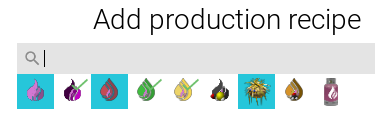
Inspiration struck, and I realized I could add checkmarks to already-selected items, like the initial dropdowns for selecting production/consumption recipes.
|

shpaass
added a commit
to shpaass/yafc-ce
that referenced
this pull request
Feb 7, 2024

By embedding the milestone elements in a (virtual) scroll list, it will be possible to scroll them, which lifts the restriction of only allowing 60 milestones. Background: when playing extensive mod packs with lots of new/unknown technologies it is often hard to determine the research path to take. I find it convenient to add a lot (all) technologies to the milestone list, so YAFC shows which technologies I should research to unlock some item/recipe. This PR also fixes the original (probable) reason for this limitation: `ulong` can only hold 64 bits, and the Analyser uses bits to keep track of the dependencies of the milestones (and other objects). By replacing `ulong` with the custom build `Bits` class, this limitation is lifted. To be more confident that I did not break things, I first added a (simple) test suite for milestones. Then applied the changes and with minimal changed (had to use the `Bits` class now) the test suite still runs properly. Additionally, I made these changes more than a year ago (ShadowTheAge#203) and have been playing with loads/all (!) technologies of Pyanodons added to the milestones without issues:  Note that these (open) PRs are _very_ convenient combined with this feature: * ShadowTheAge#168 * ShadowTheAge#204
shpaass
added a commit
to shpaass/yafc-ce
that referenced
this pull request
Apr 7, 2024
From Veger's PR: A PR by @DaleStan (ShadowTheAge#168) I had to fully rebase it due to all the changes we made in YAFC-CE. I tested it a bit, and it seems to be working. From the original PR: > Where logical (The Add production recipe, Add consumption recipe, Select raw recipe, and Add new milestone windows) this allows you to control-click to select multiple items. The currently selected items are highlighted, and you can control-click again to deselect them. After control-clicking at least one item, use the OK button to add all selected items and close the window. > > 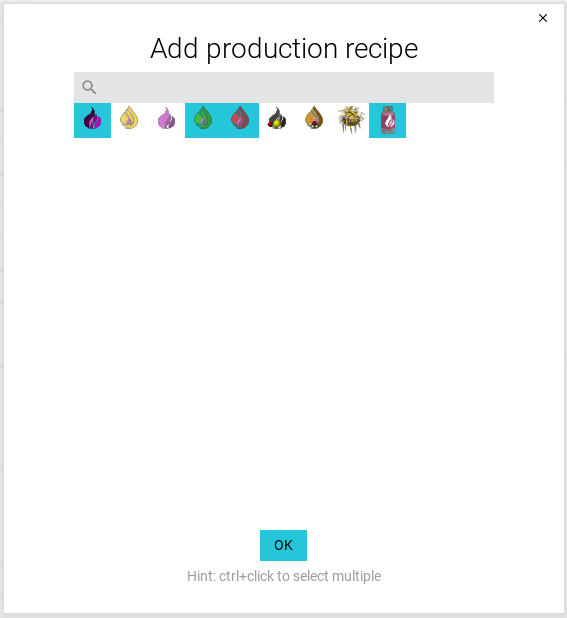 > > If you do not control-click, the single clicked-on item is selected and added, and the window is closed, as before.

craig-johnston
pushed a commit
to craig-johnston/yafc
that referenced
this pull request
Jul 15, 2024
`gui.SetTextInputFocus` was setting `gui.mouseDownRect`, which is
heavily used by scrollbars to detect is the mouse is still inside the
scrollbar rect when dragging.

Since the `PageSearch` focus gets updated every (build) event, the
`mouseDownRect` was effectively always set to the search input, and the
scrollbar could not be dragged as it detected that the mouse was not in
the correct `Rect` anymore.

I fixes the issue by introducing a `gui.focusRect`, so these `Rect`s are
tracked independently. Both typing text, as well as dragging the
`PageSearch` scrollbar seem to be working now.

I (quickly) checked some other input fields, but did not see any
regressions.

(The other commit is a small cleanup that I encountered while debugging
this issue)

Fixes ShadowTheAge#168
Sign up for free
to join this conversation on GitHub.
Already have an account?
Sign in to comment
2 participants


Add this suggestion to a batch that can be applied as a single commit.
This suggestion is invalid because no changes were made to the code.
Suggestions cannot be applied while the pull request is closed.
Suggestions cannot be applied while viewing a subset of changes.
Only one suggestion per line can be applied in a batch.
Add this suggestion to a batch that can be applied as a single commit.
Applying suggestions on deleted lines is not supported.
You must change the existing code in this line in order to create a valid suggestion.
Outdated suggestions cannot be applied.
This suggestion has been applied or marked resolved.
Suggestions cannot be applied from pending reviews.
Suggestions cannot be applied on multi-line comments.
Suggestions cannot be applied while the pull request is queued to merge.
Suggestion cannot be applied right now. Please check back later.
I found while working on my AngelBob factory that I often wanted to add several recipes that produced, for example, syngas, but there were more than can be displayed in the initial dropdown.
Where logical (The Add production recipe, Add consumption recipe, Select raw recipe, and Add new milestone windows) this allows you to control-click to select multiple items. The currently selected items are highlighted, and you can control-click again to deselect them. After control-clicking at least one item, use the OK button to add all selected items and close the window.

If you do not control-click, the single clicked-on item is selected and added, and the window is closed, as before.
Possible further enhancements
The selection dialog could show which items are already present in the underlying production sheet. This would have been useful to me, and it doesn't look like this should be technically difficult. Unfortunately, it wasn't obvious how to clearly indicate the necessary four states.(Completed)The "Recipe already exists" message box could be improved to show which of the selected recipes you were potentially duplicating. This would not have been useful to me, but could be a nice "fit-and-finish" feature.(Completed)