A compilation of open-source projects for Star Resonance (Blue Protocol). These tools cover DPS meters, overlays, bots, asset extraction, and community utilities. Use responsibly and follow the game’s terms of service.
For real-time combat tracking, analysis, and packet-based DPS/HPS meters.
Tools that collect combat data directly (via packet sniffing or capture).
dmlgzs/StarResonanceDamageCounter THE OG
- Real-time DPS and combat data sniffer for Star Resonance.
- Provides live damage statistics, DPS calculations, and detailed combat analysis.
- No modification of the game client is needed; relies on network packet capture.


asgharkapk/Star-Resonance-Dps This fork includes:
-
more en translations
-
Theme changes
- changed progressbar colors
- fully transparent background in light theme
- removed useless empty space before progress bars
- Changed proportion % in progressbars to death counter
-
New Features
- Adde sorting by per second or total switch
- Added automatica GitHub Actions Release
- Automatic Window Resize presets
-
Fixed minor bugs
- fixed always using class not subclass for progress bar color and icon
- reset death count with reset button
- skill diary translation
- fixed subclass icon and color detection dictionary
-
compact theme in compact branch
-
not compact theme in normal branch
-
beta test branch: monster branch
-
فارسی branch: فارسی branch
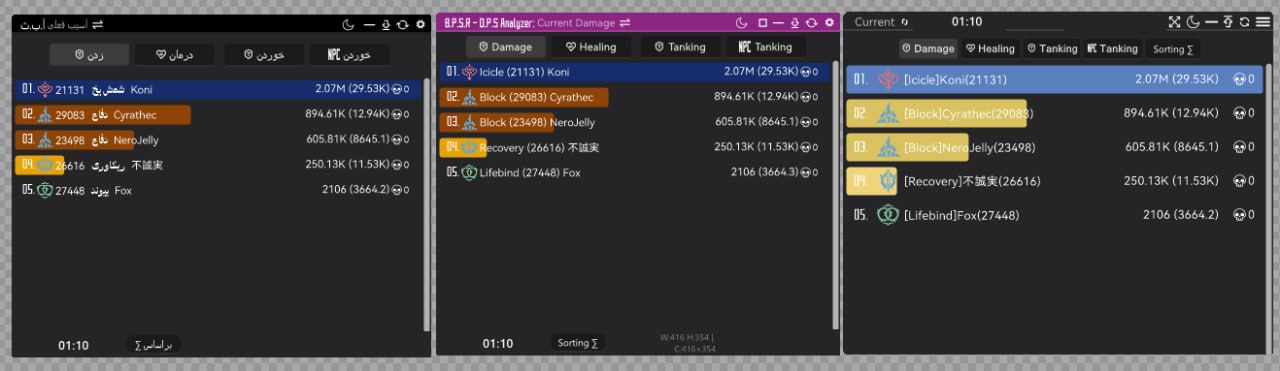
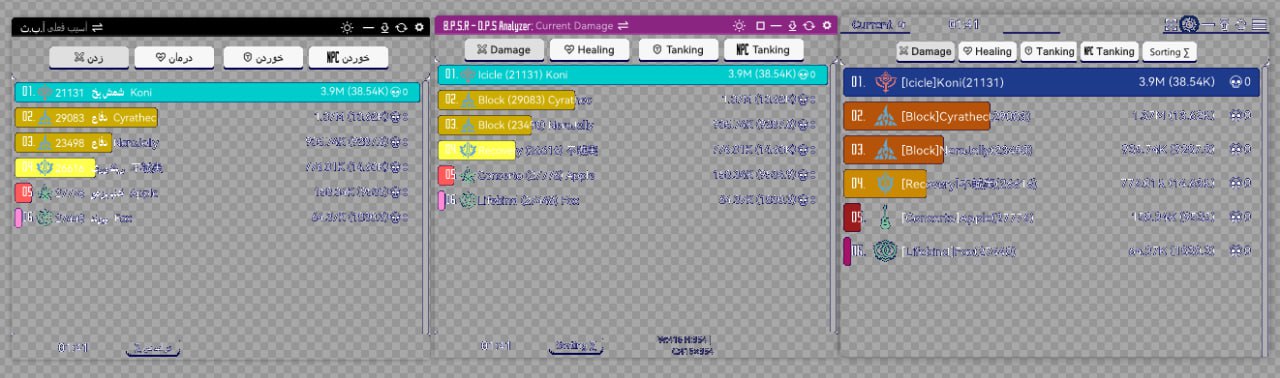
- Based on StarResonanceDamageCounter for real-time DPS analysis.
- Tracks individual and team damage output during encounters.
- Helps optimize gameplay by understanding DPS distribution and critical hits.


tom228studio/StarResonanceDamageCounter-master
- Localized Russian fork of the original DamageCounter.
- Provides combat analytics, DPS tracking, and skill statistics.
- Focuses on reliability in real-time battle scenarios with packet capture.
- Star Resonance DPS Statistics Tool
- Based on and ported from the StarResonanceDamageCounter project
- Does not modify the game client or violate game terms of service
- Designed to help players analyze combat data and improve performance
- Requires .NET 8.0 runtime
- Licensed under AGPL v3
- Open for community contributions via Issues and Pull Requests
- Intended for fair use only — do not use for player discrimination or to harm the game community

- Advanced DPS analysis and combat data tool for Star Resonance.
- Based on and extended from StarResonanceDamageCounter, with additional analysis modules and UI improvements.
- Captures, parses, and visualizes combat logs for real-time and post-battle review.
- Offers multiple frontends (WPF/WinForms) for customizable user experience.
- Designed for player self-improvement and performance benchmarking.
- Does not modify or interfere with the game client — works through network data interpretation.
- Requires .NET 8.0 runtime to operate.
- Distributed under the AGPL v3.0 open-source license.
- Aimed at transparency, education, and fair gameplay analytics.


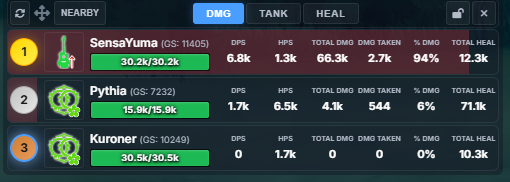
- A real-time DPS/HPS meter overlay for Blue Protocol: Soul Resurrection
- Built with Electron and advanced packet sniffing capabilities
- Tracks damage and healing per second with 50ms updates
- Supports dual view modes: Nearby (Top 10 players + you) and Solo (personal stats)
- Features include channel change detection, class icons, HP bars, and damage contribution visualization
- Offers rank badges 🥇🥈🥉 and blue highlight for local player
- Customizable interface with draggable, lockable, and always-on-top transparent window
- Includes click-through mode for seamless in-game overlay usage
- Minimalistic and responsive design optimized for real-time gameplay analysis
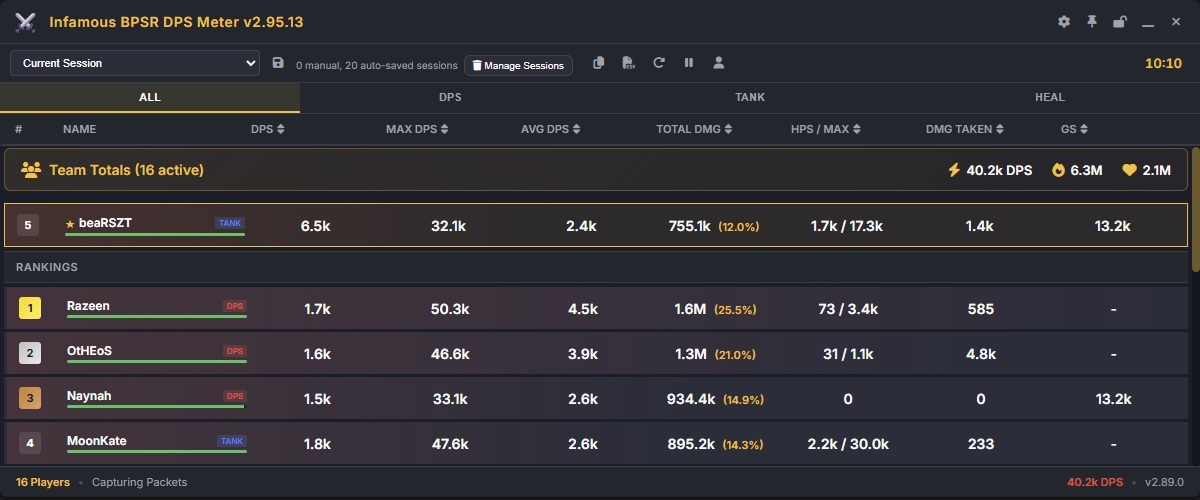
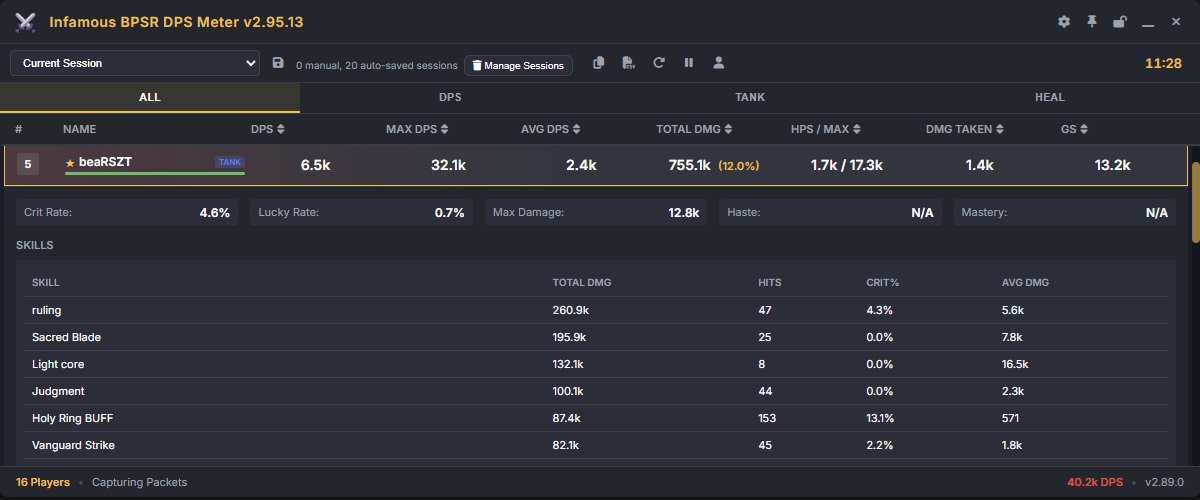
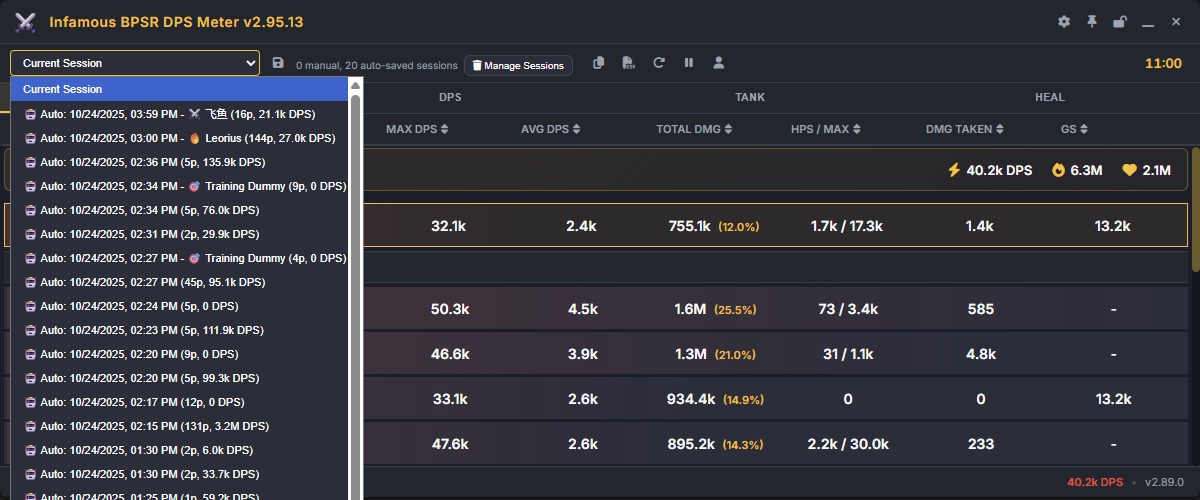
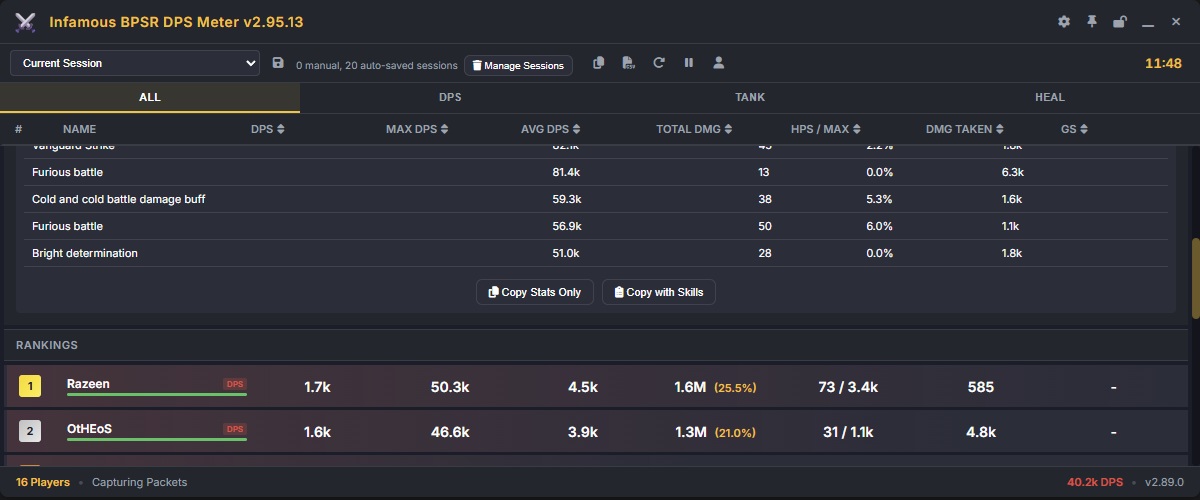
ssalihsrz/InfamousBPSRDPSMeter
- Infamous Blue Protocol: Star Resonance DPS Meter
- Real-time damage tracking and performance analysis tool
- Inspired by similar DPS meters from popular online RPGs
- Built to provide transparent and fair player statistics
- Supports customizable overlays and detailed combat summaries
- Requires .NET runtime and in-game data parsing setup
- Community-driven project — feedback and contributions are welcome
- Intended for educational and analytical use only
- Blue Protocol: Star Resonance Plug-in System (PSO-SX)
- Modular enhancement framework for Star Resonance utilities
- Includes support for performance tracking, overlays, and UI extensions
- Focused on stability, modularity, and community plugin development
- Compatible with various Star Resonance helper tools
- Written in C# with modern architecture design
- Licensed under open-source terms for collaborative development
- For fair and transparent gameplay analytics only
Below are some example views of the overlay in action:


Real-time DPS display showing nearby players’ output.

Real-time HPS display showing nearby players’ output.

“Sola Extended” view with enhanced tracking and session analytics.

- Blue Protocol Timer Utility
- Comprehensive time tracking and boss/event scheduling tool
- Supports multiple regions and synchronized server times
- Built with web-based UI for easy access and portability
- Features countdowns, alerts, and world boss tracking
- Ideal for players and communities organizing events
- Continuously updated with global Blue Protocol content
- Open-source and community-maintained for accuracy and fairness

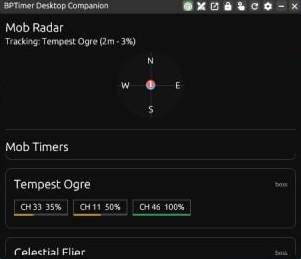
Blue-Protocol-Source/BPSR-ZDPS ZDPS is a Damage Meter and Companion Tool for Blue Protocol: Star Resonance. It's built on modern frameworks, making it fast and efficient at performing the role of a DPS Meter. It however also packs a lot of additional features in it such as complete Encounter History, Module Optimizer, Log Reporting, Field Boss/Magical Creature Spawn Tracking, Cooldown Tracking, and more.


backaround/BPSR-PSO Blue Protocol: Star Resonance - Per Second Overlay Provides a useful GUI to track DPS / HPS / DMG Taken for nearby players

Denoder/BPSR-Meter A DPS meter for Blue Protocol built with Electron, React 19, and TypeScript. This project is a fork of NeRooNx's BPSR Meter, featuring improved performance with Vite, Tailwind CSS, and optimized DOM updates.

seilent/BPSR-ZDPS ZDPS is a Damage Meter and Companion Tool for Blue Protocol: Star Resonance. It's built on modern frameworks, making it fast and efficient at performing the role of a DPS Meter. It however also packs a lot of additional features in it such as complete Encounter History, Module Optimizer, Log Reporting, Field Boss/Magical Creature Spawn Tracking, Cooldown Tracking, and more.
GUI or overlay tools that display DPS data from a backend.
- Lightweight frontend for displaying combat data from DamageCounter.
- Shows team DPS, healing, and skill usage in real-time floating windows.
- Supports multi-player monitoring and skill distribution analysis.
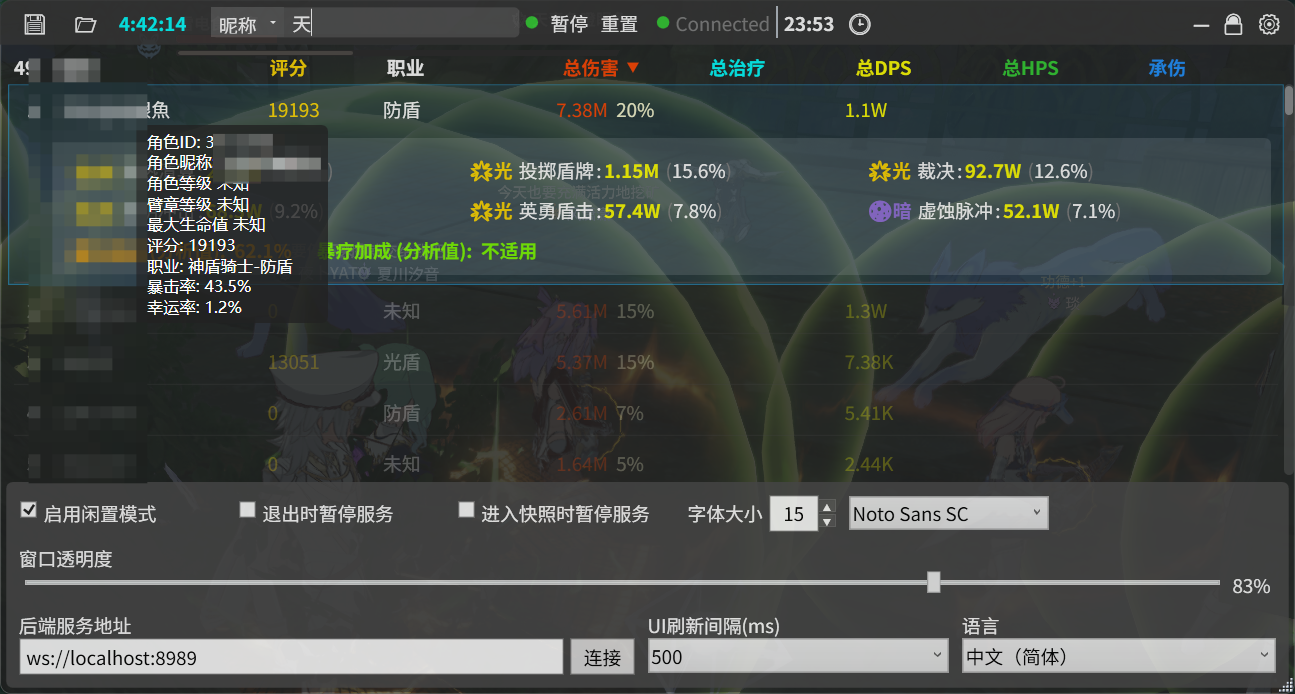
- English-language desktop DPS/HPS meter overlay.
- Displays total damage, healing, contributions, critical hit rate, and max DPS.
- Non-intrusive; overlays game window without affecting gameplay.


CKylinMC/StarResonanceDamageCounterOverlay
- Tauri-based frontend for displaying DPS and combat data.
- Works as a companion to DamageCounter backend, visualizing real-time statistics.
- Lightweight and responsive with simple UI controls for team data tracking.
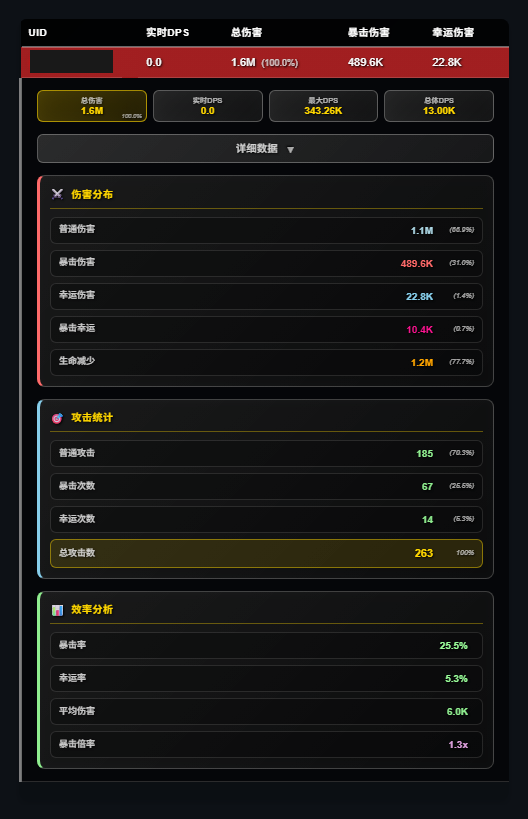
ziqi-rgb/StarResonanceDamageCounter-overlay
- Displays live combat data in floating windows without capturing packets.
- Syncs with DamageCounter for DPS, team stats, and skill information.
- Supports nickname edits and multiple independent windows for characters.
- Floating window overlay for DamageCounter API data.
- Shows team metrics, skill usage, and individual tracking.
- Customizable window layout and nickname settings.
tom228studio/StarResonanceDamageCounter-overlay-main
- Russian version of DamageCounter overlay supporting team monitoring.
- Allows UI customization like transparency, colors, and nickname edits.
- Displays skill statistics, DPS contribution, and supports multi-window layouts.
- Blue Protocol: Star Resonance - Per Second Overlay (PSO) provides a GUI to track DPS/HPS for nearby players.
- Standalone packet analyzer that does not modify BPSR files.
- Built with Node.js and Npcap for real-time combat data tracking. Pros:
- Non-invasive and does not require modifying game files.
- Offers clear, visual DPS/HPS metrics.
- Easy setup for developers (Node.js + npm). Cons:
- Requires Npcap installation with WinPcap API compatibility.
- Windows-only (Npcap dependency).
- Might need admin rights for packet capture. User comments:
- Users report it works reliably for monitoring nearby player performance.

- Real-time DPS and combat tracker for Blue Protocol.
- Provides live player and monster damage statistics, DPS calculations, and detailed combat analysis.
- Tracks group damage with individual player stats and boss/monster breakdowns.
- Includes combat timers, auto-clear options, and session logging with export capabilities.
- Built using Electron, React 19, and TypeScript for Windows OS.
- Uses network packet capture via Npcap or WinDivert, requiring no modification to the game client.
- Multilingual support: English and Chinese interface.
- Auto-update support via GitHub releases ensures users stay on the latest version.
- Open-source under AGPL-3.0, allowing modification and redistribution under the same license.
- Requires Node.js v22.20.0 or higher for building from source.
- Early-stage project with limited community adoption; users should check compatibility with the latest game version.

- StarResonanceDPS is an Electron-based third-party tool for real-time DPS tracking and analysis in Star Resonance.
- It captures network packets locally and parses Protocol Buffers data to compute detailed damage statistics.
- Provides real-time DPS monitoring, including normal, critical, and lucky damage, plus historical peak and average DPS.
- Supports multi-player tracking and automatically calculates critical rates and damage distributions.
- Runs as a native desktop app on Windows 10/11, requiring administrator permissions and WinPcap/Npcap for packet capture.
- Users can clone the repository, install dependencies with
npm install, and launch withnpm startin admin mode. - The interface allows selection of network devices, starting/stopping captures, clearing stats, and viewing live DPS dashboards.
- All processing is local; the tool does not modify game files, and users must follow community rules while using it.
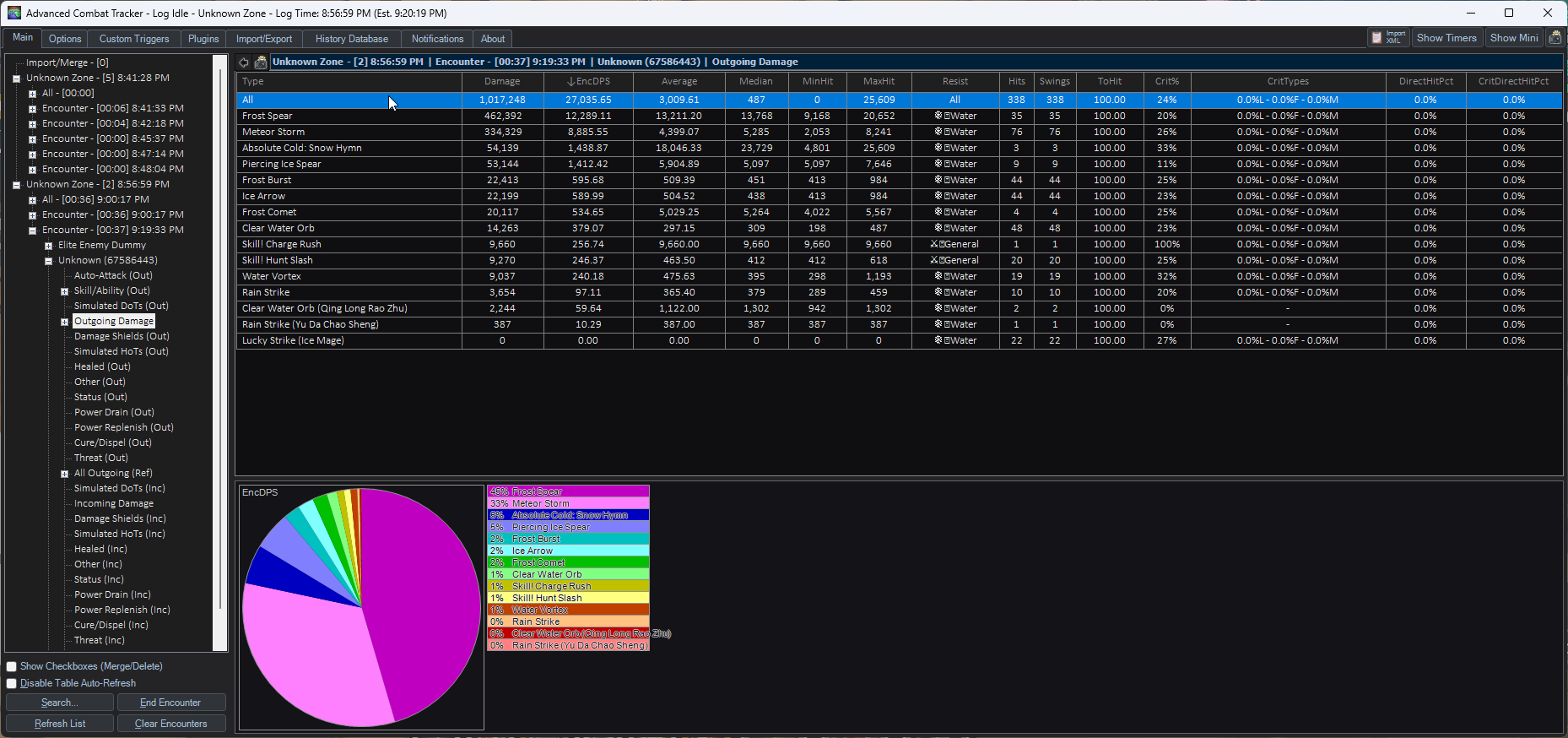
- BPSR_ACT_Plugin is an Advanced Combat Tracker (ACT) plugin for Blue Protocol: Star Resonance.
- It provides detailed combat analysis, including DPS, death reports, damage by combatant, and individual hit info.
- Users must install Advanced Combat Tracker and Npcap, then place the plugin DLL in
%appdata%\Advanced Combat Tracker\Plugins. - The plugin is loaded via ACT’s Plugins tab, enabling real-time combat tracking and analytics.
- Features planned include better device autodetection, class/spec display, zone handling, and improved monster/skill name translations.
- Uses SharpPcap, PacketDotNet, and ZstdSharp.Port for packet capture and processing.
- All networking and packet handling code is adapted from Star Resonance Damage Counter.
- The tool is open-source and intended for detailed combat monitoring and research, not for cheating.
- Blue Protocol: Star Resonance - Per Second Overlay (BPSR-PSO) is a standalone GUI application that tracks DPS/HPS for nearby players by analyzing network packets in transit. It does not modify the game or interact directly with game files. Setup & Installation:
- Install Node.js (npm included).
- Install Npcap (installer in
/resourcesfolder; enable "WinPcap API-compatible Mode"). - Clone the repository:
git clone https://github.com/Chase-Simmons/BPSR-PSO.git - Navigate to the folder and install dependencies:
npm installRunning:
- Run Npcap installer and start the application.
- Latest release: BPSR-PSO releases Features:
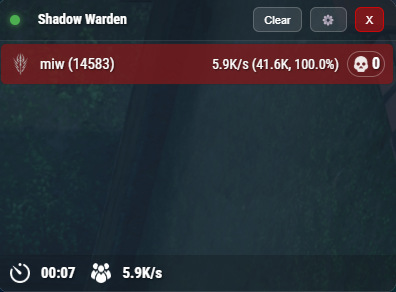
- Main window for monitoring DPS/HPS.
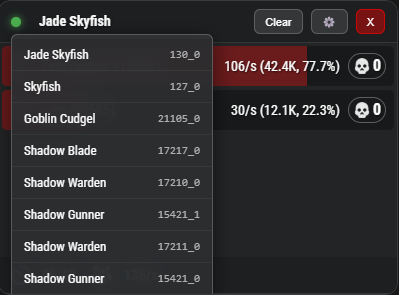
- Monster list overview.
- Skill detail view (click DPS blocks to open).
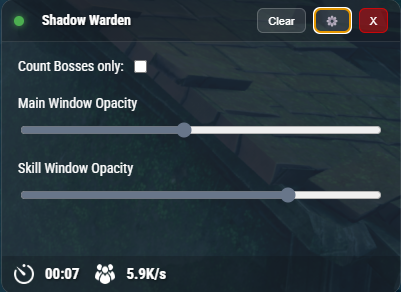
- Settings accessible from main window.
Note: Designed by the developer for personal use, inspired by TERA Online's Shinra meter.
License: AGPL-3.0
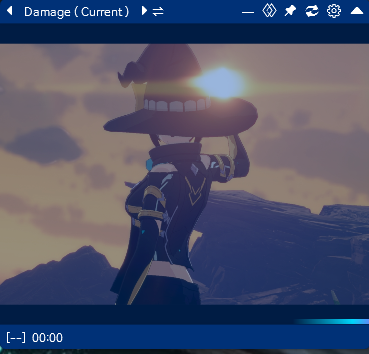
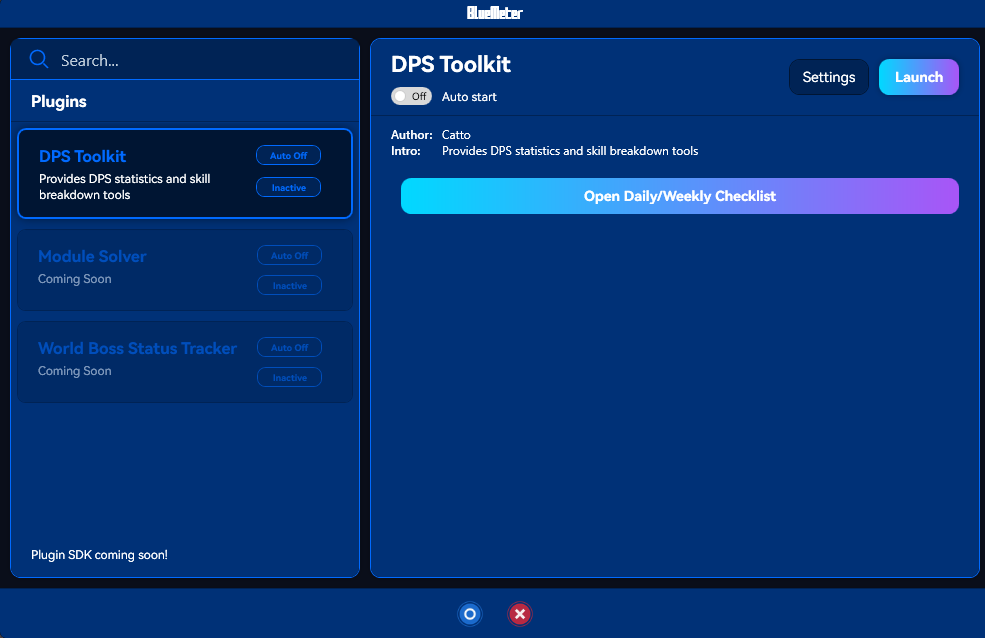
Main window
 Monster list
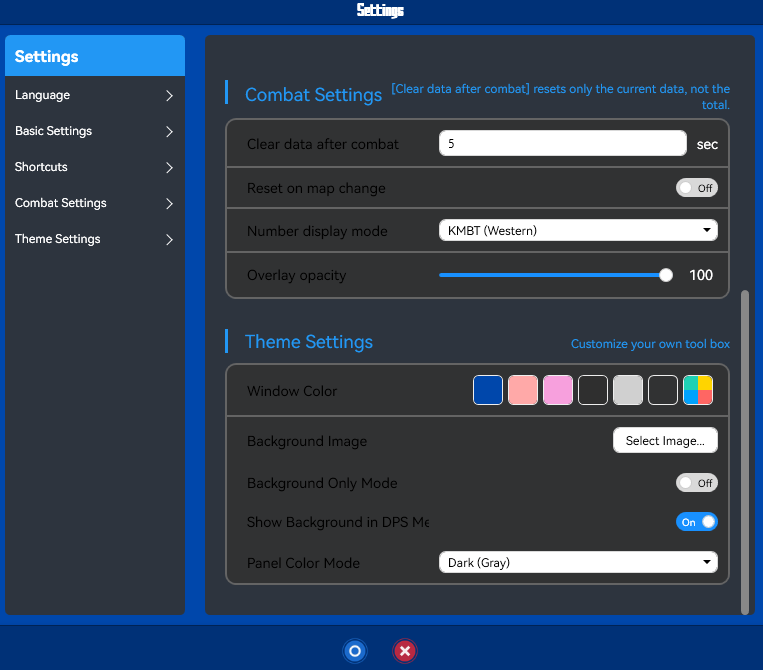
 Settings in Main window
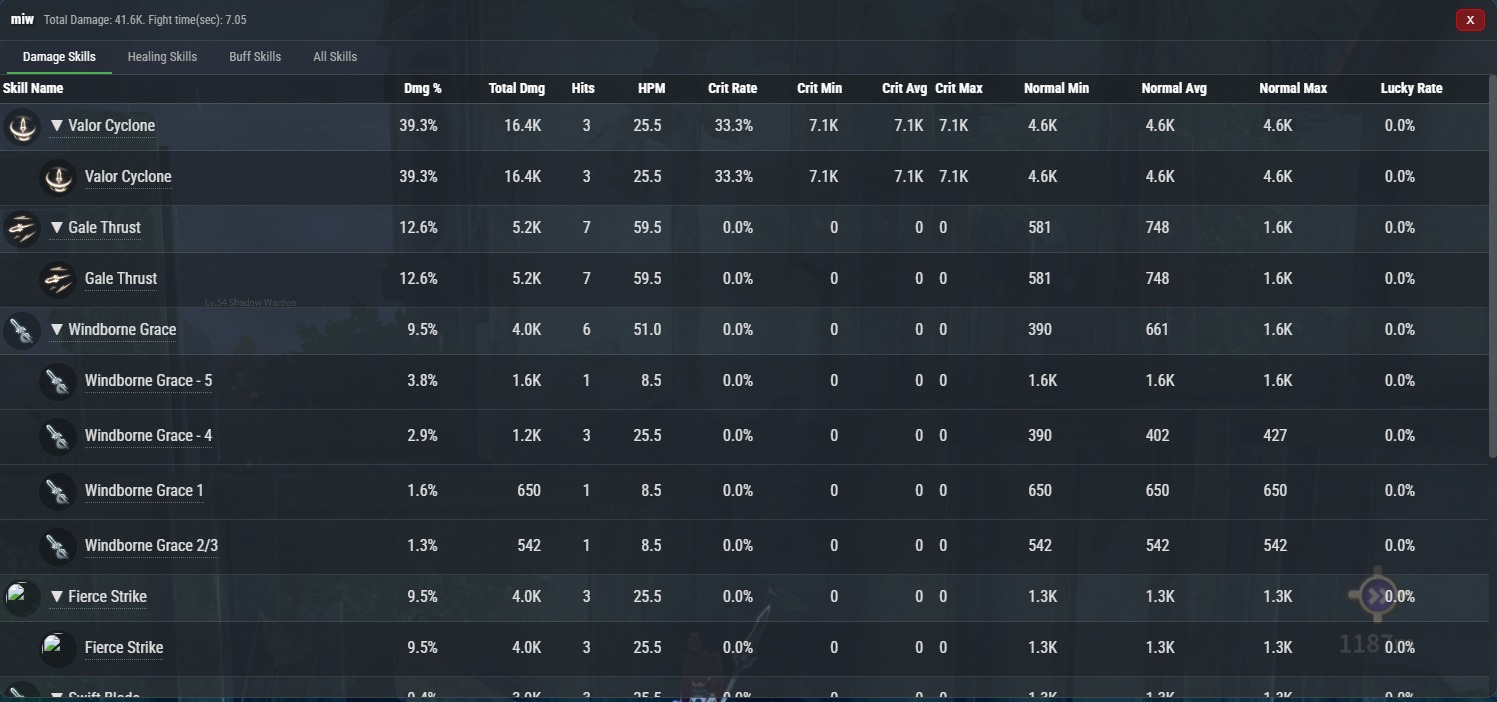
- It’s a desktop tool called BlueMeter for Blue Protocol: Star Resonance that analyses real‑time combat data (DPS/HPS etc) by capturing network packets and presenting them as overlay stats.
- It does not modify the game client or its files—it passively monitors traffic to compute damage/healing metrics.
- How it works: you download the release ZIP or build from source (.NET 8.0 required), install and run the application, and it listens to your network adapter via a packet capture driver (e.g., Npcap) to parse combat packets.
- After launching, the overlay will display your stats such as DPS, HPS, peak damage, contribution percentage and other combat‑related numbers while you play.
- To use: extract the release to a folder, run
BlueMeter.WPF.exe(or the built executable), ensure .NET 8.0 runtime is installed, start the game and fight as usual—stats are captured real‑time. - Alternatively, for building from source: install .NET 8.0 SDK, clone the repo, build with
dotnet build -c Release, ordotnet publishto generate the executable. - The UI is a visible overlay you can move or resize, it reads network packets from your system’s adapter, decodes game events and shows them in meaningful metrics.
- Users must run it under their own responsibility—while it is non‑invasive (no memory injection or file modding), usage may still carry risk depending on game policy.
wahfcore/bpsr-meter-wahf-edition
- It’s a custom-branded real-time DPS/HPS meter overlay for Blue Protocol: Star Resonance.
- Works on Windows 10/11 and captures network packets via Npcap to track player stats.
- Displays metrics for nearby players or solo, with rank badges and local player highlighting.
- Overlay updates every 50ms, supports adjustable scale (100%, 70%, 50%, 30%) and click-through transparency.
- Uses Electron framework for the GUI, with dark theme, HP bars, class icons, and damage visualization.
- To use: install Npcap with WinPcap API-compatible mode and loopback support.
- Download and extract the ZIP, then run
BPSR Meter - WAHF Edition.exe; overlay appears top-right. - Change game instance or line to start detection; interact with overlay controls by hovering over buttons.
- BPSR Meter is a real‑time DPS/HPS overlay tool for Blue Protocol: Star Resonance, built on top of packet‑capture techniques from earlier meters. (GitHub)
- It captures network traffic using drivers like Npcap (WinPcap‑compatible mode) to parse combat events without modifying the game client. (GitHub)
- For end users: download the installer from GitHub Releases, install Npcap first, then run the application (Windows 10/11 supported). (GitHub)
- For developers: clone the repo, install Node.js v22+, run
npm install, then build or start in dev mode (npm run dev,npm run build). - The architecture uses Electron + Vite for the renderer UI, Express for API backend, and socket.io for real‑time event updates.
- At runtime the overlay positions itself (top‑right by default), updates stats every ~50 ms, supports scaling and click‑through transparency, and highlights the local player plus top performers.
- It resets stats when you change server channels or instances (since new packet streams are detected) and may show “Unknown” for players who joined before the meter started. (Reddit)
- Note: Because it listens to packets, use at your own risk; community posts mention concerns about security and compatibility with anti‑cheat systems. (Steam Community)
---
👉 https://asgharkapk.github.io/star-resonance-module-optimizer/
- Browser-only React module optimizer for Blue Protocol.
- CSV import + live editable module table.
- Role presets (DPS/Healer/Tank/Support) + Maxroll builds.
- Shows icons, color-coded levels, stat toggles.
- Generates all 4-module combinations.
- Supports 10 ranking modes: total, highest, ability score, target level, smart, weighted, balanced, spike, efficiency, synergy.
- Exports CSV (input + results).
- No backend. Pure client-side.
👉 https://asgharkapk.github.io/star-resonance-module-optimizer/converter.html
- Web-based log → CSV converter.
- Parses
.log/.txtexported by StarResonanceAutoMod. - Auto-names modules (X1, X2, …).
- Dark/light theme toggle.
- Drag/drop or paste log text.
- Download CSV result.
- Works offline, browser only.
- https://github.com/HuaChunOXO/StarResonanceModuleSolver
- Modified continuation of StarResonanceAutoMod, originally derived from StarResonanceDamageCounter.
- Uses AGPL-3.0 license due to inheritance from previous projects.
- Captures in-game module data via Npcap and enumerates/optimizes module sets.
- Steps: install Npcap → run
模组求解器.exe→ start capture → change maps/channels to feed data → stop capture → set target/excluded attributes → view Target Requirement Plan & Profession Attribute Plan → export to Word. - Helps players discover optimal module combinations.
- https://github.com/fudiyangjin/StarResonanceAutoMod
- Captures live packets from Star Resonance to extract modules.
- Has CPU and GPU acceleration (CUDA/OpenCL).
- Optimizes four-module combinations with target/excluded attributes.
- Requires Npcap; works on Windows 10/11.
- Usage:
.\StarResonanceAutoMod.exe -a -lang en— live capture.\StarResonanceAutoMod.exe -lv -lang en— offline analysis - Developers can build Python + C++ extension version.
- https://github.com/fishing-dev-sm/bpsr_automodule
- OCR-based optimizer for BPSR using Python + Flask + OpenCV.
- Has CLI version and Web-UI at
localhost:5000. - Features: intelligent OCR, attribute matching, module combination optimization, JSON export, config files for screen/ROI tuning.
- Provides threshold-based filtering & multi-objective combo scoring.
- Installation includes scripts for Windows, Linux, macOS.
- Note: OCR + automation may conflict with some games’ ToS.
- Web UI with drag-and-drop screenshots and live recognition.
- Real-time visualizer for best module combos.
- Cross-platform support, one-click setup, JSON export.
- Multi-strategy OCR + multi-objective filtering.
- https://github.com/mrsnakke/BPSR-AutoModules
- GUI application for capturing & analyzing BPSR modules.
- Captures module data automatically from the game.
- Filters: module type (Attack/Guard/Support/All), attribute filters, presets for classes, attribute distribution (Lv5/Lv6).
- Refilter instantly without new capture.
- Shows detailed panels: module images, rarity, attributes, combo score, total distribution, combat power.
- Built-in console view.


- https://github.com/MessyMeshi/BPSR-AutoModules
- Another GUI tool similar to the above, focused on module capture and optimization.
- Attribute filtering & class presets included.
- Re-screen (refilter) without new capture.
- Shows combination fitness scores, module cards, attribute totals, estimated combat power.
- Integrated console panel for logs.
.png?raw=true)
.png?raw=true)
Data endpoints or frameworks to expose, transform, or extend DPS data.
- Exposes detailed API endpoints for enemies, players, and scene data.
- Provides JSON outputs for real-time combat statistics and mapping coordinates.
- Built on top of DamageCounter to allow integration with other tools or overlays.
Plugins integrating with ACT or external meters.
Bluefissure/StarResonanceACTPlugin
- Plugin for Advanced Combat Tracker (ACT) integration.
- Captures encounters and overlays DPS, built from DamageCounter code.
- Still WIP, may have packet loss with VPNs or UDP connections.
For data mining, resource parsing, build calculators, and profit tools.
- Parses game asset files like Lua scripts, protobufs, and asset bundles.
- Useful for modding, research, and analyzing game resources.
- Supports extracting JSON tables and Unity asset bundles for offline analysis.
- Parses game data for Blue Protocol: Star Resonance.
- Extracts combat, assets, and protocol information for analysis.
- Supports research and tool development using official game files.
c0derceejay/unofficial-blueprotocol-star-resonance
- Unofficial Blue Protocol: Star Resonance Build Calculator is a community tool for creating, analyzing, and sharing character builds.
- Users can customize stats, equipment, and skills for five classes: Blade Warden, Spell Weaver, Twin Striker, Heavy Smasher, and Fatal Mask.
- Builds are automatically evaluated for power rating, build type, and difficulty in real time.
- Community Build Gallery allows browsing, copying, and sharing user-created builds.
- Fully responsive, browser-based interface with Blue Protocol-themed visuals and animations.
- All data is stored locally in the browser using
localStorage; no external servers are needed. - Built with pure HTML, CSS, and JavaScript, compatible with modern browsers on desktop and mobile.
- To use: open
index.htmlin a browser, navigate to Build Builder to create builds, and explore community builds in the gallery.
whbyaoi/star-resonance-profit-tool
- Market and trade profit calculator for in-game items.
- Requires Windows and 1080p resolution for accurate UI reading.
- Tracks item prices, crafting efficiency, and profit over time.
Myazusa/star_resonance_library
- Offline library containing item info, crafting chains, and calculators.
- Includes profit calculators for association and resource management.
- Standalone executable, no installation required.
RayneClouds/rayneclouds.github.io
- Web-based talent tree visualizer for planning character skills.
- Supports multiple builds and shows detailed skill interactions.
- Designed for easy use in browsers without additional software.
- A C#-based packet-sniffing and detection tool for BPSR.
- Inspired by the original open-source project by Dimole (
StarResonanceDamageCounter). - Allows users to monitor BPSR data packets in real time, useful for developers and mod creators analyzing game behavior.
- Provides a foundation for future tools involving automated performance tracking and data capture.
Remering/starresonance_battle_data_statistics
- Flutter-based project for battle data statistics in Star Resonance.
- Provides a starting point for building a mobile app with combat data visualization.
- Includes resources for Flutter development, tutorials, and sample code for beginners.
amoeet/StarResonanceSimpleDamageDistribution
- Plots incremental damage over time for team analysis.
- Visualizes DPS trends using DamageCounter logs.
- Does not capture live data; works with existing datasets.


- A forked version of the StarResonanceDamageCounter with added guild management tools.
- Introduces a Guild Roster window for member tracking, data visualization, and performance analysis.
- Maintains all original DPS tracking and combat analytics while adding export and management features.
- Designed to promote transparency, collaboration, and fair play within guilds.
- Fully open-source under AGPL v3, with respect to community standards and non-invasive data collection.
- An event countdown tracker for the Blue Protocol: Star Resonance community.
-
Developed specifically for the STARWIND Guild to monitor upcoming in-game events.
-
Displays real-time countdowns for limited-time content, raids, and special seasonal events.
-
Helps guild members coordinate participation and stay synchronized with in-game schedules.
-
Some note setup complexity due to Npcap configuration.
-
Generally praised for being a clean, standalone overlay tool.
- ok-star-resonance automates Star Trace Resonance gameplay using image recognition and Windows interface simulation.
- It does not read game memory or modify game files, only simulates user clicks through the UI.
- The software is open source, free, and intended for personal learning, not for commercial use.
- It supports fishing and simple resource collection in-game.
- Runs at any 16:9 resolution, windowed or fullscreen, but cannot run in the background.
- AI detects fish positions and swings the rod accurately; notifications use PushDeer.
- Python source requires Python 3.12; run via
python main.py(release) ormain_debug.py(debug). - Users must follow instructions for display settings, key bindings, and antivirus exceptions to ensure proper operation.
BlueProtocolStarResonanceDataAnalysis
- BlueProtocolStarResonanceDataAnalysis is a toolkit for extracting and processing game data from Blue Protocol: Star Resonance.
- Currently, it provides a complete mapping from Skill ID to English names for core gameplay skills.
- A small subset of rare or edge-case skills is still marked as WIP; main skills are fully supported.
- Future updates aim to include dungeon/world-boss datasets, drop tables, and cross-referencing skill sources.
- Users extract raw game data via
bspr_data_extraction_pipline.py, optionally specifying game DLL and metadata paths. - Skill ID → English mapping can be generated with
skill_table_generator.py. - The project is for educational and research purposes only, with no support for cheating or violating Terms of Service.
- All processing is local; users should respect laws and game publisher rights when using this toolkit.
- StarResonanceNews is a personal bot that pushes official Star Resonance game news.
- Currently, it only works with YuiChyanBot for news delivery.
- The bot parses web page JavaScript to extract news content and metadata.
- Returned data includes news title, description, images, author, creation time, and unique IDs.
- Supports multi-page results, allowing retrieval of all recent news entries.
- Developers can use the JSON-like output as a template for secondary development or integration.
- All processing is local; the bot does not modify game files or interact with gameplay.
- Intended for personal use to stay updated with official announcements and events.
- Star Resonance Profit Tool is a desktop utility for Blue Protocol: Star Resonance that calculates daily profit using template‑matching of in‑game transaction data. (GitHub)
- It requires administrator mode to run and expects the game to be set to 1080p resolution with the Trading Center screen active for data capture. (GitHub)
- Captured price data is stored in the file
xhgm_prices.jsonin the user home directory, and you can edit output/recipes in/good/templates/items.json. (GitHub) - The tool is built with Go and uses the Wails framework for UI. (GitHub)
- To run in development mode you must install dependencies (e.g.,
go get github.com/go-vgo/robotgo), thengo mod tidy, and executewails dev. (GitHub) - To build a Windows executable:
wails build -clean -o srpt.exe. Cross‑platform building is possible via environment variables (GOOS=windows GOARCH=amd64 …) targeting Windows/amd64. (GitHub) - The tool uses image/template matching of UI elements (rather than data capture from the game’s internal files) to estimate profit, based on the user’s captured market/trading data.
- Being a third‑party tool, usage is at your own risk; ensure you comply with the game’s Terms of Service and community guidelines when using such utilities.
- It’s a web‑based raid planner for Blue Protocol: Star Resonance that helps coordinate players’ availability in different timezones.
- You go to the live site and register each player with their name, class, gear score, and availability on a 7‑day × 24‑hour grid.
- The tool detects your local timezone automatically (or you can select one manually) and displays times in both your local time and the server’s time.
- It supports real‑time multi‑user sync (auto‑sync every 30 seconds) so changes by one user update for all participants.
- To use it, open index.html, fill in player data, mark their free hours, and let the system convert & display availability for your group.
- Players can edit their own entries, export/import the player list as JSON, and switch between light and dark mode.
- The interface supports filters and viewing by class or gear score, making it easier to pick raid times that suit everyone.
- No backend is required—the tool works entirely in the browser and syncs using local storage or shared JSON files for groups.
- It is a toolkit for analyzing packet captures from Blue Protocol: Star Resonance, aimed at researchers and advanced users for combat, DPS, and trading‑center data.
- It decodes network packets (combat events, trading listings) using Protocol Buffers schemas (V2) to transform raw captures into structured data.
- It calculates DPS metrics with skill‑ and target‑level breakdowns, and can extract trading‑center listing info for market analysis.
- To use it, clone the repository (
git clone https://github.com/JordieB/bpsr-labs.git) and navigate into the project folder. - Then run the one‑command setup using
poetry run poe setupto prepare the environment and dependencies. - Example commands include
poetry run bpsr-labs decode input.bin output.jsonlto decode packets, orpoetry run bpsr-labs dps output.jsonl dps_summary.jsonto compute DPS. - For trade‑center extraction use:
poetry run bpsr-labs trade-decode trading.bin listings.jsonto process listings data from capture. - The CLI interface is unified; you can run
poetry run bpsr-labs --helpto view all available commands and workflows.
- It’s a web‑based crafting tracker built with JavaScript and Firebase designed for managing game recipes and materials.
- Works by letting you add or load recipes from a shared database and then calculates all required materials automatically.
- Supports nested recipes (“recipe within a recipe”), so sub‑recipes get saved and reused too.
- You start by cloning the repo, adding your Firebase config, and opening
index.htmlin your browser. - Once running, you can search or add a recipe, enter desired output quantity, and it computes raw and crafted inputs.
- The tool stores data in Firestore so different users can contribute and share recipes.
- Upcoming yield‑aware feature will let you enter how many outputs you want and it adjusts crafts accordingly.
- Ideal for tracking crafting workflows in games, keeping raw material summaries and organizing recursive recipes.
- It is a C# packet‑capture tool named BpsrDetector for Blue Protocol: Star Resonance that captures and processes game network traffic.
- The tool is based on the open‑source project StarResonanceDamageCounter and re‑implemented in C#.
- It monitors player character data and updates in real time when you change servers or lines.
- To use it: clone the GitHub repository, open the Visual Studio solution (
BpsrDetector.sln), and build the project. - Then run the executable with the required WinPcap/Npcap driver installed, ensuring monitoring of the game’s network adapter.
- Once running, the software listens for packet streams, decodes them for player and combat information, and displays detected data.
- Because it uses raw packet capture, administrator privileges and a compatible capture driver are required.
- Use it responsibly—monitoring is passive and unintrusive, but always comply with game terms of service.
Scripts and bots that automate gameplay actions or provide information.
- An automated fishing assistant for Blue Protocol: Star Resonance (BPSR).
- Allows the player to start fishing automatically through a simple Python script (
python main.py). - Detects when the fishing rod breaks and handles the “Continue Fishing” button automatically, reducing manual interaction.
- Designed for quick setup: navigate to the directory in CMD or PowerShell, and run the main file to begin automation.
- A computer vision automation framework tailored for BPSR’s fishing mechanics.
- Implements precise mouse and keyboard control combined with OpenCV-based image detection.
- Features advanced safety checks, fail-safe conditions, and coordinate validation for reliable automation.
- Provides modular Python APIs for easy integration into custom scripts, along with over 60 unit tests to ensure robustness.
- Can be adapted for other automation tasks beyond fishing through its extensible design.
fishing-dev-sm/bpsr_autofishing
- An improved, vision-based automatic fishing script for Star Resonance.
- Uses pixel color analysis (HSV/BGR) to detect bites, reel timing, and “fish escaped” conditions.
- Adapts to any 16:9 resolution with DPI scaling and automatic region-of-interest (ROI) adjustment.
- Features dynamic mode switching between fast tapping and stable long-press reeling based on color detection.
- Includes timeout protection, intelligent recovery (auto-refishing, reconnecting, or re-equipping rods), and detailed logging.
- Designed to run safely without altering game files or memory, ensuring non-invasive automation.
Xuan-cc/ShiroFisher-StarResonanceSmartFishing
- Python script to automate fishing gameplay.
- Detects fish bites, casts rods, collects fish, and manages bait automatically.
- Uses OpenCV and PyAutoGUI for computer vision and input simulation.
ArtjomsBogatirjovs/bpsr-fishing
- Star Resonance AutoFisher automates fishing in Star Resonance using image recognition and Windows API click simulation.
- It does not read game memory or modify game files, interacting only through the visible game interface.
- The tool works in any 16:9 resolution, windowed or fullscreen, but cannot run in the background.
- AI detects fish positions and performs accurate casting for efficient fishing.
- Users must follow display and key-binding requirements, and whitelist folders in antivirus/Windows Defender to avoid issues.
- Python source requires Python 3.12; run CPU version with OpenVINO via
python main.pyormain_debug.py. - Troubleshooting includes hiding character names, adjusting resolution, and ensuring extraction to English-only directories.
- The project is open-source, free, and for personal use only, with all consequences of use borne by the user.
EricHongXDD/nonebot-star-resonance-plugin
- NoneBot framework plugin for in-game interactions.
- Supports querying player info, daily tasks, and generating videos.
- Automates common Discord-like commands for Star Resonance communities.
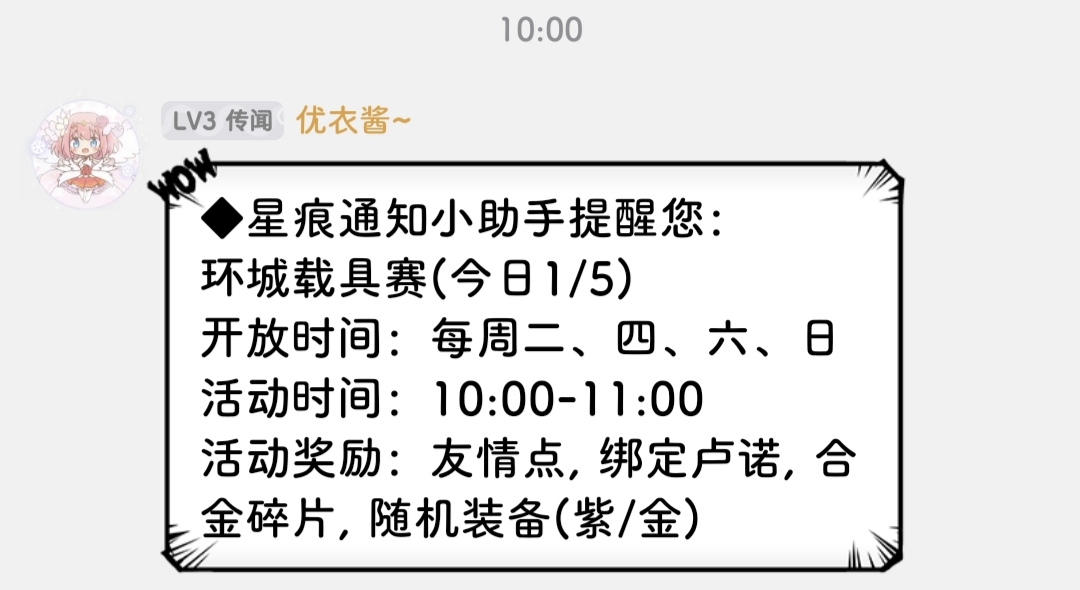
- Bot plugin to provide notifications and event alerts.
- Integrates with YuiChyanBot and updates players on in-game schedules.
- Lightweight and easy to configure via JSON settings.
exneverbur/StarResonanceChatSender
- Automates sending long chat messages in-game.
- Splits text into segments and simulates typing at intervals.
- Useful for bulk messaging or roleplaying events.
- Automates hunting encounters in-game.
- Switches lines, starts battles, and logs loot efficiently.
- Designed to reduce repetitive manual actions during farming.
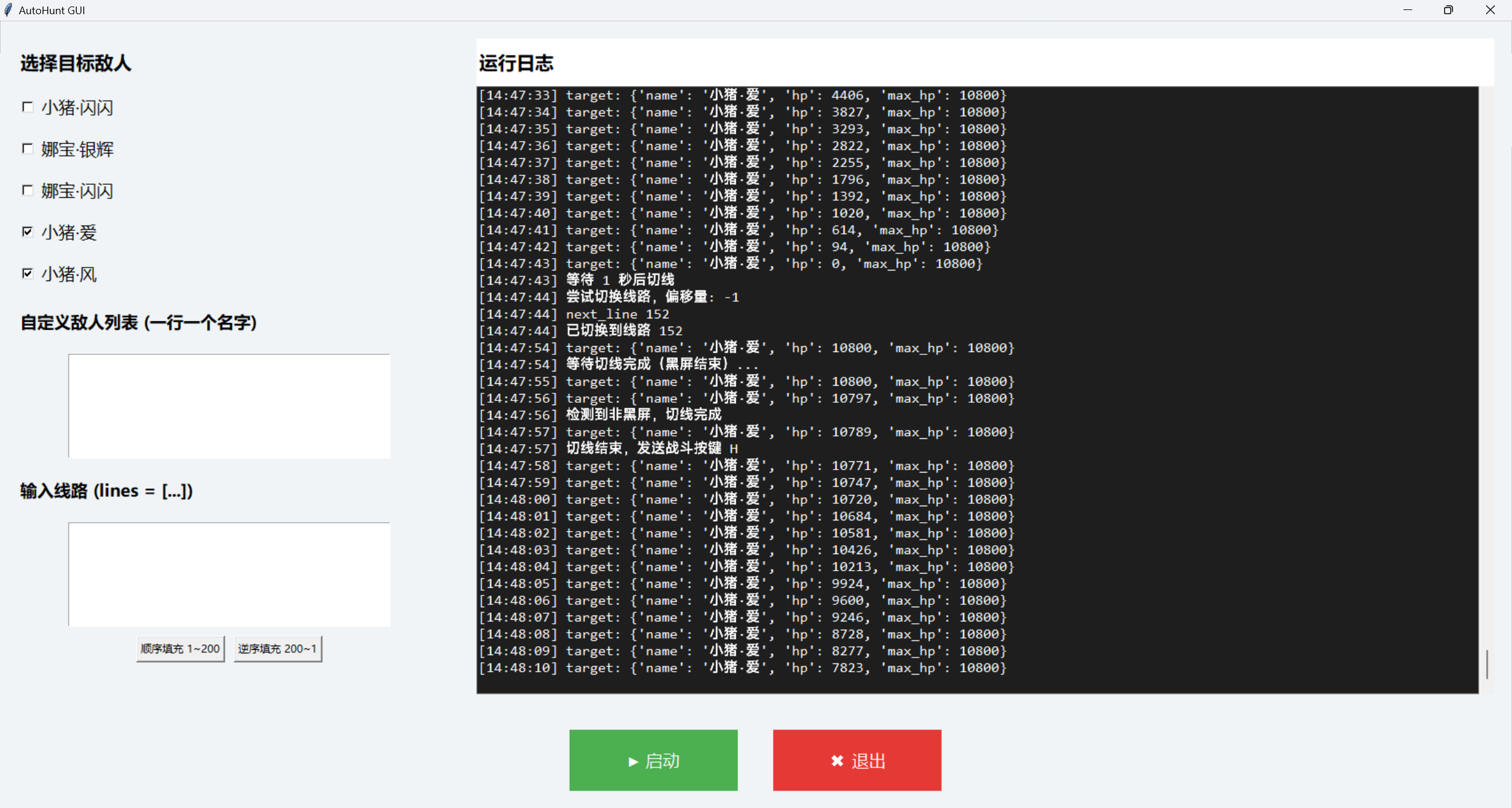
xxfttkx/StarResonanceAutoSwitchLine
- Automatically switches server channels to optimize farming.
- Reduces lag and competition for resources during peak hours.
- Simplifies routine gameplay navigation.
xxfttkx/StarResonanceEnemyCapture
- Captures enemy data in real-time via packet analysis.
- Logs positions, HP, templates, and attack targets for research.
- Helps with encounter planning and enemy tracking.
- It’s a Python‑based autofishing script designed for the game Star Resonance (or possibly a variant/related game) — repository includes
autoFish.py,getMousePos.py, and various image assets (e.g.,left.png,right.png,no_cast.png). - The script likely uses screen image recognition (matching bait/fishing UI visuals, fish icons or fishing indicators) plus simulated mouse clicks to automate the fishing action.
- The presence of
getMousePos.pysuggests a helper tool to capture screen coordinates for the target UI elements. - The image assets like
continueFishing.png,use.png, etc., indicate the script checks for specific in‑game visuals (e.g., “use” button, “no cast” state) and acts accordingly. - No README provides full installation or usage steps; you would need Python installed and likely run the script in administrator mode (for screen capture or UI simulation) and ensure the game is visible on screen.
- Because it automates in‑game actions via UI simulation, usage may conflict with game terms of service—use at your own risk.
- The repository is small and appears to be a personal project rather than a polished commercial tool.
If you like, I can check the repository in more detail and write exact steps to set it up (with caveats about risks).
leo2971998/AutoFishingTool-BlueProtocolStarResonance
- It is a Python‑based automatic fishing tool for Blue Protocol: Star Resonance that casts and reels automatically, detects fish rarity, tracks catches, and can auto‑buy rods and bait.
- How it works: it uses image‑recognition to detect in‑game UI cues (like fish rarity icons or bait empty prompts) and simulates mouse actions to fish, purchase bait/rods, and log statistics.
- How to use: install Python 3.12+ (ensure “Add Python to PATH” and pip installed), then run the provided
install.batto set up. - Then run
run.bat, make sure the game is running and visible, press F5 to start fishing, F6 to pause, and ESC to stop. - The game window must use 16:9 resolution, be in the foreground (not moved), and overlays/streaming software should be disabled.
- The tool runs in Administrator mode and relies on capturing visible UI elements (screenshots are exported in debug mode if detection fails).
- It keeps a log of catches in real time and categorises common / rare / mythical fish for statistics and tracking.
- You should follow the troubleshooting steps if it fails: ensure Python version is correct, run as admin, check screen capture assets match your resolution, and see debug screenshots for what the script sees.
mofutoshi-ctrl/blue-protocol-mining-bot
- It’s a Python‑based advanced mining bot for Blue Protocol: Star Resonance called blue‑protocol‑mining‑bot, designed to automate in‑game mining tasks.
- The tool uses an 8‑tier intelligent system to orchestrate mining actions such as locating ore, executing mining commands, and managing resources.
- To use it: install Python and dependencies (
requirements.txt), configure your bot settings inconfig.yaml, and runmain.pyas the entry point. - It interacts with the game via UI automation (e.g., simulated clicks or key‑presses) rather than modifying game memory or files directly.
- Before running, ensure the game window is visible and mining‑zones are accessible so the bot can detect mining nodes and mine them automatically.
- The bot requires administrator permissions (for automation UI control) and may rely on screen position/configuration matching the game’s mining interface.
- While running, the bot continuously checks for mining nodes, executes mining cycles, handles resource cooldowns, and loops based on configuration.
- Use it solely for personal learning/testing in a contained environment; be aware of any potential violation of the game’s Terms of Service.
f1shyondrugs/BlueProtocol-Autofarm
- It’s an automated fishing bot for Blue Protocol: Star Resonance that uses computer‑vision to detect bobber movement and simulate fishing actions.
- It detects specific pixel coordinates to identify when a fish bites and then automatically casts, reels, and collects the catch.
- Features include a transparent always‑on‑top GUI overlay, hotkey controls (F1 to pause/resume, F2 to restart), and a fish counter tracking total catches.
- Must run at 1920×1080 resolution since coordinate and color values are hard‑coded for that resolution only.
- Before starting, install dependencies via
pip install -r requirements.txt, configure optional Discord webhook for notifications, and runpython fishing.py. - Game window must be visible and focused, no overlays or streaming apps interfering, and the bot runs in Administrator mode to properly simulate input.
- The bot monitors colors such as orange for bobber movement, gray for catch detection, and uses key presses (‘A’/’D’) for guiding fish when needed.
- It includes emergency recovery logic: if an unexpected color is detected it resets the process, and users must configure optional Discord webhook and verify screen config.
- It’s a Windows macro script called BPSR Fishing Macro for automating fishing in Blue Protocol: Star Resonance.
- You must set your game window to 1920 × 1080 resolution (fullscreen or windowed) before starting.
- The script keeps track of catches, fish types, XP gained and session duration.
- To start, open the game and the macro, then press F9 to begin fishing and F10 to stop.
- The player character must be positioned at a fishing spot and have sufficient rods and bait pre‑checked.
- The game window must be visible on the main monitor for the macro to work correctly.
- If the script presses “Exit” instead of “Continue,” restart it and ensure it was launched after the game.
- Recommended supplies: at least 200 baits and 10 rods for each hour of fishing.
- BPSR Fishing Bot is an automated fishing tool for Blue Protocol: Star Resonance using Python and image detection.
- It detects fishing events, plays the fishing minigame, swaps broken rods, and tracks catches automatically.
- Users control it via hotkeys: F1 to start/pause and F2 to stop the bot.
- Requires the game in windowed mode at 1920x1080 resolution.
- Installation: clone the repository and install Python dependencies with
pip install -r requirements.txt. - Run the bot by executing
python main.pywhile the game is visible. - Configuration allows adjusting detection regions, precision, delays, and state timeouts via files in
src/fishbot/config/. - The bot uses a Finite State Machine architecture to handle different fishing states, with modular detector and controller modules.
- A patching utility to enable English language support for Blue Protocol: Star Resonance.
- Requires installation of the .NET 8.0 Runtime environment.
- Users must place the patcher executable inside the
AppData\LocalLow\bokura\Star\localsavefolder (wherelocalsave.bytesexists). - Once executed, it modifies local save data to enable English translation, simplifying localization for non-Chinese users. Here’s a 12‑line summary with suspicion checks for the project BPSREngPatcher:
-
It’s described as a Windows tool built in C# (.NET 8.0) that patches game files by placing an .exe in the game’s localsave folder.
-
The instructions tell you to download a pre‑built .exe from a GitHub release and drop it into
AppData\LocalLow\bokura\Star\localsave. -
It claims to work for the game (presumably Blue Protocol: Star Resonance), but the name “EngPatcher” and the folder note suggests it modifies game save or client data.
-
It links to a VirusTotal report of the .exe:
113bec441e53da02d5c5b38e94257bd62b2f1a3af94010b4984fb5757ad87766— implying potential risk or suspicion that the file is flagged or analysed. -
The README gives minimal details about what exactly the patcher does: “Add files via upload”, but doesn’t explain the mechanics of the patch or why it’s needed.
-
Because it involves placing an .exe inside the game’s local save folder, it may violate the game’s Terms of Service or trigger anti‑cheat / detection mechanisms.
-
There is no publicly documented transparency about what changes it makes — this is a red flag for trust/security.
-
It may enable modifications, cheats, or unauthorized edits of game data, making it potentially suspicious or unsafe, especially for online games.
-
The project does not show source code detail (only a
.slnand some uploads) so verifying its internal logic may be difficult. -
Users should be cautious: before running any .exe placed in game folders, ensure you understand what it changes, backup data, and check for anti‑cheat risks.
-
If you choose to proceed, verify the file on your own system with VirusTotal (or similar), run it in a sandbox or isolated environment first, and monitor for unusual behavior.
-
In summary: the tool could be useful if well‑documented and safe, but the lack of documentation, placement in game folder, and patching nature raise significant suspicion—use at your own risk. Here’s a 12‑line summary of the patcher project with a suspicion check:
-
It’s named BPSREngPatcher, a .NET 8.0 C# project designed to patch a localsave.bytes file in the game folder.
-
The project uses Brotli compression/decompression to modify the “LanguageIndex” field inside the game’s local save file, then re‑compresses and writes it back.
-
Instructions ask the user to place the downloaded .exe into
AppData\LocalLow\bokura\Star\localsave(same folder as localsave.bytes) and run it. -
The tool thereby modifies user save data (or game local data), which means it is effectively patching or altering game files.
-
Because it is modifying game save or config files, it may violate the game’s Terms of Service or anti‑cheat policies.
-
The repository provides a link to a VirusTotal report of the executable, indicating that the file may have been flagged or analysed for malware.
-
The README lacks full transparency on what all modifications occur beyond the “LanguageIndex” change, leaving unknown side‑effects.
-
The nature of patching local save files suggests risk: if the game validates localsave files or server syncs, this could lead to account penalties.
-
Users should verify the executable via antivirus/VirusTotal, run it in a sandbox environment, and backup originals before use.
-
Because it executes an .exe inside a game folder, there is elevated suspicion of unintended consequences (e.g., data corruption, detection, or malicious code).
-
If one chooses to proceed, best practice: backup the localsave.bytes file, run the patcher offline, check and test results before using it in normal gameplay.
-
Overall: while this tool may serve a legitimate purpose for language index or translation patching, the patch‑nature, lack of deep documentation, and placement in game folder raise strong suspicion — use at your own risk.
- A steganographic text encryption and translation utility for Star Resonance.
- Uses zero-width characters for invisible data embedding, ensuring secure, hidden message transfer.
- Every encryption produces unique randomized results, enhancing data obfuscation.
- Can be used online via the “星痕共鸣内鬼翻译器” for quick text conversions.
- Fully customizable with editable phrases, keys, salts, and versioning for personalized encryption schemes.
Fan-made content, guides, and overlays extending gameplay understanding.
- A detailed gameplay guide focused on the Skyward Wind Knight class in BPSR.
- Covers builds, rotations, skill setups, and aerial combat strategies.
- Offers comprehensive explanations for wind-based mechanics and optimal stat balancing.
- Aimed at helping players maximize airborne combat performance through advanced techniques.
MrDustyBowl/bpsr-skyward-wind-knight-guide-fr
- The French-language version of the Skyward Wind Knight comprehensive guide.
- Offers localized explanations of class builds, wind mechanics, and skill rotations.
- Helps French-speaking players master aerial combat strategies in Blue Protocol: Star Resonance.
- Maintains all content depth and quality of the English version with linguistic adaptation for clarity and accessibility.
- BPSR Resources:
-
https://docs.google.com/document/u/0/d/1LBmaUTWGeTz42XJTxvbjpxHSUVAzg08ZiyOOr7tqfUU
-
Flower Document:
-
https://docs.google.com/spreadsheets/d/1oQeh3xKwLLgIdPFfFx_ecmGCMerFv_FVDrrceGZ3UzA
-
Goblin Masters Glitch
- https://www.bilibili.com/video/BV1MLWQzqEio/
- Seems to be a trick where you don’t break his shield too soon though.
- Class Suffixes
-
https://docs.google.com/spreadsheets/d/1pH9VxypGG85T1TVHQnUrZnSIktWHR21xhLUTM0z4UCY
-
All Cosmetic list:
A detailed list of the most active and resourceful Discord communities dedicated to Blue Protocol and Star Resonance (BPSR). Whether you're looking for game guides, farming groups, database resources, or community events, these servers will help you connect with fellow players and stay up-to-date with the latest information.
🔗 Invite: https://discord.gg/starresonance
🌟 Focus: Official server for Star Resonance, a vibrant social hub for players to discuss updates, share builds, and participate in community events.
💬 Features:
- Official news, patch notes, and announcements.
- Player support and FAQ channels.
- Team recruitment and co-op event coordination.
- Showcase channels for artwork, screenshots, and tips.
- Active moderators and multilingual community support.
🔗 Invite: BP:SR Farmers
🔗 Invite: BPSR Rarefarmers
🌾 Focus: A community-driven hub dedicated to farming routes, resource optimization, and crafting efficiency in both Blue Protocol and Star Resonance.
💬 Features:
- Daily farming route sharing and optimization discussions.
- Trading and marketplace value tracking.
- Build and resource chain discussions for efficient gameplay.
- Farming bot alerts and spawn timer updates.
- Collaborative guides and spreadsheets.
🔗 Invite: https://discord.gg/3UTC4pfCyC
🌐 Focus: A large international community that unites both Blue Protocol and Star Resonance players under one roof.
💬 Features:
- News and update aggregation across regions (JP/Global/CN).
- PvE and PvP coordination for major events.
- Translation channels for non-English resources.
- Friendly social community with meme and off-topic lounges.
- Voice channels for live farming and group raids.
🔗 Invite: https://discord.com/invite/srdb
📚 Focus: A data-driven server for Star Resonance players who enjoy analytics, drop rate analysis, and crafting path optimization.
💬 Features:
- Item, gear, and crafting database discussions.
- Drop rate research and verified data tables.
- Spreadsheet collaboration for item chains and currency costs.
- Technical insights into game mechanics and data mining.
- Developer tools and fan-made utility bots.
🔗 Invite: https://discord.gg/invite/blueprotocoldb
📘 Focus: The primary data and research server for Blue Protocol, managed by community data analysts and database maintainers.
💬 Features:
- Comprehensive item, equipment, and skill databases.
- Crafting chain analysis and stat breakdowns.
- Automated data sync with the Blue Protocol Database website.
- Patch change tracking and version comparison tools.
- Data submission and validation community.
🔗 Invite: (Community-managed — link available on the Blue Protocol Database website)
💡 Focus: Companion Discord to the Blue Protocol Database, ideal for contributing to ongoing research and updates.
💬 Features:
- Data verification discussions.
- Feedback and improvement suggestions for the site.
- Integration of API updates and localization projects.
- Opportunities to contribute guides, media, and translations.
- 🌐 Official Sites:
- 📊 Community Databases:
- Always read the rules and use the correct channels.
- Introduce yourself — communities are welcoming!
- Use server tools like
/search,/build, and/farmroute(where available). - Check pinned messages for guides and resources.
- Stay active — event notifications often happen in real time.
⚡ Join these servers to connect with experts, contribute to research, and enhance your Star Resonance and Blue Protocol experience!
A curated collection of community sites, tools, and wikis dedicated to Blue Protocol: Star Resonance (BPSR / スタレゾ).
🔗 Website: https://luk.gg/bpsr/guides/life-skills/crafting-tree
- Interactive crafting tree for all life skills in Blue Protocol: Star Resonance.
- Covers recipes, levels, and required materials for crafting progression.
- Provides quick reference for planning life skill development.
- This guide shows the full crafting tree for life skills, including alchemy, gathering, and other production systems. It details ingredients, output items, and skill levels.
- A comprehensive fan-maintained guide for Blue Protocol: Star Resonance crafting. Helps players plan skill advancement and item creation efficiently.
- Well-organized and easy to navigate.
- Covers all crafting levels and recipes.
- Great for planning and resource management.
- English-focused, may not cover JP-specific content.
- Dependent on community updates for completeness.
- Part of the luk.gg suite of Blue Protocol: Star Resonance guides.
- Useful for both beginners and advanced life skill players.
🔗 Visit luk.gg Crafting Tree »
🔗 Website: https://bpsr.swiki.jp/
- Comprehensive Japanese-language wiki covering classes, combat, and life systems.
- Editable by users (community contributions).
- Keeps logs of recent edits and version history.
This wiki aggregates all known mechanics, strategies, and reference data for Blue Protocol: Star Resonance, based on existing (e.g. CN) versions and player findings.
A fan-maintained “攻略Wiki” (strategy wiki) in Japanese, covering classes, gear, combat, crafting, and updates.
- Extremely detailed and active.
- Frequently updated with new content.
- Great for fluent Japanese readers.
- Japanese-only (no full translation).
- Some data based on non-JP versions.
- As community-edited, accuracy can vary.
- Will adapt content once Japanese servers launch.
- Uses swiki.jp / PukiWiki for editing and version control.
🔗 Website: https://www.prydwen.gg/blue-protocol/
- English/global interface with guides, tier lists, and maps.
- Talent planner, daily checklists, and class info.
- Regular updates for PVE and class systems.
Acts as a global English hub combining wiki + tools + guides for all BPSR players.
Provides both static guides (e.g. PVE content) and dynamic tools (e.g. maps, planners).
- English interface.
- Excellent layout and structure.
- Consistent content updates.
- Some info may become outdated between patches.
- Niche details may lag behind native wikis.
- Includes tier lists and PVE mode breakdowns.
- Covers Chaotic Realm, Monster Hunt, and other events.
🔗 Website: https://luk.gg/bpsr
- Guides, tools, and databases for BPSR.
- Modular, user-friendly layout.
LUK.gg provides a simplified experience for browsing game systems and mechanics.
- Fast and lightweight.
- Great for quick references.
- Community-maintained and frequently updated.
- May lack deep or advanced details.
- Incomplete in some areas.
🔗 Website: https://star-resonance.com/en/
- Official news, updates, and announcements.
- Interactive map and lore.
- FAQs, trailers, and introduction content.
A fan-maintained, semi-official hub consolidating lore, news, and system overviews.
- Great visuals and official feel.
- English-friendly.
- Covers lore and world background.
- Not as detailed as wikis.
- Focused on presentation, not mechanics.
🔗 Website: https://maxroll.gg/blue-protocol
- Strategy site known for in-depth builds and analytics.
- Expected to include Blue Protocol beginner guides, builds, and gear systems.
While still emerging, Maxroll’s coverage of BPSR is expected to match its high standard seen in other games.
- Excellent theorycrafting and build analysis.
- Well-organized, professional design.
- Section is still in development.
- Some links may be inactive or missing.
🔗 Website: https://blueprotocol.lunixx.de
Unofficial player database and leaderboard, showing stats, classes, and ability scores. Includes shareable signature banners.
- Player search and rankings.
- Stat pages and signature generator.
- Multi-language support (EN/DE/FR).
- Mobile-friendly and fast.
- Clean UI, instant lookups.
- Actively updated.
- Great for comparing player stats.
- Unofficial (community-made).
- Data sources are not transparent.
- Some stats may lag behind actual data.
“Not official, but incredibly useful for stat tracking and rankings.”
🔗 Website: https://natsume.io/bpsr/
Tracks real-time events, resets, and world timers for all BPSR servers, synced to local time.
- Live countdowns and notifications.
- Server + local time display.
- Separate tracking for Global and CN servers.
- Simple, accurate, and auto-updating.
- Perfect for raid/guild planning.
Keep the tab open for live notifications.
🔗 Website: https://questlog.gg/blue-protocol/en
Interactive guide and map companion for Blue Protocol, including quests, regions, and loot tracking.
- Database of quests, items, and enemies.
- Interactive maps with filters.
- Mobile-friendly and well organized.
- Perfect for completionists.
- Streamlined navigation and filtering.
- Community-driven and regularly updated.
🔗 Website: https://bpsrtalent.vercel.app/
- 8 playable classes with full talent trees.
- Valid build dependency checks.
- Shareable build links.
Damage: Frost Mage, Stormblade, Marksman, Wind Knight
Tank: Heavy Guardian, Shield Knight
Support: Verdant Oracle, Beat Performer
🔗 Website: https://blueprotocol.fr/
- Real-time DPS/HPS leaderboards.
- Dungeon filters and class rankings.
- Linked Discord community.
- Competitive insight for FR players.
- Transparent and active.
- Great for improving performance.
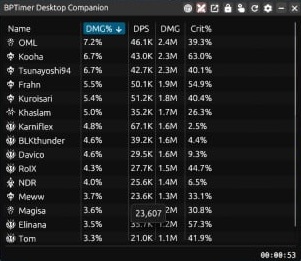
🔗 Website: https://bptimer.com/
- Live boss and magical creature spawn timers.
- Player-contributed data.
- Favorites list for quick access.
- Open-source (SvelteKit + PocketBase).
- Real-time accuracy.
- Community-powered.
- Ideal for efficient farming.
🔗 Website / Repository: https://github.com/Teawase/blue-protocol-checklist
- Track daily/weekly progress.
- Live reset timers.
- Local data save (no login).
- Import/export support.
- Confetti + progress visuals.
Stay organized and motivated — perfect for efficient daily play.
| Category | Site | Focus |
|---|---|---|
| JP Wiki | bpsr.swiki.jp | Deep mechanics (JP) |
| Global Wiki | Prydwen.gg | English wiki + tools |
| Tools | LUK.gg | Lightweight tools |
| Events | Natsume.io | Timers |
| Builds | bpsrtalent.vercel.app | Talent planner |
| Map/Quests | QuestLog.gg | Map & quest tracking |
| Rankings | blueprotocol.fr | DPS/HPS leaderboards |
| Boss Timers | bptimer.com | Boss spawn tracking |
| Checklist | Teawase Checklist | Task tracking |
| Player Stats | Lunixx DB | Player lookup |
⭐ Maintained for fans of Blue Protocol: Star Resonance
💙 All links verified and formatted for readability.
🗺️ Complete Guide to the Best Star Resonance & Blue Protocol Interactive Maps – Resources, Features, and Community Tips
Hey everyone 👋
If you're exploring Star Resonance or Blue Protocol and want to make the most out of your gameplay — from finding hidden treasures to optimizing routes and locating rare collectibles — here’s a deep dive into the best interactive maps currently available. I’ve tested several of these tools, and each one offers something unique depending on what you’re trying to do in-game.
🌌 1. Star Resonance Map – starresonancemap.com
This is the most comprehensive fan-made map for Star Resonance at the moment. It covers nearly every collectible, quest marker, and point of interest across the available regions.
Key features:
- Dynamic map layers – You can toggle between resources, chests, teleporters, bosses, and event points.
- Search & filter system – Quickly locate specific materials or rare spawns.
- Progress tracking – Mark completed objectives or looted items, perfect for completionists.
- Responsive design – Works well on both desktop and mobile, so you can use it while gaming on the go.
- Community input – Markers are actively updated by players, ensuring near real-time accuracy.
Use tip: Create a free account if you plan to track your collection progress — it syncs across devices and helps you avoid retreading the same areas.
⚔️ 2. Blue Protocol Interactive Map – blueprotocol.interactivemap.app
Although this one is technically for Blue Protocol, it deserves a mention because it shares the same interactive foundation and style that Star Resonance players can appreciate.
Highlights:
- Highly detailed world overlay with spawn timers, NPCs, resource nodes, and hidden chests.
- Route planning tool for farming efficiency.
- Global marker database contributed by users, very similar to Genshin Impact’s fan maps.
- Fast performance even with multiple layers activated.
Why it’s relevant: The same team or style of community-driven mapping might inspire how Star Resonance maps evolve, especially for players switching between the two games.
🌠 3. Star Resonance Global Map Hub – starresonance.th.gl
This one acts as a map aggregator and region portal, providing direct links to detailed map instances for different zones in Star Resonance.
Features:
- Region-based navigation – Jump directly into maps like Asteria Plains or Celestia Heights.
- Lightweight and fast – Loads quickly, ideal for lower-end devices or quick lookups.
- Integrated updates – Automatically syncs with newly released map layers from the main database.
- Language support – Community translations are being added gradually.
Pro tip: Bookmark this page as your map hub. It’s a convenient starting point for exploring new regions as they get released.
🌾 4. Asteria Plains Detailed Map – starresonance.th.gl/maps/Asteria%20Plains
This is a zoomed-in, detailed version focused on the Asteria Plains region — one of the earliest and most resource-rich areas in the game.
What makes it great:
- Accurate item spawn locations – Ideal for farming early-game materials.
- Mini-event markers showing puzzle spots, elite enemies, and special chests.
- Interactive pins with item/tooltips so you know exactly what each node drops.
- High map resolution, allowing deep zoom levels for tight farming routes.
Community tip: This specific region map often gets updates first before the global one. If you’re grinding Asteria Plains daily, this is the most efficient tool you can use.
All four resources together form an ecosystem of exploration tools for both Star Resonance and Blue Protocol fans. Whether you’re a completionist, lore hunter, or casual explorer, these maps make a huge difference in how efficiently you can plan routes and track your progress.
If you find missing markers, incorrect placements, or want to share farming routes, consider contributing back — most of these maps have community submission forms or Discords for that purpose.
- 🗺️ Star Resonance Main Map: https://starresonancemap.com/
- ⚔️ Blue Protocol Map: https://blueprotocol.interactivemap.app/
- 🌍 Star Resonance Global Hub: https://starresonance.th.gl/
- 🌾 Asteria Plains Map: https://starresonance.th.gl/maps/Asteria%20Plains
If you’ve tried any of these, what’s your favorite feature? Also, if there are other map tools or trackers I missed, drop them below — I’ll add them to the post for everyone’s benefit.
Happy exploring, Travelers! 🌟
Explore the full interactive map of Blue Protocol and uncover every nook and cranny of its stunning world!
🔗 Visit: QuestLog – Blue Protocol Map
- 🎮 Comprehensive Interactive Map — Easily navigate zones, landmarks, and hidden treasures.
- 🧭 Detailed Guidance — Pinpoints key points of interest so you never miss a challenge or treasure.
- 🕹️ Perfect for Gamers — Whether you’re a beginner or a veteran, the map helps streamline your adventures in Blue Protocol.
- Fully browsable world map—zoom, pan, and explore.
- Marked areas for quests, dungeons, and secret locations.
- Clean interface and fast loading for smooth navigation.
Bookmark the map and keep it handy during your game sessions. Use it as your on-the-fly reference when you’re out in the field and need to locate that elusive objective or side-quest point.
- Click here to open the map page.
- Use the controls to zoom into your preferred zone.
- Hover/click on icons to reveal what’s there — be it quests, dungeons, or hidden gems.
- Dive into your next mission with clarity and purpose!
“With the QuestLog map, I found all the hidden side-quest markers I’d been missing for hours!” – A satisfied gamer
Ready to elevate your Blue Protocol journey? Explore, strategize, and conquer the world with unmatched clarity.
— Spoiler: The treasures you’d been hunting are right under your nose 😉

![@github-actions[bot]](https://avatars.githubusercontent.com/in/15368?s=64&v=4)