Making BDDStack Reports available through Jenkins Menu items
BDDStack generates a series of reports as a result of the test run, but these reports are not all that easy to access. The following describes a method to show the reports via a Jenkins menu entry, making access significantly easier.
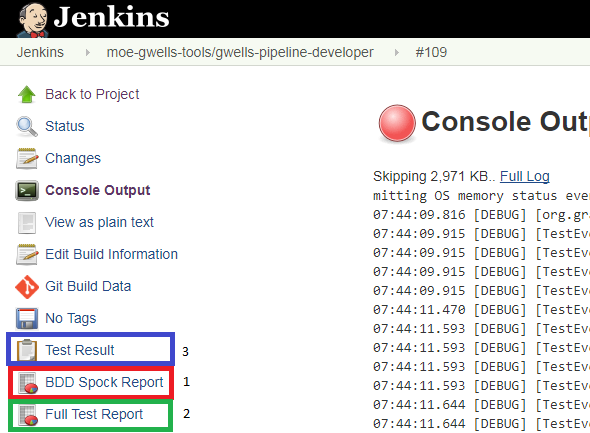
- Spock Report (Typically the best report to share with your Client)
- GEB Test Results report (Typically the go to report for testers and developers)
- The standard Jenkins JUnit report
In order to set this up you need to do the following:
- Install the Jenkins HTML Publisher Plugin
- Add the following lines to your JenkinsFile for BDDStack:
node('bddstack') {

	stage('FT on Dev') {
		//the checkout is mandatory, otherwise functional test would fail
        echo "checking out source"
        echo "Build: ${BUILD_ID}"
        checkout scm
        dir('functional-tests') {
	    try {
                sh './gradlew --debug --stacktrace chromeHeadlessTest'
	    } finally {
		        archiveArtifacts allowEmptyArchive: true, artifacts: 'build/reports/**/*'
                archiveArtifacts allowEmptyArchive: true, artifacts: 'build/test-results/**/*'
                junit 'build/test-results/**/*.xml'
Add The following lines
                publishHTML (target: [
                            allowMissing: false,
                            alwaysLinkToLastBuild: false,
                            keepAll: true,
                            reportDir: 'build/reports/spock',
                            reportFiles: 'index.html',
                            reportName: "BDD Spock Report"
                        ])
                publishHTML (target: [
                            allowMissing: false,
                            alwaysLinkToLastBuild: false,
                            keepAll: true,
                            reportDir: 'build/reports/tests/chromeHeadlessTest',
                            reportFiles: 'index.html',
                            reportName: "Full Test Report"
                        ])
This will make the reports available to the Jenkins menu
	    }
        }
    }
}
The complete entry for you copying pleasure:
node('bddstack') {

	stage('FT on Dev') {
		//the checkout is mandatory, otherwise functional test would fail
        echo "checking out source"
        echo "Build: ${BUILD_ID}"
        checkout scm
        dir('functional-tests') {
	    try {
                sh './gradlew --debug --stacktrace chromeHeadlessTest'
	    } finally {
		        archiveArtifacts allowEmptyArchive: true, artifacts: 'build/reports/**/*'
                archiveArtifacts allowEmptyArchive: true, artifacts: 'build/test-results/**/*'
                junit 'build/test-results/**/*.xml'
                publishHTML (target: [
                            allowMissing: false,
                            alwaysLinkToLastBuild: false,
                            keepAll: true,
                            reportDir: 'build/reports/spock',
                            reportFiles: 'index.html',
                            reportName: "BDD Spock Report"
                        ])
                publishHTML (target: [
                            allowMissing: false,
                            alwaysLinkToLastBuild: false,
                            keepAll: true,
                            reportDir: 'build/reports/tests/chromeHeadlessTest',
                            reportFiles: 'index.html',
                            reportName: "Full Test Report"
                        ])
	    }
        }
    }
}