sideview editor
The SideView Editor allows you to change the layout, connectivity and enemies for a side-view area.
Side-view editing is by far the most complex aspect of editing Zelda 2 maps. Unlike the Overworld which is a simple grid of tiles, the representation of a sideview area is more like a list of commands which describe how to draw the area. This list of commands limits what can be drawn in a given type of area. For example, you cannot put a tree inside of a palace area because the commands for drawing a tree do not exist in palace areas.
Sections:
The Map Commands view shows the command list to draw this map.
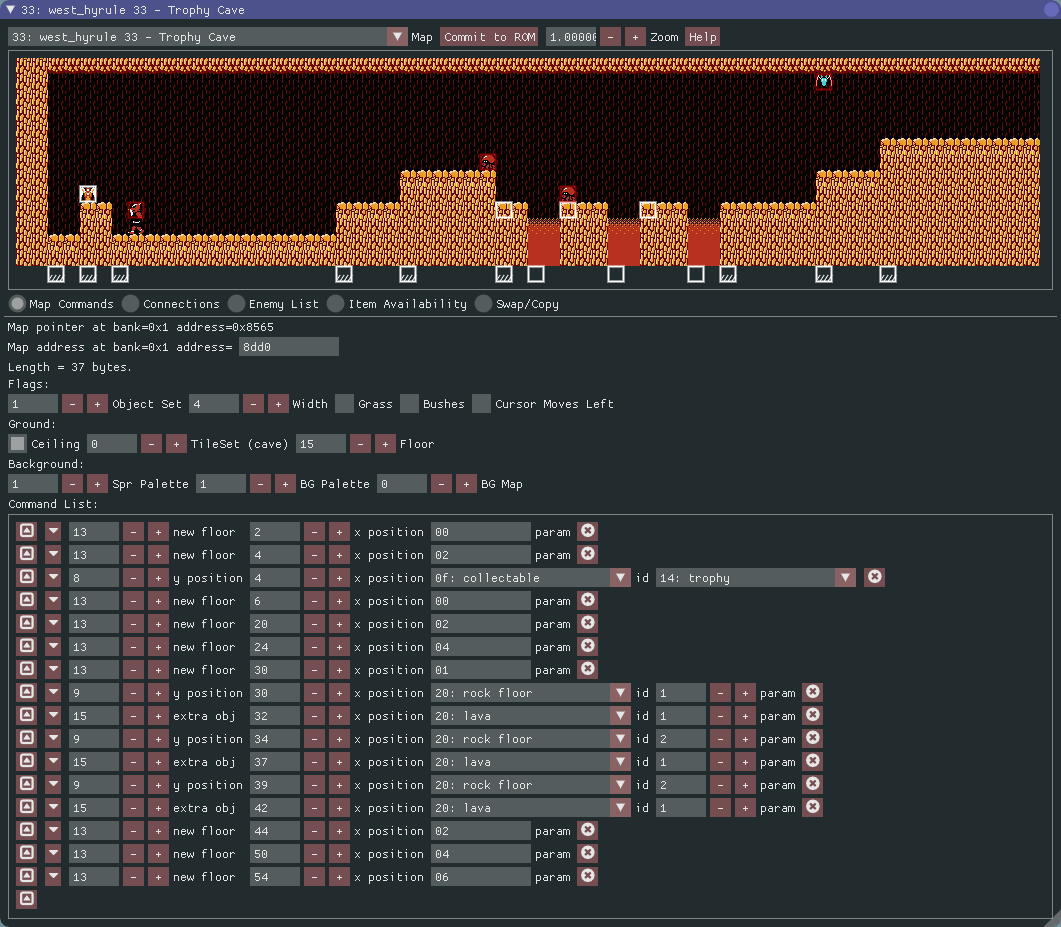
There are lots of parameters which control map drawing:
Each object on the map has its anchor point highlighed with a box.
-
 Represents a normal map item, such as
a rock floor, lava, a pillar, etc.
Represents a normal map item, such as
a rock floor, lava, a pillar, etc. -
 Represents a map command which sets a new
floor or ceiling height.
Represents a map command which sets a new
floor or ceiling height. -
 Represents a map command which advances
the map cursor (normally, you won't need to interact with this command).
Represents a map command which advances
the map cursor (normally, you won't need to interact with this command).
Each anchor point can be moved by dragging it with the mouse.
Using the scroll-wheel inside of a normal map item will also adjust its param
field (if it has one). For example, the param field often controls the length
or height of an object (e.g. the height of a pillar).
Each anchor point has a right-click context dialog that allows you to edit its properties.
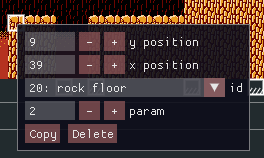
Note that if you Copy an object, it will be duplicated and placed in the
exact same position as the existing object. Drag it to a new location.
-
Object Setcontrols which set of objects are available on this map. -
Widthcontrols how wide the map is (in screens). All maps decompress to four screens wide. TheWidthcan be used to make a 4-screen wide area into four 1-screen wide areas. Many of the 1-screen wide destinations on the Overworld use this technique (such as road-encouters, fairies, or item screens). -
Grasscontrols whether grass appears at vertical position 9. -
Bushescontrols whether bushes appear at vertical position 9. -
Cursor Moves Leftis not a real map parameter, but controls how Z2Edit attempts to optimize maps when it compresses them back into ROM. So far, I believe only the church in the town of Mido uses this feature.
-
Ceilingcontrols whether the area has a ceiling. -
TileSetcontrols which tiles are used in this area. -
Floorcontrols at which height the floor is drawn.
-
Spr Palettecontrols which palette is used for sprites in this area. -
BG Palettecontrols which palette is used for the background. -
BG Mapcontrols whether or not a background map is drawn first, before drawing this map. This seems to be typically used for item rooms, such asPalace1 08orwest_hyrule 17(Heart Container Cave).
This is the list of commands used to draw this map.
TODO(cfrantz): Expand this section. For now, refer to Dwedit's information on DataCrystal.