Options
In the Setting up you can find the explanation for the options that are required to connect the Arduino with Brunner CLS2Sim.
Besides those, there are some other options. They are divided between the Profile and the Options tabs
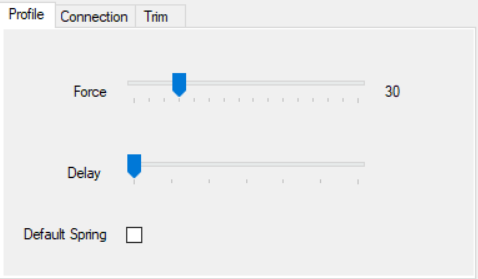
You'll find here anything related to the forces and more frequent parameters.
How strong do you want the forces to be
This option helps mapping the axes in some games. There are games that detect which device and axis is the first to be moved. While you are running this program you will have the Brunner device and the Arduino device (x and y axes) moving at the same time. That can be problematic if the game sees two joysticks moving and it doesn't let you choose which one to map. You want to map the Arduino axes for getting force feedback.
This solution involves setting the delay at let's say 5 seconds, then moving the joystick (only the Brunner will move as the Arduino is delayed) then you click on the game on whatever control you want to map and then after a few seconds the Arduino will move and the game will detect it.
Of course remember to set the delay back to 0 to play! Forces will be deactivated while the delay is active.
Make the joystick act as a spring if there is no sim being played. This is similar to the way a MS FFB2 joystick used to behave. If you don't mark this and you are not playing any sim, the joystick will just be limp.
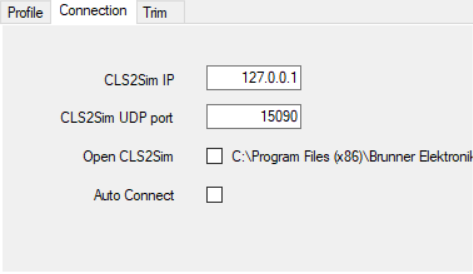
You'll find here options related to connecting to CLS2Sim.
IP in which CLS2Sim is running. Please check Setting up if you haven't connected already.
UDP port in which CLS2Sim is running. Please check Setting up if you haven't connected already.
Open CLS2Sim in External control mode on opening BrunnerDX.
This will automatically disconnect the External control mode next time you open CLS2Sim so it makes switching between sims easier.
Setting this option will automatically open CLS2Sim so that's just one less button to press.
It will try connecting to the Arduino and CLS2Sim shortly after opening BrunnerDX.