Change log
For conciseness, HTTP Switchboard is referred as HTTPSB in the text below. This page is often updated before the latest version is released.
- Changes in Rule manager:
- Remove all is now Mark all for deletion.
- Mark all for deletion will preserve out-of-the-box rules if these still exists.
- New buttons: Backup to file and Restore from file, operate on the content of the Recipe text area (so you can backup a single recipe or all of them).
- Restore from file does not replace existing rules, it adds on top of existing rules.
- Changes in extension popup:
- The "preset recipes" button now has a badge showing the number of matching preset recipes.
- A button has been added to take over the task of removing all temporary rules.
- The function of the existing button has changed to "revert temporary rules for current scope".
- More internal work on preset recipes.
- File format is YAML-compliant. Benefits: future-proofing, syntax highlighting.
- Fixed https://github.com/gorhill/httpswitchboard/issues/177:
- Thanks to my-password-is-password for his pull request.
- Fixed https://github.com/gorhill/httpswitchboard/issues/176.
- Fixed https://github.com/gorhill/httpswitchboard/issues/175.
- Fixed https://github.com/gorhill/httpswitchboard/issues/174.
- Fixed https://github.com/gorhill/httpswitchboard/issues/166.
- Opera requires that Youtube works out-of-the-box:
- A site-level scope for Youtube is created at install time.
- I decided to do this for all flavors of Chromium, not just Opera.
- Small improvements to the Remove all function in Rule manager:
- No longer remove whitelisting of
cssandimagerules in global scope (if they exist): that was a bit radical (users who really want these gone are just two clicks away at most from literally removing all rules.) - Scopes are completely flushed from memory. They used to hang around ready to be brought back to life, which is nice when playing with the scope menu in the popup, but not nice when user expects a clean slate after using Remove all.
- This was most confusing for users who checked the Auto create temporary site-level scope option.
- No longer remove whitelisting of
- So mainly this version was to pass Opera store review process (Youtube must work at first install), I don't plan to release this one to the Chrome store, as I want to wait for a fix to issue #166.
-
Emergency fix: Due to latest changes regarding scopes, a portion of code which was not revised caused HTTPSB to fall into allow-all/block-exceptionally mode.
- More technically, that piece of code was to whitelist all requests from behind-the-scene scope if the scope was not found. With latest changes, the behind-the-scene scope was indeed never found, and because of this the whitelist-all default rule for behind-the-scene scope was created in the global scope.
-
If you were working in block-all/allow-exceptionally mode, please do click the "all" matrix cell to toggle it back to red (if ever it is now green as in allow-all/block-exceptionally mode), and lock the change.
- Also, you may want to check your behind-the-scene matrix: Out-of-the-box, this matrix is in allow-all/block-exceptionally mode, so as to not interfere with the browser operation and other installed extensions. If you never changed the behind-the-scene matrix from its out-of-the-box default and you find that it is currently in block-all/allow-exceptionally mode, reset it to its original state by clicking the "all" matrix cell to turn it green, than lock the matrix.
- Sorry. The changes re. scopes was a big change, and I failed to revise this one portion of code.
- More 1st- and 3rd-party preset recipes added.
- While at it, I made the preset recipes popup sticky, i.e. user can click multiple preset recipes without the popup closing after clicking on a single preset.
- Fixed https://github.com/gorhill/httpswitchboard/issues/172.
- Fixed https://github.com/gorhill/httpswitchboard/issues/171.
- Fixed https://github.com/gorhill/httpswitchboard/issues/160.
- Fixed https://github.com/gorhill/httpswitchboard/issues/157:
- The storage usage can now be seen in the Statistics page, at the top.
-
Important change: The scheme (or "protocol") is now ignored in a scope definition. A scope is now defined solely by its hostname for site-level scopes or domain name for domain-level scopes. For example, a scope for
www.example.comwill no longer be defined ashttp://www.example.comorhttps://www.example.com, but just bywww.example.com, i.e. the scheme is ignored. Having two flavors for the same site- or domain-level scope was just confusing and unmanageable for the users (it was for me, so imagine for users), and was actually broken in the UI itself.- This takes care of issue #165.
- The transition from old scopes to new scopes is all taken care.
- If you want to enforce
httpsvshttp, I recommend installing HTTPS Everywhere.
- Added a few more preset recipes:
- Brightcove as 3rd-party.
- Instagram as 3rd-party.
- Vine as 3rd-party.
- Huffington Post as 1st-party.
- Youtube as 1st-party (no login yet though, will work on this).
- Fixed https://github.com/gorhill/httpswitchboard/issues/170.
- Fixed https://github.com/gorhill/httpswitchboard/issues/169.
- Fixed https://github.com/gorhill/httpswitchboard/issues/168.
- Fixed https://github.com/gorhill/httpswitchboard/issues/165.
-
New feature (beta): Preset recipes available from the popup menu. HTTPSB will display all relevant recipes given the state of the matrix. Clicking on a recipe will import its rules in order to enable a specific feature on a web page:
- For example, for a web page with an embedded -- but blocked -- Youtube video, the popup will offer the import of a "Youtube" recipe which should enable the embedded video to play properly.
- Consider this feature beta.
- There are very few preset recipes for now but I do hope more will be contributed by the community, for the benefit of the community.
- Pull requests for useful recipes will be greatly appreciated.
- I will soon provide here a link to a wiki page which describe the syntax.
- Currently, only recipes available: Youtube, Vimeo, Disqus, Livefyre (as 3d parties).
- I will work to add more useful recipes and make quick minor updates in the coming days to make these available.
- It is a convenient feature for everybody, but primary motivation is to help less geeky user to not give up on the extension.
- Added new preset lists of blocked hosts:
- Adblock+ EasyList
- Adblock+ EasyPrivacy
- Fanboy's Annoyance List
- Fanboy's Enhanced Tracking List
-
Important note: HTTPSB extracts and uses ONLY filters which correspond to blocking an entire domain from the Adblock-filter lists, since HTTPSB doesn't support finer granularity beyond
type of request/hostname. - Added block-facebook.txt for those who do not want Facebook to have the ability to track them.
- Since preset blocked hosts are omnipresent (they are seen by all scopes), it is more convenient and efficient to block Facebook using such a preset list.
- In the Settings page, for each preset lists in use, HTTPSB now displays the number of entries used and the total number of entries present. Less entries might be shown as "used" because of duplicate entries in two or more lists.

- Added
aad73c550c.seto httpsb-blacklist.txt: Related toadrotator.se - Fixed https://github.com/gorhill/httpswitchboard/issues/163.
- Fixed https://github.com/gorhill/httpswitchboard/issues/162.
- URL redirections are now reported in the matrix of the landing page.
- URL redirections are recognizabled by a group of domain/subdomains in the matrix for which all the cells are empty. More details re. URL redirections.
- Added
panoramtech.netto HTTPSB's list of blocked hosts.- Because it is in the screenshot used in this article: Adware vendors buy Chrome Extensions to send ad- and malware-filled updates.
- Fixed https://github.com/gorhill/httpswitchboard/issues/158
- Fixed https://github.com/gorhill/httpswitchboard/issues/150
- Fixed https://github.com/gorhill/httpswitchboard/issues/148
- Fixed https://github.com/gorhill/httpswitchboard/issues/139
- Chromium-behind-the-scene scope has its own section in the Rule manager page.
- Fixed https://github.com/gorhill/httpswitchboard/issues/112
- Fixed https://github.com/gorhill/httpswitchboard/issues/145.
- Fixed https://github.com/gorhill/httpswitchboard/issues/141.
-
New feature: Auto-create temporary site-level scope (disabled by default, enable from Settings page)
- When a user creates a site-level scope, he effectively sandboxes the whitelist/blacklist rules to apply only to web pages matching that scope.
- Example of how this feature works (assuming out of the box settings):
- User visits http://arstechnica.com/security/2014/01/more-researchers-join-rsa-conference-boycott-to-protest-10-million-nsa-deal.
-
Temporary site-level scope
http://arstechnica.comautomatically created. - Just for demonstration purpose, let's say you are in a hurry so you whitelist "all" (top-left cell) in order to be able to post a comment without having to hunt which specific rules are needed (you will take the time to do so later):
- This very permissive (temporary) rule would make security conscious users uneasy, however, in this case it applies only to web pages which URL address starts with
http://arstechnica.com.
- This very permissive (temporary) rule would make security conscious users uneasy, however, in this case it applies only to web pages which URL address starts with
- Another virtuous side-effect of sandboxing ruleset using site-level scopes (or to a lesser extent domain-level scopes) is to minimize the spurious reloading of other pages when you change rules for one page. Example:
- Whitelist
twitter.comin one page in global scope. - Many other pages reload because they were also requesting resources from
twitter.com(a typically ubiquitous hostname from which resources are pulled from countless web pages). - If you sandbox the rules to only one web site, adding or removing rules will only affect web pages of the same web site.
- Whitelist
- Therefore, auto-creating temporary scope for every page you visit enhance security and convenience (this enhances security as long as you don't start to whitelist "all" on every web page you visit...)
- Keep in mind the site-level scope created is temporary, unless you persist it (padlock).
- Currently planning a future option to flush temporary scopes and rules after x minutes of being unused, in order to avoid runtime bloat of temporary scopes/rules.
- Turning on the auto-creation of site-level scopes is pointless if you use HTTPSB in an allow-all/block-exceptionally mode.
-
Feature change: The "Process behind-the-scene HTTP requests" checkbox in the Settings page is gone:
- Users will now have to use the matrix to tell HTTPSB how to filter behind-the-scene requests ("BtSR").
- For first time installations, the BtSR matrix is in allow-all mode.
- For existing installations, if "Process behind-the-scene HTTP requests" was...
- Not checked: BtSR matrix is set to allow-all mode.
- Checked: BtSR matrix is set to block-all mode.
- However, HTTPSB will leave the BtSR matrix unchanged if it concludes the user has fiddled with it.
- The behind-the-scene matrix can now be accessed from any of HTTPSB web pages, not just the Statistics page.
- Added another third-party list of blocked hosts: http://winhelp2002.mvps.org/hosts.txt (turned off by default).
- Fixed https://github.com/gorhill/httpswitchboard/issues/137.
- Fixed https://github.com/gorhill/httpswitchboard/issues/126.
- Fixed https://github.com/gorhill/httpswitchboard/issues/124.
- Fixed https://github.com/gorhill/httpswitchboard/issues/119.
- Fixed https://github.com/gorhill/httpswitchboard/issues/105:
- The fix is to copy whatever rules from global (and possibly domain-level) scope which is relevant to the newly created scope. Here is the logic of the copy-rules algorithm:
- Copy whitelist rules only if they are relevant to the web page for which a scope is newly created.
- Copy all blacklist and graylist rules.
- The fix is to copy whatever rules from global (and possibly domain-level) scope which is relevant to the newly created scope. Here is the logic of the copy-rules algorithm:
- Fixed https://github.com/gorhill/httpswitchboard/issues/73
-
New feature: Ability to use the matrix on behind-the-scene requests (issue #122).
- Since the matrix reflects the network traffic of a web page, in order to access the matrix for behind-the-scene requests I had to pick a web page to allow for this.
- The web page picked is the Statistics page. So if you go to the Statistics page, HTTPSB's popup menu will show the matrix populated according to behind-the-scene requests.
- A default scope called
http://chromium-behind-the-sceneis created by default for behind-the-scene rules. - Important read to prevent any misunderstanding: Behind-the-scene requests
- Remember, whitelist/blacklist rules in the matrix for behind-the-scene requests will apply only if the option "Process behind-the-scene HTTP requests" is enabled on the Settings page.
- More work done on translation by volunteers:
- Deutsch (issue #123) von tlu1024
- Français (issue #69) par tailHey
-
"Plugin" column in the matrix is no longer blacklisted by default for first install.
- It is strongly recommended that new users enable "Click to play" for plugins in their Chromium-based browser settings.
- Fixed https://github.com/gorhill/httpswitchboard/issues/125
- German translation ongoing, thanks to tlu1024:
- Fixed https://github.com/gorhill/httpswitchboard/issues/116
- Fixed https://github.com/gorhill/httpswitchboard/issues/110
- All third-party blacklists have been updated to their latest version.
- Note that
assets/thirdparties/hosts-file.net/hosts.txthas grown from ~240,000 to ~350,000 (this list is not enabled out of the box, but if you enabled it, expect more memory consumed by HTTPSB with this latest version). - Note that 9,290 hostnames were delisted from
assets/thirdparties/mirror1.malwaredomains.com/files/justdomains. This will save memory in HTTPSB. - For further details of what changed in the preset blacklists, see the diffs.
- Note that
-
New setting: "Clear browser cache every [x] minutes."
- This is to take care of those trackers which use browser cache tricks to track you:
- To implement this feature a new permission is required: "browsingData".
- Since a new permission is required, I believe your browser might ask you to confirm the updating of the extension.
- Fixed https://github.com/gorhill/httpswitchboard/issues/97
- Fixed https://github.com/gorhill/httpswitchboard/issues/111
- Slight change in behavior of drop down menus in extension popup.
-
New privacy option: In Settings page, "Remove third-party HTTP referer information for non-whitelisted hostname".
- The HTTP referer is a potential threat to privacy. This option allows to have the HTTP referer header removed when these two conditions are met:
- The domain name of the referer is different than the domain name of the request.
- The hostname of the request is not whitelisted.
- For example, let's say:
-
www.foo.comrequests an image fromimages.bar.com- If
bar.comis not whitelisted, the referer information is removed - If
bar.comis whitelisted, the referer information is NOT removed
- If
-
www.foo.comrequests an image fromimages.foo.com- the referer information is NOT removed
-
- The HTTP referer is a potential threat to privacy. This option allows to have the HTTP referer header removed when these two conditions are met:
- The list of preset blacklists has been moved from the Statistics page to the Settings page.
- Because really, these are settings.
- Two new counters added to the Statistics page (in order to make you feel good about using HTTP Switchboard):
- Number of foiled HTTP cookie headers
- Number of foiled HTTP referer headers
- Completed the Rule manager. Three new buttons at the top:
- "Commit All":
- All temporary scopes and rules will become permanent.
- All scopes and rules marked for deletion will be deleted.
- "Revert All":
- All temporary scopes and rules will be removed.
- All scopes and rules marked for deletion will be unmarked.
- "Remove All":
- All scopes and rules will be deleted (you must confirm).
- To mark a scope or rule for deletion, click on the item.
- As before, you can import/export rules.
- "Commit All":
- Regarding https://github.com/gorhill/httpswitchboard/issues/104: I can't fully test the problem there as this requires OSX, and I have no access to a Mac. Any assistance in debugging on OSX is welcomed. I did take care of a problem on Windows-based Yandex browser though, whereas the layout of the toolbar at the top was broken, resulting in the extension becoming rather unusable.
- Fixed https://github.com/gorhill/httpswitchboard/issues/103
- Got rid of Bootstrap dependency.
- Fixed https://github.com/gorhill/httpswitchboard/issues/102
- Fixed https://github.com/gorhill/httpswitchboard/issues/101
- Updated third-party preset blacklists to their latest version.
- Made Dan Pollock's blacklist active by default for a new install (it was off by default).
- It's a high quality blacklist, carefully maintained, it deserves to be used out of the box.
-
Important: UI change:
- Locking down the status of a matrix cell:
- The padlock icons used to lock down a cell status are gone.
- You can lock down the status of all cells in the matrix using the single padlock button at the top.
- Using the single padlock button at the top won't affect temporary rules which are not currently displayed in the matrix. Only the rules which are present in the current matrix will be locked down.
- Better scoping, now three scope levels:
- Global: no change, as before.
- Domain: new. Example:
https://*.google.com.- This will take care of a lot of pain when creating rules for those domain names which offer many various services. Best example is
google.com. I don't want to be tracked bygoogle.com(not whitelisted globally), but I do wantgoogle.comand associated subdomains to be whitelisted when visiting one of its subdomains. - Creating a per-site ruleset for
https://plus.google.com,https://support.google.com,https://translate.google.com, etc. was a real burden. - Now I can create one per-domain ruleset,
https://*.google.com, to take care of all the previous per-site rulesets.
- This will take care of a lot of pain when creating rules for those domain names which offer many various services. Best example is
- Site: no change, as before. Example:
https://plus.google.com. - Scoping is now temporary by default. Use top padlock button to make it permanent.
- This opens the door to this interesting feature: Auto site-scope temporarily (request from a user, thought it was a good idea). Will see if I include this in this release.
- Scope lookup at request eval time is now smarter: Example: If visiting
https://facebook.com, per-site rulesethttp://facebook.comwill be used if it exists. However, the reverse is not true.
-
New feature: Auto-whitelisting of the domain of the visited web page. Default is off. Go to Settings... page to turn it on.
- I personally advise against, but some people really want it. So be it.
- A reminder: blocking
frameby default prevent that kind of problem.
- Smarter smart reload:
- Blocking formerly unblocked requests won't result in a page reload, except for scripts (because they need to be disabled).
- So for example, if I block previously unblocked images, there is no need to reload the page, as the already loaded images are not affecting the page's behavior, just its look.
- Page can be force-reloaded from the popup menu.
- This means you can now apply and see the result of your changes without having to close the popup menu.
- Now using Font Awesome instead of PNG icons wherever possible.
- This simplifies styling a lot: size, colour, etc. through CSS.
- Fixed:

-
Important: UI change (as per issue #87):
- A new column has been added in the matrix: "css", which acts on/reports:
- Stylesheets
- Web fonts (these are no longer reported in the "other" column)
- Adding a new column required that I revisited the visuals of the matrix, due to limited horizontal space.
- Especially, the visual for the "permanent" status of a cell has changed in order to take up less horizontal space. It is somewhat more subtle, but we get used to it. (Spent hours trying to figure the best visual, and nothing else I tried worked IMO.)
- Result is that now important stylesheet requests are no longer buried in the obscure "other" column.
- I decided to also report web fonts in the "css" column, as these contribute, just like stylesheets, to the appearance of web pages.
- The "css" column will default to being whitelisted (just like images).
- A new column has been added in the matrix: "css", which acts on/reports:
- Fixed https://github.com/gorhill/httpswitchboard/issues/91
- Fixed https://github.com/gorhill/httpswitchboard/issues/87
- Overhaul of cookie management code = robustness and performance enhancement.
- New user setting: "[ ] Delete non-blocked session cookies [?] minutes after last time they have been used."
- Because W3C: "A session cookie ... is erased when you end the browser session", except that in Chromium, this is not happening. This setting lets you make it happening.
- FYI, session cookies are typically used to keep users logged in into a web site. So long as a session cookie still exists and is valid from the web site's point of view, you are still logged in.
- Cookie janitor code is back: this gets rid of any unused cookies from non-whitelisted hostnames which might be present in your browser.
- Be aware that some extensions use cookies which are created from hostnames which might not have been whitelisted.
- For example, LastPass needs cookies from
lastpass.com, so be sure to whitelist cookies forlastpass.com(by visiting LastPass web site, so that you can use HTTPSB matrix).
- For example, LastPass needs cookies from
- There is no way for the cookie janitor to know whether a stale cookie was created by an extension or a web page, so if an extension misbehave, it could be because of cookies being deleted under its feet (all cookie managers will potentially interfere, this is not specific to HTTPSB). The fix is to identify and whitelist the hostname of the cookie, or to disable the "Delete blocked cookies" option.
- The cookie janitor is easy going though, only non-whitelisted orphan cookies which have been stale for more than two hours will be removed.
- Be aware that some extensions use cookies which are created from hostnames which might not have been whitelisted.
- Added tooltip for "other" header in the matrix to help people remember what is in this column.
- New entries in context menu to quickly access "Rule manager", "Statistics", and "Settings" pages.
- Improved navigation to extension pages: tab will become active if it is being reused (wasn't working before).
- Third-party blacklists have been updated to their latest version.
- Fixed https://github.com/gorhill/httpswitchboard/issues/79
- For some web site, there will still be a lot of cookie entries in the log in the Statistics page: this is because the site changes the value of cookies very often, it's not because HTTPSB over-report.
- Fixed "Sometimes web page reload after closing popup menu even when no change made"
- This one was introduced back in version 0.6.6 :-(
- Third-party blacklists can now be selectively enabled/disabled (from the Statistics page).
- So now you are free to browse the web naked if it is your thing.
- Number of distinct entries in each third-party blacklist is now shown in the Statistics page.
- Added two more third-party blacklists (from now on, newly added third-party blacklists will always be disabled by default):
- hosts-file.net/hosts.txt (huge!) (from hpHosts online)
- someonewhocares.org/hosts/hosts (from Dan Pollock)
- Suggested by this pull requester (I merged manually)
- While at it, simplified/cleaned up/improved legacy code from when third-party blacklists were downloaded from their remote location (which was not a polite thing to do).
- New version/revision scheme: a fourth number is now used to denote when third party resources have been updated or when regression bugs are fixed.
- Small fixes in blacklist names to ensure a click on a blacklist link will result in the blacklist being loaded in the browser, so that you can see its content.
- Merged pull request https://github.com/gorhill/httpswitchboard/pull/84
- Fixed https://github.com/gorhill/httpswitchboard/issues/78
- No change for existing users. First time HTTPSB is installed, requests of type "other" are whitelisted by default. This is the best option given the last update in which stylesheets are treated as 'other' for 3rd-party hostnames. Even without this change in version 0.6.6, I had been leaning toward whitelisting by default the "other" column because it is often used also for web fonts.
- Fixed https://github.com/gorhill/httpswitchboard/issues/76.
-
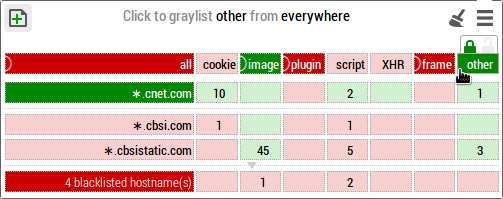
IMPORTANT: stylesheets (
.cssfiles) which are pulled from hostnames which do not match the domain name of the top web page will be reported as "other" in the pop-up menu matrix.- I realize many web pages which were displaying properly before this last update might now not display properly, but the reason they were displaying properly before is because requests (stylesheet) on which you had no control were made. Now you have full control.
- Remember: if a web page doesn't display properly, it might be because the requests for stylesheets are blocked. Requests for stylesheet are counted in the "other" column. Example, three stylesheets at
cbsistatic.com: - Remember: with this update, you are now in control of your privacy: you choose where your browser is allowed to connect.
-
IMPORTANT: stylesheets (
- Fix required in order to be able to run as an Opera add-on.
- In Opera,
onBeforeRequestcan be called before the URL is bound to tab, thus preventing the blocking of inline javascript. - Maybe the above problem also affected Chromium/Chrome, so I pushed the new version to Chrome web store as well.
- The fix is: if HTTPSB is unable to evaluate with 100% certainty whether javascript should be enabled, javascript will not be enabled.
- Extension has been submitted to Opera add-on collection,
it might take a few days before it shows upnever mind, it was rejected, I figured the Chromium screenshots might cause an issue. Opera users can still install the extension manually though.
- In Opera,
- Fixed https://github.com/gorhill/httpswitchboard/issues/74
- Fixed https://github.com/gorhill/httpswitchboard/issues/35 -- Read carefully:
- HTTPSB no longer uses Chrome/Chromium settings to block inline javascript, because the way Chromium/Chrome's javascript blocker works is incompatible with how HTTPSB works. This means:
- You won't see Chromium/Chrome's "javascript blocked" icon in the omnibar (do not panic).
- Here are some links where you can test whether HTTPSB blocks javascript if you doubt: https://github.com/gorhill/httpswitchboard/issues/46.
- On the positive side, you don't have to care about the initial Chromium/Chrome settings regarding javascript (so no more "IMPORTANT NOTE!" required).
- How it works (for the technically inclined):
- At startup time, HTTPSB creates two rules in Chromium/Chrome to allow javascript from everywhere (do not panic).
- Then when the user opens a web page where inline javascript must be blocked, the following directive is added to the incoming response headers:
Content-Security-Policy: script-src 'none'. This prevents inline javascript from running on the main page. (More details regarding Content Security Policy). - For external javascript, this is taken care as it always has been since the beginning, by cancelling the requests to fetch the external resource.
- HTTPSB no longer uses Chrome/Chromium settings to block inline javascript, because the way Chromium/Chrome's javascript blocker works is incompatible with how HTTPSB works. This means:
- Context menu entries:
- To temporarily whitelist all for domain of current page
- To revert temporary permissions
- Support for Internationalized Domain Name through punycode.js. Examples:
- Support for complete Public Suffix List ("PSL") through publicsuffixlist.js to determine the domain of a specific hostname. Examples:
-
googleblog.blogspot.cais now reported as a domain (prior to v0.6.2,blogspot.cawas deemed the domain); -
twitter.github.iois now reported as a domain (prior to v0.6.2,github.iowas deemed the domain); -
kpbsd.k12.ak.usis now reported as a domain (prior to v0.6.2,ak.uswas deemed the domain); - Etc.
-
- Master power switch to completely disengage blocking of everything (beware!), so you don't have to uninstall HTTP Switchboard if for some reasons you don't want to filter anything temporarily (HTTPSB will still continue to log HTTP requests though, so at least you can see what you subject yourself to without a blocker.)
- Ability to adjust the size of the log buffer. Can be set to
0to reduce memory usage if you have no interest whatsoever in examining details of HTTP traffic. - Display filters of logged HTTP traffic in the Statistics page are now persisted.
- Version française entamée.
- Added to HTTPSB's blacklist:
analytics.edgesuite.netatedra.comclicktale.neteverestjs.neteveresttech.net
- Fixed:
- Further fix to https://github.com/gorhill/httpswitchboard/issues/55:
- Be less strict for when a subdomain can be collapsed:
- Before: No subdomain could be collapsed if it, or one peer subdomain had at least one explicit block/allow rule in one if its columns.
- Now: Only a subdomain which has at least one explicit block/allow rule in one of its columns can't be collapsed. Other rule-less peer subdomains are now collapsible.
- Be less strict for when a subdomain can be collapsed:
- Fixed https://github.com/gorhill/httpswitchboard/issues/67.
- New blacklisted entry:
-
clicktale.com: "See absolutely everything your visitors do on your webpage ... See their every mouse move, click and keystroke"
-
- Fixed https://github.com/gorhill/httpswitchboard/issues/61.
- Fixed https://github.com/gorhill/httpswitchboard/issues/55.
- Updated third-party blacklists to latest versions.
- More work internally to support internationalization.
- Fixed https://github.com/gorhill/httpswitchboard/issues/60.
- Some groundwork to support internationalization (volunteer translators are welcomed).
-
New feature: Rule manager.
- Backup in part or whole your rules.
- Restore in part or whole your rules.
- Exchange "recipes" with others.
- Example: Youtube, with comments enabled.
- The idea is to make it easy for the geekier to help less geeky people use the absolute minimal set of rules required to make a web page/site work correctly, so that having to whitelist all can be avoided.
- Consider this new feature early beta, more details to add (delete rules, scopes, etc.) or think through.
-
Reorganized pop-up menu layout to allow for new features without cluttering the UI.
-
Imported contributions from GuardianMajor to make Settings page slicker.
- Originally presented as a pull request (I merged manually)
-
Imported latest version of third-party blacklists.
- Fixed https://github.com/gorhill/httpswitchboard/issues/51.
- Fixed https://github.com/gorhill/httpswitchboard/issues/50.
- Settings: user can now choose size of text in matrix (as suggested by a user).
- Popup menu: Blacklisted hostnames section can be collapsed/expanded.
- New Google groups to informally discuss HTTP Switchboard: https://groups.google.com/forum/?hl=en#!forum/httpsb.
- Implemented ability to have local storage wiped out for hostnames which have cookies blacklisted (see Settings page).
- More blacklisted hostnames:
- erovinmo.com
- New feature: per-site permissions. For example, this allows:
- Blacklist hostname
facebook.comglobally, - Whitelist hostname
facebook.comwhen visitinghttps://www.facebook.com. - Net result: this disables
facebook.comfrom tracking you (like when you visit a web site in whichfacebook.comhas assets embedded), except when visiting a web page onhttps://www.facebook.com.
- Blacklist hostname
- Extension icon offers a sense of how much is allowed/blocked on the page.
- Users have now the ability to permanently override the blacklist status of read-only blacklisted entries.
- Added another third-party blacklist: ad_servers.asp from http://hosts-file.net/. (So expect more dark red cells at the bottom of the matrix).
- Updated other third-party blacklists to their latest version.
- Added a switch in the Settings page to let the user choose whether to use strict blocking (introduced in 0.3.6) or not. Default is
off. If you like this feature, be sure to turn it on.
-
Change in behavior, read carefully!
- Before 0.3.6:
- A "gray" matrix cell was whitelisted through sole inheritance from an expressly whitelisted hostname, regardless whether the type of request for this "gray" matrix cell was blacklisted.
- After 0.3.5, now the rule is more strict:
- A "gray" matrix cell will be whitelisted through inheritance if and only if none of the inherited hostname and inherited type of request is expressly blacklisted.
- Concretely, using an example: let's posit frames are expressly blacklisted, hostname arstechnica.net is expressly whitelisted:
- Before 0.3.6: frames for arstechnica.net were whitelisted (through inheritance).
- After 0.3.5: frames for arstechnica.net are blacklisted (through inheritance).
- In this example, if you really want frames for arstechnica.net to be whitelisted while keeping the general blacklisting of frames (which is good), then you need to expressly and specifically whitelist frames for arstechnica.net, meaning not relying anymore on inheritance.
- Why the change? It's common for drive-by malware to inject
<iframe>in order to activate themselves (example: http://arstechnica.com/security/2013/10/hackers-compromise-official-php-website-infect-visitors-with-malware/)
- Before 0.3.6:
-
Change in behavior, read carefully!
- Clicking on a matrix cell doesn't cycle through black, white and graylist anymore:
- Click in the upper half of a cell, you will toggle between white and graylist.
- Click in the lower half of a cell, you will toggle between black and graylist.
- This change addresses what I considered two annoyances:
- Annoyance #1: You would have to click more than once on a cell to whitelist.
- Annoyance #2: It was difficult to predict what would happen to the cell once clicked.
- Clicking on a matrix cell doesn't cycle through black, white and graylist anymore:
- More work toward reducing memory footprint and improving performance.
- Fixed https://github.com/gorhill/httpswitchboard/issues/22
- Fixed https://github.com/gorhill/httpswitchboard/issues/29 (Matrix behavior changed!)
- Further reduction of memory footprint and further performance improvement.
- New Chromium-behind-the-scene virtual tab intercepts net requests made by the browser behind the scene and process these hidden requests against the current whitelist/blacklist. You can look at these requests through the Global info page: in the Geeky stats section, use the drop-down list to select "http://chromium.behind.the.scene". More information regarding what the browser can send behind the scene is disclosed at Google Chrome Privacy Whitepaper
- All third parties blacklists are now available locally, which brings many advantages:
- Blacklists are loaded independently of availability of remote sites where they sit.
- Loading blacklists from remote sites is no longer complicated by the fact the user setting "Process behind-the-scene requests" could be switched on.
- This saves on local storage space.
- Further reduction of memory footprint and further performance improvement.
- Fixed https://github.com/gorhill/httpswitchboard/issues/27.
- Fixed https://github.com/gorhill/httpswitchboard/issues/26.
- Fixed https://github.com/gorhill/httpswitchboard/issues/25.
- Fixed https://github.com/gorhill/httpswitchboard/issues/24.
- Fixed https://github.com/gorhill/httpswitchboard/issues/21.
- More blacklisted hostnames:
- eyereturn.com: "eyeReturn Marketing is the only end-to-end digital advertising platform in the market"
- lduhtrp.net
- yceml.net
- Now reporting the number of cookies effectively removed by HTTP Switchboard (see Settings pages).
- Further reduced memory footprint and performance improvement.
- Popup menu responsiveness: avoid using slow jQuery.data() if it can be avoided, which was the case here.
- Fixed another memory leak issue (forgot to put planned code to purge internal cacher).
- Fixed the counting of cookies on the Info page.
- Fixed https://github.com/gorhill/httpswitchboard/issues/19.
- Fixed https://github.com/gorhill/httpswitchboard/issues/18.
- More blacklisted hostnames:
- 2mdn.net: "2mdn.net is a domain used by Doubleclick which is an advertising company..."
- adnxs.com: "Adnxs.com is run by AppNexus, a company that provides technology, data and analytics to help companies buy and sell online display advertising" (Ref.: http://www.theguardian.com/technology/2012/apr/23/adnxs-tracking-trackers-cookies-web-monitoring)
- adobetag.com: "Adobe Announces Adobe Tag Manager for the Online Marketing Suite"
- crosspixel.net: "leading provider of high performance audience data and information for the real-time advertising industry"
- crsspxl.com: Related to crosspixel.net
- gigya.com: "The tools you need to connect with consumers, harness rich data, and make marketing relevant"
- mookie1.com: "Specializing in online digital advertising, search marketing"
- servebom.com: no home page, seen as 'tracking.servebom.com': good enough for this list
- New extension page: "Settings".
- Cookies can optionally be deleted once accounted for.
- Better cookie reporting in the matrix.
- Fixed https://github.com/gorhill/httpswitchboard/issues/12.
- Fixed https://github.com/gorhill/httpswitchboard/issues/9.
- Found and fixed a one-time memory leak.
- Fixed
localhostending up in read-only blacklist. - Blacklisted hostnames added to project's own list:
- adgear.com: "AdGear is an online advertising technologies company"
- bounceexchange.com: "The BounceX software is tracking all the cursor movements of every visitor in real-time"
- Added handling cookies using
binaryValue(Not handling cookies usingbinaryValuewas preventing the blocking of cookies on the pages where these cookies occurred). - If an external blacklist can't be obtained, use locally cached copy, if any, so that user is not left naked.
- Latest version of HTTP Switchboard blacklist is always used (as opposed to external blacklists which are cached locally for a week).
- Added more blacklisted hostnames to HTTP Switchboard blacklist.
- Added button in popup menu to revert all temporary changes to the whitelist/blacklist (thus no need to reboot chromium/chrome to reset all fiddling with black and whitelist).
- A bit of work on documentation, more to come.
- Added a project-maintained blacklist, for those domain names which I believe should be blacklisted but are not found in other blacklists.
- The menu is organized in four logical groups:
- First, all the requests directly related to the current page,
- Second, all the whitelisted hostnames,
- Third, all the graylisted hostnames,
- Fourth, all the blacklisted hostnames.
- Major change in behavior: Any change to a cell status in the matrix is temporary by default, which means the blacklist/whitelist status of a cell will revert to being graylisted when chromium is rebooted. This encourage users to fiddle without worry with the permissions on the page. The user will have to make an extra click (on the padlock) to permanently blacklist/whitelist a cell. I will soon add a button to force a reset, and a user-configurable timeout, so that the user doesn't not have to reboot chromium.
- Now using URI.js thus gaining sensible management of second-level domain names and increasing performance overall.
- Work on performance and reduced memory usage.
- Better default blacklist filters when first installing ("plugin" and "frame" are now blacklisted by default, so that if user toggle master switch to whitelist "all", these types of items will still be effectively blacklisted.)
- In matrix, "object" is renamed "plugin".
- Plugins are now outright blocked if effectively blacklisted (in addition of being prevented from making web requests.)
- Fixed bug introduced in 0.2.4 which broke the fetching of remote blacklists.
- IP addresses can now be properly handled.
- Show details of remote blacklists being used on info page.
- Ability to filter stats per web page on info page.
- Fixed a bug which caused HTTP Switchboard to diagnose there was actual inline scripting on all pages, regardless whether it was really the case.
- Added button in popup menu to easily access info page.
- More work on info page.
- Fix to address the issue of msn.com disregarding standards (as per RFC1738, '|' must be escaped in a URL, msn.com does not escape '|'... culprit URL found at
http://money.ca.msn.com/). - Fixed memory leak (something to investigate: non visible web pages can still run their JS in chromium?!)
- Remote blacklists will be reloaded from remote servers every 7 days.
- Started work on options page.
- Fixed issue #1.
-
Fixed a memory leak.
- More accurate cookie reporting.
- Further fine tuning the UI of the popup menu.
- Added ability to whitelist/blacklist cookies.
- Added justdomains blacklist from DNS-BH – Malware Domain Blocklist (22,850 entries)
- Ignore fragment in URL when creating/looking URL stats store.
- Extension now loads properly when tabs are already present, and when chromium is launched first time
- Better display of web requests count in extension icon when count > 999
- Opened popup menu now updates in real-time as net traffic is processed
- Fine tuning visuals
- Smart reloading of tabs when extension popup menu closed (only if necessary)
- Improved responsiveness:
- async update of extension badge
- caching top url stats for a while, this reduce mem alloc during stats collection
- Fixed an issue with <noscript> tags caused by a bug in Chromium (see https://code.google.com/p/chromium/issues/detail?id=232410)
- Fixed code related to some error messages at the console (valid web requests not necessarily matched to a tab, like when the page is pre-rendered -- example: googling for 'wikipedia', wikipedia.org is pre-fetched internally)
- Now block inline script tags on top frame when scripts are blacklisted for this top frame (before, only separate script files where prevented from being loaded/executed). Still need to look into this for subframes.
- Added immortal_domains blacklist from DNS-BH – Malware Domain Blocklist (2,306 entries)
- Added ability to block whole page
- Blocked subframes (<iframe>, etc.) are now redirected to a safe page (so there is a visual to indicate blocking)
- In a new install page & images are whitelisted by default
- Now using Roboto Condensed font, better suited for the matrix
- Reworked project structure and code in order to grow better
- Fine tuned local storage
- Using built-in community-built blacklists from:
- Peter Lowe's blacklist: Ad server hostnames for blocking ads (2,547 entries)
- Malware Domain List: MalwareDomainList.com Hosts List (1,651 entries)
- Trivial GUI improvements
- User-defined lists stored format now more similar to third party lists (newline-separated entries)
- Changed name to more accurate "HTTP Switchboard"
- First version. Rather bare.