Dialogue System
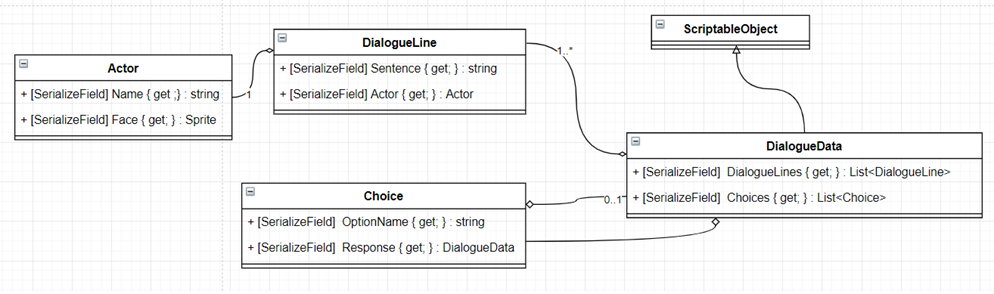
Dialogue System is one of the key features of this game. Useful for interacting or talking with NPCs (non-playable character).
- Create new Actor & DialogueData
- DialogueData
- Using DialogueData
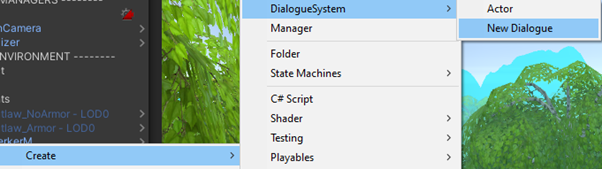
You can create Actor and DialogueData by right clicking on Project Folder, choose Create -> DialogueSystem -> Actor / New Dialogue
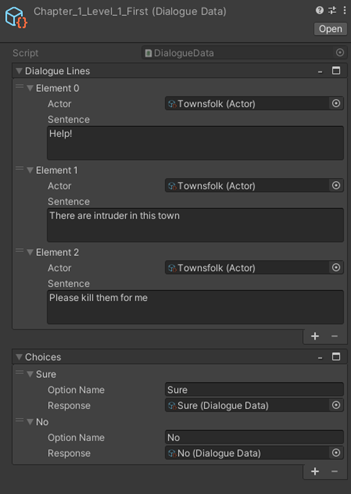
Dialogue data consist of one or many DialogueLine. DialogueLine consist of Actor and sentence. You can leave actor empty if you don't want to use actor on that line.
Dialogue Data CAN contain zero or many choices. You can leave Choice empty if the DialogueData doesn't have branch.
Option name is what option do player have when player is at the end of the currently playing DialogueData. Response is reference to another DialogueData that will be played when player chose this choice.
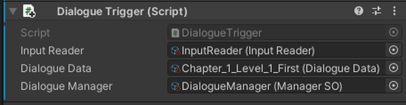
To use DialogueData, you need to attach the DialogueData to DialogueTrigger in the scene.