-
Notifications
You must be signed in to change notification settings - Fork 37
doc: updated diagrams with CBR #976
New issue
Have a question about this project? Sign up for a free GitHub account to open an issue and contact its maintainers and the community.
By clicking “Sign up for GitHub”, you agree to our terms of service and privacy statement. We’ll occasionally send you account related emails.
Already on GitHub? Sign in to your account
Merged
Merged
Changes from 8 commits
Commits
Show all changes
11 commits
Select commit
Hold shift + click to select a range
b55f660
doc: updated diagrams with CBR
Ak-sky dd6176a
doc: updated diagrams with CBR
Ak-sky 4997eae
doc: added initial steps for the tutorial
Ak-sky 5a01642
Merge branch 'main' into cbr-updates
Ak-sky c879529
Merge remote-tracking branch 'origin/main' into cbr-updates
Ak-sky 0e0b01d
doc: added initial steps for the tutorial
Ak-sky efb35a0
Merge branch 'main' into cbr-updates
Ak-sky 08e7515
docs update
Ak-sky 0bdc5ab
addressed review comments
Ak-sky 11bcea1
addressed review comments
Ak-sky 503dc2e
Merge branch 'main' into cbr-updates
Ak-sky File filter
Filter by extension
Conversations
Failed to load comments.
Loading
Jump to
Jump to file
Failed to load files.
Loading
Diff view
Diff view
There are no files selected for viewing
This file contains hidden or bidirectional Unicode text that may be interpreted or compiled differently than what appears below. To review, open the file in an editor that reveals hidden Unicode characters.
Learn more about bidirectional Unicode characters
| Original file line number | Diff line number | Diff line change |
|---|---|---|
| @@ -0,0 +1,57 @@ | ||
|
|
||
| # Configuring Landing Zone with Account Base DA to create CBR VPC Zone | ||
|
|
||
| This tutorial provides step-by-step instructions for using the IBM Cloud Account Infrastructure Base Deployment Architecture to provision a Context-Based Restriction (CBR) VPC zone and configure it with Landing Zone. | ||
|
|
||
| ## Prerequisites | ||
|
|
||
| - IBM Cloud account with administrative permissions | ||
Ak-sky marked this conversation as resolved.
Outdated
Show resolved
Hide resolved
|
||
|
|
||
| ## Step 1: Deploy the Account Infrastructure Base Deployment Architecture | ||
Ak-sky marked this conversation as resolved.
Outdated
Show resolved
Hide resolved
|
||
|
|
||
| 1. Navigate to the IBM Cloud Catalog using this URL: | ||
| [Cloud automation for account configuration](https://cloud.ibm.com/catalog/7a4d68b4-cf8b-40cd-a3d1-f49aff526eb3/architecture/deploy-arch-ibm-account-infra-base-63641cec-6093-4b4f-b7b0-98d2f4185cd6-global?kind=terraform&format=terraform&version=93c7f855-881d-459b-8999-4567a4883f57-global) | ||
Ak-sky marked this conversation as resolved.
Show resolved
Hide resolved
|
||
|
|
||
| 2. Click on **Add to project** to start the deployment process | ||
|
|
||
| 3. Configure the deployment parameters: | ||
Ak-sky marked this conversation as resolved.
Show resolved
Hide resolved
|
||
| - Enter the name for the project | ||
| - Enter the description (optional) | ||
| - Enter the configuration name | ||
| - Select the region | ||
| - Select the resource group | ||
|
|
||
| 4. Review your configuration and click **Create** | ||
|
|
||
| 5. Configure the required variables present under **security**, **required** and **optional** sections. | ||
|
|
||
| 6. Click on deploy. | ||
|
|
||
| ## Step 2: Retrieve the CBR VPC Zone ID | ||
|
|
||
| To access the CBR Zone ID, which becomes available as an output after the Account Base DA deployment completes - | ||
Ak-sky marked this conversation as resolved.
Outdated
Show resolved
Hide resolved
|
||
|
|
||
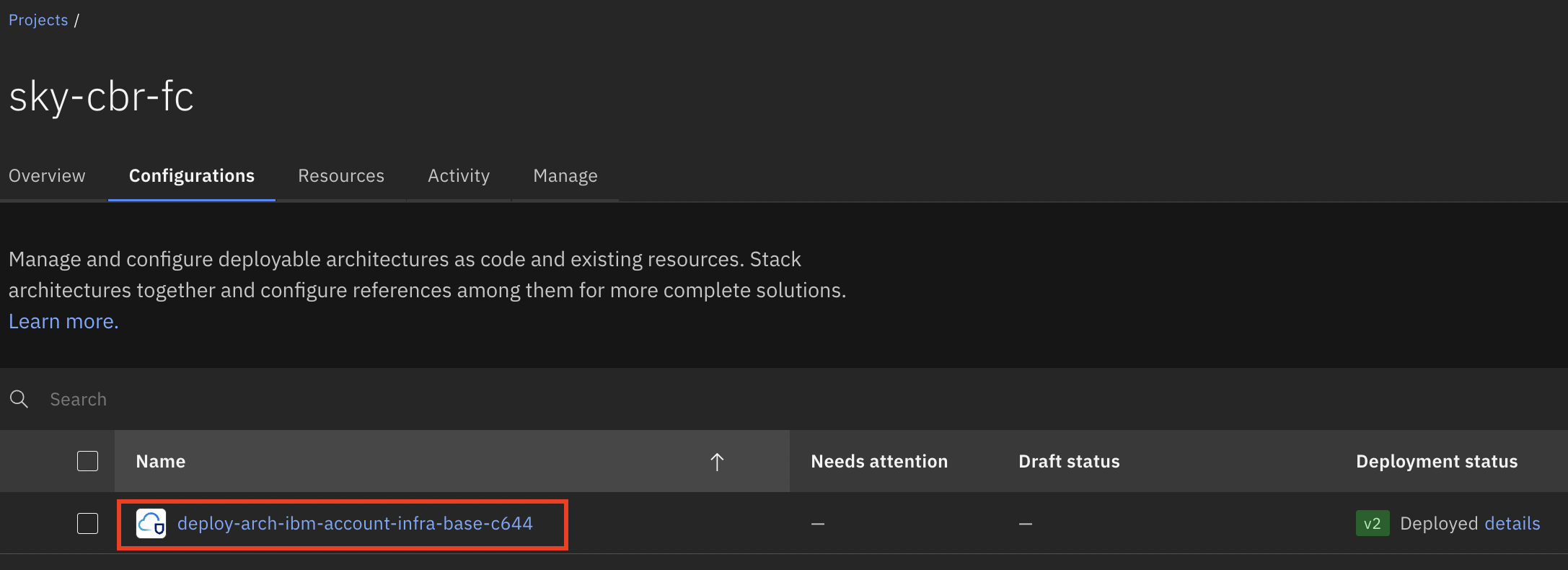
| 1. Navigate to Account Infrastructure Base deployment and select the configuration as shown in the reference image below. | ||
|  | ||
|
|
||
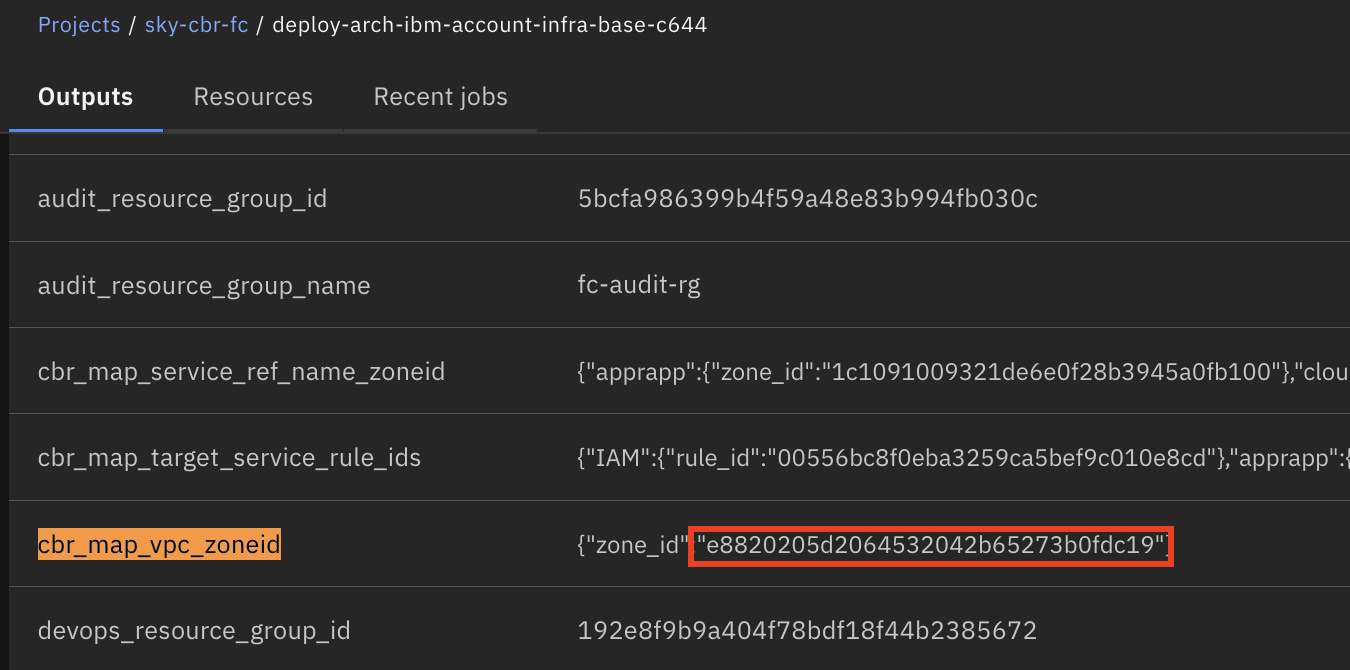
| 2.In the outputs section, locate the output variable named `cbr_map_vpc_zoneid` and copy the `zone_id` value as illustrated below. | ||
|  | ||
|
|
||
| ## Step 3: Configure Landing Zone with the CBR Zone ID | ||
|
|
||
| To properly configure landing zone with the retrieved CBR Zone ID - | ||
|
|
||
| 1. Select the appropriate landing zone configuration from one of the following options: | ||
| - [Red Hat OpenShift Container Platform on VPC landing zone](https://cloud.ibm.com/catalog/architecture/deploy-arch-ibm-slz-ocp-95fccffc-ae3b-42df-b6d9-80be5914d852-global) | ||
| - [VPC landing zone](https://cloud.ibm.com/catalog/architecture/deploy-arch-ibm-slz-vpc-9fc0fa64-27af-4fed-9dce-47b3640ba739-global) | ||
| - [VSI on VPC landing zone](https://cloud.ibm.com/catalog/architecture/deploy-arch-ibm-slz-vsi-ef663980-4c71-4fac-af4f-4a510a9bcf68-global) | ||
|
|
||
| 2. Configure the required variables present under **security**, **required** and **optional** sections. | ||
|
|
||
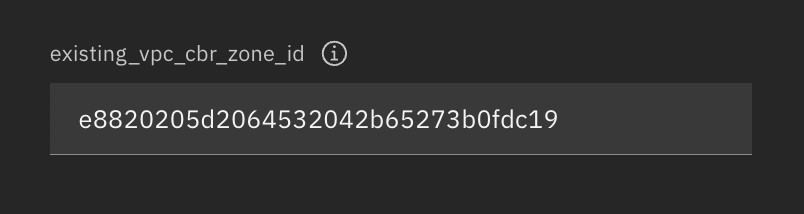
| 3. Within the **optional** section, locate the field labeled `existing_vpc_cbr_zone_id` and paste the `zone_id` value copied in step 2, as shown below. | ||
|  | ||
|
|
||
| 4. Click on deploy. | ||
|
|
||
| 5. Once deployed, CBR VPC zone will contain the required VPCs IDs as shown below. | ||
|  | ||

Loading
Sorry, something went wrong. Reload?
Sorry, we cannot display this file.
Sorry, this file is invalid so it cannot be displayed.

Loading
Sorry, something went wrong. Reload?
Sorry, we cannot display this file.
Sorry, this file is invalid so it cannot be displayed.

Loading
Sorry, something went wrong. Reload?
Sorry, we cannot display this file.
Sorry, this file is invalid so it cannot be displayed.

Loading
Sorry, something went wrong. Reload?
Sorry, we cannot display this file.
Sorry, this file is invalid so it cannot be displayed.

Loading
Sorry, something went wrong. Reload?
Sorry, we cannot display this file.
Sorry, this file is invalid so it cannot be displayed.

Loading
Sorry, something went wrong. Reload?
Sorry, we cannot display this file.
Sorry, this file is invalid so it cannot be displayed.

Loading
Sorry, something went wrong. Reload?
Sorry, we cannot display this file.
Sorry, this file is invalid so it cannot be displayed.
Add this suggestion to a batch that can be applied as a single commit.
This suggestion is invalid because no changes were made to the code.
Suggestions cannot be applied while the pull request is closed.
Suggestions cannot be applied while viewing a subset of changes.
Only one suggestion per line can be applied in a batch.
Add this suggestion to a batch that can be applied as a single commit.
Applying suggestions on deleted lines is not supported.
You must change the existing code in this line in order to create a valid suggestion.
Outdated suggestions cannot be applied.
This suggestion has been applied or marked resolved.
Suggestions cannot be applied from pending reviews.
Suggestions cannot be applied on multi-line comments.
Suggestions cannot be applied while the pull request is queued to merge.
Suggestion cannot be applied right now. Please check back later.
Uh oh!
There was an error while loading. Please reload this page.