-
Notifications
You must be signed in to change notification settings - Fork 2
Editor API Emulation
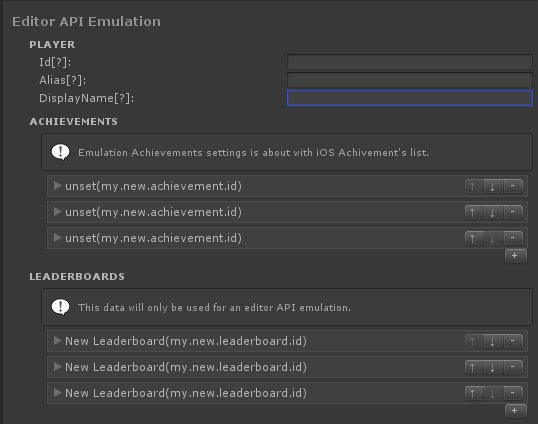
One of the Ultimate Mobile features is an ability to emulate native Game Service responses while you testing your game with the editor. But you have to provide some data for the emulator to work with.
For example, you can specify the player id & name, or provide the list fo achievements & leaderboards. This is not a requirement at all, but if you want to be able to test the Game Services implementation right inside the editor, it's might be a good idea to set up the editor emulator data.
You will find this setting under the GameService module inside the Plugin Editor UI. The UI will look similar to the screenshot below:
Reliable and high-quality Unity Development service. Let's Talk!
Website | AssetStore | LinkedIn | Youtube | Scripting Reference
- Application
- Dark Mode
- Native Dialogs
- Native Preloader
- Date Picker Dialog
- Time Picker Dialog
- Rate Us Dialog
- Build Info
- Locale
- Permissions
- Wheel Picker Dialog
- Getting Started
- Connecting to The Service
- Purchase flow
- Transactions Validation
- Test Inside the Editor
- Advanced use cases
- Getting Started
- Enabling the Ads Service
- Banner Ads
- Non-rewarded Ads
- Rewarded Ads
- Unity Ads
- Google AdMob
- Chartboost
- Getting Started
- Analytics API
- Automatic Tracking
- Unity Analytics
- Firebase Analytics
- Facebook Analytics