Unity Analytics
Unity Analytics is a simple but powerful data platform that provides analytics for your Unity game. Find out who the players are in your game and their in-game behavior.
Important: For information about EU General Data Protection Regulation (GDPR) compliance, see Unity Analytics and the EU General Data Protection Regulation.
Platforms supported:
- iOS
- Android
- Tizen
- Universal Windows Platform
- Mac, PC, Linux Standalone
- WebGL - 5.3 integration and onwards
The Unity Analytics is available out of the box, so do not need to do any additional action to enable it. However, you may provide additional tracking option by expanding the service settings UI.
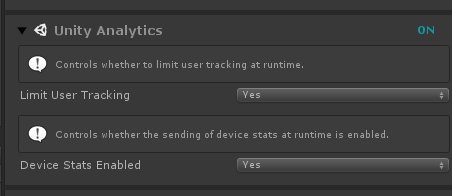
Those setting can also be provided via the code if you prefer, see the code snippet below:
using SA.CrossPlatform;
...

UM_Settings.Instance.Analytics.UnityClient.LimitUserTracking = true;
UM_Settings.Instance.Analytics.UnityClient.DeviceStatsEnabled = true;