EN_IT_DevOps
SSO, or Single Sign-On, is an authentication process that allows users to access multiple systems or applications through one authentication. Users can log in to multiple services with a single ID and password, which improves user experience and reduces the complexity of authentication management. SSO also contributes to efficient resource management and enhanced security. For example, when employees use various services such as company email, document tools, and internal portals, they can access all services with a single login without having to remember different login information for each.
SSO implementation can be accomplished in several ways, typically using standard protocols such as OAuth, SAML (Security Assertion Markup Language), and OpenID Connect. These protocols ensure the secure exchange of authentication information and mediate communication between service providers and trusted authentication providers.
- Increased user convenience: User convenience is increased as multiple services can be accessed with a single login.
- Enhanced security: Users do not have to remember complex and different passwords for various services, making it easier to enforce strong password policies.
- Efficient resource management: Since the authentication process is centrally managed, IT administrators can manage user accounts more effectively.
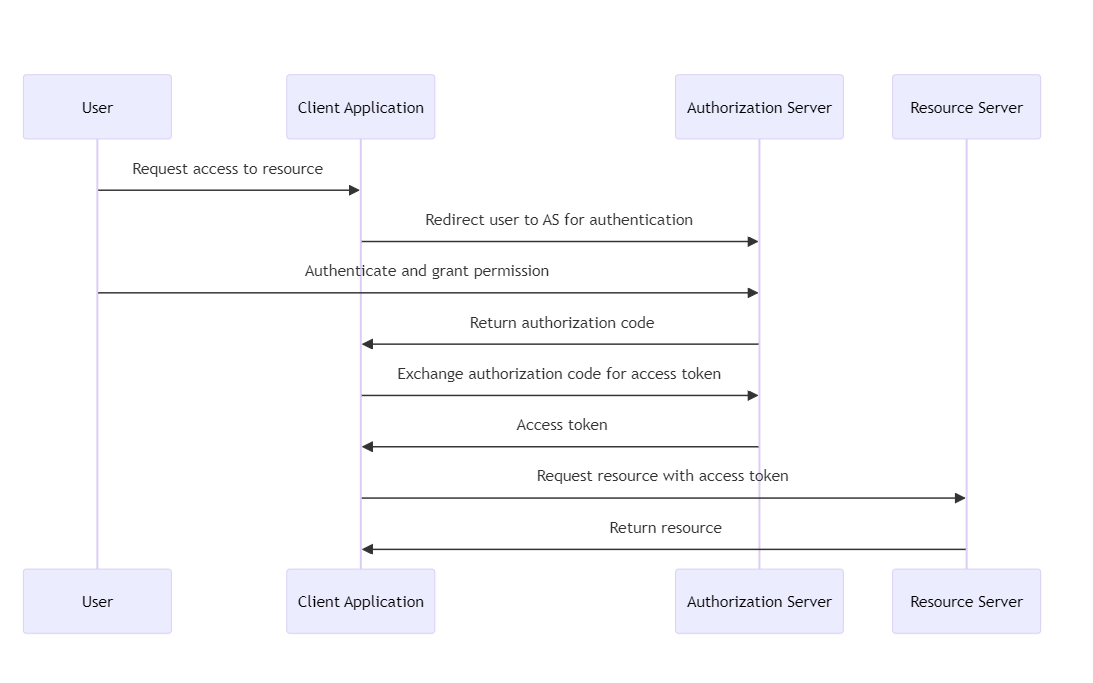
- Purpose: OAuth is an open standard for access delegation, commonly used as a way for Internet users to give websites or applications access to information on other websites without having to provide a password. It focuses on authenticating third-party applications to access user data without exposing user credentials.
-
How it works: OAuth works by receiving permission from the resource owner (user) and issuing a token to a third-party application from an authorization server. This token grants access to a specific set of resources for a defined period of time. The latest version, OAuth 2.0, is used for API authentication and supports multiple flows (or grants) for different client types and scenarios.
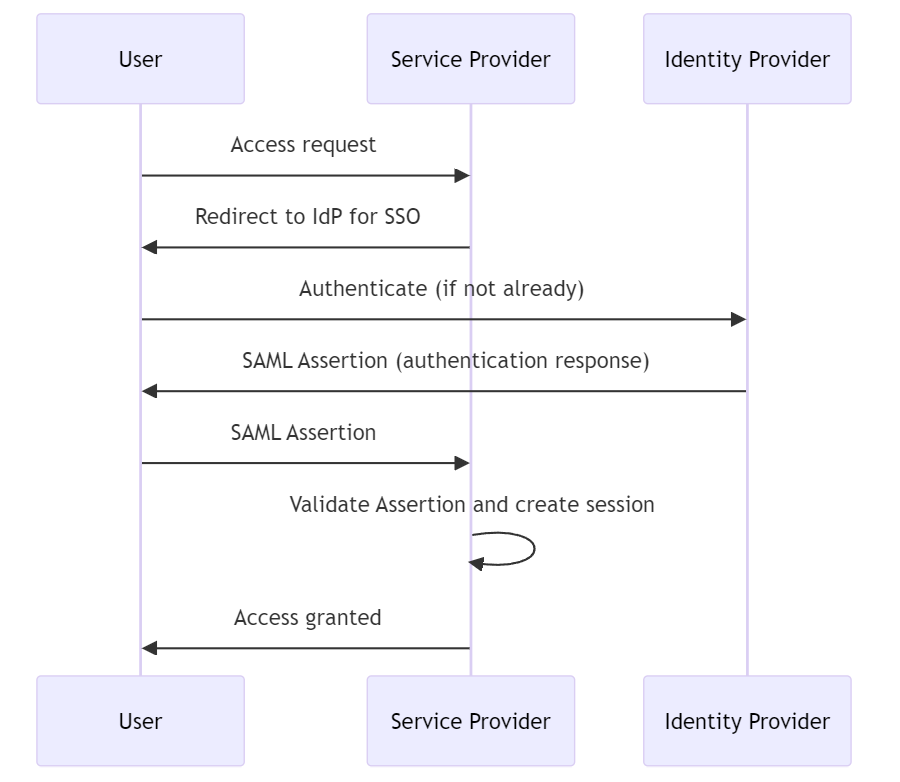
- Purpose: SAML is an XML-based framework for authentication and authorization between service providers and identity providers. It is widely used in enterprise environments for single sign-on (SSO), allowing users to log in once and access multiple systems without re-authentication.
-
How it works: In SAML, the identity provider (IdP) verifies the user's credentials and then sends a SAML assertion to the service provider (SP). This assertion contains authentication statements and properties related to the user identity. The service provider then grants access based on this assertion. SAML 2.0 is the currently commonly used version.
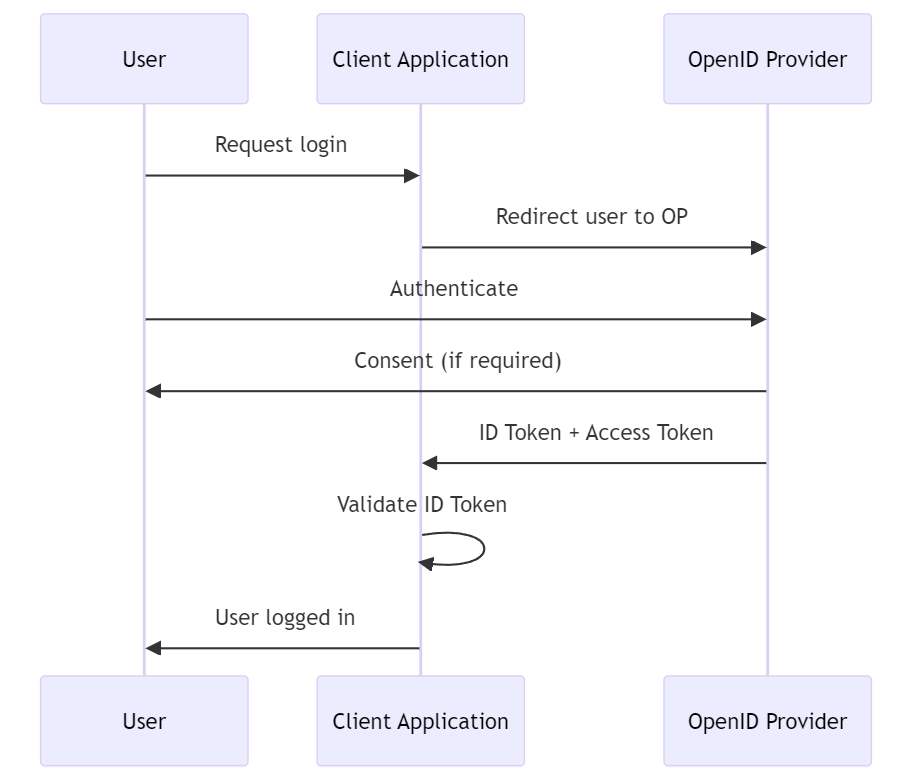
- Purpose: OpenID Connect is a simple identity layer on top of the OAuth 2.0 protocol, allowing clients to verify the identity of end users and obtain basic profile information in an interoperable REST-like manner. Widely used in web, mobile, and JavaScript clients.
-
How it works: OpenID Connect extends OAuth 2.0 with ID tokens, which are JWTs (JSON Web Tokens) containing information about the user. After authenticating the user, the identity provider issues an ID token and an access token (if approved). The client can then use the ID token to obtain user information and access tokens to access authorized resources.
- OAuth is primarily concerned with authorization, not authentication. Used to grant an application permission to act on behalf of the user.
- SAML primarily focuses on authentication and authorization through SSO in enterprise scenarios where users access multiple services during a session.
- OIDC builds on OAuth 2.0 to add authentication, making it a more comprehensive solution for modern web and mobile applications that require both identity verification and data access permissions.
JSON Web Tokens (JWT) are a URL-safe, concise means of representing claims to be transferred between two parties. Claims within a JWT are encoded as JSON objects and digitally signed using JSON Web Signatures (JWS). Optionally, you can also encrypt it using JSON Web Encryption (JWE).
JWT generally consists of three parts: Header, Payload, and Signature, separated by a dot (.). The structure is header.payload.signature.
- Header: The header usually consists of two parts: the type of token, which is JWT, and the signature algorithm used (e.g., HMAC SHA256 or RSA).
{
  "alg": "HS256",
  "typ": "JWT"
}-
Payload: The payload contains claims. Claims are statements about an entity (usually the user) and additional data. There are three types of claims: registered claims, public claims, and private claims.
- Registered Claims: These are not mandatory but are a predefined set of claims to provide a set of useful, interoperable claims. Some of these are iss (issuer), exp (expiration time), sub (subject), aud (audience), etc.
- Public Claims: Those using JWTs can define these as desired. However, to avoid conflicts, they should be defined in the IANA JSON Web Token Registry or as a URI that contains a collision-resistant namespace.
- Private Claims: These are custom claims created to share information between parties that agree on using them and are neither registered nor public claims.
{
  "sub": "1234567890",
  "name": "John Doe",
  "admin": true,
  "iat": 1516239022
}- Signature: To generate the signature part, you must sign it using the encoded header, the encoded payload, a secret, and the algorithm specified in the header. For example, when using the HMAC SHA256 algorithm, the signature is generated in the following way:
HMACSHA256(
  base64UrlEncode(header) + "." +
  base64UrlEncode(payload),
  secret)
- Authentication: After a user logs in, each subsequent request includes the JWT, allowing access to the routes, services, and resources permitted by that token.
- Information Exchange: Since JWTs can be signed—for example, with public/private key pairs—you can be sure the sender is who they claim to be. Additionally, since the signature is calculated using the header and the payload, it can also be verified that the content has not been tampered with.
sequenceDiagram
    participant User
    participant Client
    participant Server
    participant Protected Resource

    %% 인증 프로세스
    Note over User,Protected Resource: Authentication Flow
    User->>Client: Login with credentials
    Client->>Server: Send credentials
    Server->>Server: Validate credentials
    Server->>Client: Generate & return JWT
    Client->>Protected Resource: Request with JWT
    Protected Resource->>Protected Resource: Validate JWT
    Protected Resource->>Client: Return requested resource

    %% 정보 교환 프로세스
    Note over User,Protected Resource: Information Exchange Flow
    Client->>Server: Request with JWT
    Server->>Server: Verify signature
    Server->>Server: Validate claims
    alt Signature valid
        Server->>Client: Process request
    else Signature invalid
        Server->>Client: Return error
    end
Infrastructure as Code (IaC) is the managing and provisioning of infrastructure through code instead of through manual processes. With IaC, infrastructure is managed using configuration files rather than hardware. This approach enables developers and IT operations teams to automatically manage, monitor, and provision resources, rather than manually setting up hardware or configurations.
- Automation: IaC automates the deployment of infrastructure, allowing for fast and consistent setups.
- Idempotency: An IaC system's operations can be executed one or multiple times with the same outcome, ensuring reliability and consistency.
- Version Control: Infrastructure configurations are stored in version control systems, enabling change tracking, history, and rollback.
- Speed and Efficiency: Rapid provisioning of infrastructure, enabling quicker development and deployment cycles.
- Consistency and Reliability: Minimizes human error by automating the provisioning process, ensuring that environments are provisioned consistently every time.
- Scalability: Easily scale infrastructure up or down with changes to configuration files, without the need for manual intervention.
- Cost Savings: Reduces the need for physical hardware and manual labor, leading to cost savings over time.
Several tools facilitate IaC, each with its own syntax and ecosystem:
- Terraform: An open-source tool by HashiCorp, allowing for the management of both cloud and on-premises resources.
- AWS CloudFormation: A service by Amazon Web Services that allows you to manage AWS resources by defining them in templates.
- Ansible: An open-source tool that provides simple automation for cloud provisioning, configuration management, and application deployment.
- Chef: A configuration management tool that uses Ruby-based recipes to automate infrastructure provisioning.
- Puppet: Another configuration management tool that allows you to define the state of your IT infrastructure, then automatically enforces the correct state.
Continuous integration refers to periodically merging code worked by developers into a shared repository. This process includes automated builds and testing to ensure that code changes do not cause problems. The main purpose of continuous integration is to early discover and resolve errors that may occur during the software development process.
Continuous deployment refers to automatically distributing developed software to an environment where customers can use it. This involves delivering software to customers after going through a continuous integration process, without any additional manual steps. Continuous deployment allows new versions of software to be delivered to customers quickly.
- Increased efficiency: Automated processes speed up the development and deployment process and reduce the likelihood of errors.
- Quality improvement: The quality of software is improved through continuous testing and integration.
- Improved customer satisfaction: Through rapid deployment, user feedback can be quickly reflected and software improvements can be provided quickly.
There are several tools available to build and manage CI/CD pipelines. Some of the most popular tools include:
- Jenkins: An open source automation server that supports various CI/CD scenarios. Jenkins is highly customizable with a vast plugin ecosystem.
- Travis CI: A continuous integration service for GitHub projects. It has the advantage of being easy to integrate with GitHub repositories and simple to use.
- GitLab CI/CD: Provides a solution that integrates source code management and CI/CD into one platform. Provides powerful pipeline configuration.
- CircleCI: A cloud-based CI/CD service that supports quick build and deployment. It provides excellent integration with GitHub and Bitbucket.
- GitHub Actions: Enables workflow automation within GitHub repositories. GitHub Actions makes it easy to automate all software workflows, from CI/CD to issue triage.
- ArgoCD: A declarative GitOps continuous delivery tool for Kubernetes. ArgoCD allows you to maintain and manage your Kubernetes resources using your source code repository as your source of truth.
- Bamboo: A continuous integration and deployment tool that combines automated build, test, and release into one workflow. It integrates well with other Atlassian products.
- TeamCity: A build management and continuous integration server provided by JetBrains. It supports a variety of programming languages and technologies and has a comprehensive feature set.
Application Performance Monitoring (APM) refers to the process of using software tools and telemetry data to monitor the performance of business-critical applications. APM helps IT professionals detect and diagnose complex application performance issues to ensure applications meet expected service levels.
APM typically includes several key components:
- Performance Metrics: APM tools collect data on various performance indicators, including response time, transaction volume, error rate, and system resource usage.
- Real-time monitoring: APM provides real-time monitoring of applications to quickly detect performance abnormalities and interruptions.
- End User Monitoring: Track how end users interact with your application and how application performance impacts the user experience. This may include analyzing browser and mobile app performance.
- Distributed tracing and transaction profiling: APM tools can trace and visualize transactions across various services and components within a distributed architecture. This helps pinpoint where delays or failures occur in the transaction chain.
- Analysis and Reporting: APM solutions provide analytics tools to process collected data, identify patterns, predict potential problems, and provide actionable insights.
- Application topology discovery: Modern APM tools can automatically discover and map the various components and dependencies of an application, providing a comprehensive view of the application architecture.
- Dynatrace: Known for its deep monitoring capabilities and extensive automation to detect and diagnose performance issues.
- New Relic: Provides comprehensive application and infrastructure monitoring with powerful analytics capabilities.
- Datadog: Focuses on cloud environments and provides monitoring of servers, databases, tools, and services.
- AppDynamics: Focuses on detailed application performance insights and business performance monitoring.