EN_K8s_RBAC_Security
The Kubernetes API Group is a way to organize Kubernetes API resources. API groups categorize related resources and allow for efficient version management.
Kubernetes API is broadly divided into Core Group and Named Group.
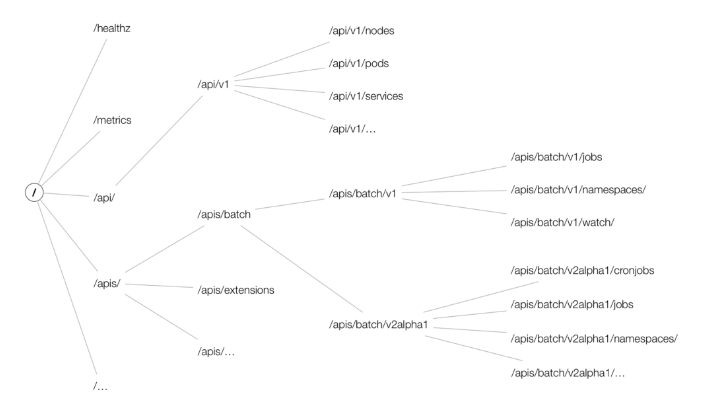
- Image Reference : https://cloud.redhat.com/blog/kubernetes-deep-dive-api-server-part-1
The Core Group contains basic Kubernetes resources and is identified with an empty string ("") as the API group name. This group includes essential Kubernetes resources like Pods, Services, ReplicationControllers, Nodes, and Namespaces.
For example, to set permissions for the pods resource in the Core Group, use:
apiGroups: [""]
resources: ["pods"]The Named Group consists of API groups with specific names other than the Core Group. This group includes resources related to applications, security, configuration, and various extensions. Examples of Named Groups are extensions, apps, networking.k8s.io, rbac.authorization.k8s.io, etc.
For instance, to set permissions for the deployments resource in the apps API group, use:
apiGroups: ["apps"]
resources: ["deployments"]Kubernetes RBAC (Role-Based Access Control) is a security mechanism(Authorization) that provides access to resources in a Kubernetes cluster to users or groups. RBAC ensures secure protection of cluster resources by assigning minimal necessary permissions to specific users.
In Kubernetes, RBAC is implemented using four elements: Role, ClusterRole, RoleBinding, and ClusterRoleBinding.
A Role defines access rights to resources within a specific namespace in Kubernetes. It specifies the types of resources to set permissions for and the operations (e.g., get, list, create, update, etc.) included in those permissions.
Example Role definition:
apiVersion: rbac.authorization.k8s.io/v1
kind: Role
metadata:
  name: gitlab-runner-role
rules:
  - apiGroups: ["extensions", "apps"]
    resources: ["deployments"]
    verbs: ["get", "list", "watch", "create", "update", "patch", "delete"]
  - apiGroups: [""]
    resources: ["pods", "services", "secrets", "pods/exec", "serviceaccounts"]
    verbs: ["get", "list", "watch", "create", "update", "patch", "delete"]
Permissions for the deployments resource in the extensions and apps API groups include operations like get, list, watch, create, update, patch, and delete. For resources in the core API group, similar operations are granted, including pods/exec for executing commands in containers within a pod.
RoleBinding links the permissions defined in a Role to a user, group, or service account. It essentially assigns the permissions of a Role to specific users or groups. RoleBinding is namespace-specific.
apiVersion: rbac.authorization.k8s.io/v1
kind: RoleBinding
metadata:
  name: gitlab-runner-role-binding
subjects:
  - kind: ServiceAccount
    name: default
roleRef:
  kind: Role
  name: gitlab-runner-role
apiGroup: rbac.authorization.k8s.ioKubernetes secrets are utilized to securely store sensitive data like passwords, API keys, tokens, or certificates within a Kubernetes cluster. They aid in isolating sensitive information from application code and configuration files. Secrets can be mounted as files or environment variables for use by pods and containers in your cluster.
The resources that can be stored as Kubernetes Secrets include:
- Opaque Secrets
- Service account token Secrets
- Docker config Secrets
- Basic authentication Secret
- SSH authentication secrets
- TLS secrets
- External Secrets
Kubernetes is an open-source platform for managing container-based applications and services.
- API Server Security: The API server is the core of the Kubernetes cluster and must be protected through appropriate authentication, authorization, and authorization.
- Node Security: Nodes are part of a cluster, and access to them must be strictly controlled.
- Network Policy: Implementing a network policy is necessary to control communication between pods.
- Image Security: Insecure container images may contain vulnerabilities; therefore, security must be maintained through image scanning and signing.
- Container Isolation: Each container must be isolated and use resource limitations to prevent affecting other containers and services.
- Security Context: Use the security context to control the permissions and capabilities of containers.
Access control in Kubernetes is divided into authentication and authorization for API access.
- X.509 Client Certs: Authentication using CA crt (Certificate Authority certificate), Client crt (client certificate), and Client key (client private key) in kubeconfig.
- kubectl: Manages multiple clusters (kubeconfig) - refers to clusters, users, and certificates/keys in contexts.
- Service Account: Default service account (default) - Secret (CA crt and token).
- Authorization Methods: RBAC (Role, RoleBinding), ABAC, Webhook, Node Authorization.
-
RBAC: Role-based permission management, separate declaration of users and roles, binding them together, assigning permissions to users, and managing through kubectl or API.
- Namespace/Cluster - Role/ClusterRole, RoleBinding/ClusterRoleBinding, Service Account.
- Role - (RoleBinding role binding) - Service Account: RoleBinding connects the role and service account.
- Role (privileges of resources within the namespace) vs. ClusterRole (privileges of resources at the cluster level).
- Audit Log: Important activities should be recorded in audit logs for investigation of security incidents.
- Logging: System and application logs provide essential information for security incident response and troubleshooting.
This example demonstrates how to apply a Network Policy:
apiVersion: networking.k8s.io/v1
kind: NetworkPolicy
metadata:
  name: example-network-policy
  namespace: default
spec:
  podSelector:
    matchLabels:
      role: db
  policyTypes:
    - Ingress
  ingress:
    - from:
        - podSelector:
            matchLabels:
              role: frontend
      ports:
        - protocol: TCP
port: 3306- This policy limits incoming traffic to the database pod (role: db) so that only the frontend pod (role: frontend) can access it on TCP port 3306.
This example shows how to create a role that grants read-only access to Pods in a specific namespace:
apiVersion: rbac.authorization.k8s.io/v1
kind: Role
metadata:
  namespace: default
  name: pod-reader
rules:
  - apiGroups: [""]
    resources: ["pods"]
    verbs: ["get", "watch", "list"]
---
apiVersion: rbac.authorization.k8s.io/v1
kind: RoleBinding
metadata:
  name: read-pods
  namespace: default
subjects:
  - kind: User
    name: "example-user"
    apiGroup: rbac.authorization.k8s.io
roleRef:
  kind: Role
  name: pod-reader
apiGroup: rbac.authorization.k8s.ioThis example demonstrates a Pod Security Policy that enforces containers to not run as root:
apiVersion: policy/v1beta1
kind: PodSecurityPolicy
metadata:
  name: non-root-psp
spec:
  privileged: false
  allowPrivilegeEscalation: false
  requiredDropCapabilities:
    - ALL
  runAsUser:
    rule: MustRunAsNonRoot
  seLinux:
    rule: RunAsAny
  supplementalGroups:
    rule: RunAsAny
  fsGroup:
    rule: RunAsAny
  volumes:
- "*"First, let's briefly explain User Account and Service Account. User accounts are for people. Service accounts are for processes running in pods.
A Kubernetes Service Account is a credential used to authorize pods running within a Kubernetes cluster to interact with the API server. A service account belongs to a specific namespace and can be created automatically or by the user. And when creating a namespace, a default service account is created.
Caution
- Prior to Kubernetes version 1.24, a service account token was automatically created when a service account was first created.
- After Kubernetes version 1.24, to enhance security, a service account token is not created even when a service account is created.
-
ServiceAccount admission controller: The ServiceAccount admission controller is responsible for assigning the default Service account to an unspecified Pod. Included in
api-server. -
ServiceAccount Token Controller: The Token controller is responsible for creating and managing tokens for each ServiceAccount in the cluster. Included in
controller-manager. -
ServiceAccount Controller: The ServiceAccount controller manages the creation and deletion of ServiceAccount and related Secrets. Included in
controller-manager.
- Token: A token is a JSON web token (JWT) that can be used to authenticate requests to the Kubernetes API server on behalf of a service account. This token is signed with the private key of the Kubernetes API server and can be verified using the corresponding public key (in ca.crt). The token contains information about the service account, such as its name and the namespace it belongs to.
- ca.crt: The ca.crt file contains the certificate authority (CA) certificate for the Kubernetes cluster. It is used to establish trust between the client and the API server when making a request. The client can use this CA certificate to verify that the API server's certificate is valid and signed by the same CA. This ensures that the client is communicating with an authenticated API server and not a malicious actor.
- Namespace: Namespace is a key component of Kubernetes' multi-tenant architecture. Namespaces are used to logically separate resources within a cluster, allowing multiple teams or projects to share the same cluster without interfering with each other.