3. User Interface
The structure of the operating system is shown in the following list. The explanations in this chapter follow this order.
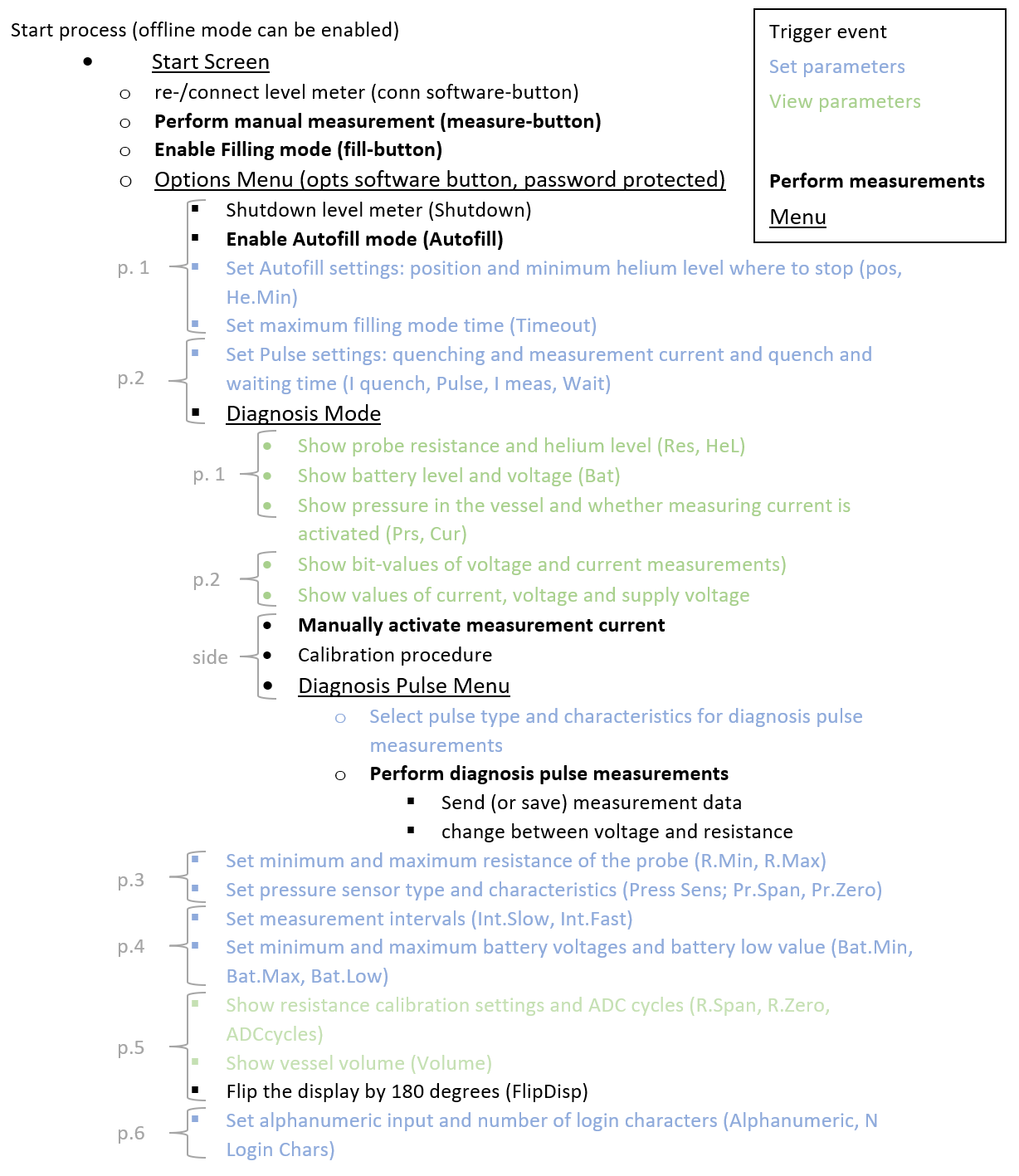
The start process of the helium level meter is illustrated by figure 5. In all following interface descriptions, it is oriented the way that the navigation buttons are on the right side of the display.
The helium level meter is started by pressing the “MEASURE”-Button. At first, it runs a system test to check whether the internal timer (including the temperature sensor) and the external pressure sensor are connected. These sensors will only work if they are already connected during this system test. Afterwards, it automatically tries to establish a connection to HMS base station and executes the first measurement of the helium level after typing in the identification code of the vessel. This is necessary to identify the vessel in the database when the device is operated as part of the Helium Management System. The start process ends when the start screen is shown.
There are two hidden buttons above the display (see fig. 2). By pressing them simultaneously during the network establishment phase at the beginning, the offline mode is activated. This means that no data connection is established and the device remains without network connection as the device runs. Furthermore, the measurement values used most recently which are stored in the EEPROM, will be used for all subsequent measurements. They nonetheless can be changed in the options.
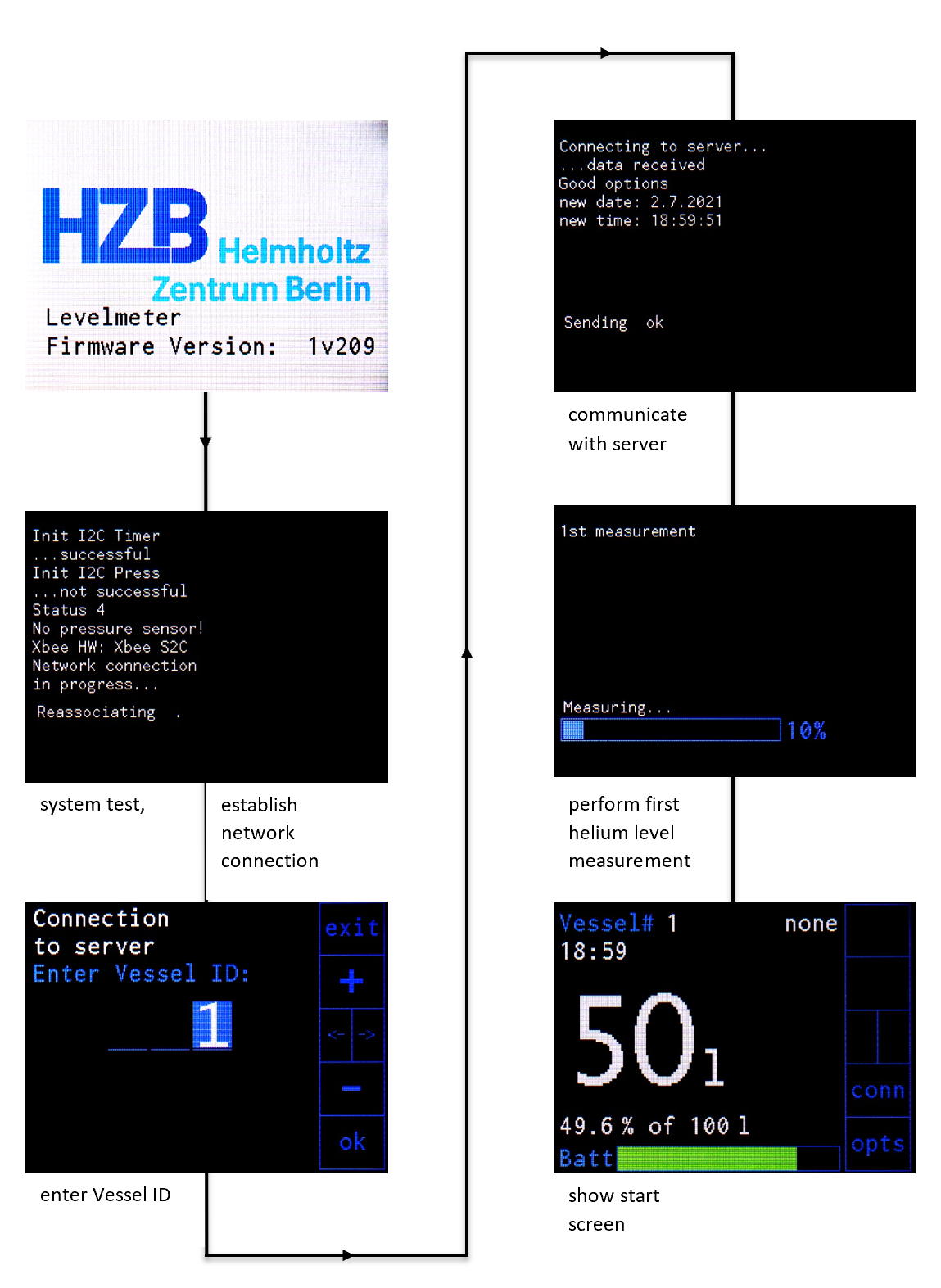
Figure 5: Start process of the helium level meter.
On the start screen all important information is displayed as shown in figure 6. This includes the vessel ID, the pressure inside the vessel, the system time, the filling level in liter and percent, the total vessel volume and the battery level of the helium level meter. The position for the Autofill and Filling Mode is displayed as well. In addition, two buttons are available with the functions “conn” (connection) and “opts” (options).
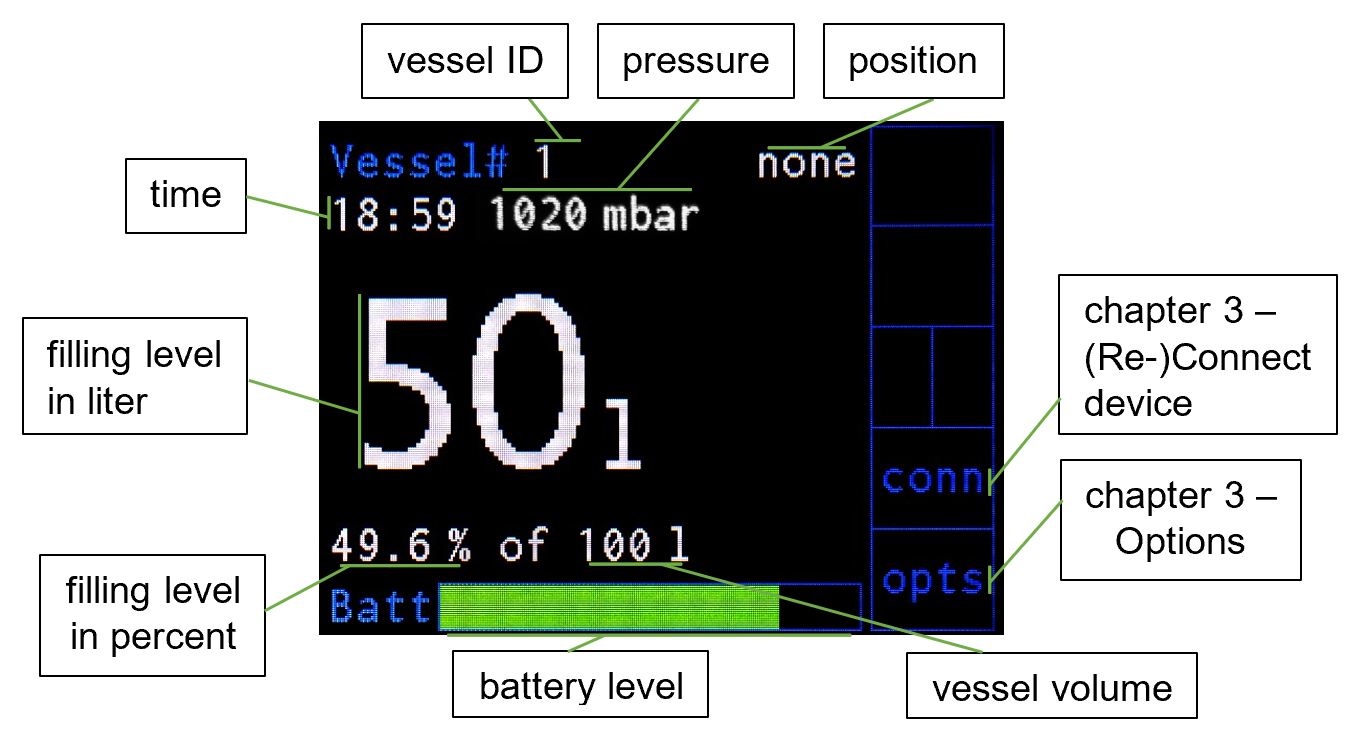
Figure 6: Start screen of the helium level meter with labels of the shown elements.
When the device shows the start screen you can
- manually perform an additional measurement by pressing the “MEASURE”-button (see chapter 3 - Manual Measurement)
- start the filling mode by pressing the “Fill”-button. In this mode the device is assigned the cryostat to be filled and measures the helium level in shorter intervals (see chapter 3 - Filling Mode)
- manually reconnect the device by pressing the “down”-button next to “conn” (see chapter 3 - (Re-)Connect Device)
- enter the options by pressing the “bottom”-button next to “opts” (see chapter 3 - Options)
Already during the start process the helium level meter undergoes the network establishment procedure. If there is the wish to connect or reconnect the helium level meter to the network afterwards, this can be achieved by pressing the “down”-button next to “conn” on the start screen. This starts the network establishment procedure.
The helium level meter automatically performs periodic measurements to monitor the level. If wished, additional manual measurements can be taken by pressing the “Measure”-button.
If a vessel is used for refilling a cryostat, the filling mode should be activated when the device is used within a network. This mode can be started by pressing the “Fill”-button. After entering the position which e.g. is the cryostat name or its room number, periodic measurements are performed in shorter intervals than in the normal state. Furthermore, the used helium is assigned to the give position inside the HMS.
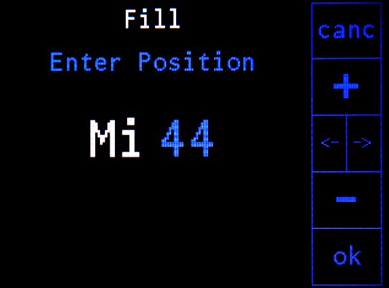
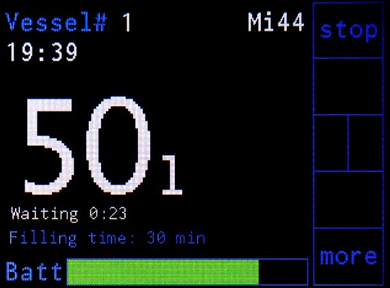
Figure 7: Left: starting window of the filling mode and entering as position “Mi 44”; right: during the filling process with 23 s until the next measurement of the level and 30 min remaining time in the filling mode.
The options menu is protected by a password which is defined in the HMS server program. The initial password is 001. Figure 8 shows the pages of the options menu.
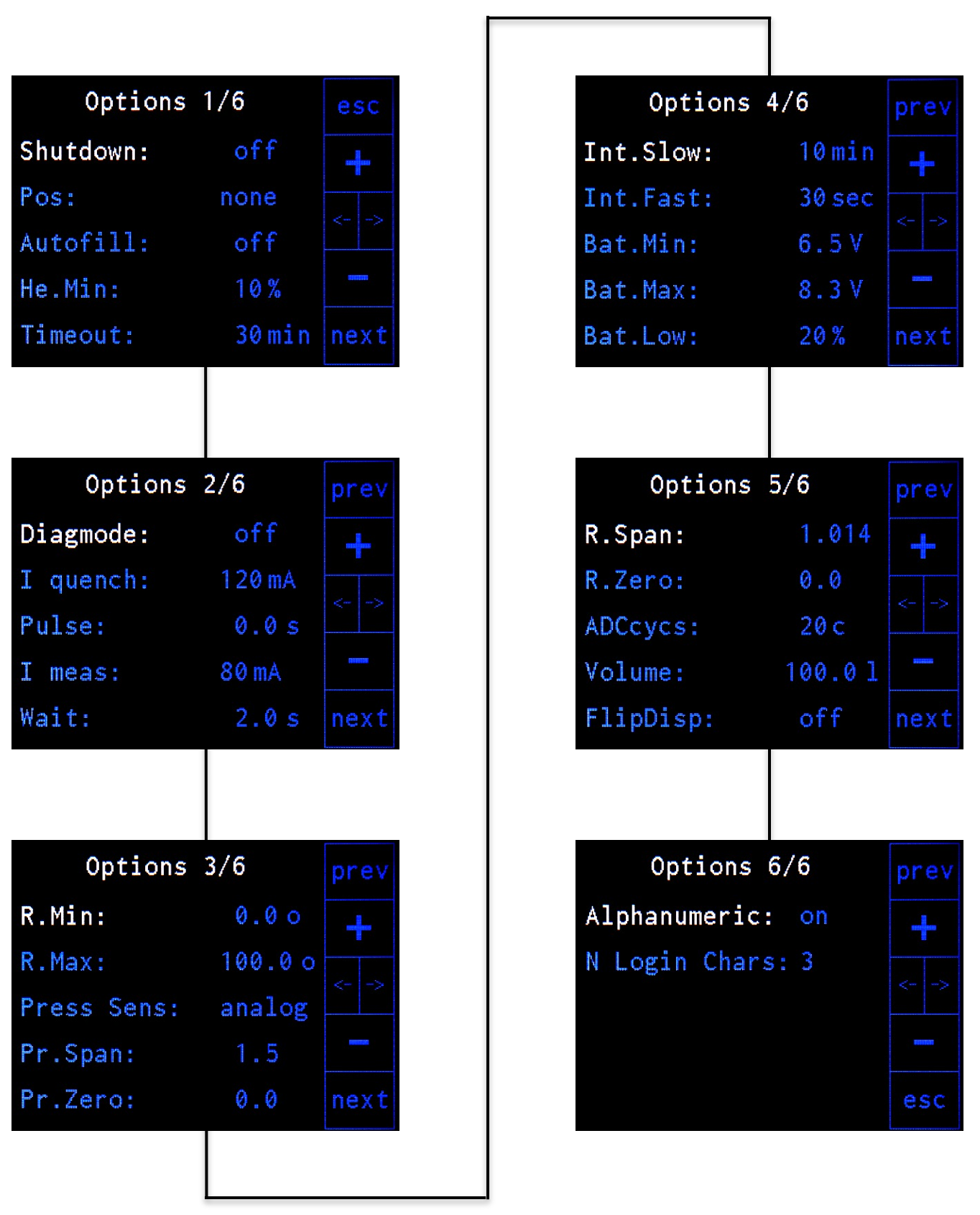
Figure 8: Overview of the options menu with its 6 pages of settings.
The explanations of the different settings are given in the following tables
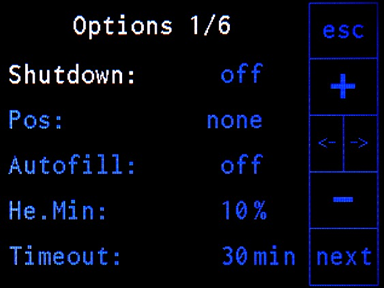
| Setting | Description |
|---|---|
| Shutdown | Switch off the level meter. |
| Pos | Choose a position for the autofill procedure out of the predefined positions transmitted from the server during the initialization (see section Autofill). |
| Autofill | Enable / disable the autofill procedure. |
| He.Min | Minimum allowed helium level for the autofill procedure, autofill will stop when the measured level falls below this value. |
| Timeout | Maximum time of the filling procedure (not active in autofill mode!). |
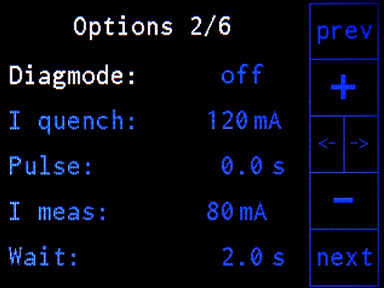
| Setting | Description |
|---|---|
| Diagmode | Sub menu which includes two more pages for analyzing the helium probe (explained in more detail after the explanation of page 5). |
| I quench | Current used for heating the helium probe (superconducting wire) before measuring the helium level. |
| Pulse | Duration of quench current (I quench) applied to the helium probe. This correlates with the red colored part of the pulse diagram of the Diagmode (see the section Diagmode). |
| I meas | Current applied to the helium probe for measuring the resistance after the quenching. |
| Wait | Waiting time after the application of the quench current and before the measurement of the resistance after the current is changed from quench current (I quench) to measurement current (I meas). This correlates with the blue colored part of the pulse diagram of the Diagmode (see the section Diagmode). |
| Setting | Description |
|---|---|
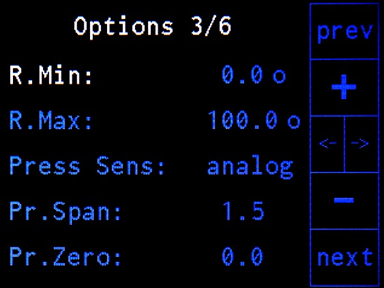
| R.Min | Minimum resistance of the helium probe which corresponds to a helium level of 100% (full vessel). |
| R.Max | Maximum resistance of the helium probe which corresponds to a helium level of 0% (empty vessel). |
| Press Sens | Choose pressure sensor. Options: off, I2C, analog. Warning! The type of the pressure sensor is defined at delivery. The electronics of the level meter have to be adapted if the type of sensor is changed. |
| (Pr.Span) | (Only shown for analog pressure sensor) span value for corrections with analog pressure sensor |
| (Pr.Zero) | (Only shown for analog pressure sensor) zero offset value for corrections with analog pressure sensor |

| Setting | Description |
|---|---|
| Int.Slow | slow measurement rate in normal mode |
| Int.Fast | fast measurement rate in filling mode |
| Bat.Min | minimum battery voltage, level meter will shut down when the battery voltage drops below this value |
| Bat.Max | maximum battery voltage |
| Bat.Low | level (in percent) for battery alarm |
| Setting | Description |
|---|---|
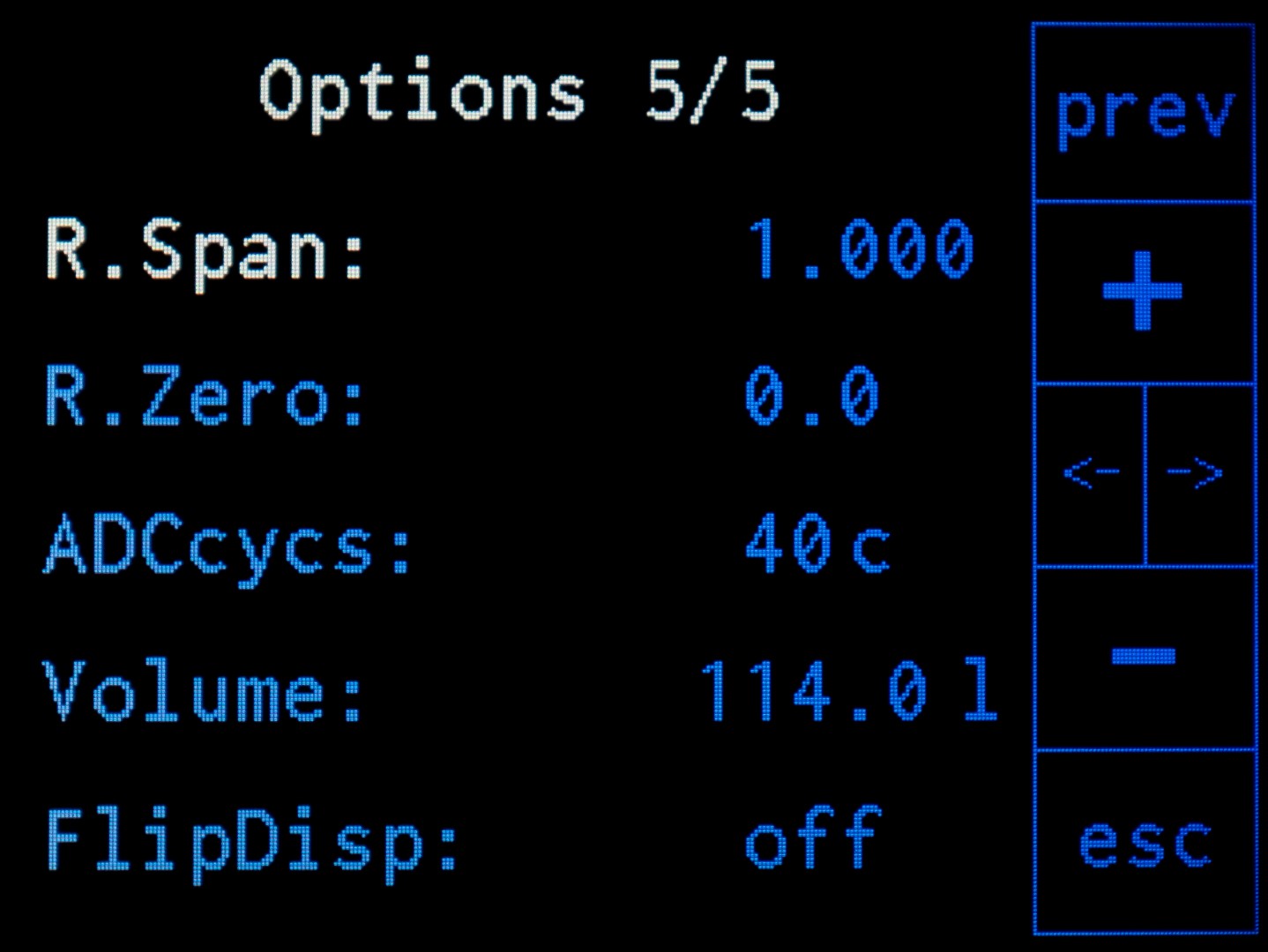
| R.Span | calibration value “span” for the more accurate measurement of the resistance (see Calibration Procedure of the Resistance Measurement) |
| R.Zero | calibration value “zero” for the more accurate measurement of the resistance (see Calibration Procedure of the Resistance Measurement) |
| ADCcycs | number of integration cycles for the AD converter (40 cycles give reasonable results) |
| Volume | volume of the vessel in liter which corresponds to a level of 100% (full vessel) |
| FlipDisp | by activation the content on the display can be rotated by 180 degrees (see the section Rotate Display) |

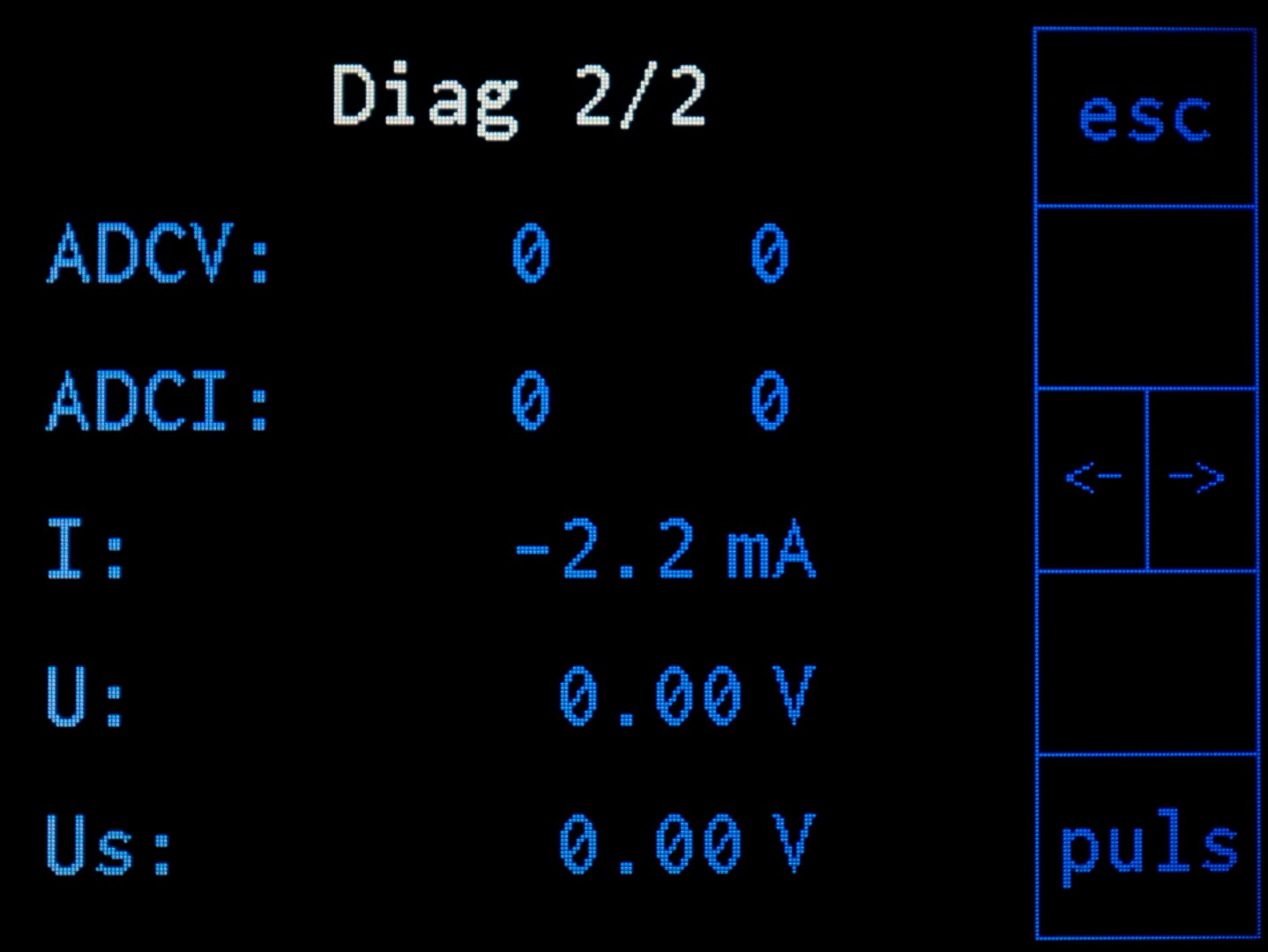
Figure 8: Overview of the pages of the diagnosis mode which is accessible via page 2 of the options.
The diagnosis mode (Diagmode) is a sub menu accessible via page 2 of the options. It accesses the calibration procedure of the resistance measurement (see Calibration Procedure of the Resistance Measurement) by pressing the “cal”-button, enables the diagnosis of the resistance and battery voltage measurement and provides a detailed diagnostics for the heat pulse in a timing diagram for voltage and current (see Diagram of Voltage and Current) which can be entered by pressing the “puls”-button. This menu is divided into two pages which are shown in figure 8.
In addition to the functions accessed by the “cal”- and the “puls”-button which are explained below in more detail there is another function accessible by pressing the “curr”-button. By doing so, the measurement current (I meas) is applied to the helium probe without following the normal measuring process including the quenching of the probe. This function is intended for the debugging of the resistance measurement using the values displayed on page 2 of the diagnosis mode. The current can be switched off by pressing the “Curr”-button again.
| Setting | Description |
|---|---|
| Res | current resistance of the helium level meter when the current is turned on; the current can be switched on and off by pressing the “curr”-button |
| HeL | helium level in percent corresponding to the measured resistance of the helium probe when the current is turned on |
| Bat | battery status: battery level and voltage |
| Prs | measured pressure inside the vessel when a pressure sensor is connected |
| Cur | states if the manual measuring current is turned on which can be switched by pressing the “curr”-button |
| Setting | Description |
|---|---|
| ADCV | bit-value of the voltage measurement of the sensor (max. 1024) |
| ADCI | bit-value of the current measurement (max. 1024) |
| I | measured current |
| U | measured voltage at the active part of the helium level probe |
| Us | supply voltage |
The internal resistances of the liquid helium level meter should be calibrated to achieve higher precision. For this purpose, a calibration is implemented which is accessible via the diagnosis mode. By pressing the “cal”-button a calibration procedure is started. During the calibration procedure the user is asked to connect two resistors chosen close to the R.min and R.max values (options page 3). A set of suitable resistors can be provided by the manufacturer. Alternatively a resistance decade can be connected to the level meter for the calibration procedure. The results of the calibration will be accessible via the values R.Span and R.Zero (options page 5).
This page is entered from the Diagmode menu by pressing the “pulse”-button. It displays the measured voltage and current versus time during the execution of the resistance measurement procedure as shown in figure 9. This process includes the quenching (red part) of the superconducting wire within the helium level probe, the waiting time (blue part) and the measurement (white part). The durations of the quenching and the measurement can be modified on page 2 of the options. Also on page 2 of the options the two values of the current which are set during the quenching and measurement phase can be changed. When the measurement is completed, the calculated resistance is displayed. The vertical line in the diagram marks the end of the quenching and the start of the waiting time. With the cursor buttons this line can be moved and the new quench time (“Pulse” on page 2 of the options menu) can be set by pressing the “save” button.
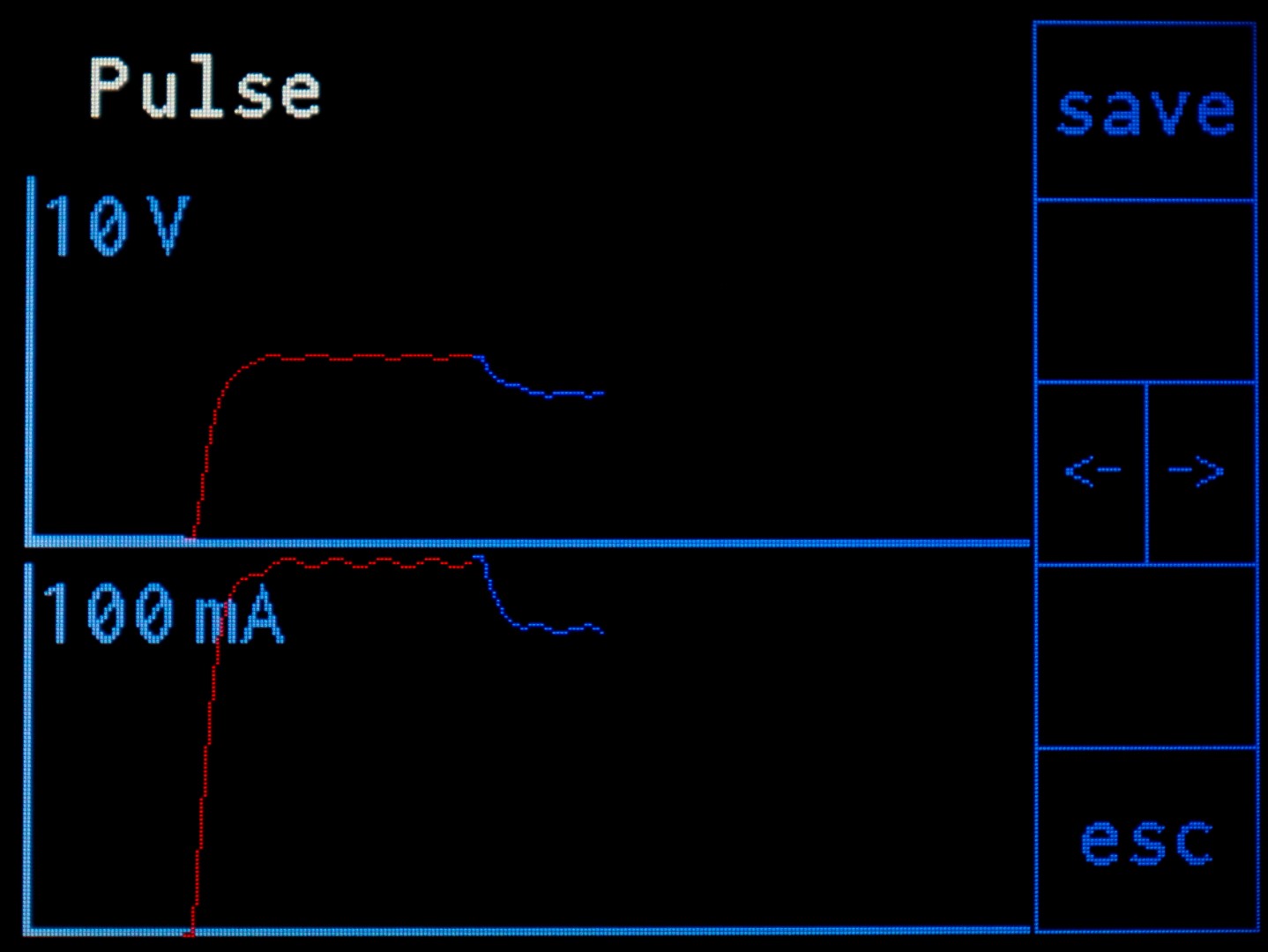
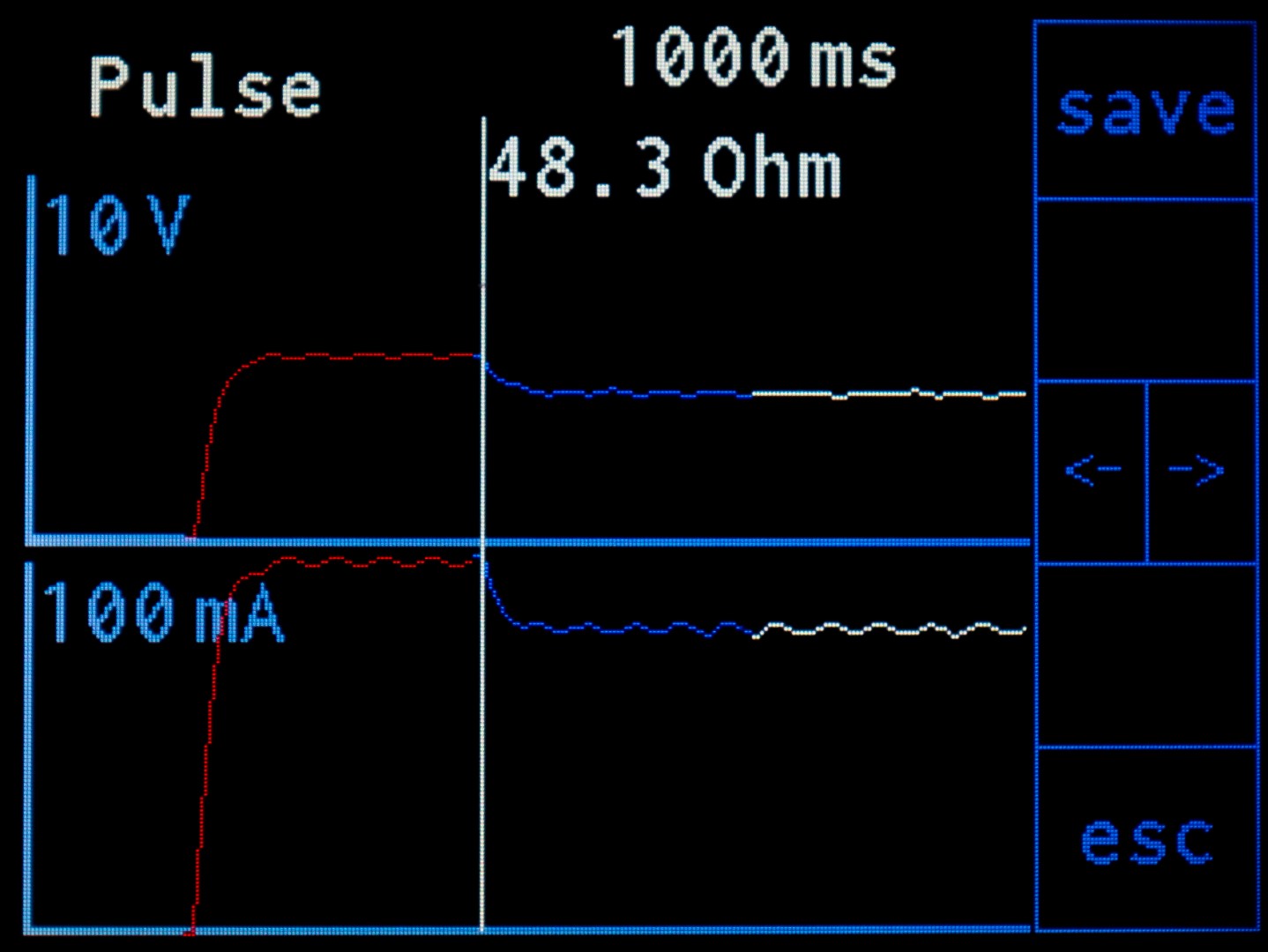
Figure 9: Process of measuring the resistance of the helium level probe which consists of quenching the superconducting wire (red part), waiting time (blue part) and the measurement (white part).
A superconducting wire with a critical temperature above 4.2 K (for example based on copper-nickel-matrix) can be used as a basis for the liquid helium probe. When the wire is held into a vessel or cryostat, the section below the liquid level becomes superconducting while the part above maintains its electrical resistance. This means, by measuring the total electrical resistance of the wire, the filling level of the cryostat can be determined.
In reality, a certain section of the wire just above the liquid level is typically also in the superconducting state due to the cold gas. This problem is solved by quenching the wire with a sufficiently high current which propagates the heat along the wire. Then the current must be reduced and it needs a moment until the lower part of the wire is superconducting again. After this preparation the actual measurement of the electrical resistance can be performed.
The measurement principle itself is based on applying a current to the superconducting wire and measuring the voltage drop across it. Normally, two wires would be used for applying the current and two additional ones for measuring the voltage drop. Based on the assumption of a negligible resistance of the supply wires the current leading ones can also be used for the voltage measurement.
In order to obtain the resistance values corresponding to filling levels of 0% and 100% measurements of the probe must be conducted in an empty and a full cryostat, respectively. For this purpose, the diagram of current and voltage which is accessible via page 2 of the options should be used to set the values for the measurement correctly. This includes the quench current, the duration of the quench current or pulse time, the measuring current and the waiting time which can be found on page 2 of the options menu. After setting appropriate values and performing conclusive measurements the two values of the resistance corresponding to 0% and 100% filling level must be entered on page 3 of the options menu to complete the setup process of the liquid helium probe.
In order to adapt the device to the way it is mounted, the content on the display can be rotated by 180 degreess by changing the value of “FlipDisp” on page 5 of the options menu.
Hidden Functions
At the height of the “top”-button above the display there are two hidden buttons located underneath the gray foil. They can be used in two situations.
First, by pressing them together during the network establishment phase at the beginning the offline mode is activated. This means that no data connection is established and the filling mode is not accessible as long as the device runs.
Moreover, by pressing the two hidden buttons simultaneously for some seconds the device can be shut down directly.
The helium level meter can be shut down in two ways. The first possibility is to enter the options page 1 and enter “Shutdown”. The second one uses a hidden function (see Hidden Functions). By pressing the two hidden buttons above the display (see the figure in Display and Buttons) simultaneously for some seconds the device can be shut down directly.