2.3.64 Satellite Activepieces
Handle:
activepiecesURL: http://localhost:34671
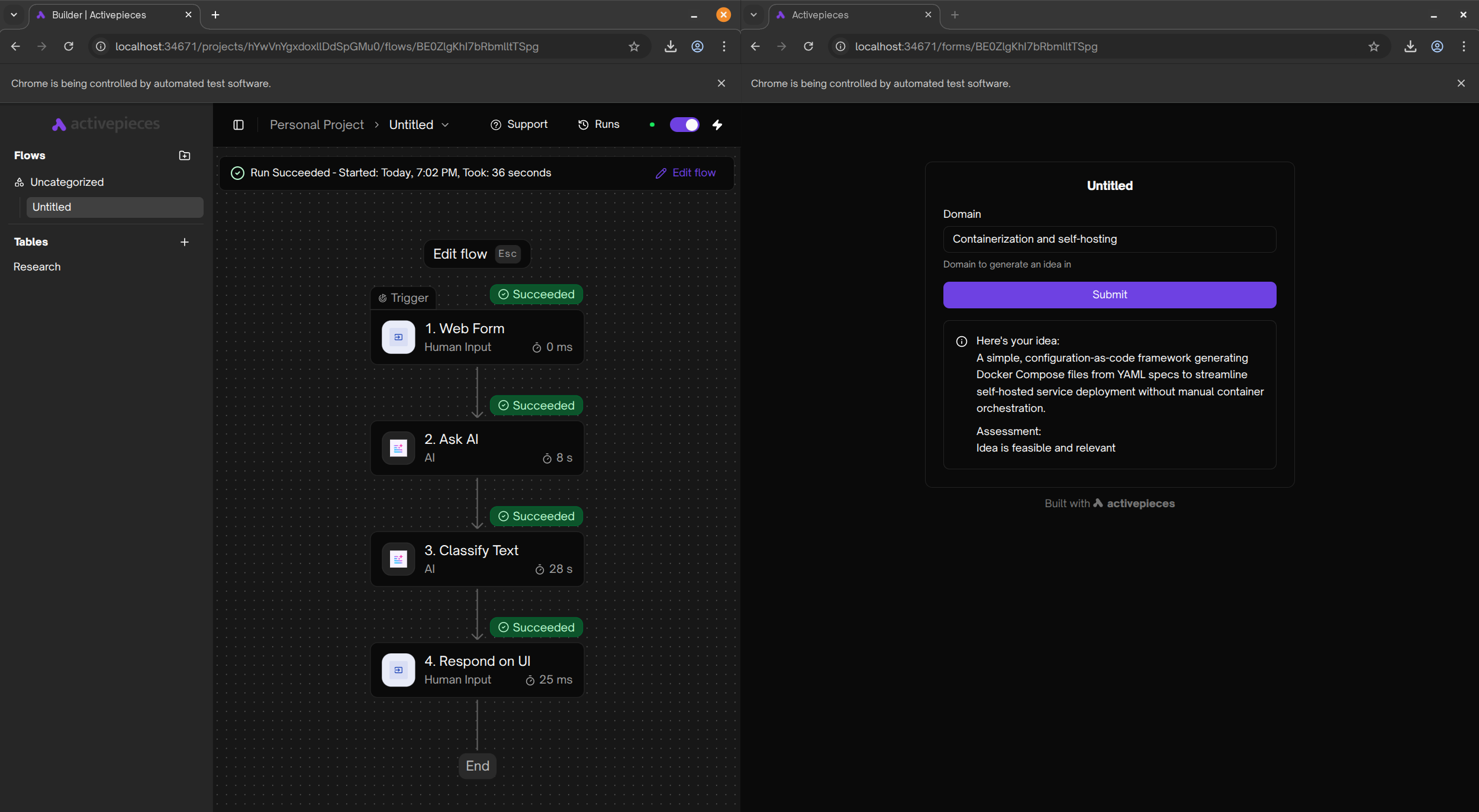
activepieces is an open-source workflow automation tool that allows you to connect apps and automate workflows with AI capabilities. It provides a visual workflow builder similar to Zapier or n8n, with 200+ app connectors and built-in AI features.
# [Optional] Pre-pull the images
harbor pull activepieces

# Start the service
harbor up activepieces

# [Optional] Open the web interface
harbor open activepieces
When running for the first time, activepieces will require you to set up an owner account. Follow the instructions on the web interface to complete the setup.
You can interact with activepieces primarily through its web interface. The visual workflow builder allows you to create automated workflows connecting different services with triggers and actions.
Key features:
- 200+ App Connectors - Connect to popular services and APIs
- AI Workflows - Built-in AI capabilities for intelligent automation
- Visual Builder - Drag-and-drop workflow designer
- Webhook Support - Trigger workflows from external events
- Custom Code - Write custom TypeScript code when needed
Explore pre-built templates and examples:
For webhook triggers to work properly, especially when accessing from external sources, you need to configure the frontend URL:
# Configure webhook URL for local access
harbor env activepieces AP_FRONTEND_URL http://localhost:$(harbor config get activepieces.host.port)
Important: By default, Activepieces attempts to use your public IP address for webhooks. For production deployments behind a reverse proxy or with a public domain, you must configure AP_FRONTEND_URL to your actual public URL:
# Example for production with domain
harbor env activepieces AP_FRONTEND_URL https://activepieces.yourdomain.comWhen configuring credentials to access Harbor's services (like Ollama for AI features), ensure you use "Internal" versions of the URLs:
# "Internal" URL can be obtained with '-i' flag
harbor url -i ollama

# This won't work, as it's outside of the Docker network
harbor url ollama
You can then use the internal URL in Activepieces workflow nodes that support custom LLM endpoints.
Following options can be set via harbor config:
# Main web UI port
HARBOR_ACTIVEPIECES_HOST_PORT             34671

# PostgreSQL database port
HARBOR_ACTIVEPIECES_PG_HOST_PORT          34672

# Data persistence path
HARBOR_ACTIVEPIECES_WORKSPACE             ./activepieces

# Container images
HARBOR_ACTIVEPIECES_IMAGE                 activepieces/activepieces
HARBOR_ACTIVEPIECES_VERSION               latest
HARBOR_ACTIVEPIECES_PG_IMAGE              postgres
HARBOR_ACTIVEPIECES_PG_VERSION            16-alpine

# PostgreSQL database credentials
HARBOR_ACTIVEPIECES_PG_USER               harbor
HARBOR_ACTIVEPIECES_PG_PASSWORD           sk-harbor
HARBOR_ACTIVEPIECES_PG_DB                 activepieces

# Security settings (⚠️ change for production!)
HARBOR_ACTIVEPIECES_ENCRYPTION_KEY        <32 characters>
HARBOR_ACTIVEPIECES_JWT_SECRET            <16 characters>

# Execution configuration
HARBOR_ACTIVEPIECES_EXECUTION_MODE        UNSANDBOXED
HARBOR_ACTIVEPIECES_TRIGGER_POLL_INTERVAL 5Additional settings can be configured using harbor env:
# Frontend URL for webhooks (important for production)
harbor env activepieces AP_FRONTEND_URL http://localhost:34671

# Change execution mode
harbor env activepieces AP_EXECUTION_MODE SANDBOX_PROCESS

# Adjust trigger polling interval (in minutes)
harbor env activepieces AP_TRIGGER_POLL_INTERVAL 10Activepieces persists all configuration and data in:
-
activepieces/- PostgreSQL database, workflow definitions, credentials, and logs
Critical for Production Deployments:
The default HARBOR_ACTIVEPIECES_ENCRYPTION_KEY and HARBOR_ACTIVEPIECES_JWT_SECRET are insecure defaults meant for local development only. You must change these values before deploying to production or storing sensitive credentials.
Generate secure keys using OpenSSL:
# Generate encryption key (16 bytes / 32 hex characters)
openssl rand -hex 16

# Generate JWT secret (32 bytes / 64 hex characters)
openssl rand -hex 32
Then set them in Harbor:
# Set encryption key
harbor env activepieces AP_ENCRYPTION_KEY <your-generated-encryption-key>

# Set JWT secret
harbor env activepieces AP_JWT_SECRET <your-generated-jwt-secret>

# Restart the service for changes to take effect
harbor restart activepieces
Important: Changing the encryption key after storing credentials will make existing credentials inaccessible. Back up your data before making changes.
Activepieces supports two execution modes:
- UNSANDBOXED (default): Faster execution but runs code directly on the host
- SANDBOX_PROCESS: Runs code in isolated sandboxed processes for better security
For production deployments with untrusted workflows or custom code, consider using sandboxed mode:
harbor env activepieces AP_EXECUTION_MODE SANDBOX_PROCESS
harbor restart activepiecesActivepieces can integrate with other Harbor services. For example, to use Harbor's Ollama instance for AI workflows:
-
Start Ollama in Harbor:
harbor up ollama
-
Get the internal Ollama URL:
harbor url -i ollama
-
Use this URL in Activepieces workflow nodes that support custom LLM endpoints (e.g., HTTP Request nodes or custom AI actions).
Webhooks not working:
- Verify
AP_FRONTEND_URLis correctly configured - Check that the port is accessible from the webhook source
- Review webhook logs in the Activepieces UI under Run Details
Cannot connect to Ollama or other Harbor services:
- Ensure you're using internal URLs (use
harbor url -i <service>) - Verify both services are on the
harbor-network - Check service status with
harbor ps
Database connection issues:
- Ensure the PostgreSQL container is healthy:
docker ps - Check logs:
harbor logs activepieces-db - Verify database credentials in environment variables
For more help, refer to: