-
Notifications
You must be signed in to change notification settings - Fork 22
How to create Crystal materials with Alpha Textures
Akkokoro edited this page Jun 16, 2020
·
2 revisions
MHW uses a preset map in specific for some monster Crystal details.
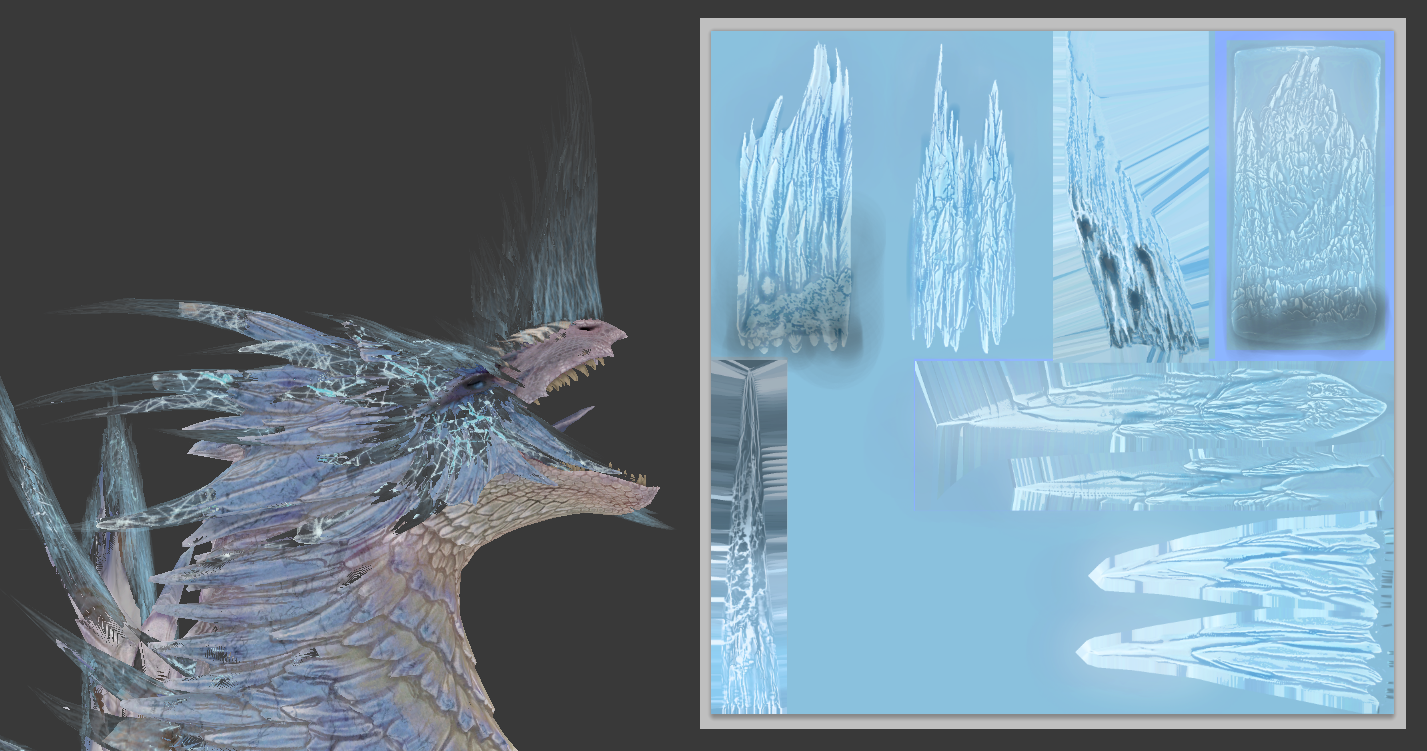
Acidic Glavenus and Velkhana share the same Texture on them, but with a change on it's hue.
To achieve this same result we can mimic a full new custom texture and recreate the Alpha map, by setting up a gradient that will cover the Crystal UV, and then drawing Thunder-like lines that will display 4 types of Grey Values.
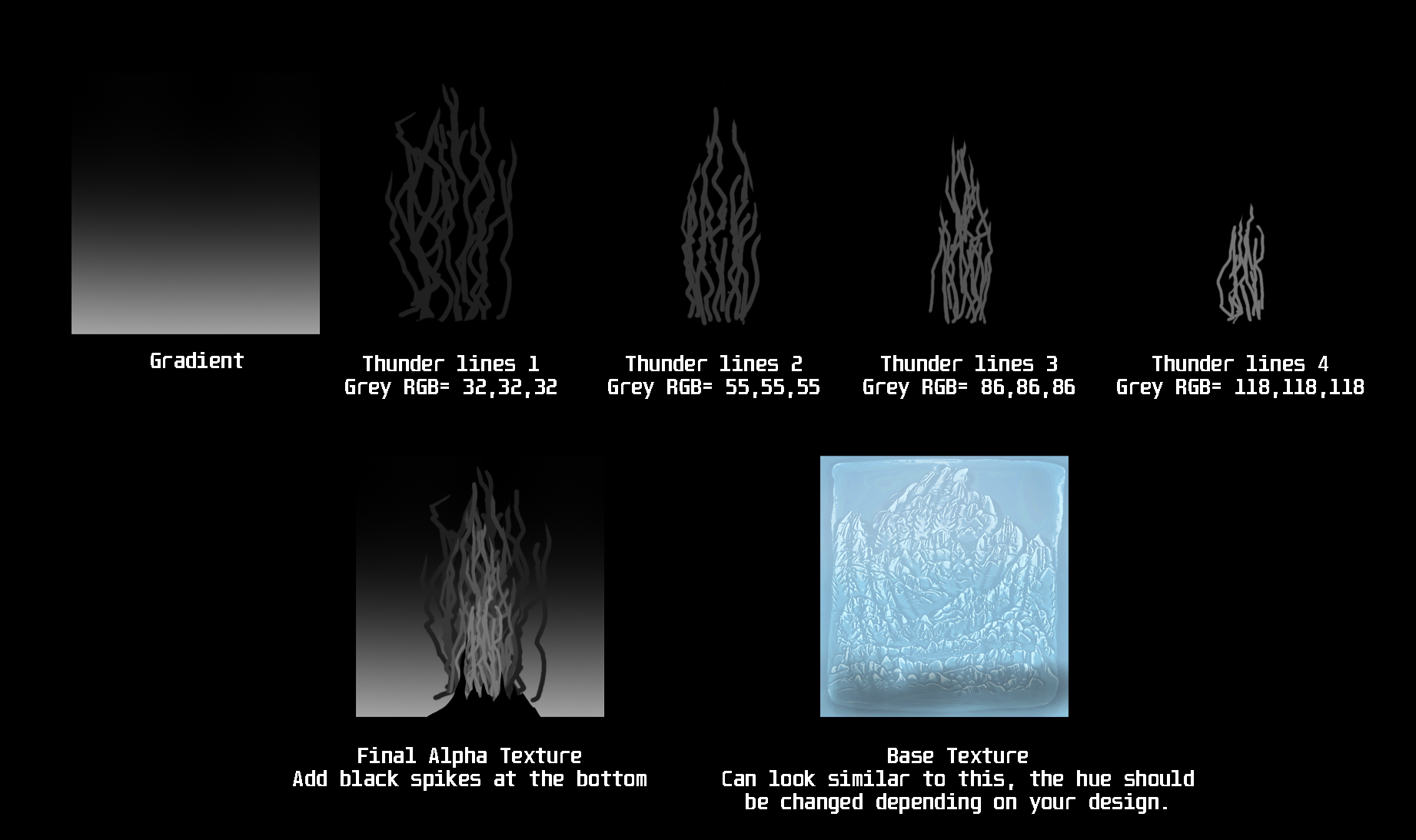
Or we can just use again the same Texture from the game, only edit the Hue so it matches your project colors and adjust the crystals Mesh UVs on it.
Where to get the original texture asset: chunk\em\em124\00\mod\em124_00_ice_BM
General Tutorials
Animation Tutorials
Audio Tutorials
File & In Game IDs
- Accessory and Specialized Tool IDs (Asset)
- Armor IDs (Asset)
- Decorations IDs
- EFX IDs
- Endemic Critter IDs (Asset)
- Face IDs (Asset)
- Furniture IDs (Asset)
- Gimmick IDs (Asset)
- Hairstyle IDs (Asset)
- Item IDs
- LMT IDs
- Material IDs
- Medal IDs
- Model Bone Function IDs
- Monster IDs
- Monster Shell IDs (A-P)
- Monster Shell IDs (Q-Z)
- NPC IDs (Asset)
- NPC Base Model (Asset)
- Palico Equipment IDs (Asset)
- Pendant IDs (Asset)
- Poogie Clothes IDs
- Quest IDs
- Skill IDs
- Stage IDs (Asset)
- Player Weapon Action IDs
- Weapon IDs (Asset)
- Weapon ID Dump (GS,SnS,DB)
- Weapon ID Dump (LS,Ham,HH)
- Weapon ID Dump (Lan,GL)
- Weapon ID Dump (SA,CB)
- Weapon ID Dump (Bow,HBG,LBG)
Model Tutorials
- Quick Guide to Importing Models (Blender 2.79)
- Walkthrough of a Weapon Import
- Basics of Exporting Into the .mod3 Format
- How To Fix UVs Sharing a Seam
- How To Separate Mesh Parts in Blender
- Rotating, Moving and Resizing in Blender
- How to Split a Single Mesh Outfit into Player Equippable Parts
- Jigglebone Chains (.ctc) and Colliders (.ccl)
- Axial CTC Rotations
- Editing Hair Models and Materials
- Useful Blender Scripts
- [external page] How to Make All Polygons Into Triangles (Required for MHW models)
- [external page] How to Convert Triangles Back Into Quads
- [external page] How to Change The View-port clipping Parameters For Large Models
- [external page] How to Set Origin to Vertex in Edit Mode
- [external page] Shortcut to repeat the last operation in Blender
- [external page] Transferring Rig Weights From One Mesh To Another
- [external page] How to Copy Paint Weights From One Object to Another
- [external page] How to Remove All Zero-Weight Vertex Groups
- [external page] How to Weight Paint Against Current Pose
- [external page] Making a Hair Rig
- [external page] Physics Transfer
EFX Tutorials
FSM Editing
MRL3 Tutorials
NPC Editing
Plugins and Memory Editing
Monster AI Editing
General Texture Tutorials
- Obtaining, Converting and Replacing Textures
- Textures with Paint NET
- How To Open DDS Files
- Editing Textures
- Understanding Alpha Channels
- Exporting Textures with Transparency
- How To Achieve Glass Texture
- How to create Crystal materials with Alpha Textures
- Working Around the Mip Map Loading Bug
- [external page] Extracting a UV Layout
Specific Texture Tutorials
Asterisk's Plugin Notes
Miscellaneous Tutorials
Outdated Tutorials
- How to Make an NPC Skin Material Support Skin Color Customization
- Plugin Comparison
- A Theoretical Proposal on Skeleton Extension
- Monster Hunter World Save Editor Tutorial
- Making Copies of a Save Slot
- Making a Green Screen
- Notes on CTC Physics Jiggle Files
- Opening MRL3 file with a template
- Transferring MRL3 Files Between Models
- Expanding mrl3 Reference List
- How to Edit Eye Color in mrl3 Files