Entity Diagrams
- Navigate to your connection and open a table or schema
- Select the "Diagram" tab (if the tab is not presented then the object does not support the diagram presentation)

You can click on an entity to highlight it:

You can click on a relation to get highlight it:
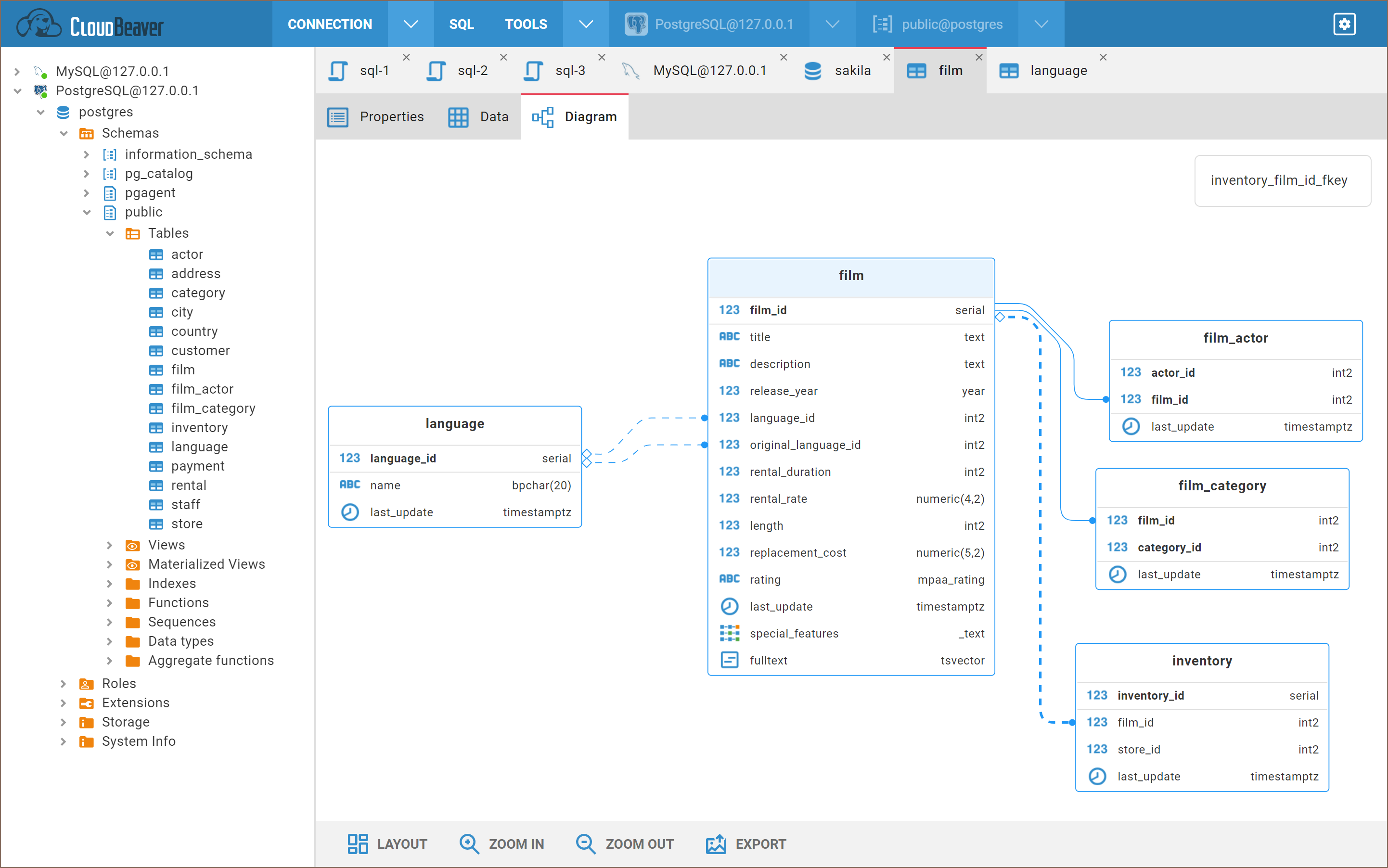
You can open the entity in the metadata editor by:
- double-clicking on the entity
- double-clicking on the entity attribute
- clicking on the link in the entity tooltip
On the bottom toolbar you can find different buttons:
-
Layout - diagram auto layout
-
Zoom in/out
-
Export - export diagram in a
pngorsvgformat
- Getting started
- Create connection
- Connection network options
- Supported databases
-
Drivers management

- Database authentication methods
- Database navigator
- Properties editor
- Data editor
- SQL editor
-
Entity relation diagrams
- Cloud services
-
AI Smart assistance
- Data transfer
- General user guide
- Administration
- Server configuration
-
Server security and access configuration
- Authentication methods
- Access management
- Proxy configuration
-
Secret management
- Logs
-
Query manager
- Workspace location
- Command line parameters
-
Session manager
- Deployment options
- CloudBeaver Editions
- FAQ
- Development