How to access query history database
Note: This feature is available in Enterprise and AWS editions only.
By default, the system uses an internal PostgreSQL database to store Query manager.
-
Identify database connection parameters used by the server.
Tip: Look for
CLOUDBEAVER_QM_DB_*in the.envfile orbackend.cloudbeaver_db_*ink8s/values.yaml. -
Create a connection to the database used by Query Manager.
Example: Typical PostgreSQL connection settings:
- Host:
postgres - Port: default is
5432 - Database: default is
cloudbeaver - User: value of
CLOUDBEAVER_QM_DB_USER - Password: value of
CLOUDBEAVER_QM_DB_PASSWORD
Default credentials depend on your deployment configuration and may differ from standard PostgreSQL defaults.
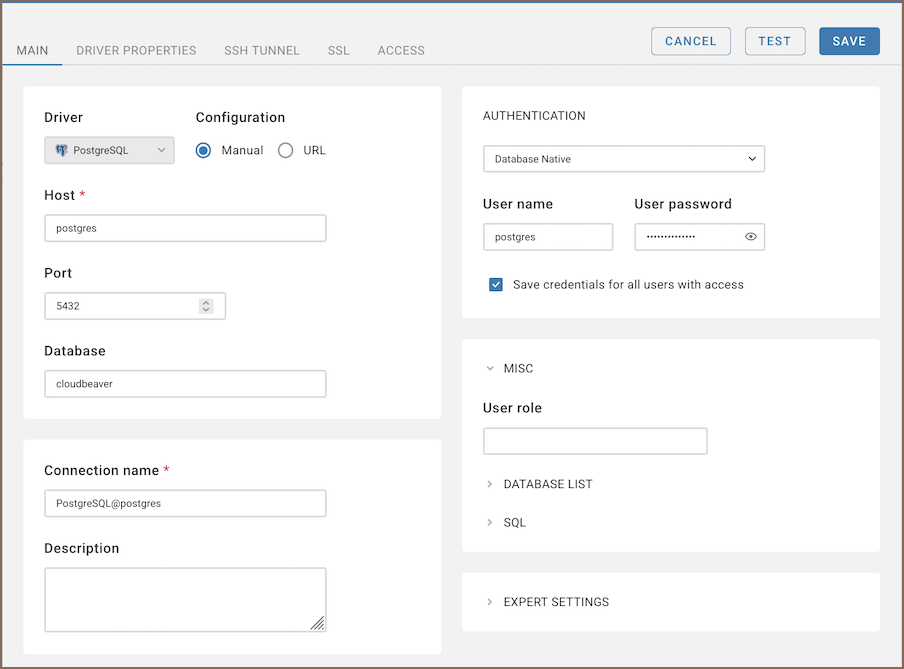
- Host:
-
Open the
qmschema to view Query Manager data.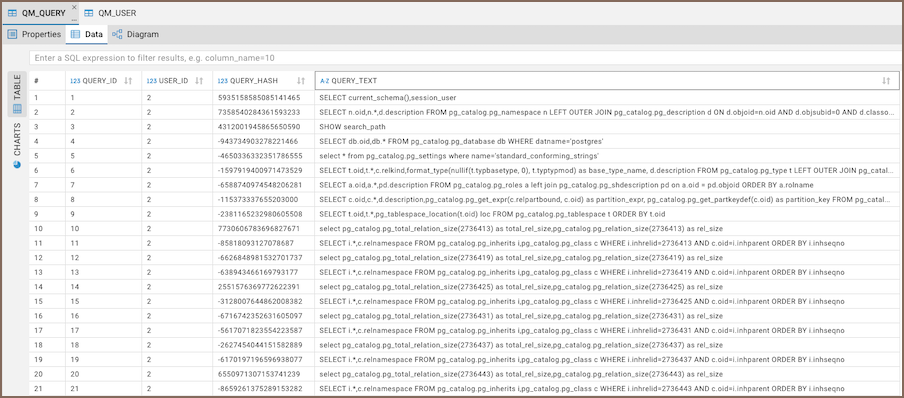
Tip: Query history is stored in the
qm_querytable.
- Getting started
- Create connection
- Connection network options
- Supported databases
-
Drivers management

- Database authentication methods
- Database navigator
- Properties editor
- Data editor
- SQL editor
-
Entity relation diagrams
- Cloud services
-
AI Smart assistance
- Data transfer
- General user guide
- Administration
- Server configuration
-
Server security and access configuration
- Authentication methods
- Access management
- Proxy configuration
-
Secret management
- Logs
-
Query manager
- Workspace location
- Command line parameters
-
Session manager
- Deployment options
- CloudBeaver Editions
- FAQ
- Development