SQL Assist and Auto Complete
CloudBeaver provides the SQL assist feature, which offers auto-completion of database object names, SQL commands, and other keywords in queries.
When you start typing an SQL code, CloudBeaver suggests auto-complete options based on the context.
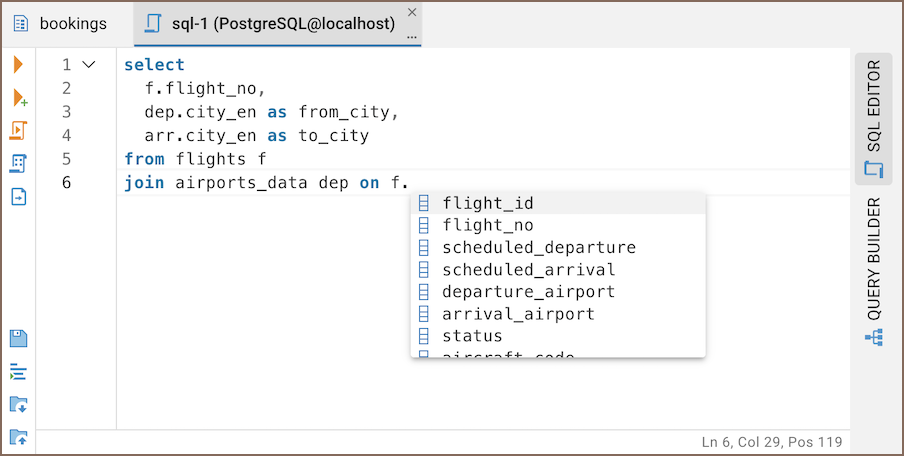
CloudBeaver offers two SQL completion engines:
- Semantic (default) – provides the most accurate and context-aware suggestions by analyzing the entire SQL structure and lexical scopes. It improves completion accuracy but may not work correctly with certain database-specific syntax.
- Legacy – a more straightforward completion engine that suggests SQL elements based only on their position in the query. This can sometimes lead to incorrect or incomplete suggestions, especially in subqueries.
Note: The Semantic engine is actively being improved, but if you encounter issues, switching to Legacy may provide more stable behavior. We still recommend using Semantic for the best overall experience.
To switch between engines:
- Profile -> Preferences -> SQL Editor -> Completion engine
- (For administrators) Settings -> Administration -> Settings -> SQL Editor -> Completion engine
- Getting started
- Create connection
- Connection network options
- Supported databases
-
Drivers management

- Database authentication methods
- Database navigator
- Properties editor
- Data editor
- SQL editor
-
Entity relation diagrams
- Cloud services
-
AI Smart assistance
- Data transfer
- General user guide
- Administration
- Server configuration
-
Server security and access configuration
- Authentication methods
- Access management
- Proxy configuration
-
Secret management
- Logs
-
Query manager
- Workspace location
- Command line parameters
-
Session manager
- Deployment options
- CloudBeaver Editions
- FAQ
- Development