Log Viewer
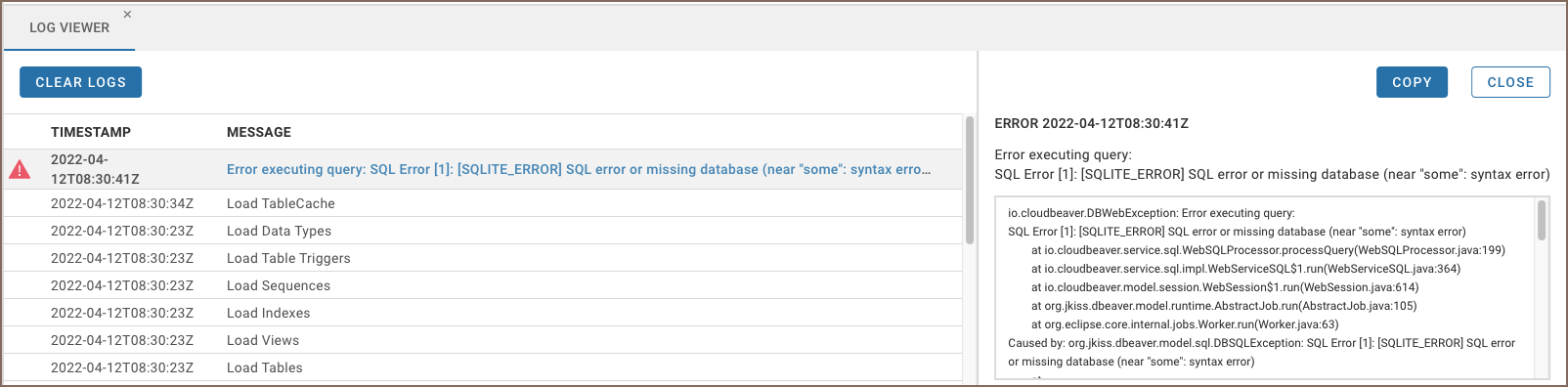
The Log Viewer shows user logs during a session. It can be opened via the Tools menu on the main page of the application.

The Log Viewer contains the logs’ times and descriptions. If you want to see the full information about an error, click the error link. The error details will be displayed in a separate panel on the right.
- Getting started
- Create connection
- Connection network options
- Supported databases
-
Drivers management

- Database authentication methods
- Database navigator
- Properties editor
- Data editor
- SQL editor
-
Entity relation diagrams
- Cloud services
-
AI Smart assistance
- Data transfer
- General user guide
- Administration
- Server configuration
-
Server security and access configuration
- Authentication methods
- Access management
- Proxy configuration
-
Secret management
- Logs
-
Query manager
- Workspace location
- Command line parameters
-
Session manager
- Deployment options
- CloudBeaver Editions
- FAQ
- Development