Query Execution Plan
If a database driver supports the visualization of the execution plan, you can see the execution plan of the query by pressing Ctrl+Shift+E or clicking Explain execution plan  button in the main toolbar:
The execution plan command generates a tree of query execution as one of the result tabs and is convenient in estimating if the query/script is quick/optimal enough:
button in the main toolbar:
The execution plan command generates a tree of query execution as one of the result tabs and is convenient in estimating if the query/script is quick/optimal enough:
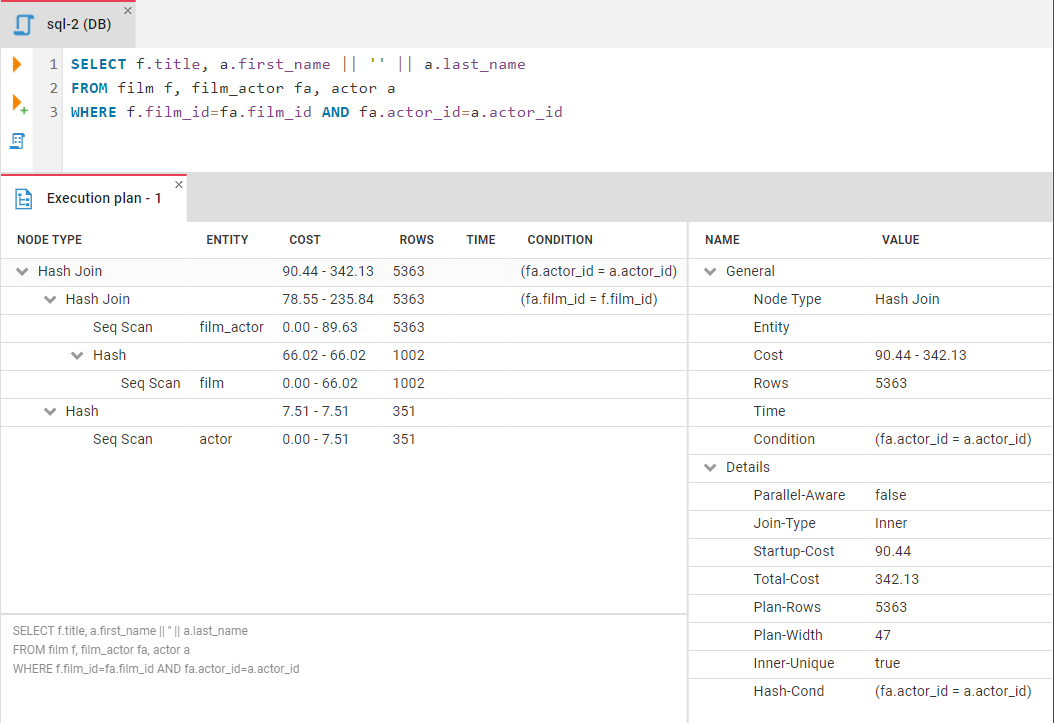
You can click the rows of the execution plan to see their details (statistics) in the panel to the right of the plan.
- Getting started
- Create connection
- Connection network options
- Supported databases
-
Drivers management

- Database authentication methods
- Database navigator
- Properties editor
- Data editor
- SQL editor
-
Entity relation diagrams
- Cloud services
-
AI Smart assistance
- Data transfer
- General user guide
- Administration
- Server configuration
-
Server security and access configuration
- Authentication methods
- Access management
- Proxy configuration
-
Secret management
- Logs
-
Query manager
- Workspace location
- Command line parameters
-
Session manager
- Deployment options
- CloudBeaver Editions
- FAQ
- Development